How to Build a Direct Primary Care (DPC) Membership Platform

By Darshak Doshi
August 12, 2026
Summary:
This guide explains how to build a modern Direct Primary Care (DPC) membership platform, covering essential features such as patient onboarding, membership management, recurring billing, scheduling, EHR integration, and secure communication. It also explores how AI and voice agents can automate DPC workflows, reduce administrative workload, improve patient engagement, and help practices modernize existing DPC software.
Direct primary care (DPC) is changing how primary care practices handle access, payments, and patient relationships. Instead of fee-for-service billing, DPC uses a membership model where patients pay a recurring fee for ongoing care, creating more predictable revenue and simpler access.
While the model is simple, running a DPC practice is not. Many teams still struggle with daily tasks like managing memberships, payments, scheduling, communication, and follow-ups across multiple systems.
This is where a modern DPC platform becomes essential.
A strong DPC platform unifies patient management, billing, scheduling, communication, and operations in one system. With automation and AI, it can also reduce repetitive work and improve scalability.
This guide covers how to build a DPC platform, key features, how AI and voice agents fit in, and when to modernize an existing system instead of building from scratch.
What Is a Direct Primary Care (DPC) Platform?
A Direct Primary Care platform is a digital system that manages both the operational and patient-facing workflows of a DPC practice. Unlike basic scheduling tools, it supports the ongoing membership relationship between patients and providers, which is central to the DPC model.
Patients typically pay a recurring fee for access to primary care services, so the platform must handle the full membership lifecycle, not just appointments. A DPC platform typically includes:
- Patient onboarding and registration
- Membership enrollment and billing
- Appointment scheduling
- Patient communication and messaging
- Telehealth visits
- Intake forms and consent management
- Provider workflows
- EHR integration
- Notifications and reminders
- Membership management (renewals, pauses, cancellations)
- Reporting and analytics
In short, it serves as the operational backbone of a DPC practice, connecting business operations with patient care.
How Does a DPC Platform Work?
A well-designed DPC platform simplifies the entire patient journey, from the first interaction with the practice to long-term membership renewal. The goal is to reduce friction at every step while ensuring staff are not burdened with repetitive manual tasks.
A typical end-to-end workflow looks like this:
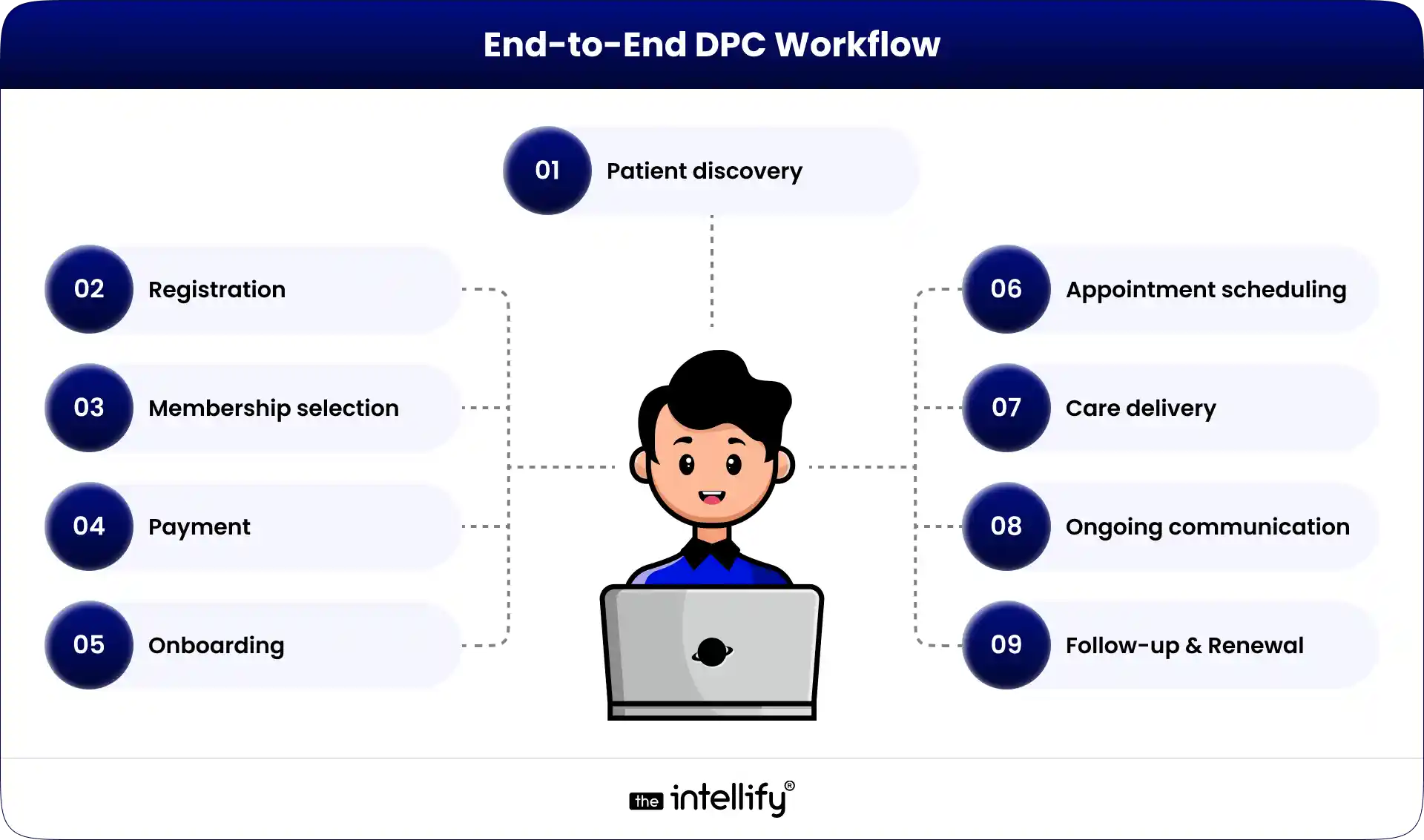
Each stage plays a specific role in maintaining both patient experience and operational efficiency.
1. Patient Registration
The journey begins when a prospective patient creates an account and submits basic information. Depending on the practice, this may include personal details, contact information, medical history, insurance details (if applicable), consent forms, and communication preferences.
The key objective at this stage is to eliminate unnecessary paperwork and reduce manual data entry for staff. A well-designed system ensures that information flows directly into the platform and is immediately usable for downstream workflows.
2. Membership Selection
Once registered, patients are presented with available membership plans. These plans may vary based on age, individual versus family coverage, employer arrangements, or included services.
A strong DPC platform clearly communicates what each plan includes, helping patients make informed decisions without needing staff intervention for basic explanations.
3. Payment and Enrollment
After selecting a plan, the system processes the initial payment and activates recurring billing. This is a critical part of the platform because it defines the financial relationship between the patient and the practice.
At this stage, the system must track membership status accurately, including whether a membership is active, pending, past due, paused, cancelled, or expired. This status directly impacts access to services and communication workflows.
4. Patient Onboarding
Once payment is complete, patients typically complete onboarding tasks such as intake forms, medical history questionnaires, and consent documentation. Automated reminders play an important role here, ensuring that patients complete onboarding without requiring constant manual follow-up from staff.
5. Appointment Scheduling
Patients should be able to view available appointment slots and book visits based on provider availability, appointment type, and scheduling rules defined by the practice. A well-designed scheduling system accounts for visit duration, new versus existing patients, telehealth availability, and cancellation policies.
6. Care Delivery
Care is delivered through in-person visits, telehealth sessions, phone consultations, or secure messaging depending on the practice model. The DPC platform should seamlessly connect these interactions with the underlying patient record and operational workflows.
7. Ongoing Communication
One of the defining characteristics of DPC is continuous access to care. Patients frequently reach out for questions, follow-ups, appointment changes, or general support. Without automation, this can quickly become a major operational burden.
A modern platform reduces this load by handling routine communication through structured workflows and intelligent automation.
8. Membership Renewal
Finally, the platform manages recurring billing and membership renewals. It tracks payment cycles, sends reminders for expiring cards or failed transactions, and ensures that staff are not manually chasing every renewal.
The goal is to maintain continuity of care while minimizing administrative overhead.
Why DPC Practices Need Modern Digital Platforms
While the DPC model simplifies insurance-related complexity, it does not eliminate operational workload. In fact, as a practice grows, the volume of administrative tasks often increases significantly.
For example, a practice with 1,500 members may receive daily inquiries about appointments, billing, membership details, prescriptions, lab results, and scheduling changes. Staff may also need to follow up on incomplete onboarding, failed payments, or missed communications.
Individually, these tasks are simple. At scale, they become a major operational challenge.
Common Operational Challenges in DPC Practices
Many DPC practices experience similar issues, including:
- Manual membership onboarding and updates
- Fragmented communication across phone, email, and messaging tools
- Heavy reliance on phone-based scheduling
- Failed or delayed recurring payments
- Inconsistent renewal follow-ups
- Repetitive patient inquiries
- High administrative call volume
- Disconnected software systems
- Limited visibility into membership performance
- Incomplete reporting and analytics
A modern DPC platform should not simply digitize these problems; it should actively reduce or eliminate them through workflow automation and system integration.
Essential Features of a DPC Platform
The exact feature set of a DPC platform depends on the size, structure, and goals of the practice. However, most modern systems should include a core set of capabilities that support both patient experience and operational efficiency.
| Feature | Purpose |
|---|---|
| Patient Registration | Digital onboarding and data collection |
| Membership Management | Plan creation, updates, and lifecycle tracking |
| Subscription Billing | Recurring payments and financial management |
| Appointment Scheduling | Self-service booking and provider availability |
| Patient Portal | Centralized access for patients |
| Secure Messaging | HIPAA-compliant communication |
| Telehealth | Virtual care delivery |
| EHR Integration | Clinical data synchronization |
| Notifications | Reminders, alerts, and updates |
| Analytics Dashboard | Operational and financial insights |
| Admin Dashboard | Practice-level management tools |
| AI Automation | Workflow optimization and task automation |
Patient Registration
Registration should be fast, mobile-friendly, and intuitive. Patients should not be required to print, scan, or email forms, as these outdated workflows create unnecessary friction and increase administrative burden.
Membership Management
Membership management is the core of any DPC platform. It should support plan creation, pricing structures, billing cycles, enrollment tracking, renewals, pauses, cancellations, and family account management. Without strong membership logic, the entire DPC model becomes difficult to scale.
Subscription Billing
Recurring billing must be reliable and automated. The system should handle payment processing, failed transactions, retries, refunds, receipts, and billing notifications. Automated recovery workflows are especially important to reduce revenue leakage and manual follow-up.
Appointment Scheduling
Patients should be able to book appointments without calling the office. The system should enforce scheduling rules, manage provider availability, and support different appointment types, including telehealth and same-day visits.
Patient Portal
A centralized patient portal improves engagement and reduces administrative load. Patients should be able to manage appointments, update information, access documents, communicate securely, and view billing and membership details in one place.
Secure Messaging
Secure messaging replaces fragmented communication channels with a structured, compliant system. It ensures that patient-provider communication remains organized, trackable, and integrated with the rest of the platform.
Telehealth
Telehealth should be fully integrated into the platform rather than treated as a separate tool. This allows patients to schedule, attend, and follow up on virtual visits without switching systems.
EHR Integration
In most cases, a DPC platform should complement rather than replace an EHR. Integration ensures that clinical data remains centralized while operational workflows are managed separately but in sync.
Analytics Dashboard
Analytics provide visibility into key operational metrics such as active memberships, churn rate, revenue trends, appointment volume, no-show rates, and patient engagement. These insights are essential for scaling a DPC practice effectively.

How to Build a DPC Platform: Step-by-Step
Building a DPC platform should always begin with understanding real-world workflows rather than selecting technology first. The most successful systems are designed around how a practice actually operates.
1. Define the Business Model
Start by clearly defining how the practice operates, including membership types, pricing structures, billing cycles, included services, cancellation policies, and provider availability. This forms the foundation for all technical decisions.
2. Map End-to-End Workflows
Document the full patient journey from registration to renewal, along with all internal staff processes. This step often reveals hidden inefficiencies and manual tasks that can be automated.
3. Translate Workflows into Requirements
Convert operational workflows into clear system requirements. For example, instead of saying “add payment integration,” define how the system should behave when a payment fails, including notifications, status updates, and retry logic.
4. Design User Experience for Each Role
Different users require different experiences. Patients need simplicity, providers need clinical context, administrators need visibility, and staff need efficient task management tools.
5. Choose the Technology Architecture
A typical DPC platform includes frontend applications, backend services, databases, cloud infrastructure, authentication systems, payment gateways, integration layers, and AI components. The architecture should be flexible enough to evolve over time.
6. Integrate External Systems
Integrations with EHRs, payment processors, telehealth tools, messaging systems, and analytics platforms are critical. A clear integration strategy should be defined early to avoid fragmentation later.
7. Build Security and Compliance into the Core
Security should not be added at the end of development. It must be embedded into system design, including access control, encryption, monitoring, and audit capabilities.
8. Introduce AI and Automation Strategically
AI should be applied only where it improves efficiency or reduces manual workload. Common use cases include scheduling, patient communication, reminders, and administrative routing.
9. Test Across Real-World Scenarios
Testing should go beyond basic functionality and include edge cases such as failed payments, scheduling conflicts, system outages, and integration failures.
10. Launch and Continuously Improve
A DPC platform should evolve over time based on real usage data. Monitoring engagement, operational efficiency, and patient feedback is essential for long-term success.
How AI Can Modernize a DPC Platform
AI can significantly improve DPC operations when applied to the right workflows. The goal is not to replace clinical decision-making but to reduce repetitive administrative work.
AI-Powered Communication
AI can handle routine patient inquiries across chat, email, and messaging platforms, providing instant responses to common questions while escalating complex issues to staff when needed.
AI Scheduling Assistance
AI can simplify appointment booking by interpreting natural language requests and automatically matching patients with available time slots based on provider rules and preferences.
AI Voice Agents
AI voice agents can manage incoming phone calls, handle scheduling, answer common questions, and execute predefined workflows. This reduces call volume and allows staff to focus on higher-value tasks.
Automated Membership Workflows
AI can identify incomplete onboarding, failed payments, upcoming renewals, and other membership-related events, triggering automated reminders or staff tasks as needed.
Self-Service Patient Support
Many patient questions are repetitive and predictable. AI can provide instant answers using approved practice information, improving response times and reducing staff workload.
Workflow Automation
AI becomes most powerful when it connects multiple steps into a single automated workflow, such as updating membership status after a failed payment and triggering appropriate notifications and follow-ups.
Where AI Voice Agents Fit in a DPC Platform
Phone calls remain one of the largest operational bottlenecks in DPC practices. Patients often prefer calling for convenience, but this creates constant interruptions for staff.
An AI voice agent can act as the first point of contact, handling routine requests such as scheduling, cancellations, membership questions, and general practice information. It can identify intent, access relevant systems, execute approved workflows, and escalate complex cases when necessary.
However, clear boundaries are essential. AI voice agents should not provide medical diagnoses or handle emergency situations independently. Instead, they should follow predefined escalation protocols to ensure patient safety.
Build vs. Modernize: Choosing the Right Approach
Not every DPC practice needs to build a platform from scratch. In many cases, modernizing an existing system is more practical and cost-effective.
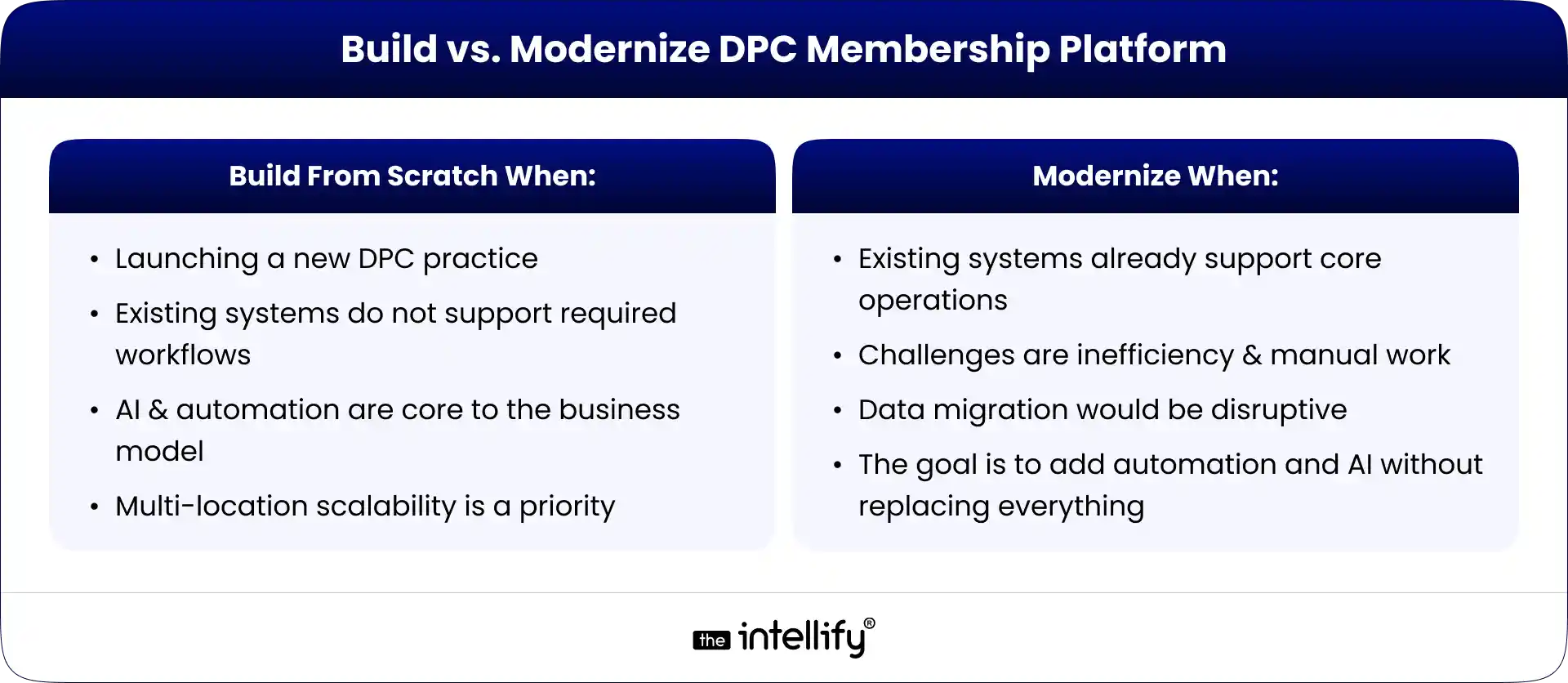
A simple rule applies: if the foundation is strong, modernize it; if it is limiting growth, rebuild it.
How Much Does It Cost to Build a DPC Platform?
The cost of building a DPC platform varies widely depending on scope, integrations, and complexity. A basic system focused on membership, scheduling, and payments is significantly less expensive than an enterprise platform with EHR integration, AI automation, mobile apps, and voice agents.
Key cost drivers include the number of user roles, level of customization, integration requirements, security needs, and long-term maintenance expectations. Instead of focusing on a fixed price, it is more effective to define the workflows the platform must support and build estimates around those requirements.
Conclusion
A successful DPC platform is not just a digital scheduling tool; it is the operational foundation of a membership-based care model. It connects patients, providers, payments, communication, and administrative workflows into a single system designed for long-term scalability.
When built correctly, it reduces administrative burden, improves patient experience, and enables practices to grow without proportionally increasing staff workload. When enhanced with AI and automation, it can further streamline repetitive tasks and improve responsiveness across the entire patient journey.
The key is not to rebuild everything, but to focus on what actually needs improvement. Start with workflow mapping first; the technology should support the operation, not define it.

Frequently Asked Questions (FAQs)
1. How does DPC software manage memberships?
DPC software can manage membership plans, enrollment, billing frequency, payment status, renewals, cancellations, family memberships, and related patient communications.
2. Can a DPC platform integrate with an EHR?
Yes. A DPC platform can be designed to integrate with an existing EHR so that operational workflows and clinical systems can work together rather than requiring the practice to replace everything.
3. Can AI automate DPC appointment scheduling?
Yes. An AI assistant or AI voice agent can handle approved scheduling workflows, check availability, book appointments, reschedule visits, and send confirmations when connected to the appropriate scheduling system.
4. Can an AI voice agent handle DPC patient calls?
Yes. An AI voice agent can handle many routine administrative calls, including questions about memberships, scheduling, practice information, cancellations, and other approved workflows. Clinical or sensitive requests should be appropriately escalated.
5. Is DPC software required to be HIPAA compliant?
Healthcare organizations and their technology providers may have HIPAA obligations depending on how protected health information is handled. A DPC platform that handles ePHI needs appropriate safeguards and should be designed around applicable HIPAA requirements. HHS identifies risk analysis as a foundational requirement of the HIPAA Security Rule.
6. Should a DPC practice build or buy software?
It depends. Buying or configuring existing software can make sense when standard workflows are sufficient. Custom development becomes more attractive when a practice needs proprietary workflows, deeper integrations, custom membership logic, or advanced automation.


Written By, Darshak Doshi
With over a decade of experience, Darshak is a technopreneur specializing in cloud-based applications and product development in healthcare, insurance, and manufacturing. He excels in AWS Cloud, backend development, and immersive technologies like AR/VR to drive innovation and efficiency. Darshak has also explored AI/ML in insurance and healthcare, pushing the boundaries of technology to solve complex problems. His user-focused, results-driven approach ensures he builds scalable cloud solutions, cutting-edge AR/VR experiences, and AI-driven insights that meet today’s demands while anticipating future needs.

How to Integrate AI Into an Existing DPC Platform Without Rebuilding It
Summary: This blog explains how to integrate AI into an existing Direct Primary Care (DPC) platform without rebuilding the entire system. It covers AI use cases, API integrations, implementation steps, HIPAA compliance, security considerations, common challenges, and costs. DPC practices can use these insights to modernize existing software, streamline administrative workflows, and improve operational efficiency. […]

How to Scale a Direct Primary Care Practice With Technology
Summary: This guide explains how technology can help Direct Primary Care practices scale without increasing administrative workload at the same pace. It covers DPC software, membership management, scheduling, billing, patient communication, automation, AI, and healthcare platform modernization, while outlining practical ways practices can build a more connected and scalable technology infrastructure. Running a Direct […]
How to Modernize a Direct Primary Care (DPC) Platform
Summary: This guide explains how to modernize a Direct Primary Care (DPC) platform for better scalability, security, patient experience, and operational efficiency. It covers essential DPC software features, legacy system assessment, platform integrations, AI opportunities, HIPAA considerations, modernization costs, common challenges, and practical steps for deciding between modernization and a complete rebuild. Direct Primary […]
How to Integrate AI Into an Existing DPC Platform Without Rebuilding It
Summary: This blog explains how to integrate AI into an existing Direct Primary Care (DPC) platform without rebuilding the entire system. It covers AI use cases, API integrations, implementation steps, HIPAA compliance, security considerations, common challenges, and costs. DPC practices can use these insights to modernize existing software, streamline administrative workflows, and improve operational efficiency. […]
How to Scale a Direct Primary Care Practice With Technology
Summary: This guide explains how technology can help Direct Primary Care practices scale without increasing administrative workload at the same pace. It covers DPC software, membership management, scheduling, billing, patient communication, automation, AI, and healthcare platform modernization, while outlining practical ways practices can build a more connected and scalable technology infrastructure. Running a Direct […]
How to Modernize a Direct Primary Care (DPC) Platform
Summary: This guide explains how to modernize a Direct Primary Care (DPC) platform for better scalability, security, patient experience, and operational efficiency. It covers essential DPC software features, legacy system assessment, platform integrations, AI opportunities, HIPAA considerations, modernization costs, common challenges, and practical steps for deciding between modernization and a complete rebuild. Direct Primary […]
0
+0
+0
+0
+Committed Delivery Leads To Client Satisfaction
Client Testimonials that keep our expert's spirits highly motivated to deliver extraordinary solutions.

Christopher Seny
My experience working with The Intellify, has been a great experience. The team has a wealth of expertise in the tech space. Working with the intellify was a growing experience for me, I learned a lot. The team keeps great communication & responds fast to new ideas & suggestions. The team also provides great suggestions & solutions as well. I couldn’t imagine working with anybody else on this project & it has been a blessing working with, The Intellify.

Izandi Serdyn
The Intellify delivered a platform from scratch, involving the client at every stage. The team was communicative, responsive, and punctual throughout the engagement. Virtual meetings and emails ensured seamless project management. Customers can expect a team that can work fast.

Kya Johnson
The app serves as an effective introduction for users to the product and its characters. Responsive and faithful to initial requirements, The Intellify’s team exceeded initial expectations. Internal stakeholders were particularly pleased with their communication.

Stefan Wyk
Working with The Intellify to develop our website was an outstanding experience. Their team displayed exceptional professionalism, creativity, and technical expertise throughout the entire process. The final product exceeded our expectations, delivering a sleek, user-friendly, and highly functional website. We highly recommend The Intellify to anyone in need of top-tier web development services.

Steve Thorpe
The Intellify’s work has been met with high praise from internal and external stakeholders. The team is efficient, diligent, and reliable in their service. They go above and beyond in terms of communication and project management. The Intellify is a responsive vendor that gets the job done.

Tal Dotan
I’ve been working with The Intellify for the last 3 years. During this period of time we’ve planned and executed projects in both small and large scale. Working with The Intellify was and still is the best decision I’ve made when rising up Divo, I strongly recommend to work with them in any type of project.


 +1-302-803-4983