How AI Is Transforming Direct Primary Care: Use Cases, Benefits & Implementation

By Jalaj Shah
August 26, 2026
Summary:
This guide explains how AI is transforming direct primary care (DPC) by improving patient communication, appointment scheduling, membership management, administrative workflows, and voice-based support. It covers practical AI use cases, benefits, HIPAA and security considerations, implementation steps, costs, and build-vs-buy decisions to help DPC practices evaluate and adopt AI technology effectively.
Direct primary care (DPC) is built around a straightforward model: patients pay a recurring membership fee directly to a practice in exchange for a defined range of primary care services.
The model can reduce some of the administrative complexity associated with traditional fee-for-service care. But running a DPC practice still involves plenty of operational work: answering calls, managing memberships, scheduling appointments, following up with patients, processing payments, and keeping communication moving.
As membership grows, those tasks can add up. This is where AI can help.
For DPC practices, the most useful applications of AI are not necessarily clinical. Many are operational: answering routine questions, scheduling appointments, handling phone calls, following up on memberships, and connecting repetitive tasks into automated workflows.
This guide explains where AI fits into direct primary care, the most practical use cases, implementation considerations, costs, security requirements, and when it makes more sense to buy, customize, or build an AI-enabled DPC solution.
What Is AI in Direct Primary Care?
AI in direct primary care means using artificial intelligence to support patient communication, scheduling, membership operations, administrative workflows, and other repetitive tasks.
It does not mean handing clinical decision-making over to an AI system. In fact, some of the strongest DPC use cases are relatively simple:
- Answering membership questions
- Scheduling appointments
- Handling routine phone calls
- Sending reminders
- Following up on incomplete onboarding
- Supporting membership renewals
- Routing requests to staff
AI vs. Traditional Automation
Traditional automation generally follows predefined rules.
For example, if a patient has an appointment tomorrow, send a reminder.
AI can work with less structured conversations.
A patient might say: “I can’t make my appointment on Thursday. Is there anything available next week?”
An AI system can understand the request, check availability, present suitable options, and complete the approved workflow. That is where AI goes beyond basic rule-based automation.
Generative AI
Generative AI can produce or interpret natural-language content. In a DPC setting, it may help draft responses, summarize conversations, answer approved questions, or assist staff.
Conversational AI
Conversational AI allows patients to interact with a system using natural language through chat or voice.
AI Voice Agents
AI voice agents bring conversational AI to telephone calls. They can handle defined administrative workflows without requiring staff to answer every routine call.
AI Workflow Automation
The larger opportunity is connecting AI to actual workflows:
Understand → Decide → Execute → Record → Escalate
That makes AI more useful than a standalone chatbot that simply provides information.
Why Are DPC Practices Adopting AI?
DPC can reduce certain administrative burdens compared with traditional healthcare models, but practices still have a significant amount of day-to-day operational work.
Patients call. Appointments change. Membership payments fail. Forms remain incomplete. People ask the same questions repeatedly. And those tasks don’t always arrive at convenient times.
AI can help DPC practices handle some of this volume without requiring staff to manually manage every interaction.
The goal isn’t to automate everything. It’s to identify the repetitive work that consumes staff time without requiring human judgment every time.
Where AI Fits in the DPC Patient Journey
A DPC patient’s journey can be viewed as:
Patient Inquiry → Registration → Membership → Payment → Onboarding → Scheduling → Care → Follow-Up → Renewal
AI can support several of these stages.
| DPC Stage | AI Opportunity |
|---|---|
| Patient inquiry | AI chatbot or voice agent |
| Registration | Automated information collection |
| Membership | Plan questions and assistance |
| Payment | Payment reminders and workflows |
| Onboarding | Form and task reminders |
| Scheduling | AI appointment booking |
| Care coordination | Task routing |
| Follow-up | Automated communication |
| Renewal | Membership reminders |
The bigger opportunity comes when these capabilities are connected.
For example: Patient inquiry → AI answers membership questions → Patient chooses to enroll → Registration link is sent → Forms are completed → Payment is processed → Appointment is scheduled.
That’s a complete workflow rather than a collection of disconnected AI features.
Top AI Use Cases for Direct Primary Care
AI can be applied to many DPC workflows, but not every use case has the same value. The best opportunities are usually repetitive, rules-based, high-volume tasks where a human doesn’t need to make a clinical judgment every time.
AI-Powered Patient Communication
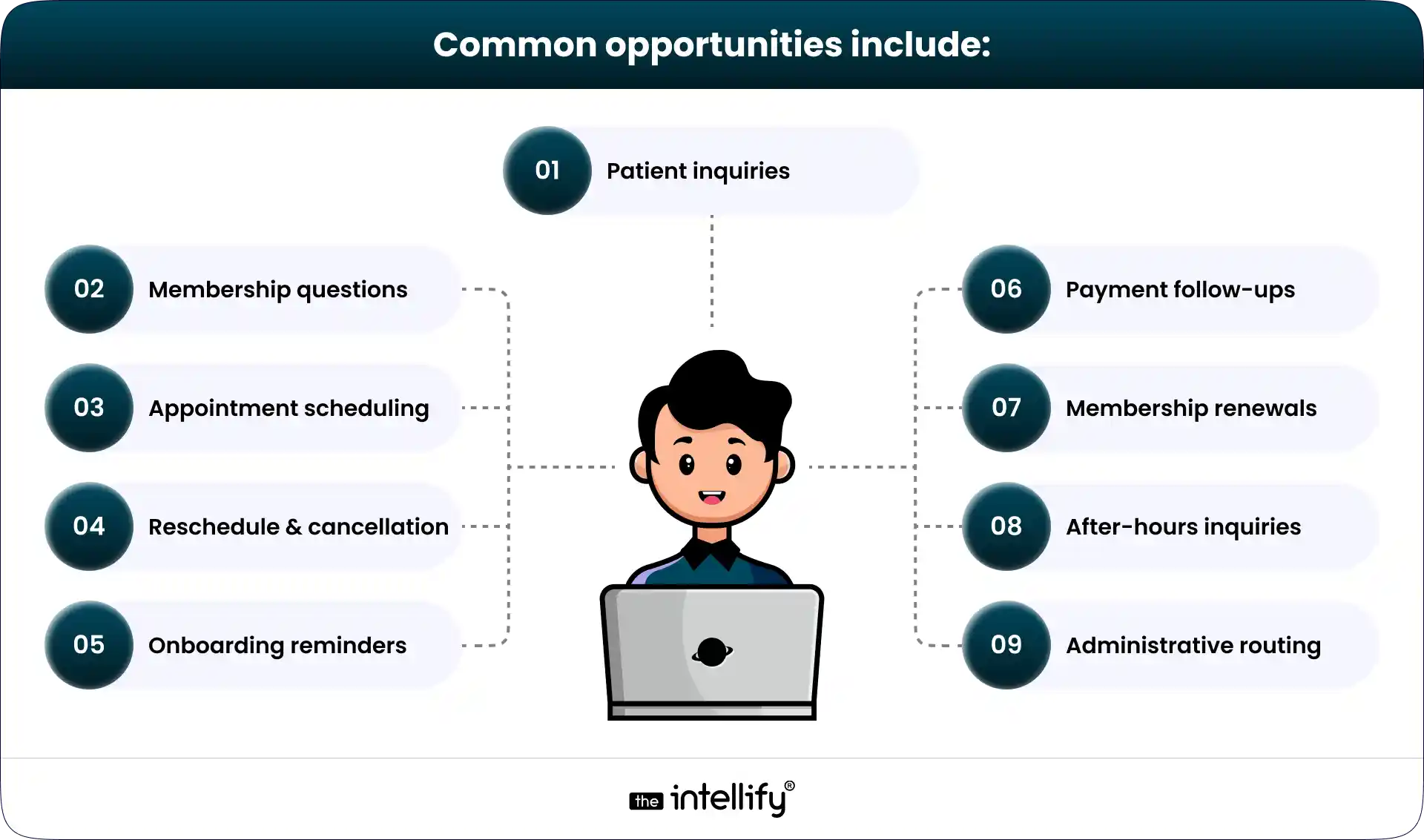
AI can answer common administrative questions about:
- Membership plans
- Pricing
- Office hours
- Appointment policies
- Telehealth
- Locations
- Registration
- General practice information
The practice can provide an approved knowledge base so the AI has clear boundaries around what it should and shouldn’t say. When a question falls outside those boundaries, it can route the patient to staff.
AI Appointment Scheduling
Scheduling is one of the clearest automation opportunities. Patients can request appointments through chat or voice, and an AI system can:
- Understand the request
- Check availability
- Apply scheduling rules
- Offer suitable times
- Book the appointment
- Send confirmation
- Support approved rescheduling or cancellation workflows
Instead of several back-and-forth messages, the patient can complete the task conversationally.
AI Voice Agents for DPC Practices
Phone calls are another major opportunity. A DPC practice may receive calls about:
- Membership plans
- Pricing
- Appointment availability
- New patient registration
- Existing patient questions
- Rescheduling
- Cancellations
- Practice information
- After-hours inquiries
- Payment questions
An AI voice agent can handle many routine administrative conversations and escalate situations that require human involvement. This can be especially useful when staff are already helping another patient or when calls arrive outside normal office hours.
Automated Patient Onboarding
New members may need to complete forms, provide information, make payments, and schedule their first appointment. AI-driven workflows can track those steps and send reminders when something is incomplete.
For example: Registration started → Forms assigned → Forms incomplete → Reminder sent → Completion detected → Staff notified
That removes a lot of manual chasing.
DPC Membership and Renewal Automation
Membership is central to the DPC model. AI can support:
- Membership inquiries
- Enrollment follow-ups
- Payment reminders
- Failed-payment communication
- Renewal reminders
- Cancellation workflows
- Membership status questions
The membership management system remains the source of truth, while AI helps patients and staff interact with it.
Patient FAQs and Self-Service
An AI assistant can provide answers to routine questions using approved practice information. This can include:
- Membership details
- Office hours
- Appointment policies
- Telehealth availability
- Cancellation rules
- Registration instructions
- General administrative information
It gives patients another way to find answers without waiting for staff.
Administrative Workflow Automation
This is where AI can become more valuable over time. Instead of automating a single action, it can connect multiple steps.
For example: Patient requests an appointment → AI identifies intent → Availability is checked → Appointment is booked → Confirmation is sent → Reminder is scheduled.
AI-Powered Patient Engagement
AI can also support ongoing communication through:
- Appointment reminders
- Onboarding follow-ups
- Membership updates
- Renewal communication
- Administrative notifications
The practice should determine which communications are appropriate for automation and which require staff involvement.
AI Voice Agents for DPC Practices
Voice AI deserves special attention because telephone calls remain an important patient access channel.
A busy front desk may miss calls while helping another patient. Some calls arrive after hours. Others are simple questions that still require someone to stop what they’re doing and answer. An AI voice agent can provide an additional layer of support.
How an AI Voice Agent Handles a DPC Call
A typical workflow could look like this:
Patient calls
↓
AI identifies the reason for the call
↓
Required verification is completed
↓
AI checks approved information or connected systems
↓
AI completes the appropriate workflow
↓
Patient receives confirmation
↓
Interaction is documented
↓
Complex request is escalated
The integration piece matters. A voice agent that can only talk isn’t enough if the goal is to book appointments or update workflows. The AI needs appropriate connections to the systems required to complete those tasks.
How AI Appointment Scheduling Works in DPC
An AI scheduling workflow typically follows several steps:
1. Patient requests an appointment
The patient can use voice, chat, or another supported interface.
2. AI understands the request
For example: “I need a follow-up with Dr. Lee next week.”
3. The system checks availability
The AI accesses the connected scheduling system.
4. Suitable options are presented
The patient receives available times that match the defined rules.
5. Patient confirms
The selected slot is confirmed.
6. Appointment is created
The scheduling system records the appointment.
7. Confirmation is sent
The patient receives the appropriate confirmation.
8. Reminder workflow begins
The system can trigger reminders according to the practice’s settings.
The same approach can support approved rescheduling and cancellation workflows.
How AI Can Automate DPC Membership Management
Membership management is one area where DPC platforms need capabilities beyond traditional appointment software. AI can assist with the communication and workflow around membership operations.
New Membership Inquiries
AI can answer questions about plans, pricing, services, and enrollment procedures using information approved by the practice.
Failed Payment Follow-Up
A workflow can identify a failed payment, notify the patient, provide instructions for updating payment details, and escalate unresolved issues.
Renewal Reminders
Patients can receive reminders before membership renewal and get answers to routine questions about their membership.
Cancellation Requests
AI can collect cancellation requests and follow the practice’s defined process. If human review is required, it can route the request rather than completing the cancellation itself.
Benefits of AI Automation for DPC Practices
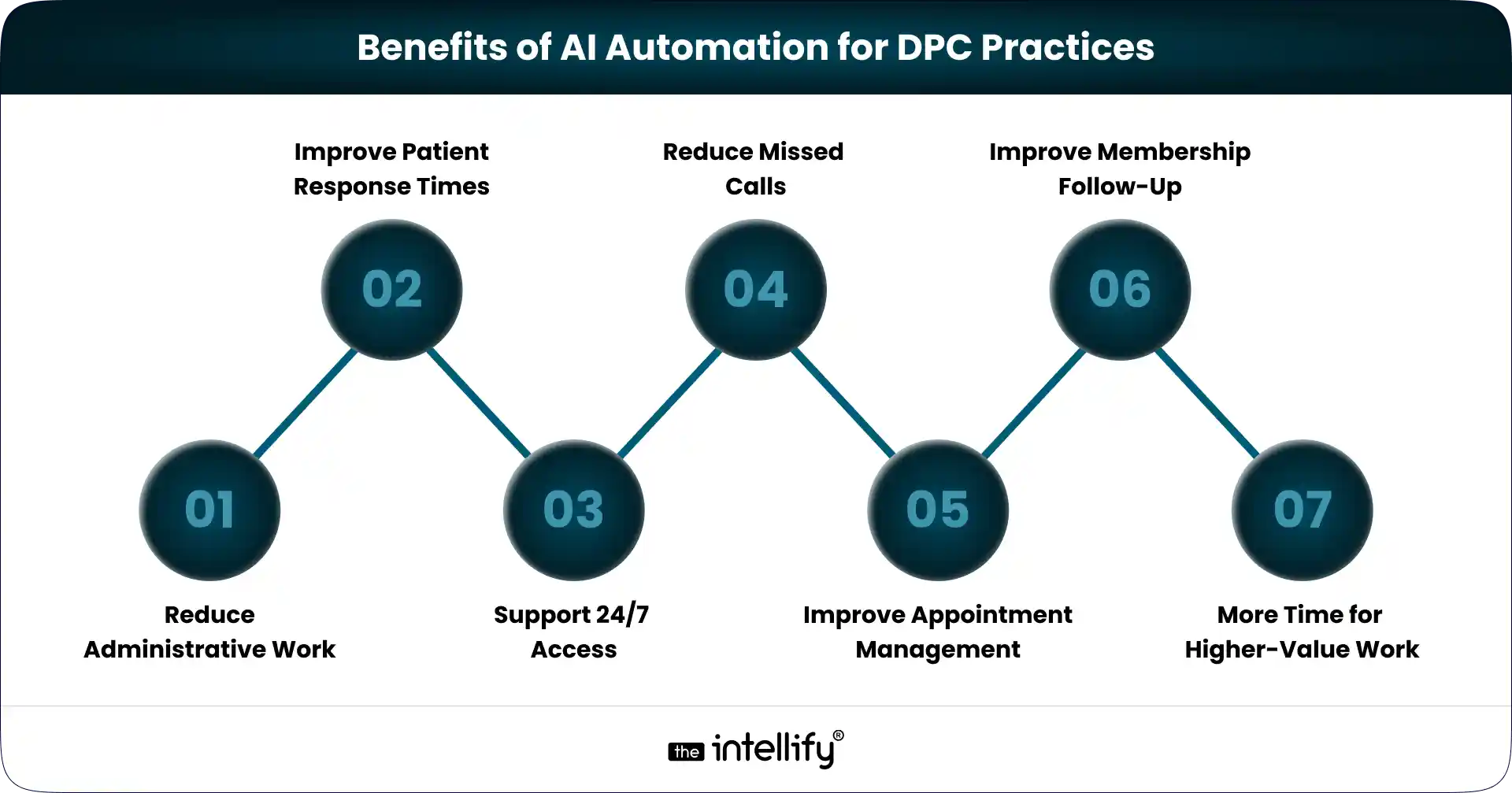
- Reduce Administrative Work: Routine calls, questions, reminders, and scheduling requests can take up significant staff time. Automation can reduce that repetitive workload.
- Improve Patient Response Times: AI can respond to approved requests immediately rather than waiting for staff availability.
- Support 24/7 Access: Patients can receive answers to routine administrative questions or initiate workflows outside normal office hours.
- Reduce Missed Calls: An AI voice agent can answer eligible calls when staff are unavailable.
- Improve Appointment Management: Patients can book, reschedule, or cancel appointments through conversational workflows.
- Improve Membership Follow-Up: Automated reminders can help reduce gaps around onboarding, payments, and renewals.
- Give Staff More Time for Higher-Value Work: This may be the most practical benefit. Staff spend less time answering repetitive questions and more time handling the situations that genuinely need a person.
AI vs. Traditional DPC Patient Support
AI isn’t necessarily a replacement for the traditional support model. It’s another layer.
| Traditional Approach | AI-Assisted Approach |
|---|---|
| Staff answers routine calls | AI handles approved routine calls |
| Manual appointment booking | Conversational scheduling |
| Manual reminders | Automated workflows |
| Business-hours support | 24/7 automated support |
| Staff answers repetitive FAQs | AI self-service |
| Manual renewal follow-ups | Automated renewal workflows |
| Manual request routing | AI-based intent routing |
| Staff collects routine information | AI can collect approved information |
The strongest approach isn’t necessarily AI instead of staff. It’s AI + staff.
AI handles appropriate repetitive work. People handle judgment, exceptions, relationships, and sensitive situations.
What AI Should and Shouldn’t Do in DPC
This deserves a clear line. Healthcare isn’t a normal customer-service environment. A mistake in a restaurant booking is annoying. A mistake in a healthcare interaction can be much more serious.
AI Can:
- Schedule appointments
- Answer approved administrative FAQs
- Handle routine administrative calls
- Send reminders
- Collect approved registration information
- Route requests
- Assist with onboarding
- Trigger approved workflows
- Summarize interactions where appropriate
AI Should Not Independently:
- Diagnose patients
- Make clinical decisions
- Override a physician
- Provide unsupported medical advice
- Handle emergencies without a defined escalation process
- Access information beyond its authorization
- Make decisions outside its configured scope
If the AI doesn’t know what to do, the correct response may simply be: “I’ll connect you with someone from the practice.” That’s a feature, not a failure.
HIPAA, Security & Compliance Considerations for DPC AI
AI systems handling healthcare information need to be designed with appropriate privacy and security controls.
HHS identifies risk analysis as a foundational component of HIPAA Security Rule compliance and recommends assessing risks to the confidentiality, integrity, and availability of electronic protected health information.
Important areas include:
- Role-Based Access: Limit access according to the user’s role and workflow requirements.
- Authentication: Use appropriate identity and authentication controls.
- Encryption: Protect sensitive information during transmission and, where appropriate, at rest.
- Audit Trails: Maintain appropriate records of system access and important actions.
- Secure Integrations: APIs connecting AI with scheduling, EHR, membership, or payment systems should be designed with appropriate security controls.
- Data Minimization: Don’t provide an AI system with information it doesn’t need to complete a particular task.
- Vendor Risk: Third-party AI, voice, cloud, and integration providers should be evaluated as part of the overall technology and security environment.
- AI Data Handling: Before choosing an AI provider, understand how patient information is processed, stored, retained, accessed, and used.
HIPAA compliance isn’t something that can simply be attached to an AI tool after implementation. The overall architecture, workflows, vendors, safeguards, and organizational processes matter.
How to Implement AI in a DPC Practice
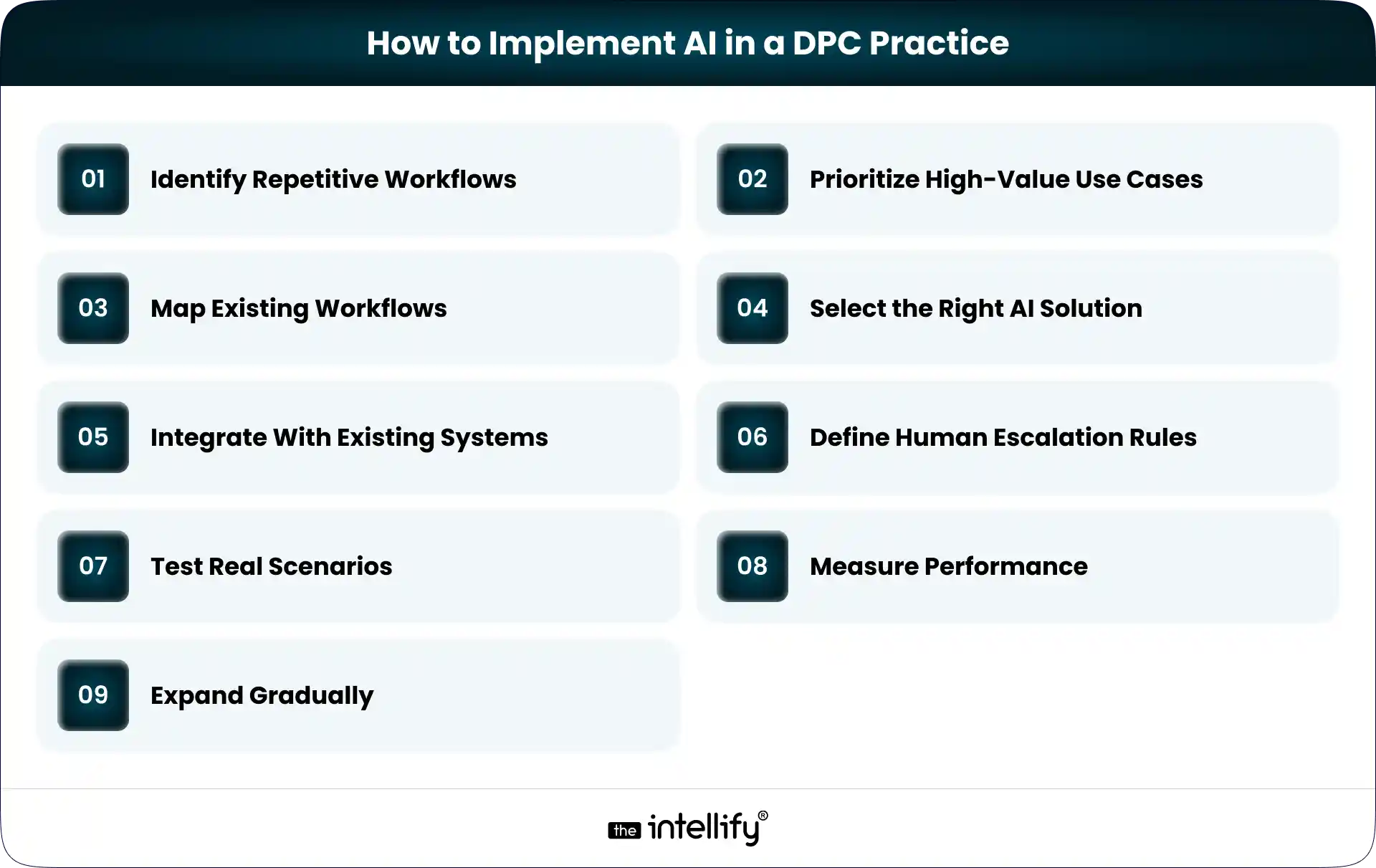
Trying to automate everything at once usually creates more complexity than value. A phased approach is more practical.
1. Identify Repetitive Workflows
Start by looking at the tasks staff perform repeatedly.
How many calls concern appointments?
How often are membership questions asked?
How much time goes into reminders and follow-ups?
2. Prioritize High-Value Use Cases
Look for workflows that are:
- Frequent
- Repetitive
- Rule-based
- Measurable
- Low risk from an automation perspective
3. Map Existing Workflows
Document what happens today before deciding what AI should do.
For example: Patient calls → Staff answers → Scheduling system opened → Availability checked → Appointment booked → Confirmation sent
Then determine which steps can safely be automated.
4. Select the Right AI Solution
Depending on the problem, the practice may need:
- AI chatbot
- AI voice agent
- Workflow automation
- Generative AI assistant
- Custom AI platform
Start with the workflow, not the technology.
5. Integrate With Existing Systems
AI can work alongside:
- EHRs
- Scheduling systems
- Membership platforms
- Payment systems
- Patient portals
- SMS and email tools
- Telehealth platforms
- CRMs
Replacing everything isn’t always necessary.
6. Define Human Escalation Rules
Decide:
- What AI can handle
- What requires verification
- What requires staff approval
- What must always be escalated
7. Test Real Scenarios
Test normal workflows and edge cases.
What happens if no appointment is available?
What happens if the patient changes their request?
What happens if the AI doesn’t understand?
What happens if the patient wants a human?
Those situations matter.
8. Measure Performance
Useful metrics can include:
- Calls answered
- Appointments booked
- Escalation rate
- Response time
- Workflow completion
- Membership follow-up completion
- Patient satisfaction
- Staff time saved
Then improve based on the results.
9. Expand Gradually
A practice might start with:
Phase 1: FAQs + scheduling
Phase 2: Voice AI + onboarding
Phase 3: Membership follow-ups
Phase 4: Broader workflow automation
This is generally easier to manage than launching everything simultaneously.
Build vs. Buy AI for DPC Practices
There isn’t one correct choice. Buying an existing solution may make sense when standard functionality is enough.
Custom development becomes more attractive when the practice has specific workflows or wants AI deeply integrated into its DPC platform.
Build or Customize When:
- Workflows are unique
- Deep EHR integration is required
- Custom membership logic is needed
- Proprietary automation matters
- Existing DPC software needs modernization
- Multiple workflows need to work together
Buy When:
- Standard functionality is enough
- Faster deployment matters
- Customization needs are limited
- Existing systems already integrate with the solution
There is also a middle option:
Keep the existing DPC platform and add an AI automation layer.
That can be useful when the core platform works, but patient communication, scheduling, or administrative workflows need improvement.
Conclusion
AI can be useful in direct primary care, but the goal shouldn’t be to automate everything.
Start with the work that repeatedly consumes time. Appointment scheduling. Membership questions. Patient calls. Onboarding reminders. Renewal follow-ups. Routine administrative communication. These are areas where AI can often make a practical difference without taking clinical judgment away from providers.
For established DPC practices, that may mean adding an AI layer to existing software rather than replacing the entire technology stack.
For new practices, AI capabilities can be considered as part of the platform architecture from the beginning.
The right question isn’t: “Where can we add AI?”
It’s: “Where are patients and staff losing time, and can AI safely remove that friction?”
That’s a much better place to start.
Frequently Asked Questions (FAQs)
1. How can AI help DPC practices?
AI can help with appointment scheduling, patient FAQs, administrative calls, onboarding reminders, membership follow-ups, payment notifications, and request routing.
2. Can AI schedule DPC appointments?
Yes. An AI assistant or voice agent can connect with an appropriate scheduling system to understand requests, check availability, book appointments, and support approved rescheduling and cancellation workflows.
3. Can AI voice agents answer DPC patient calls?
Yes. AI voice agents can handle approved administrative calls about memberships, scheduling, practice information, registration, cancellations, and other routine requests. Clinically sensitive or out-of-scope conversations should be escalated.
4. Can AI automate DPC membership management?
AI can support membership inquiries, enrollment follow-ups, payment reminders, renewal communication, and cancellation workflows. The underlying membership system should remain the source of truth.
5. Is AI in DPC HIPAA-compliant?
AI isn’t automatically HIPAA-compliant simply because it is used in healthcare. Organizations need to evaluate applicable HIPAA requirements, safeguards, vendors, contracts, data flows, and system architecture when protected health information is involved.
6. Should a DPC practice build or buy AI software?
Buying may work for standard workflows. Custom development can make more sense when a practice needs proprietary workflows, deep integrations, custom membership logic, or modernization of existing DPC software.
7. How do you implement AI in a DPC practice?
Start with repetitive workflows, prioritize practical use cases, map existing processes, select the appropriate AI technology, integrate it with existing systems, define escalation rules, test real scenarios, and measure performance before expanding.
Sources & References:
1. American Academy of Family Physicians – Direct Primary Care
2. AAFP – Direct Primary Care: What to Know
3. HHS – Guidance on Risk Analysis
4. HHS – January 2026 HIPAA Cybersecurity Guidance
5. AAFP – Five Administrative Tasks Technology Could Make Easier for Physicians


Written By, Jalaj Shah
The COO and Co-Founder of The Intellify. Jalaj enjoys experimenting with new strategies. His posts are fantastic for businesses seeking innovative development ideas. Discover practical insights from his engaging content.

How to Automate Patient Onboarding in a Direct Primary Care Practice
Summary: Patient onboarding automation helps Direct Primary Care (DPC) practices simplify registration, digital intake forms, membership agreements, payment setup, and patient communication. This blog explains how to automate key onboarding workflows, integrate existing healthcare systems, protect patient information, and measure operational improvements. It also covers implementation best practices to help DPC practices reduce administrative work […]
How to Integrate AI Into an Existing DPC Platform Without Rebuilding It
Summary: This blog explains how to integrate AI into an existing Direct Primary Care (DPC) platform without rebuilding the entire system. It covers AI use cases, API integrations, implementation steps, HIPAA compliance, security considerations, common challenges, and costs. DPC practices can use these insights to modernize existing software, streamline administrative workflows, and improve operational efficiency. […]
How to Scale a Direct Primary Care Practice With Technology
Summary: This guide explains how technology can help Direct Primary Care practices scale without increasing administrative workload at the same pace. It covers DPC software, membership management, scheduling, billing, patient communication, automation, AI, and healthcare platform modernization, while outlining practical ways practices can build a more connected and scalable technology infrastructure. Running a Direct […]
How to Automate Patient Onboarding in a Direct Primary Care Practice
Summary: Patient onboarding automation helps Direct Primary Care (DPC) practices simplify registration, digital intake forms, membership agreements, payment setup, and patient communication. This blog explains how to automate key onboarding workflows, integrate existing healthcare systems, protect patient information, and measure operational improvements. It also covers implementation best practices to help DPC practices reduce administrative work […]
How to Integrate AI Into an Existing DPC Platform Without Rebuilding It
Summary: This blog explains how to integrate AI into an existing Direct Primary Care (DPC) platform without rebuilding the entire system. It covers AI use cases, API integrations, implementation steps, HIPAA compliance, security considerations, common challenges, and costs. DPC practices can use these insights to modernize existing software, streamline administrative workflows, and improve operational efficiency. […]
How to Scale a Direct Primary Care Practice With Technology
Summary: This guide explains how technology can help Direct Primary Care practices scale without increasing administrative workload at the same pace. It covers DPC software, membership management, scheduling, billing, patient communication, automation, AI, and healthcare platform modernization, while outlining practical ways practices can build a more connected and scalable technology infrastructure. Running a Direct […]
0
+0
+0
+0
+Committed Delivery Leads To Client Satisfaction
Client Testimonials that keep our expert's spirits highly motivated to deliver extraordinary solutions.

Christopher Seny
My experience working with The Intellify, has been a great experience. The team has a wealth of expertise in the tech space. Working with the intellify was a growing experience for me, I learned a lot. The team keeps great communication & responds fast to new ideas & suggestions. The team also provides great suggestions & solutions as well. I couldn’t imagine working with anybody else on this project & it has been a blessing working with, The Intellify.

Izandi Serdyn
The Intellify delivered a platform from scratch, involving the client at every stage. The team was communicative, responsive, and punctual throughout the engagement. Virtual meetings and emails ensured seamless project management. Customers can expect a team that can work fast.

Kya Johnson
The app serves as an effective introduction for users to the product and its characters. Responsive and faithful to initial requirements, The Intellify’s team exceeded initial expectations. Internal stakeholders were particularly pleased with their communication.

Stefan Wyk
Working with The Intellify to develop our website was an outstanding experience. Their team displayed exceptional professionalism, creativity, and technical expertise throughout the entire process. The final product exceeded our expectations, delivering a sleek, user-friendly, and highly functional website. We highly recommend The Intellify to anyone in need of top-tier web development services.

Steve Thorpe
The Intellify’s work has been met with high praise from internal and external stakeholders. The team is efficient, diligent, and reliable in their service. They go above and beyond in terms of communication and project management. The Intellify is a responsive vendor that gets the job done.

Tal Dotan
I’ve been working with The Intellify for the last 3 years. During this period of time we’ve planned and executed projects in both small and large scale. Working with The Intellify was and still is the best decision I’ve made when rising up Divo, I strongly recommend to work with them in any type of project.


 +1-302-803-4983