How to Integrate AI Into an Existing DPC Platform Without Rebuilding It

By Darshak Doshi
October 15, 2026
Summary:
This blog explains how to integrate AI into an existing Direct Primary Care (DPC) platform without rebuilding the entire system. It covers AI use cases, API integrations, implementation steps, HIPAA compliance, security considerations, common challenges, and costs. DPC practices can use these insights to modernize existing software, streamline administrative workflows, and improve operational efficiency.
Direct Primary Care (DPC) practices are looking for ways to make everyday operations easier. From answering patient calls to managing memberships and scheduling appointments, there is plenty of work that happens outside the exam room. AI can help with some of these tasks, but adding it to an existing platform can feel like a major technical project.
The good news? You don’t necessarily need to rebuild your entire DPC platform to start using AI.
With the right integration strategy, practices can introduce AI capabilities while keeping their existing software, patient records, and core workflows in place. The key is understanding which tasks need improvement, how current systems exchange data, and where AI can fit without creating new problems.
This guide explains how to integrate AI into an existing DPC platform, the technologies involved, the security considerations to address, and when modernization makes more sense than a complete rebuild.
Why DPC Platforms Need AI Integration
DPC practices operate differently from traditional fee-for-service medical practices. Their membership-based model depends on ongoing patient relationships, accessible care, and predictable administrative processes.
However, managing those relationships still requires time. Staff members handle appointment requests, membership questions, payment issues, patient messages, and follow-ups. When these tasks pile up, they can take attention away from patients.
AI integration offers a way to reduce some of that workload without changing the entire operating model.
Growing Administrative Workloads in DPC Practices
A growing DPC practice may receive more calls, messages, scheduling requests, and membership inquiries than its team can comfortably manage. Even routine questions can interrupt staff throughout the day.
AI voice agents, automated messaging, and workflow assistants can help handle repetitive tasks, such as answering common questions, collecting appointment preferences, and routing requests to the right team member.
For example, an AI voice agent could answer basic questions about office hours and collect a patient’s preferred appointment time. Staff can then review or confirm the request through the existing scheduling system.
The goal isn’t to automate every interaction. It’s to reduce repetitive work while keeping personal care at the center of the DPC experience.
Limitations of Traditional DPC Software
Many established DPC platforms already support essential functions, including membership management, billing, scheduling, and patient communication. But these systems may lack advanced automation or intelligent assistance.
Some platforms also operate in separate environments. Patient messages might live in one system, while scheduling and membership information sit in another. This can make routine tasks harder to coordinate.
AI integration can help connect these workflows, provided the underlying systems offer suitable APIs, data access, or other supported integration methods.
Which AI Capabilities Can You Add to an Existing DPC Platform?
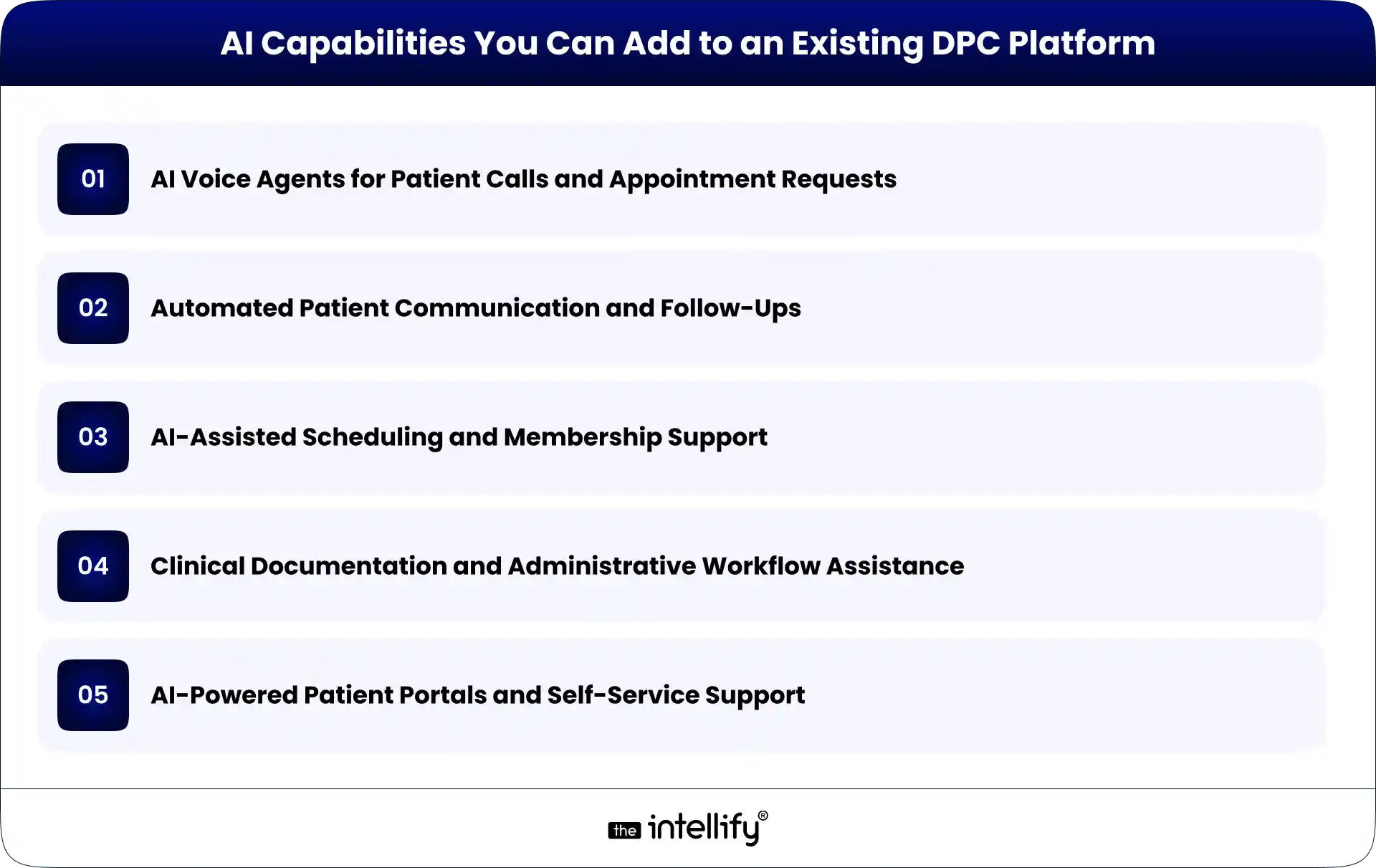
The best AI features depend on a practice’s operational challenges, software architecture, and patient needs. Rather than adding AI simply because it’s available, start with tasks that consume time and follow reasonably clear rules.
AI Voice Agents for Patient Calls and Appointment Requests
AI voice agents can answer incoming calls, respond to common questions, collect information, and route callers based on their needs.
When integrated with the appropriate systems, they may also check appointment availability or submit scheduling requests. Access to patient information and the ability to make changes should be limited to authorized workflows.
For medical concerns that require clinical judgment, the system should direct patients to qualified staff or established clinical escalation procedures.
Automated Patient Communication and Follow-Ups
AI-assisted communication can help practices manage appointment reminders, routine follow-ups, and frequently asked questions.
For example, a platform could trigger an approved reminder after an appointment is scheduled. An AI assistant may also help draft responses to common administrative questions.
Messages involving sensitive health information need appropriate safeguards, and clinical communications should receive human review when necessary.
AI-Assisted Scheduling and Membership Support
Scheduling tools can help patients find suitable appointment times, while membership support assistants can answer questions about enrollment, renewals, billing processes, and membership policies.
These capabilities work best when they use current information from the relevant systems. If membership status or appointment availability is outdated, the AI may provide an incorrect answer.
Integration should therefore include reliable data access and clear rules for when the system must defer to a staff member.
Clinical Documentation and Administrative Workflow Assistance
AI tools can assist with drafting clinical notes, summarizing permitted information, and organizing administrative documentation.
However, clinical documentation requires greater oversight than routine scheduling. Providers must be able to review and correct AI-generated content before it becomes part of the official record.
The technology should support clinical work, not independently make decisions that require professional judgment.
AI-Powered Patient Portals and Self-Service Support
An AI assistant within a patient portal can help users navigate available services, locate relevant information, and understand administrative processes.
With appropriate authentication and permissions, it may retrieve specific information from connected systems.
The assistant should not expose information from another patient’s record or provide clinical guidance beyond its approved scope. Clear escalation options are important, especially when a question falls outside the assistant’s capabilities.
How to Integrate AI Into an Existing DPC Platform: Step by Step
Successful AI integration starts with understanding the existing platform. The technology comes later.
Step 1: Audit Your Existing DPC Technology Stack
Document the software currently used for membership management, billing, scheduling, patient communication, EHRs, and reporting.
Identify where information is stored, which systems exchange data, and where staff still rely on manual work. This assessment helps uncover integration opportunities and potential limitations before development begins.
Step 2: Identify the Right AI Use Cases
Choose one or two workflows that create a clear operational burden.
For example, if staff spend considerable time answering routine calls, an AI voice agent may be a suitable starting point. If repeated appointment reminders are the bigger problem, communication automation could offer a better fit.
Define measurable outcomes, such as fewer manual call-handling tasks, shorter response times, or reduced administrative processing time.
Step 3: Check APIs and Integration Options
Next, determine how the existing platform allows external tools to connect.
REST APIs, webhooks, approved data exports, and middleware are common integration options. The appropriate choice depends on the platform’s capabilities and security requirements.
If APIs are unavailable, alternatives may exist, but they require careful evaluation. Direct database access or fragile screen-based automation can create maintenance and security problems. Don’t assume every system can support real-time AI integration. Verify the available interfaces first.
Step 4: Choose Between Third-Party AI Tools and Custom Development
Third-party AI tools may be suitable for standard needs, such as voice interactions or routine message handling. They can reduce the amount of custom development required.
Custom development makes more sense when workflows are specific to the practice, existing systems require specialized integration, or off-the-shelf tools cannot meet the requirements.
The decision should consider integration effort, data handling, customization, vendor dependencies, ongoing costs, and long-term maintenance.
Step 5: Connect AI With Existing Workflows
Once the approach is selected, define how information will move between the AI component and the DPC platform.
For instance, a voice agent might collect an appointment request, send the required information through an API, and create a pending request in the scheduling system.
The integration should specify which data can be accessed, which actions are permitted, and what happens when a request fails.
AI should not receive unrestricted access to patient records or the ability to change important information without appropriate authorization.
Step 6: Test, Validate, and Roll Out Gradually
Test the integration using realistic scenarios before making it available to patients. Check whether information is transferred correctly, permissions work as intended, errors are handled safely, and staff can intervene when necessary.
A limited pilot is often a sensible first step. For example, a practice could enable an AI assistant for routine administrative calls during selected hours before expanding its availability. Collect staff feedback and review patient experiences before increasing the scope.
Step 7: Measure Performance and Improve
After launch, compare results against the original goals. Useful measures may include administrative time saved, call-handling outcomes, scheduling accuracy, escalation rates, staff satisfaction, and patient feedback.
Review failed interactions and recurring issues. Update approved responses, integration rules, and escalation procedures as needed.
AI integration isn’t a one-time task. Ongoing monitoring helps ensure that the system remains useful as the practice and its software evolve.
How AI Integrates With Core DPC Platform Components
AI generally works best as an additional layer that interacts with existing systems through defined interfaces.
Membership Management and Recurring Billing
AI assistants can answer approved membership questions and help staff locate relevant account information. Connected workflows may also support billing inquiries or membership renewal reminders.
Financial changes, cancellations, and other consequential actions should follow established authorization and confirmation processes.
Patient Portals and Communication Systems
AI can help patients navigate portal features, find administrative information, and submit requests.
Integration may use APIs or middleware to exchange permitted information between systems. Authentication, role-based permissions, and appropriate session controls help protect patient data.
Scheduling, EHRs, and Practice Management Software
Scheduling integrations can support appointment requests and availability checks. EHR integrations may support approved documentation or information retrieval workflows.
These systems should remain authoritative for their respective records. AI-generated information should be validated before it updates official data, particularly when clinical information is involved.
Reporting, Analytics, and Operational Dashboards
AI can help summarize operational trends, categorize routine requests, and identify recurring administrative bottlenecks.
For example, a practice could analyze aggregated call data to understand when demand is highest. Reports should use appropriate access controls and data minimization, especially when patient information is involved.
Security, HIPAA, and Patient Data Considerations
Healthcare AI integration requires more than a working technical connection. Patient privacy and security must be part of the design from the beginning.
For U.S. DPC practices, relevant considerations include:
- HIPAA obligations: Determine which HIPAA requirements apply to the practice and the systems involved. When a vendor acts as a business associate, a business associate agreement may be required.
- Access controls: Limit AI systems to the minimum information and permissions needed for their specific tasks.
- Data protection: Use appropriate encryption, secure authentication, and protected data transmission.
- Audit logs: Record relevant access and system actions so incidents can be investigated.
- Vendor review: Understand how patient data is stored, processed, retained, and used by AI providers.
- Human oversight: Define when staff must review outputs, approve changes, or take over an interaction.
Avoid sending identifiable patient information to an AI service without confirming that its use is permitted and appropriately safeguarded.
HIPAA compliance is not automatic just because a vendor offers healthcare AI features. The practice must assess the complete workflow, contractual arrangements, and applicable obligations.
AI Integration vs. Rebuilding Your DPC Platform
The right approach depends on the condition of the existing software and the changes the practice needs.
| Factor | AI integration | Complete rebuild |
|---|---|---|
| Initial scope | Focused on selected capabilities | Replaces or redesigns much of the platform |
| Existing workflows | Largely retained | May require significant changes |
| Implementation | Can be phased | Usually involves broader development and migration |
| Technical flexibility | Depends on current architecture | Greater freedom to redesign |
| Main risk | Integration limitations | Migration, adoption, and implementation complexity |
AI integration is often the better starting point when core systems remain reliable and support suitable integration methods.
A rebuild may be justified when the architecture is fundamentally unsuitable, critical components are no longer supported, or ongoing limitations prevent necessary business changes.
There is also a middle ground: modernize selected components while retaining the rest of the platform. The decision should follow a technical assessment, not an assumption that newer software is always better.
How Much Does It Cost to Integrate AI Into a DPC Platform?
There is no single price for AI integration. A simple administrative assistant connected to one system requires a different level of effort than a voice agent that interacts with scheduling, membership records, and multiple healthcare systems.
The main cost factors include:
- Complexity of the selected AI use case.
- Availability and quality of APIs.
- Number of systems that need to connect.
- Data preparation and migration requirements.
- Security reviews, testing, and compliance obligations.
- AI usage fees, infrastructure, monitoring, and maintenance.
A limited pilot can help establish realistic costs before a practice commits to a larger rollout. When evaluating proposals, consider the total cost of ownership rather than development fees alone. Ongoing support, vendor charges, system updates, and future integration needs can all affect the budget.
How The Intellify Can Help Modernize Your DPC Platform
Adding AI to an existing DPC platform requires a clear understanding of the current architecture, operational needs, and integration options.
The Intellify helps businesses explore healthcare software modernization opportunities, including ways to improve existing DPC platforms through targeted development and integration.
Depending on the platform and requirements, a DPC modernization engagement may involve:
- Assessing existing software architecture and integration limitations.
- Identifying suitable AI use cases and automation opportunities.
- Planning API integrations and connections between systems.
- Developing custom capabilities around existing workflows.
- Evaluating security requirements and testing integrations before rollout.
The first step is to understand what your current platform already does well and where it falls short. That makes it easier to prioritize useful improvements instead of investing in a complete rebuild without a clear reason.
Final Thoughts
Integrating AI into an existing DPC platform doesn’t have to begin with a complete rebuild. In many cases, practices can start by identifying a specific operational problem, connecting a suitable AI capability, and improving the workflow over time.
The important part is choosing the right use case, checking system compatibility, protecting patient information, and testing each integration before expanding it.
Some platforms will need only a few targeted improvements. Others may require bigger architectural changes. A technical assessment helps determine the difference.
The goal is straightforward: make your existing technology more useful, reduce avoidable administrative work, and give your team more time to focus on patients.
Frequently Asked Questions (FAQs)
1. Can you add AI to an existing DPC platform without rebuilding it?
Yes. AI can often be added through APIs, middleware, or integrations with existing software. The available options depend on the platform’s architecture, data access, and security requirements.
2. What AI features are most useful for Direct Primary Care practices?
Useful options include AI voice agents, automated patient communication, scheduling assistance, membership support, and administrative documentation tools. The best starting point is a workflow that consumes significant staff time and can be automated safely.
3. Is AI integration into a DPC platform HIPAA compliant?
AI integration can be designed to support HIPAA compliance, but using an AI tool does not automatically make the complete system compliant. Practices must assess data handling, access controls, vendor agreements, security safeguards, and applicable legal obligations.
4. How long does it take to integrate AI into DPC software?
Timelines vary based on the AI capability, system compatibility, API availability, security requirements, and testing needs. A focused integration with a well-documented system may be simpler than a project involving several legacy systems. A technical assessment is the best way to estimate the timeline.


Written By, Darshak Doshi
With over a decade of experience, Darshak is a technopreneur specializing in cloud-based applications and product development in healthcare, insurance, and manufacturing. He excels in AWS Cloud, backend development, and immersive technologies like AR/VR to drive innovation and efficiency. Darshak has also explored AI/ML in insurance and healthcare, pushing the boundaries of technology to solve complex problems. His user-focused, results-driven approach ensures he builds scalable cloud solutions, cutting-edge AR/VR experiences, and AI-driven insights that meet today’s demands while anticipating future needs.

How to Scale a Direct Primary Care Practice With Technology
Summary: This guide explains how technology can help Direct Primary Care practices scale without increasing administrative workload at the same pace. It covers DPC software, membership management, scheduling, billing, patient communication, automation, AI, and healthcare platform modernization, while outlining practical ways practices can build a more connected and scalable technology infrastructure. Running a Direct […]
How to Modernize a Direct Primary Care (DPC) Platform
Summary: This guide explains how to modernize a Direct Primary Care (DPC) platform for better scalability, security, patient experience, and operational efficiency. It covers essential DPC software features, legacy system assessment, platform integrations, AI opportunities, HIPAA considerations, modernization costs, common challenges, and practical steps for deciding between modernization and a complete rebuild. Direct Primary […]
Where AI Voice Agents Fit Into a Modern DPC Platform
Summary: AI voice agents can become a practical part of a modern Direct Primary Care (DPC) platform by handling routine phone interactions, appointment scheduling, membership questions, reminders, and call routing. This guide explains where voice AI fits within the DPC technology stack, what tasks it should and shouldn’t handle, HIPAA considerations, integration requirements, and how […]
How to Scale a Direct Primary Care Practice With Technology
Summary: This guide explains how technology can help Direct Primary Care practices scale without increasing administrative workload at the same pace. It covers DPC software, membership management, scheduling, billing, patient communication, automation, AI, and healthcare platform modernization, while outlining practical ways practices can build a more connected and scalable technology infrastructure. Running a Direct […]
How to Modernize a Direct Primary Care (DPC) Platform
Summary: This guide explains how to modernize a Direct Primary Care (DPC) platform for better scalability, security, patient experience, and operational efficiency. It covers essential DPC software features, legacy system assessment, platform integrations, AI opportunities, HIPAA considerations, modernization costs, common challenges, and practical steps for deciding between modernization and a complete rebuild. Direct Primary […]
Where AI Voice Agents Fit Into a Modern DPC Platform
Summary: AI voice agents can become a practical part of a modern Direct Primary Care (DPC) platform by handling routine phone interactions, appointment scheduling, membership questions, reminders, and call routing. This guide explains where voice AI fits within the DPC technology stack, what tasks it should and shouldn’t handle, HIPAA considerations, integration requirements, and how […]
0
+0
+0
+0
+Committed Delivery Leads To Client Satisfaction
Client Testimonials that keep our expert's spirits highly motivated to deliver extraordinary solutions.

Christopher Seny
My experience working with The Intellify, has been a great experience. The team has a wealth of expertise in the tech space. Working with the intellify was a growing experience for me, I learned a lot. The team keeps great communication & responds fast to new ideas & suggestions. The team also provides great suggestions & solutions as well. I couldn’t imagine working with anybody else on this project & it has been a blessing working with, The Intellify.

Izandi Serdyn
The Intellify delivered a platform from scratch, involving the client at every stage. The team was communicative, responsive, and punctual throughout the engagement. Virtual meetings and emails ensured seamless project management. Customers can expect a team that can work fast.

Kya Johnson
The app serves as an effective introduction for users to the product and its characters. Responsive and faithful to initial requirements, The Intellify’s team exceeded initial expectations. Internal stakeholders were particularly pleased with their communication.

Stefan Wyk
Working with The Intellify to develop our website was an outstanding experience. Their team displayed exceptional professionalism, creativity, and technical expertise throughout the entire process. The final product exceeded our expectations, delivering a sleek, user-friendly, and highly functional website. We highly recommend The Intellify to anyone in need of top-tier web development services.

Steve Thorpe
The Intellify’s work has been met with high praise from internal and external stakeholders. The team is efficient, diligent, and reliable in their service. They go above and beyond in terms of communication and project management. The Intellify is a responsive vendor that gets the job done.

Tal Dotan
I’ve been working with The Intellify for the last 3 years. During this period of time we’ve planned and executed projects in both small and large scale. Working with The Intellify was and still is the best decision I’ve made when rising up Divo, I strongly recommend to work with them in any type of project.


 +1-302-803-4983