AR-Driven Virtual Customer Support: Use Cases, Benefits & Business Value

By Jalaj Shah
January 21, 2026
Summary:
This blog explains how AR-driven virtual customer support helps businesses solve customer issues using visual, real-time guidance instead of long calls or text instructions. It covers how AR support works, where it’s used, and the business value it delivers across industries. The article also explores key benefits, implementation challenges, and what the future of AR-powered customer support looks like for modern, customer-focused organizations.
Customer support used to be simple. Someone had a problem, they called a number, waited on hold, and eventually spoke to a human. Slow? Yes. But expectations were lower. That’s no longer the case.
Today’s customers want help right now, without repeating themselves, without guessing what a support agent means, and without shipping a product back just because one tiny thing went wrong. And honestly, most support issues aren’t that complex. They’re just hard to explain using words alone.
That gap between what customers see and what support teams can explain is exactly where AR-driven virtual customer support fits in.
What Is AR-Driven Virtual Customer Support?
At its core, AR-driven virtual customer support uses augmented reality to guide users visually while they’re facing a problem. Instead of reading steps or listening to instructions, customers point their phone or tablet camera at the product. On-screen arrows, highlights, or notes show them exactly what to do.
No guessing. No back-and-forth. Just clear, visual help. Think about setting up a new Wi-Fi router. Support tells you, “Check the small port next to the reset button.” You look at the back of the device. There are five ports. They all look the same.
Now imagine the camera view highlighting the exact port in real time. That’s AR support. Simple, but powerful.
Why Businesses Are Moving Toward AR-Powered Customer Support
Customer expectations have changed. Fast. People are used to visual apps, video calls, and instant answers. A long support email or a scripted call feels… outdated. And expensive. At the same time, businesses are dealing with:
- Higher support volumes
- Global customers in different time zones
- Rising costs of field service and on-site visits
AR-powered customer support solves several problems at once. It reduces confusion, shortens support calls, and helps customers fix things on their own without feeling lost. And when customers solve issues quickly, they remember that experience in a good way.
How AR-Driven Virtual Customer Support Works (Step-by-Step)
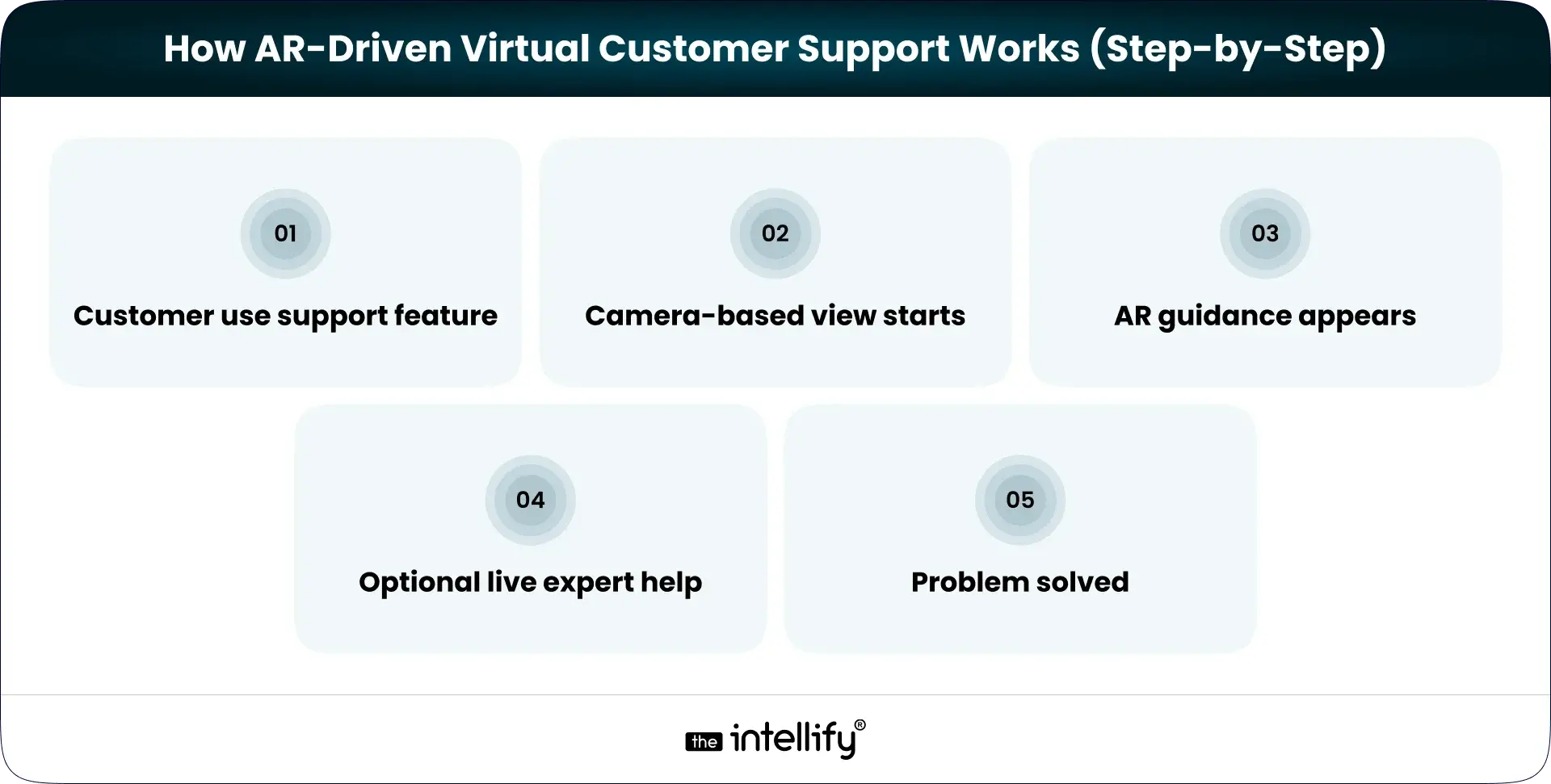
The flow is usually straightforward. No complicated setup required.
1) Customer opens the support feature: This could be inside a mobile app or via a web-based AR experience.
2) Camera-based view starts: The customer points their device at the product or environment.
3) AR guidance appears: Visual cues like arrows, labels, or animations appear on the screen, aligned with real objects.
4) Optional live expert help: If needed, a remote support agent can see the same view and guide the user in real time.
5) Problem solved: Faster than a call. Less frustrating than trial and error.
It feels natural. Almost obvious once you see it in action.
Benefits of AR-Powered Virtual Customer Support for Businesses
Faster Issue Resolution
Most support delays come from misunderstanding. Visual guidance cuts explanation time dramatically. What takes 10 minutes on a call often takes 2 minutes with AR.
Lower Support Costs
Shorter interactions mean lower costs. Fewer repeat tickets mean less workload. And fewer on-site visits mean real savings, especially for businesses supporting physical products or equipment.
Better First-Contact Resolution
AR support increases the chance that issues are resolved the first time. Customers don’t need to call back because they “missed a step” or misunderstood instructions. First-contact resolution quietly improves, and support teams notice.
Reduced Product Returns
A surprising number of returns happen because customers think something is broken when it isn’t. Visual guidance helps them use products correctly, which reduces unnecessary returns and refunds.
Higher Customer Satisfaction
When support feels clear and helpful, customers feel taken care of. That trust doesn’t come from big promises. It comes from small moments that go smoothly.
Real-World Use Cases of AR-Driven Virtual Customer Support
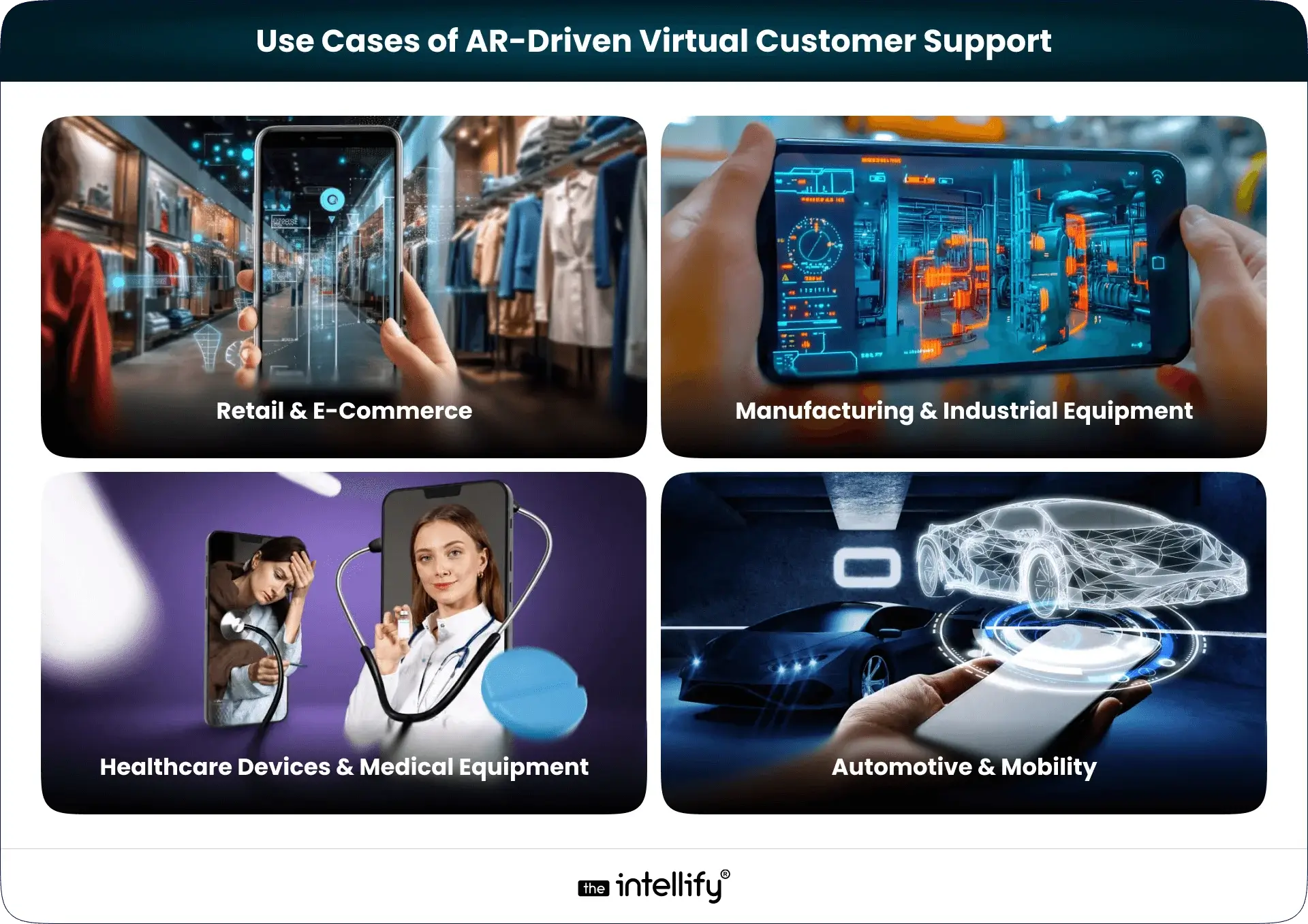
This isn’t theoretical. AR support is already being used across industries, quietly improving how support works.
Retail & E-Commerce
Customers use AR in retail & e-commerce guidance to assemble furniture, install appliances, or understand product features. It reduces confusion and cuts down on “I can’t figure this out” messages that clog support inboxes.
Consumer Electronics & Smart Devices
Smart devices are powerful, but setup can be frustrating. AR walks users through the process step by step, helping them avoid common mistakes without reading long manuals.
Manufacturing & Industrial Equipment
When machines go down, every minute matters. AR-driven support allows technicians and customers to troubleshoot issues remotely, reducing downtime and unnecessary travel.
Healthcare Devices & Medical Equipment
Clear usage matters here. AR helps guide users through safe operation and setup, especially during onboarding or remote assistance scenarios.
Automotive & Mobility
Instead of flipping through thick manuals, users can point their phone at a component and see exactly what it does or how to fix a minor issue. It’s practical, not flashy.
AR-Driven Virtual Customer Support vs Traditional Support Models
Traditional support relies heavily on explanation. AR relies on observation. With phone calls, customers describe problems in their own words, often imperfectly. With AR, support teams see the problem directly. That changes the conversation.
Compared to chatbots, AR handles real-world problems better. Compared to video calls, AR adds structure and clarity instead of open-ended conversation. AR doesn’t replace human support. It simply makes human support more effective.
Key Features to Include in an AR Virtual Customer Support App
A good AR support app doesn’t try to do everything. It focuses on what matters.
- Real-time AR overlays should be accurate and stable. Nothing breaks trust faster than instructions floating in the wrong place.
- Live expert collaboration should feel seamless, not intrusive. Customers should feel helped, not watched.
- Multi-device compatibility matters more than fancy visuals. If it doesn’t work smoothly across common smartphones, adoption suffers.
- Security and data privacy can’t be an afterthought, especially in regulated industries.
- Analytics and insights: Businesses need to understand what issues occur most often and how AR support impacts resolution time and customer satisfaction.
Challenges in Implementing AR-Driven Virtual Support (And Solutions)
AR support isn’t magic. There are challenges.
1. User hesitation or unfamiliarity
Some users may feel unsure about using AR at first. Simple onboarding screens and clear prompts help ease them in.
2. Device compatibility limitations
Not all users have high-end devices. Designing lightweight AR experiences ensures broader accessibility.
3. Accuracy of AR overlays
Poor alignment breaks trust quickly. Careful testing and calibration are essential for reliable guidance.
4. Data privacy and security concerns
Especially in regulated industries, strong data protection and compliance practices must be built in from the start.
5. Trying to do too much at once
Overloading the experience with features can hurt adoption. Starting with a few high-impact use cases works better.
Future of AR-Powered Virtual Customer Support

AR-powered customer support is slowly moving from being a “nice-to-have” feature to something customers will quietly expect. Not because it’s flashy, but because it makes getting help feel easier and more natural. As AR becomes more familiar on everyday devices, support experiences will feel less like technical sessions and more like guided assistance that just fits into the moment.
What’s coming next looks practical, not dramatic:
- AR support shifting from reactive problem-solving to proactive guidance
- Tighter integration with voice assistance for hands-free support
- AI helping predict issues and suggest visual fixes before customers ask
- More lightweight AR experiences that work smoothly across common devices
- Wider adoption across industries, from consumer products to enterprise systems
- AR is becoming a standard layer of customer support rather than a standalone feature
In the near future, customers won’t think about the technology behind the support. They’ll just notice that issues get resolved faster, with less effort and less frustration, and that’s exactly the point.
How to Get Started with AR-Driven Virtual Customer Support
Getting started with AR-driven virtual customer support doesn’t mean rebuilding your entire support system from scratch. In most cases, it works best when it grows out of real problems your customers already face, not big ideas on a whiteboard.
The first step is slowing down and observing where support actually breaks down. Most businesses already have the answers hidden in their tickets, call logs, and frustrated customer emails.
- Review support tickets to spot issues customers struggle to explain using words alone.
- Look for repetitive problems that take agents a long time to resolve.
- Prioritize scenarios where visual guidance would clearly save time for both customers and support teams.
- Decide whether AR support should live inside an existing mobile app or work as a standalone experience.
- Start small with a pilot, focused on a few high-impact use cases, before scaling further.
This is also where choosing the right AR App development partner matters more than choosing flashy features.
An experienced AR app development company like The Intellify helps businesses think through the practical side of what should be visual, what should stay simple, and what will actually get used by customers. The focus isn’t on showing off AR, but on making support easier, faster, and less frustrating.
When AR is built around real user behavior, adoption follows naturally. And support teams feel the difference almost immediately.

Conclusion
Customer support doesn’t have to be a cost center. With the right tools, it becomes quite a differentiator. AR-driven virtual customer support helps customers help themselves, with confidence. It saves time. Reduces frustration. And when support works quietly in the background, customers remember the brand for the right reasons. Not because something went wrong, but because fixing it felt easy.
Frequently Asked Questions (FAQs)
1) What is AR-driven virtual customer support?
AR-driven virtual customer support helps customers solve problems using visual, real-time guidance instead of text or phone instructions. Customers point their device camera at a product, and on-screen visuals show exactly what to do. This makes support faster, clearer, and less frustrating for both users and support teams.
2) How is AR-powered customer support different from chatbots or video support?
Chatbots explain. Video calls talk. AR-powered support shows. It adds visual cues directly onto real-world objects, making it easier to fix physical or setup-related issues. This works especially well when describing a problem with words isn’t enough.
3) Which industries benefit the most from AR-driven virtual customer support?
Industries with physical products benefit the most, including retail, consumer electronics, manufacturing, healthcare devices, automotive, and telecom. Any business where customers struggle with setup, usage, or troubleshooting can use AR to reduce support effort and improve outcomes.
4) Does AR-driven customer support reduce support costs?
Yes. AR support shortens resolution time, reduces repeat tickets, lowers product returns, and cuts down on on-site visits. Businesses that implement AR support thoughtfully often see measurable cost savings while maintaining better customer satisfaction.
5) Do customers need special devices to use AR customer support?
No. Most AR customer support solutions work on standard smartphones and tablets. Customers simply use their device camera through an app or browser-based experience, without needing special hardware or accessories.
6) Is AR-powered customer support secure?
It can be very secure when designed properly. AR support systems can limit camera access, protect session data, and follow industry compliance standards. Working with an experienced development partner like The Intellify helps ensure security is built in from the start.
7) How long does it take to build an AR virtual customer support solution?
Simple AR support features can be built in weeks, while more advanced solutions may take a few months. Most businesses start with one high-impact use case and expand gradually to see faster results and lower risk.


Written By, Jalaj Shah
The COO and Co-Founder of The Intellify. Jalaj enjoys experimenting with new strategies. His posts are fantastic for businesses seeking innovative development ideas. Discover practical insights from his engaging content.

Indoor Navigation with AR: The Future of Smart Wayfinding Systems
Summary: AR-powered indoor navigation is helping businesses deliver smarter and more seamless wayfinding experiences. By guiding users with real-time visual directions, it eliminates confusion in complex environments like hospitals, malls, airports, and campuses. These solutions not only improve visitor satisfaction but also enhance operational efficiency and accessibility. As demand for smarter buildings grows, indoor navigation […]
How Augmented Reality in Education is Transforming Learning Apps for Kids
Summary: Augmented Reality in education is transforming how children learn by making lessons more interactive, visual, and engaging. Instead of relying only on text or videos, AR allows kids to explore 3D models, animations, and real-world simulations, improving understanding and retention. This blog covers how AR learning apps work, their key features, real-world applications, benefits, […]
How Augmented Reality Is Redefining the Furniture Industry
Summary Augmented Reality is changing how people explore and buy furniture by allowing them to visualize products in their own spaces before making a purchase. This technology helps reduce uncertainty, improves buying confidence, and creates a more interactive shopping experience. In this blog, we explore how AR is being used across the furniture industry, its […]
Indoor Navigation with AR: The Future of Smart Wayfinding Systems
Summary: AR-powered indoor navigation is helping businesses deliver smarter and more seamless wayfinding experiences. By guiding users with real-time visual directions, it eliminates confusion in complex environments like hospitals, malls, airports, and campuses. These solutions not only improve visitor satisfaction but also enhance operational efficiency and accessibility. As demand for smarter buildings grows, indoor navigation […]
How Augmented Reality in Education is Transforming Learning Apps for Kids
Summary: Augmented Reality in education is transforming how children learn by making lessons more interactive, visual, and engaging. Instead of relying only on text or videos, AR allows kids to explore 3D models, animations, and real-world simulations, improving understanding and retention. This blog covers how AR learning apps work, their key features, real-world applications, benefits, […]
How Augmented Reality Is Redefining the Furniture Industry
Summary Augmented Reality is changing how people explore and buy furniture by allowing them to visualize products in their own spaces before making a purchase. This technology helps reduce uncertainty, improves buying confidence, and creates a more interactive shopping experience. In this blog, we explore how AR is being used across the furniture industry, its […]
0
+0
+0
+0
+Committed Delivery Leads To Client Satisfaction
Client Testimonials that keep our expert's spirits highly motivated to deliver extraordinary solutions.

Christopher Seny
My experience working with The Intellify, has been a great experience. The team has a wealth of expertise in the tech space. Working with the intellify was a growing experience for me, I learned a lot. The team keeps great communication & responds fast to new ideas & suggestions. The team also provides great suggestions & solutions as well. I couldn’t imagine working with anybody else on this project & it has been a blessing working with, The Intellify.

Izandi Serdyn
The Intellify delivered a platform from scratch, involving the client at every stage. The team was communicative, responsive, and punctual throughout the engagement. Virtual meetings and emails ensured seamless project management. Customers can expect a team that can work fast.

Kya Johnson
The app serves as an effective introduction for users to the product and its characters. Responsive and faithful to initial requirements, The Intellify’s team exceeded initial expectations. Internal stakeholders were particularly pleased with their communication.

Stefan Wyk
Working with The Intellify to develop our website was an outstanding experience. Their team displayed exceptional professionalism, creativity, and technical expertise throughout the entire process. The final product exceeded our expectations, delivering a sleek, user-friendly, and highly functional website. We highly recommend The Intellify to anyone in need of top-tier web development services.

Steve Thorpe
The Intellify’s work has been met with high praise from internal and external stakeholders. The team is efficient, diligent, and reliable in their service. They go above and beyond in terms of communication and project management. The Intellify is a responsive vendor that gets the job done.

Tal Dotan
I’ve been working with The Intellify for the last 3 years. During this period of time we’ve planned and executed projects in both small and large scale. Working with The Intellify was and still is the best decision I’ve made when rising up Divo, I strongly recommend to work with them in any type of project.


 +1-302-803-4983