How to Develop an eCommerce App: Guide for Brands & Retailers

Summary:
Thinking about building an eCommerce app for your brand in 2025? This blog walks you through everything you need to know about eCommerce app development, from defining your business goals and choosing the right tech stack to designing a seamless shopping experience your customers will love. You’ll also learn about the must-have features, development process, estimated cost in the U.S., and smart marketing strategies to grow your app after launch. Whether you’re a startup or a retail brand ready to scale, this guide helps you plan, build, and launch a successful eCommerce app that drives sales and strengthens your digital presence.


The eCommerce App Boom You Can’t Afford to Ignore

Let’s be honest, people don’t “go shopping” anymore. They scroll, tap, swipe, and buy in seconds. From your favorite sneakers to that last-minute birthday gift, everything happens inside sleek, mobile eCommerce apps.
And here’s the kicker: over 70% of U.S. online sales now come from mobile devices (Statista, 2025). If your brand doesn’t have an app yet, you’re probably losing customers to someone who does.
This guide breaks down everything you need to know about how to develop an eCommerce app – the strategy, tech, cost, and design principles that actually make users want to come back.


Understanding Why You Need an eCommerce App in 2025

Rise in Demand of eCommerce App

The best apps don’t start with “we need one too.”
They start with “why.”

Your “why” defines your entire app development direction.

  • Are you trying to build customer loyalty?
  • Do you want to personalize shopping experiences?
  • Are you targeting Gen Z mobile shoppers or busy professionals?

Your goal will guide every decision, from which features you prioritize to how your app communicates your brand story.
Example: A skincare brand might focus its app around personalized routines and AR skin analysis, while a fashion label could build “try before you buy” features with virtual fitting rooms.


Must-Have Ecommerce App Features to Include in 2025
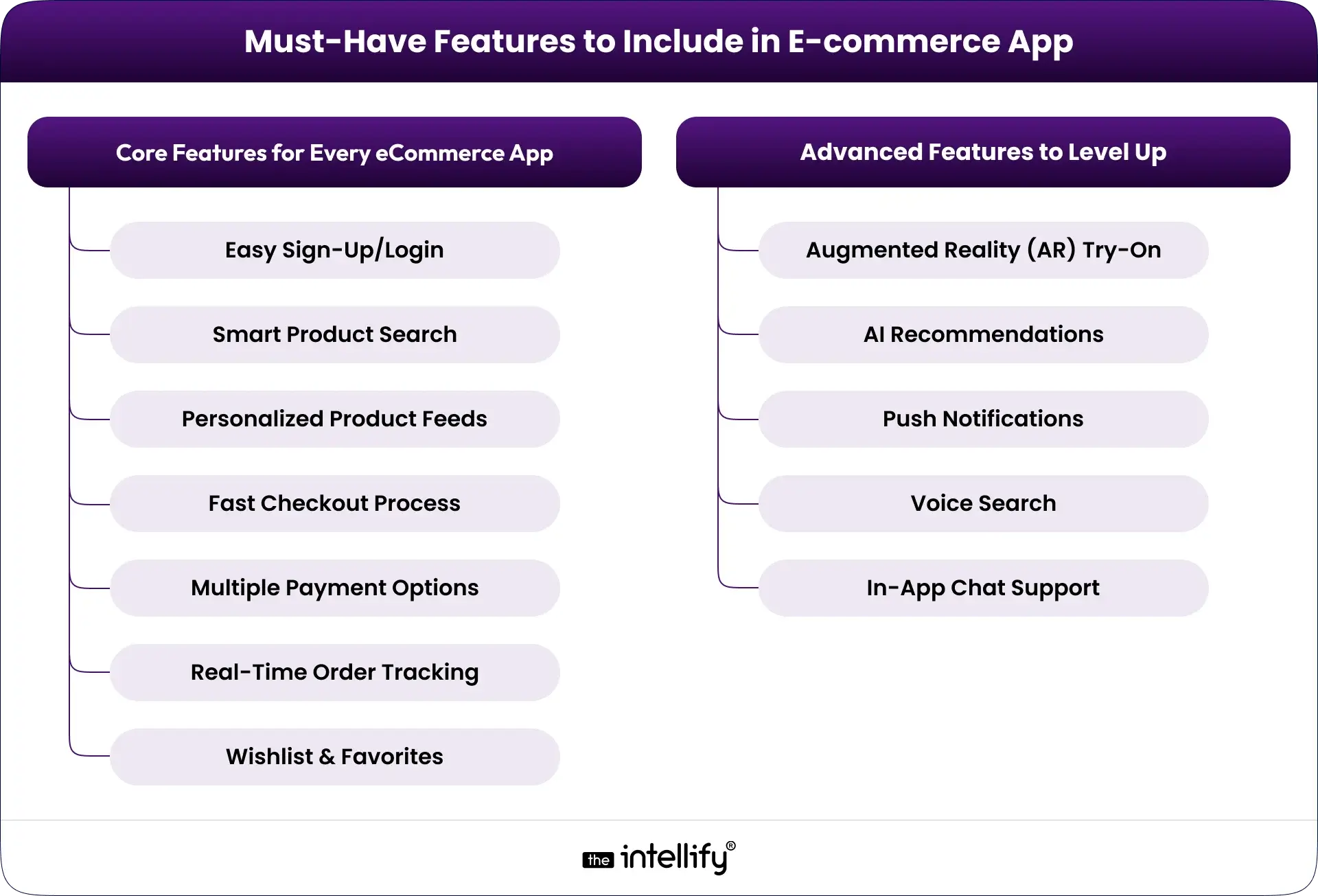
Ecommerce App Features

Here’s the deal: flashy features don’t make an app successful; useful ones do.

Core Features for Every eCommerce App

  1. Easy Sign-Up/Login: One-tap social or biometric logins, no friction.
  2. Smart Product Search: AI-powered suggestions, filters, and auto-complete save time.
  3. Personalized Product Feeds: People love it when your app “gets” them.
  4. Fast Checkout Process: Three steps max: cart, address, pay.
  5. Multiple Payment Options: Apple Pay, Google Pay, PayPal, cards, and even crypto.
  6. Real-Time Order Tracking: Transparency builds trust.
  7. Wishlist & Favorites: Keeps engagement high even when users aren’t ready to buy.

Advanced Features to Level Up

  • Augmented Reality (AR) Try-On: Furniture, clothes, or virtual makeup try before you buy.
  • AI Recommendations: Smarter upselling and cross-selling.
  • Push Notifications: Send discounts, back-in-stock alerts, or birthday offers.
  • Voice Search: For users who’d rather ask Siri than type.
  • In-App Chat Support: Fast answers reduce abandoned carts.

Tip: Launch your MVP (Minimum Viable Product) first. Collect real feedback before investing in bells and whistles.


Choosing the Right Platform & Tech Stack for eCommerce App Development

Your platform = your user base. Choose wisely.

Native App Development

  • Pros: Best performance, access to full device features.
  • Cons: Higher cost (you’ll need two versions, iOS & Android).

Cross-Platform Development (React Native / Flutter)

  • Pros: Build once, run anywhere; cost-efficient and fast.
  • Cons: Slightly limited for ultra-high performance apps.

Progressive Web Apps (PWAs)

  • Pros: Instant install, SEO-friendly, no App Store approvals.
  • Cons: Limited offline capabilities compared to native.

Recommended Tech Stack:

  • Frontend: React Native / Flutter
  • Backend: Node.js, Python (Django), or Ruby on Rails
  • Database: PostgreSQL, Firebase
  • Cloud Hosting: AWS, Google Cloud, or Azure

At The Intellify, we use scalable, future-proof architectures so your app won’t crumble when your user base doubles overnight.


Designing an eCommerce App That Feels Effortless (UI/UX Tips That Convert)

People don’t remember every button, but they do remember how your app made them feel.

Key Design Principles

  • Keep it Clean: White space is your friend. Avoid clutter.
  • Visual Hierarchy: Highlight products and CTAs clearly.
  • Faster Load = More Conversions: Each second of delay can drop sales by 7%.
  • Micro-Interactions: Subtle animations make browsing feel alive.
  • Consistency Across Devices: Seamless transitions from phone to tablet.

Case in Point: Target’s mobile app nails personalization with tailored deals and smooth navigation, one reason its app revenue crossed billions in 2024.
Design is emotion. Don’t just sell delight.


Step-by-Step E-commerce App Development Process
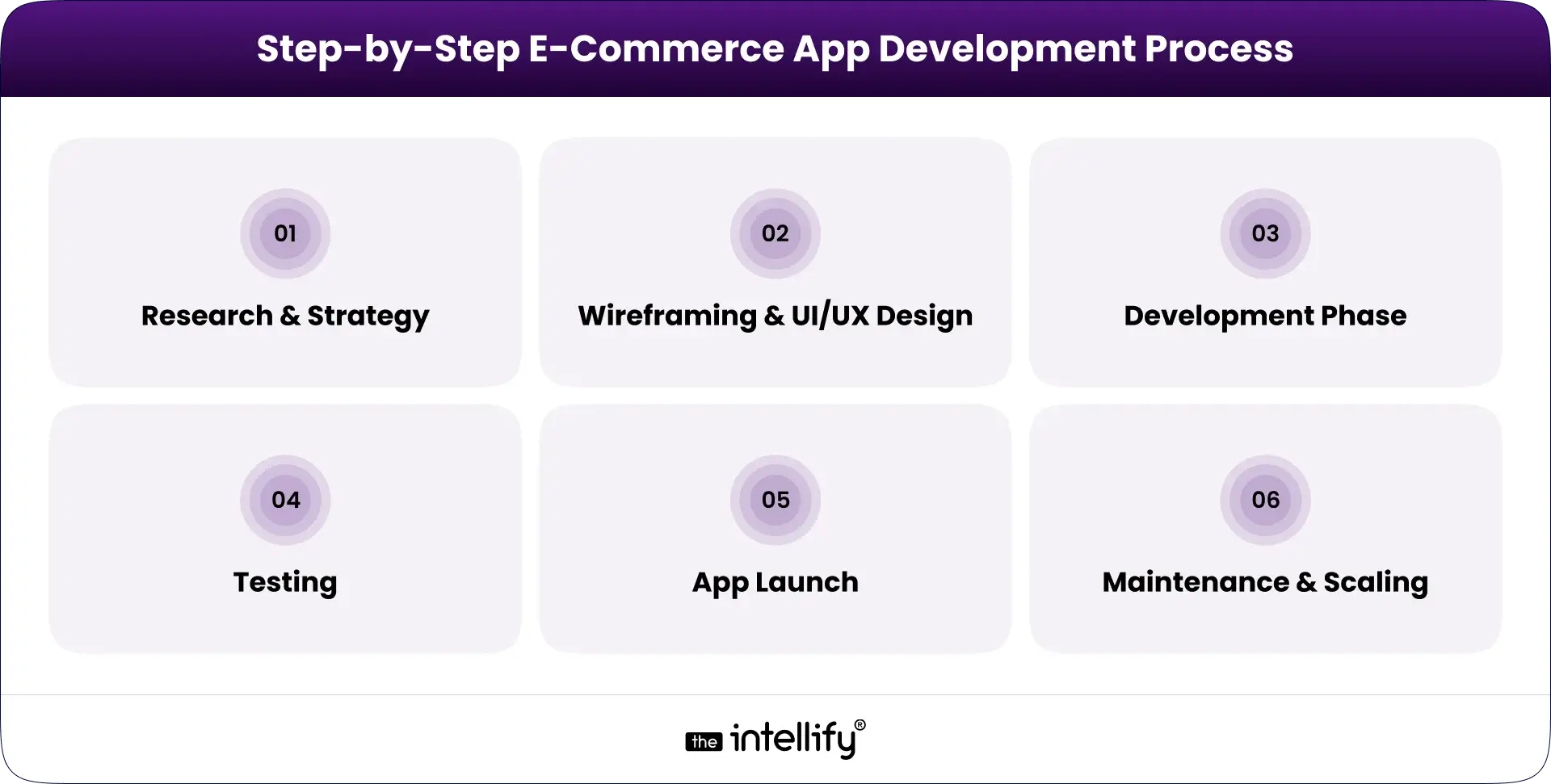
E-Commerce App Development Process

Developing an eCommerce app can feel like juggling tech, design, and deadlines but with a good plan, it’s totally manageable.
Here’s your roadmap:

1. Research & Strategy: Define your target audience, unique value, and competitor gaps.

2. Wireframing & UI/UX Design: Sketch layouts, user journeys, and a prototype for early feedback.

3. Development Phase: Frontend + backend development, API integration, database setup, and admin dashboard.

4. Testing: Functional testing, performance checks, and security audits.

5. App Launch: Submit to the App Store/Play Store, or go live with your PWA.

6. Maintenance & Scaling: Update features, monitor analytics, and keep optimizing post-launch.

Partnering with a professional e-commerce app development company like The Intellify ensures smoother sprints, transparent communication, and faster time-to-market.


E-commerce App Development Cost in the U.S. (2025 Estimates)

Let’s get into the dollars.
The cost of developing an e-commerce app depends on complexity, design, and platform.

Type of eCommerce App Estimated Cost Range Timeframe
Basic MVP $15,000 – $30,000 3-4 months
Mid-Level App $35,000 – $60,000 4-6 months
Advanced App (AR/AI) $70,000 – $150,000+ 6-9 months


Cost Tip: Outsourcing to a hybrid team (U.S. + offshore) can reduce cost by 30-40% while maintaining top quality.
Don’t forget maintenance! Post-launch support costs around 15-20% of total project value per year.

 

Develop E-commerce App


Marketing, Retention, and Monetization Strategies for eCommerce Apps

Building an app is half the battle – marketing keeps it alive.

Marketing That Works

  • Pre-Launch Buzz: Teasers, early access, influencer sneak peeks.
  • App Store Optimization (ASO): Keywords, screenshots, and ratings.
  • Email Marketing: “Download the app for exclusive offers.”
  • Paid Ads: Google UAC + Meta Ads targeted to mobile users.

Retention = Repeat Revenue

  • Personalized notifications (“Hey, your favorite sneakers are 20% off!”)
  • Loyalty programs that actually reward users
  • AI-based recommendations that feel human

Monetization Models

  • Direct Sales (D2C): Standard retail model.
  • Subscription: Exclusive access or perks (think Prime).
  • Commission-Based: For marketplace-style apps.
  • In-App Ads: If done tastefully, can supplement revenue.

Pro Tip: Use push notifications wisely. Relevant + timely = engagement. Too many = uninstalls.


Common Challenges in E-Commerce App Development (and How to Fix Them)

Challenge Reality Fix
High Cart Abandonment 70% of users leave before checkout Simplify checkout, add guest checkout
Low App Engagement Poor UX or irrelevant content Add gamification, personalization
Performance Lag Heavy visuals, bad caching Optimize media, enable lazy loading
Security Concerns Data leaks scare users Use end-to-end encryption, tokenized payments


Extra Tip: Regularly update your app. Inactive apps lose visibility in App Store algorithms.


The Future of E-Commerce App Development in 2025 and Beyond

Future of E-Commerce App Development

The e-commerce landscape isn’t slowing down, it’s evolving fast.
Here’s what’s shaping 2025 and beyond:

  • AI Personalization: Apps that understand buying behavior in real-time.
  • Voice Commerce: “Alexa, reorder my protein bars.”
  • AR/VR Shopping: Try, place, or visualize before purchase.
  • Sustainability & Ethical Shopping: More users value eco-conscious brands.
  • Frictionless Payments: One-tap checkout with digital wallets.

If you’re planning your app, future-proof it. Build for where users will be, not just where they are.


Choosing the Right E-Commerce App Development Company

The right partner isn’t just a coder, they’re a strategist.
Look for an e-commerce app development company that:

  • Has proven experience in eCommerce & retail app development
  • Communicates clearly (no jargon, no surprises)
  • Offers post-launch support
  • Provides UX strategy, not just UI design

At The Intellify, we specialize in custom eCommerce app development from MVPs for startups to enterprise-level retail platforms.
We don’t just build apps. We build growth engines that connect brands with real customers.
 

Ecommerce app development company


Final Thoughts: Your eCommerce App Journey Starts Here

In the U.S. market, users expect speed, personalization, and trust. Your app doesn’t need to be fancy, it needs to be frictionless. Start with clarity, invest in design, and choose a partner who treats your business like their own. And if you’re ready to turn your eCommerce vision into a reality.


Frequently Asked Questions (FAQs)

1. How long does it take to develop an eCommerce app?

Typically, 3-6 months for MVPs and 6-9 months for full versions, depending on complexity and integrations.

2. What is the average eCommerce app development cost in the U.S.?

Between $15,000 and $150,000, based on size, platform, and features.

3. How can I improve retention after launch?

Focus on personalization, loyalty programs, and responsive support. Your app’s UX drives your retention rate.

4. What makes an eCommerce app successful?

Speed, simplicity, trust, and personalization. These four pillars separate apps people love from those they uninstall.
How AI Chatbot Integration Is Transforming Business Applications

Summary
Discover how AI chatbot integration is reshaping business applications by automating tasks, improving customer interactions, and boosting efficiency. This blog explains key benefits, real-world use cases, future trends, and expert insights to help you understand why integrating AI chatbots is the next big step for future-ready businesses.


The New Era of Business Conversations

In today’s fast-moving digital world, customers expect instant responses, personalized recommendations, and seamless experiences across every touchpoint. Businesses can no longer afford to rely solely on manual interactions or long response times. That’s where AI chatbot integration is reshaping the game.
Modern chatbots are no longer simple FAQ bots. When integrated into business applications like CRM systems, ERP software, e-commerce platforms, or marketing automation tools, they become intelligent assistants that can understand intent, act on data, and deliver real value to both businesses and customers.
From improving customer engagement to automating workflows, AI chatbot integration is helping organizations work smarter, scale faster, and grow consistently.


What Exactly Is AI Chatbot Integration?

What is AI Chatbot Integration

At its core, an AI chatbot uses machine learning and natural language processing (NLP) to understand user queries, provide contextual answers, and perform actions automatically.
But the real transformation happens when the chatbot is integrated into your existing business systems and data sources like CRMs (Salesforce, HubSpot), e-commerce platforms (Shopify, Magento), or enterprise software (SAP, Microsoft Dynamics).
Without integration, a chatbot is just an isolated communication tool. With integration, it becomes an intelligent bridge between users and business data, enabling end-to-end automation.
For example:

  • A customer support chatbot can check the order status directly from your ERP.
  • A sales chatbot can pull contact data from CRM and suggest next steps.
  • An HR chatbot can handle leave requests through your internal system.
  • This connection between conversation and data-driven action is what makes chatbot integration a game-changer for businesses.


Why Businesses Are Turning Toward Chatbot Integration

Enterprises today face challenges like increasing customer expectations, rising operational costs, and the constant need to stay responsive across multiple channels. AI chatbot integration addresses all three.
Here’s why businesses across industries are investing in this technology:

  • Operational Scalability: Handle thousands of conversations simultaneously without hiring more staff.
  • Efficiency: Reduce human workload and eliminate repetitive tasks.
  • Personalization: Deliver contextual responses based on real-time data.
  • Cost Savings: Automate 60-70% of routine queries, reducing support costs dramatically.
  • Improved Lead Management: Capture, qualify, and route leads instantly to the right sales representative.

In short, for decision-makers, chatbot integration isn’t just a support upgrade; it’s a strategic investment that boosts efficiency and strengthens customer relationships.


The Key Benefits of AI Chatbot Integration

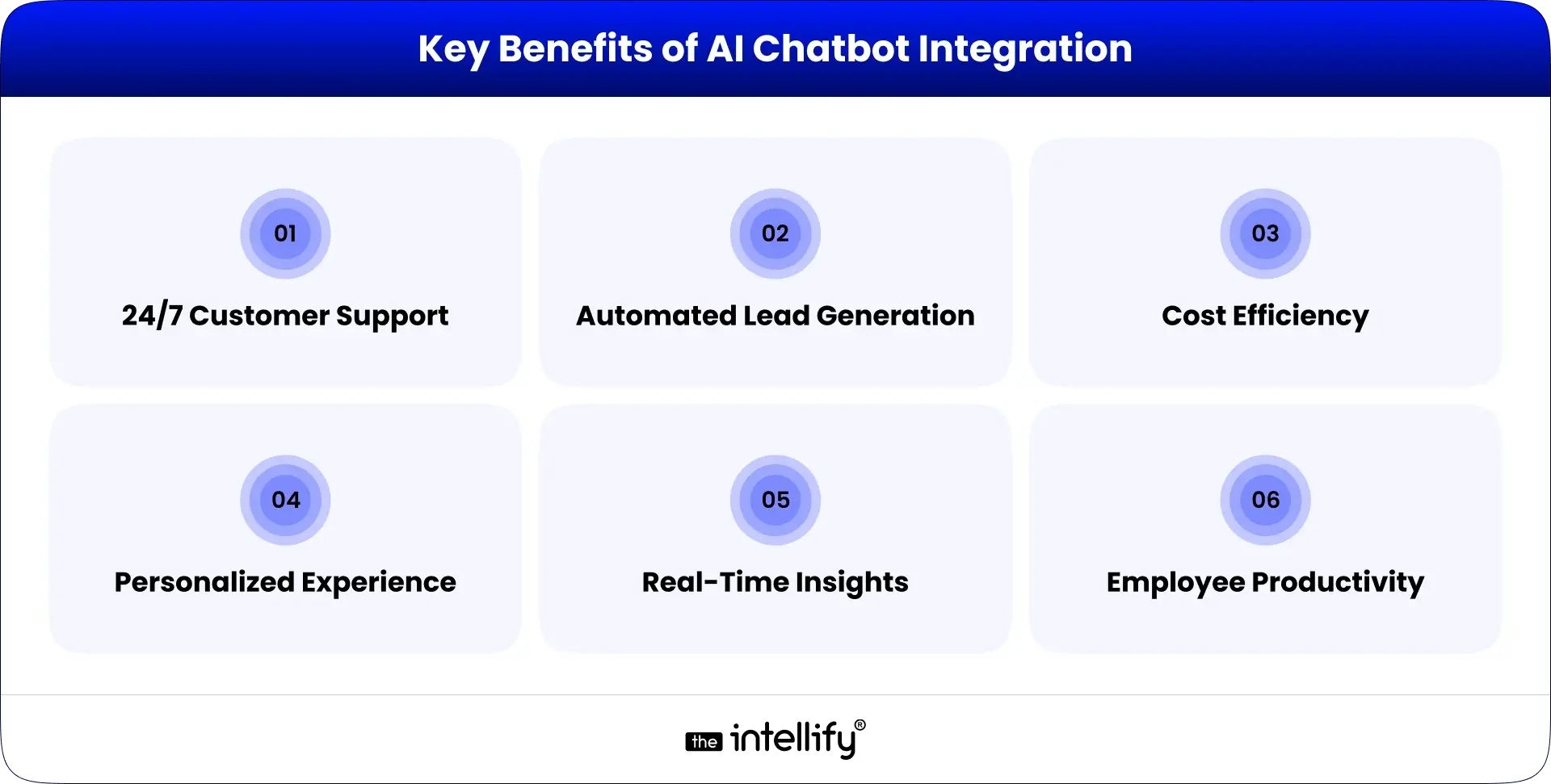
Benefits of AI Chatbot Integration

Let’s look at how integrated chatbots are transforming business operations:

1. 24/7 Customer Support

Chatbots ensure customers are never left waiting. Whether it’s a query at midnight or on a holiday, AI chatbots respond instantly, increasing customer satisfaction and loyalty.

2. Automated Lead Generation

Integrated chatbots can identify potential buyers, qualify them using predefined rules, and automatically pass them to your sales team. This leads to better conversion rates with less manual effort.

3. Cost Efficiency

By handling repetitive queries and automating simple processes, chatbots reduce the need for large support teams, saving both time and resources.

4. Personalized Experience

Integration enables access to customer history and preferences stored in CRMs, allowing chatbots to tailor recommendations and responses.

5. Real-Time Insights

Chatbots collect valuable data about customer behavior and preferences, helping businesses improve marketing campaigns and optimize customer journeys.

6. Employee Productivity

Internal chatbots help employees quickly find answers, submit requests, and stay informed by reducing dependency on HR or IT departments for routine queries.


AI chatbots for business


Real-World Example: Retail Chatbot Integration Success

A leading global retail brand faced rising support costs and abandoned carts. They integrated an AI chatbot with their CRM and e-commerce backend. The chatbot assisted shoppers with product discovery, price comparisons, and order tracking through real-time integration.
Within 90 Days:

  • Customer response time dropped by 45%.
  • Cart abandonment decreased by 25%.
  • Sales conversions increased by 30%.

This case proves that AI chatbots, when deeply connected with data systems, don’t just talk, they drive tangible business results.


Top Use Cases: Where AI Chatbot Creates the Most Impact

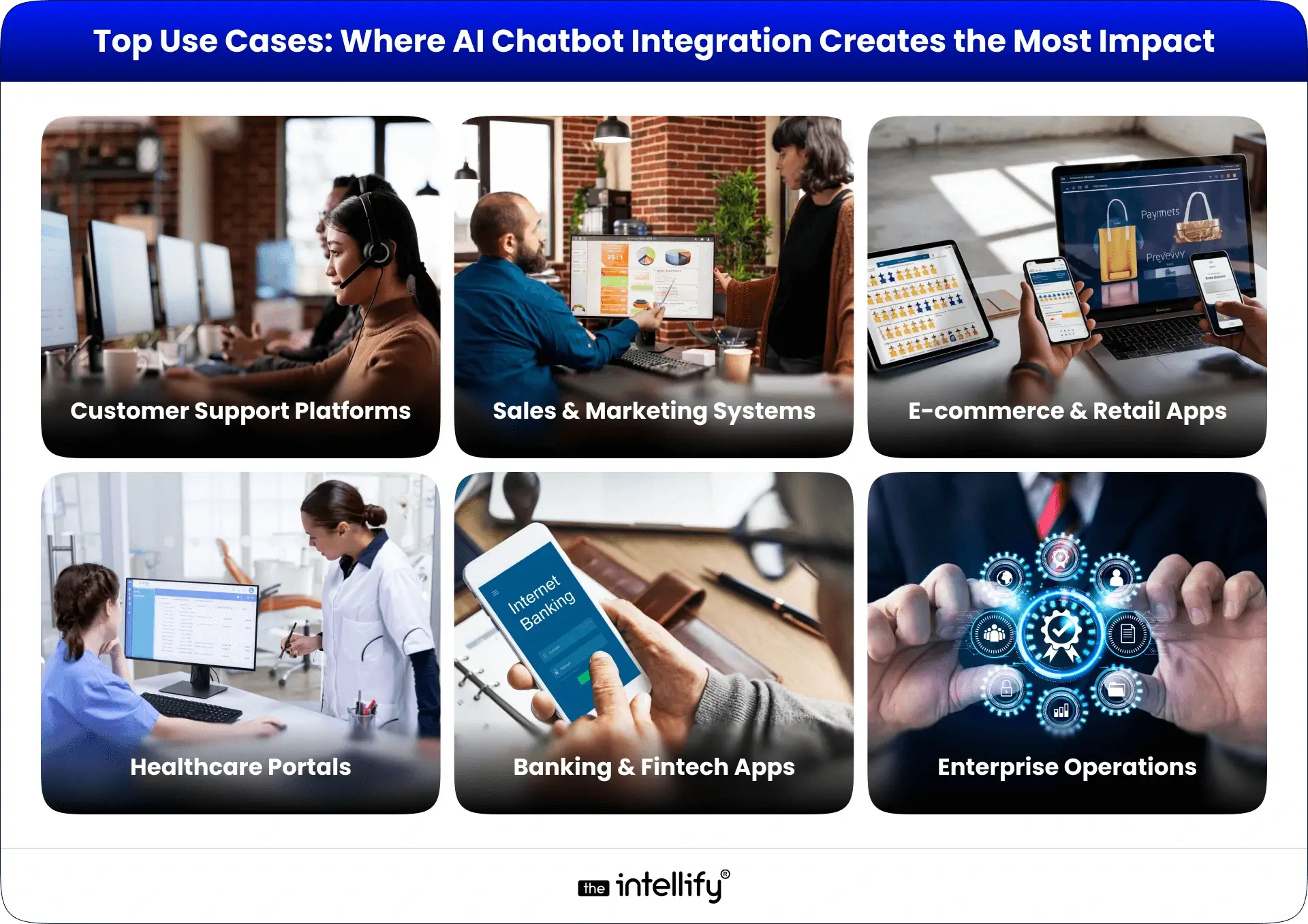
AI chatbot use cases

AI chatbot integration is highly adaptable. Here are some of the most common applications across industries:

Customer Support Platforms

Integrated chatbots instantly respond to common queries, check order statuses, and create support tickets, reducing wait times and improving satisfaction scores.

Sales & Marketing Systems

Chatbots can engage website visitors, qualify leads, and even book sales appointments by syncing with your CRM or email automation tool. This creates a frictionless buyer journey from interest to conversion.

E-commerce & Retail Apps

In e-commerce, AI chatbots act as shopping assistants which recommend products, manage cart recovery, and handle post-purchase queries. Integrated bots can even track inventory or initiate reorders automatically.

Healthcare Portals

Healthcare providers use integrated chatbots for appointment booking, patient pre-screening, and medication reminders. This reduces admin overhead while improving patient access to care.

Banking & Fintech Apps

Chatbots handle secure transactions, track spending, and provide real-time updates. Integration with banking systems ensures accurate, compliant, and instant responses.

Enterprise Operations

For large enterprises, chatbots automate employee onboarding, IT support, and HR requests, while reducing manual intervention and improving efficiency.

In short, AI chatbot integration adapts to every domain, wherever there’s repetitive interaction or data-driven communication, chatbots create a measurable impact.


Process of Integrating AI Chatbots into Business Applications

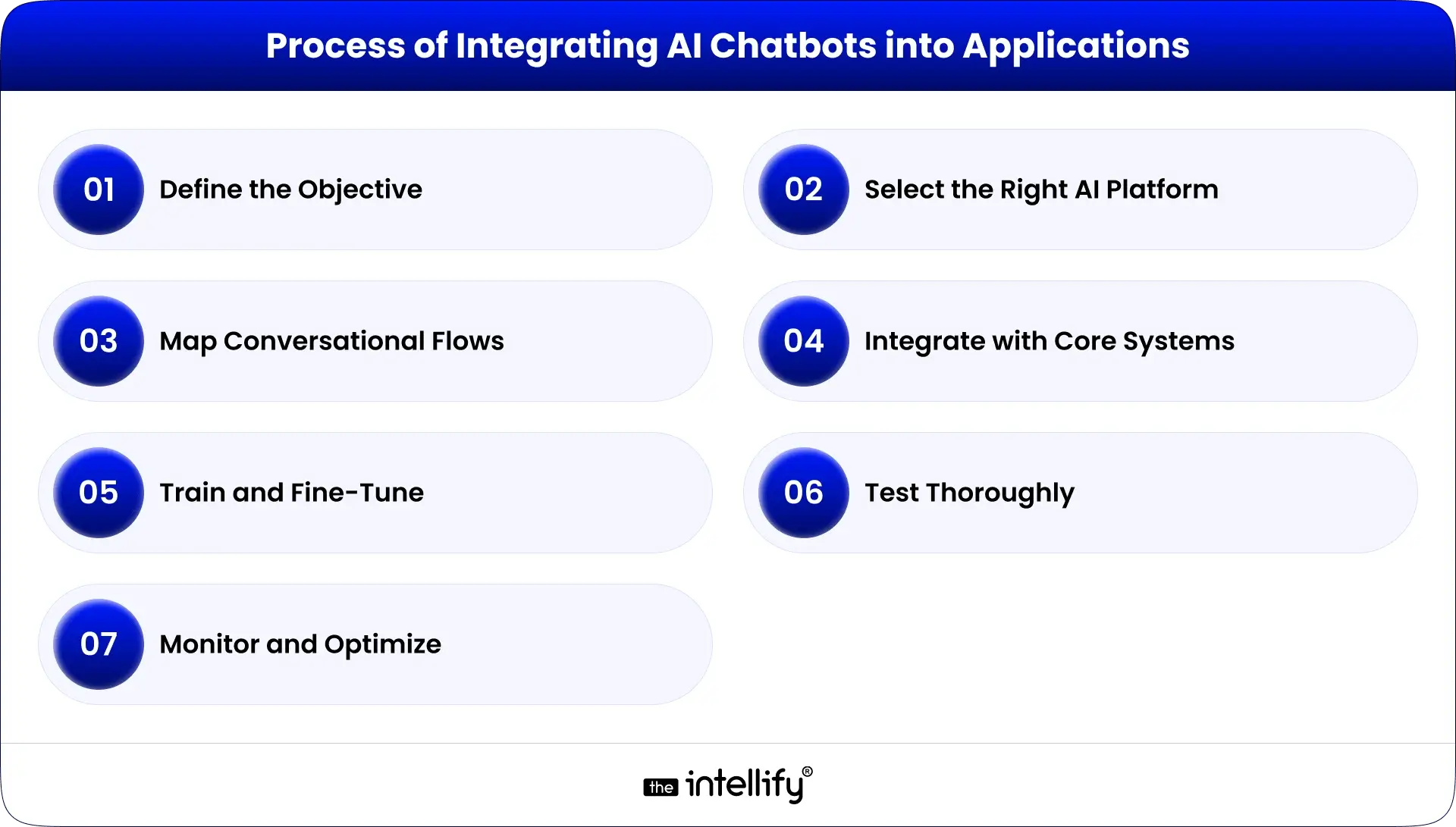
AI chatbot integration process

Integrating AI chatbots is more than installing a plugin, it’s about creating a smooth digital ecosystem where conversations lead to outcomes.

Here’s how businesses can do it strategically:

  • Define the Objective: Identify what you want your chatbot to achieve, whether it’s lead generation, customer support, or workflow automation.
  • Select the Right AI Platform: Choose an AI chatbot platform that aligns with your stack, like Google Dialogflow, Microsoft Bot Framework, or IBM Watson.
  • Map Conversational Flows: Design natural and helpful dialogues that mirror real user needs.
  • Integrate with Core Business Systems: Connect APIs to CRMs, ERPs, and databases so your chatbot can fetch and update data automatically.
  • Train and Fine-Tune: Use real customer interactions to train the bot for better accuracy, tone, and context.
  • Test Thoroughly: Conduct live testing for different use cases to ensure smooth integration and quick responses.
  • Monitor and Optimize: Track performance metrics, engagement rate, resolution time, conversion rate, and keep improving over time.


Challenges to Consider While Integrating AI Chatbots

Even though chatbot integration offers huge benefits, it’s not without challenges. Here’s how to address them:

  • Complex IT Ecosystems: Use middleware or unified API connectors to simplify integration.
  • Data Privacy Concerns: Follow GDPR, HIPAA, or other relevant regulations to ensure compliance.
  • Conversational Accuracy: Continuously train and improve your bot with real-world data.
  • Measuring ROI: Define KPIs early and track measurable business impact.
  • Skill Gaps: Collaborate with experienced AI integration partners to ensure technical success.


The Future of AI Chatbots in Business Applications

Future of AI chatbot in business applications

The next evolution of chatbot technology is moving toward AI agents, intelligent systems capable of predicting needs, making decisions, and automating tasks end-to-end.
Future chatbot integrations will include:

  • Voice Interfaces: Seamless voice-enabled support across devices.
  • Generative AI: Smarter bots that create human-like responses and adapt tone dynamically.
  • Predictive Insights: Using data to anticipate customer questions or recommend next actions.
  • Omnichannel Integration: Consistent experience across web, mobile, social, and in-store channels.

As AI maturity grows, chatbots will no longer just support business operations, they’ll run parts of them autonomously.


The Intellify: Your Trusted Partner for AI Chatbot Integration

At The Intellify, we specialize in building and integrating AI chatbot solutions tailored to your unique business ecosystem.
Our team connects chatbots with CRMs, ERPs, e-commerce systems, and internal tools, creating intelligent assistants that enhance customer experience, streamline operations, and increase profitability.
From concept to deployment, we ensure your chatbot delivers real, measurable business outcomes.
Whether you’re looking to automate support, qualify leads, or personalize customer journeys, The Intellify helps you do it smarter, faster, and more efficiently.


AI chatbot integration company


Conclusion

AI chatbot integration is no longer optional, it’s essential for businesses aiming to stay relevant in a digital-first world. By connecting your chatbot to your business applications, you can unlock new efficiencies, turn conversations into conversions, and stay ahead of the competition.
The future of business is conversational, and those who integrate early will lead the way. The time to act is now. Integrate Smart, Automate Smarter!


Frequently Asked Questions (FAQs)

1. What is “AI chatbot integration” and why does my business need it?

AI chatbot integration connects an intelligent chatbot with your existing business systems, such as CRM, ERP, or eCommerce platforms, so it can access and use real-time data to assist customers or teams more effectively. Instead of answering basic queries, the integrated chatbot can check order statuses, capture leads, manage tickets, or schedule appointments instantly.
Businesses need this integration because it simplifies operations, saves time, and delivers faster, more personalized customer experiences. In short, it turns every interaction into a potential business opportunity.

2. How quickly can a business implement a chatbot integration and see results?

The implementation timeline largely depends on your business goals and system complexity. For simple use cases like automating FAQs or lead qualification, integration can be completed in 2-4 weeks. More advanced setups, like connecting with CRMs or ERP systems, may take 6-8 weeks.
That said, many businesses start seeing improvements right after deployment, such as reduced response time, smoother workflows, and better lead engagement. Partnering with an experienced company like The Intellify ensures faster setup and measurable outcomes from day one.

3. Can small or medium-sized businesses benefit from AI chatbot integration, or is this only for large enterprises?

Absolutely. AI chatbot integration isn’t just for large enterprises anymore. Small and mid-sized businesses can use chatbots to automate support, handle repetitive queries, and capture leads, all without major investment.
The key is starting small: integrate the chatbot with a few essential systems like your website or CRM, test results, and then scale gradually. The Intellify has helped many SMEs integrate AI chatbots tailored to their size, goals, and customer needs, proving that smart automation is accessible to all.

4. What types of business applications work best for chatbot integration?

Chatbots can be integrated with almost any digital platform, but the most effective ones include:

  • Customer Support Platforms: for instant ticket creation, FAQs, and feedback collection.
  • Sales & Marketing Systems: to qualify leads, schedule demos, and follow up automatically.
  • E-commerce Platforms: to guide shoppers, recommend products, and assist with checkout.
  • Internal Systems: such as HR or IT helpdesk for employee support and task automation.

When connected properly, these integrations help businesses improve efficiency and offer real-time assistance that feels personal and seamless.

5. How do I choose a partner to help with AI chatbot integration?

Selecting the right partner makes all the difference. Look for a team with proven experience in AI chatbot development, integration expertise across different platforms, and a focus on business outcomes rather than just technology.
A reliable partner should help you identify use cases, design natural conversational flows, and ensure data privacy and compliance throughout.
At The Intellify, we specialize in designing and integrating intelligent chatbots that align with your goals, ensuring your business sees measurable growth through automation and better customer engagement.

6. What are the key metrics I should track to measure the success of AI chatbot integration?

To truly understand your chatbot’s performance, monitor metrics such as:

  • Response time reduction: how quickly customers receive answers.
  • Lead conversion rate: how many chatbot-captured leads turn into sales.
  • Customer satisfaction (CSAT): the overall experience rating post-interaction.
  • Task automation rate: how many routine tasks are handled automatically.
  • Operational cost savings: reduction in manual support time and staff load.

These KPIs show whether your chatbot is adding measurable business value. With data-driven insights from The Intellify, you can keep optimizing performance for maximum impact.

View
Case Study