How to Modernize a Direct Primary Care (DPC) Platform

By Shravan Rajpurohit
September 10, 2026
Summary:
This guide explains how to modernize a Direct Primary Care (DPC) platform for better scalability, security, patient experience, and operational efficiency. It covers essential DPC software features, legacy system assessment, platform integrations, AI opportunities, HIPAA considerations, modernization costs, common challenges, and practical steps for deciding between modernization and a complete rebuild.
Direct Primary Care (DPC) has changed how many patients access primary care in the U.S. Instead of relying on traditional fee-for-service models, DPC practices typically use membership-based care, giving patients more direct access to their providers.
But there’s a catch: a DPC practice can have a modern care model while still running on outdated technology.
A slow patient portal, disconnected billing system, manual scheduling, or an aging database can quickly become a problem as membership grows. Staff spend more time on administrative work, patients face unnecessary friction, and providers have less time for care.
That’s where DPC platform modernization comes in.
Modernizing a DPC platform is not simply about replacing old software. It means improving the underlying technology, workflows, integrations, security, and user experience so the platform can support the practice today and as it grows.
What Is DPC Platform Modernization?
DPC platform modernization is the process of upgrading an existing Direct Primary Care platform to make it more scalable, secure, connected, and easier to use.
It can involve replacing outdated components, redesigning the patient experience, connecting third-party systems, improving infrastructure, automating repetitive processes, or rebuilding parts of the platform.
A useful distinction is this:
Software upgrade: Improve or replace a specific component.
Platform modernization: Look at the entire technology ecosystem and improve how its components work together.
For example, a DPC practice may already have scheduling, billing, patient communication, and member management tools. If these systems don’t share data, staff may still have to move information manually between them.
A modern DPC platform should reduce that friction. The goal isn’t to add technology for the sake of it. The goal is to make everyday work simpler for patients, providers, and administrative teams.
Why DPC Practices Need to Modernize Their Platforms
1. Legacy Systems Create Operational Bottlenecks
Older DPC software often develops around the needs of a smaller practice. As membership increases, those early design decisions can become limitations.
Staff may have to:
- Enter the same patient information into multiple systems
- Manually track membership status
- Reconcile payments
- Send appointment reminders
- Manage schedules across separate tools
- Generate reports manually
None of these tasks seem huge individually. Together, they consume a surprising amount of time. Modernization can connect these workflows and reduce unnecessary manual work.
2. Patient Expectations Have Changed
Patients are accustomed to managing many services digitally. They expect convenient scheduling, timely notifications, mobile-friendly experiences, and simple access to information.
A DPC membership model naturally supports a closer patient-provider relationship, so the technology supporting that relationship matters.
A modern DPC patient portal can allow members to schedule appointments, communicate securely, manage their information, review documents, and handle other routine tasks without calling the practice for every small request.
That doesn’t replace personal care. It removes avoidable administrative friction around it.
3. Scaling Becomes Harder With Outdated DPC Software
A platform that works for 500 members may struggle when a practice reaches several thousand.
More members can mean more appointments, payments, messages, providers, locations, and data. If the underlying DPC technology wasn’t designed to scale, performance and maintenance issues can appear at the worst possible time.
Modern architecture helps practices add functionality and capacity without constantly rebuilding the foundation.
4. Data and Integration Gaps Limit Growth
A DPC practice rarely operates with one system. It may use an EHR/EMR, payment processor, telehealth service, laboratory system, communication provider, analytics platform, and other healthcare tools. If these systems don’t communicate properly, staff become the integration layer. That’s expensive and error-prone.
DPC platform integration through secure APIs and appropriate data exchange can create a more connected workflow.
Key Features of a Modern DPC Platform
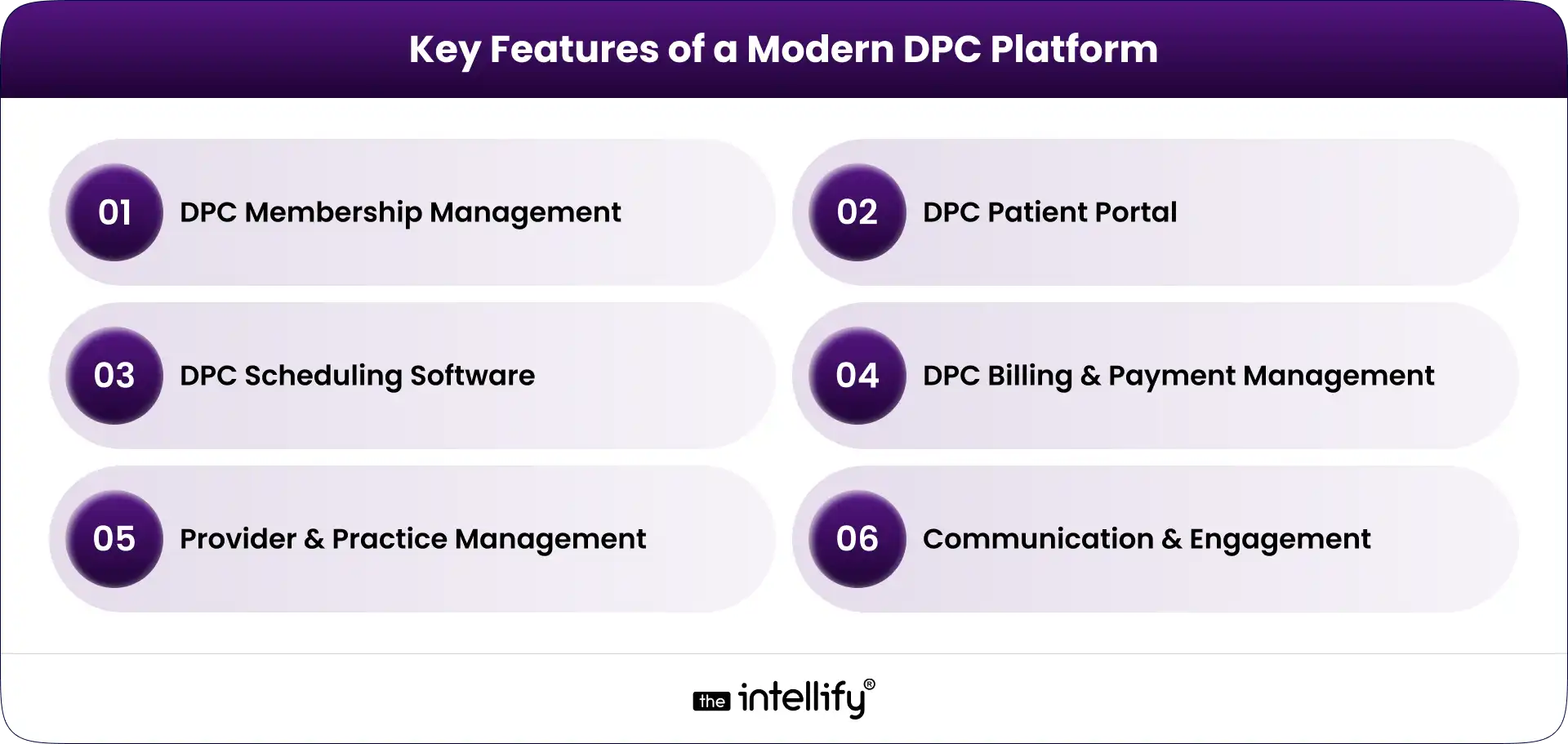
A modern DPC platform should support the core operations of a membership-based primary care practice while leaving room for future integrations and automation.
DPC Membership Management
Membership management is at the center of a DPC business model. The platform should support:
- Individual and family memberships
- Membership plans
- Enrollment and cancellation
- Member status tracking
- Subscription renewals
- Eligibility and account information
Automation is particularly useful here. When membership changes, related billing, communication, and access permissions should update without requiring several manual steps.
DPC Patient Portal
The DPC patient portal is often the part of the platform patients interact with most. A useful portal can provide:
- Patient profiles
- Secure messaging
- Appointment access
- Forms and documents
- Care-related information
- Account and membership details
The experience should also work well on smartphones. Patients shouldn’t have to zoom, pinch, and fight their way through a desktop-only interface just to book an appointment.
DPC Scheduling Software
Good DPC scheduling software should make appointments easier for both patients and staff. Important capabilities include:
- Online appointment booking
- Provider availability
- Calendar management
- Appointment reminders
- Rescheduling and cancellation
- In-person and virtual appointment support
Scheduling rules can also be configured around different appointment types, providers, locations, and availability.
DPC Billing and Payment Management
Membership billing is another area where automation can remove repetitive work. A modern DPC billing software component may support:
- Recurring membership payments
- Invoices and receipts
- Payment processing
- Failed-payment handling
- Subscription changes
- Payment history
The exact workflow depends on the practice’s business model and payment providers, but the objective remains the same: reduce manual reconciliation and give staff better visibility into membership revenue.
Provider and Practice Management
Providers and administrators need different views of the same underlying data. A modern platform can provide role-based dashboards for:
- Provider schedules
- Member lists
- Tasks
- Practice activity
- Operational reports
- User permissions
This helps keep the platform useful without giving every user access to information they don’t need.
Communication and Engagement
Communication can be built into the DPC platform instead of scattered across separate tools. Depending on the use case, this may include SMS and email notifications, secure patient messaging, appointment reminders, follow-ups, and automated administrative communications.
The important part is control. Patients should receive useful communication, not a pile of automated messages they eventually ignore.
How to Modernize a DPC Platform: Step-by-Step
1. Audit the Existing DPC Platform
Start with discovery, not development. Review the current technology stack, database, workflows, integrations, security controls, performance, user experience, and technical debt.
Talk to the people who use the system every day. They usually know where the real problems are. The audit should answer a basic question:
What should we keep, what should we improve, and what needs to go?
2. Identify What Should Be Rebuilt, Replaced, or Integrated
A full rebuild isn’t always the right answer. Some legacy components may still work perfectly well. Others may be impossible to maintain or integrate with modern systems.
Separate the platform into components and evaluate each one. A phased approach can reduce disruption while allowing the practice to modernize the areas causing the most pain first.
3. Design a Scalable DPC Platform Architecture
Architecture matters because modernization shouldn’t create another technology problem five years from now.
A modern DPC platform may use modular services, cloud infrastructure, secure APIs, scalable databases, and centralized identity and access management.
An API-first approach can also make future DPC platform integration easier.
The architecture should be designed around the practice’s actual requirements, not whatever technology happens to be popular this month.
4. Modernize the Patient and Provider Experience
Technology can be technically sound and still frustrating to use. Review the main workflows from the user’s perspective:
- How does a new member enroll?
- How does a patient book an appointment?
- How does a provider find member information?
- How does staff update membership status?
- How does someone handle a failed payment?
Remove unnecessary steps wherever possible.
5. Connect the DPC Platform With Existing Systems
The goal isn’t necessarily to replace every tool. A modern platform should connect with the systems the practice already depends on, using secure and appropriately governed integrations.
This can include EHR/EMR systems, payment providers, laboratories, pharmacies, telehealth platforms, and communication services.
6. Add Automation and AI Where It Makes Sense
AI for Direct Primary Care can be useful when applied to repetitive, administrative, or assistive workflows. Examples include:
- Scheduling assistance
- Patient intake support
- Administrative communication
- Internal staff assistants
- Information summarization
- Operational insights
AI should not be added simply because a platform needs an “AI feature.”
For clinical workflows, appropriate validation, human oversight, privacy controls, and governance are especially important. The technology should support healthcare professionals rather than quietly making high-stakes decisions without oversight.
7. Test, Secure, and Gradually Roll Out the Modernized Platform
Don’t wait until launch week to discover that something breaks. Test core workflows, integrations, permissions, performance, security, and data migration before going live.
A phased rollout can also reduce risk. Start with a controlled group, monitor the results, fix issues, and expand. Modernization is a process, not a single launch event.
DPC Platform Integration: What Should You Connect?
A modern DPC platform may need to integrate with several systems depending on the practice. Common categories include:
- EHR/EMR systems
- Payment and subscription platforms
- Telehealth solutions
- Laboratory systems
- Pharmacy services
- SMS and email providers
- Identity and authentication services
- Analytics and reporting platforms
APIs are particularly important because they allow systems to exchange information without forcing staff to manually move data between applications.
However, integration isn’t just a technical exercise. Healthcare data requires careful consideration of privacy, security, authorization, data mapping, error handling, and auditability.
Where AI Fits Into a Modern DPC Platform
AI can become a useful layer within a modern DPC platform, particularly for administrative workflows.
For example, an AI assistant could help answer routine membership questions, guide patients through scheduling, support intake workflows, or help staff summarize information.
A practice could also use AI to identify operational patterns, such as appointment demand or recurring administrative bottlenecks. But there’s a line worth keeping clear.
AI that helps someone find an appointment is very different from AI making an autonomous clinical decision.
For DPC practices, a sensible starting point is often low-risk, high-volume administrative work. From there, practices can evaluate more advanced use cases based on evidence, governance, security, and clinical oversight.
Security and Compliance Considerations for DPC Platform Modernization
Healthcare software modernization has to treat security as part of the architecture, not a final checkbox. A DPC platform handling protected health information may need appropriate safeguards around:
- HIPAA requirements
- Data encryption
- Authentication
- Role-based access
- Audit logs
- Secure APIs
- Data backups
- Disaster recovery
- Vendor and business associate relationships
- Ongoing security monitoring
HIPAA compliance itself isn’t achieved simply by adding encryption or signing a vendor agreement. The platform, organization, workflows, policies, and vendors all need appropriate controls.
For that reason, security and compliance requirements should be considered during discovery and architecture rather than added after development is finished.
How Much Does DPC Platform Modernization Cost?
There isn’t a reliable one-size-fits-all price for DPC platform modernization. A platform with a stable architecture and a few outdated components will have very different requirements from a heavily customized legacy system that needs migration and multiple integrations.
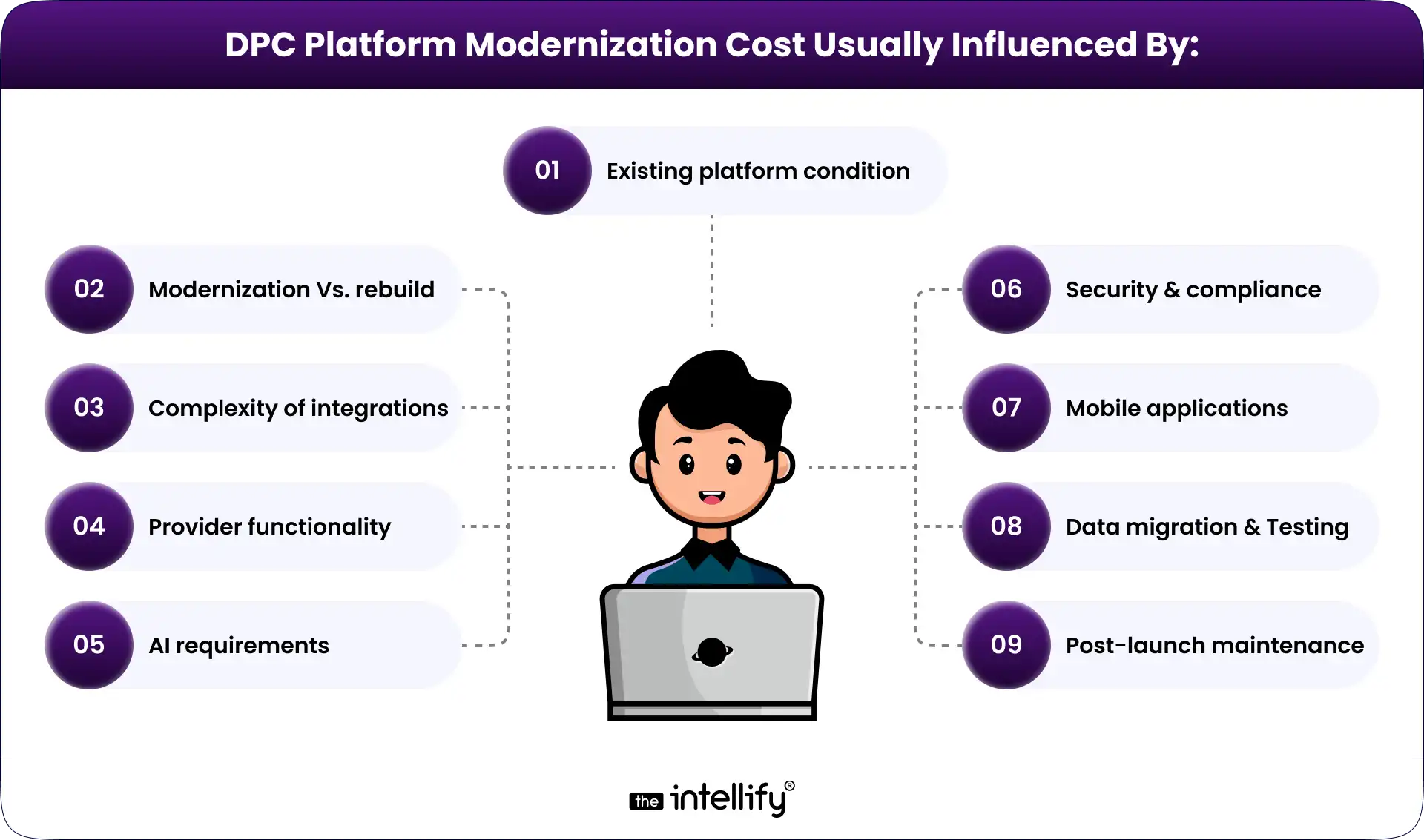
The best way to estimate the investment is to conduct a technical and workflow assessment first. That creates a clearer scope before development begins.
Common Challenges in Legacy DPC Platform Modernization
Data migration: Older databases may contain inconsistent or duplicated information. Data needs to be mapped, cleaned, validated, and migrated carefully.
Legacy integrations: Some older systems may have limited APIs or outdated interfaces. Integration planning needs to account for these constraints.
Downtime: Practices cannot simply stop serving members while a new system is deployed. A phased migration and rollback plan can reduce operational risk.
Staff adoption: A technically better system can still fail if employees don’t understand how to use it. Training and usability testing matter.
Technical debt: Old code can hide dependencies that aren’t obvious during the initial assessment. This is one reason a proper technical audit is valuable.
Security risks: Modernization can introduce new endpoints, integrations, and access paths. Security needs to be tested throughout the process.
Modernize or Rebuild: Which Approach Is Right for Your DPC Platform?
There are three common approaches.
| Approach | Best When | Main Advantage | Main Risk |
|---|---|---|---|
| Modernize existing platform | Core technology is still viable | Less disruption | Some legacy limitations remain |
| Partial rebuild | Only certain components are outdated | Balanced approach | Architecture requires careful planning |
| Full rebuild | Platform is heavily constrained | Clean technical foundation | Higher migration and implementation effort |
The right choice depends on the condition of the existing platform. If the database, architecture, and core workflows are still sound, rebuilding everything may create unnecessary risk.
On the other hand, continuously patching a fundamentally outdated platform can become expensive too. The decision should come from a technical assessment rather than a preference for “new” technology.
Final Thoughts
A modern DPC platform doesn’t need every new technology available. It needs to work well.
Patients should be able to interact with the practice without unnecessary friction. Providers should have access to the information they need. Staff shouldn’t have to spend hours moving data between disconnected systems. And the technology should be able to grow with the practice.
That’s the real purpose of DPC platform modernization.
For practices working with an aging platform, the first step isn’t choosing a technology stack. It’s about understanding what’s currently slowing the business and where modernization will create the most value.
The Intellify can help DPC organizations assess existing systems, plan modernization, develop DPC software, build patient and provider experiences, integrate healthcare systems, and introduce automation or AI where appropriate.

Frequently Asked Questions About DPC Platform Modernization
1. How do I modernize a legacy DPC platform?
Start with a technical and workflow audit. Identify outdated components, integration gaps, security risks, and user pain points. Then determine what should be modernized, replaced, integrated, or rebuilt before creating a phased implementation roadmap.
2. What features should a modern DPC platform have?
Common features include membership management, a DPC patient portal, scheduling, billing and payments, provider management, secure communication, reporting, integrations, and appropriate automation.
3. Should I modernize my existing DPC software or rebuild it?
It depends on the condition of the existing platform. If its core architecture is still viable, modernization or a partial rebuild may be more practical. If the platform has severe technical debt or architectural limitations, a full rebuild may make more sense.
4. Can AI be integrated into a DPC platform?
Yes. AI can support administrative and assistive workflows such as scheduling, intake, communication, summarization, and operational analysis. Higher-risk clinical use cases require appropriate validation, governance, privacy controls, and human oversight.
5. How long does DPC platform modernization take?
The timeline varies significantly based on platform complexity, integrations, migration requirements, and the scope of the rebuild. A small modernization project can be much shorter than a complete platform redevelopment with multiple healthcare integrations.
6. How can I make a DPC platform HIPAA-compliant?
HIPAA compliance requires appropriate administrative, physical, and technical safeguards for protected health information. The platform should incorporate suitable access controls, security measures, audit capabilities, policies, vendor management, and risk processes rather than treating compliance as a single development task.


Written By, Shravan Rajpurohit
Shravan Rajpurohit is the Co-Founder & CEO of The Intellify, a leading Custom Software Development company that empowers startups, product development teams, and Fortune 500 companies. With over 10 years of experience in marketing, sales, and customer success, Shravan has been driving digital innovation since 2018, leading a team of 50+ creative professionals. His mission is to bridge the gap between business ideas and reality through advanced tech solutions, aiming to make The Intellify a global leader. He focuses on delivering excellence, solving real-world problems, and pushing the limits of digital transformation.

Where AI Voice Agents Fit Into a Modern DPC Platform
Summary: AI voice agents can become a practical part of a modern Direct Primary Care (DPC) platform by handling routine phone interactions, appointment scheduling, membership questions, reminders, and call routing. This guide explains where voice AI fits within the DPC technology stack, what tasks it should and shouldn’t handle, HIPAA considerations, integration requirements, and how […]
How AI Is Transforming Direct Primary Care: Use Cases, Benefits & Implementation
Summary: This guide explains how AI is transforming direct primary care (DPC) by improving patient communication, appointment scheduling, membership management, administrative workflows, and voice-based support. It covers practical AI use cases, benefits, HIPAA and security considerations, implementation steps, costs, and build-vs-buy decisions to help DPC practices evaluate and adopt AI technology effectively. Direct primary […]
HIPAA Compliant Software Development Guide 2026
Summary: This guide explains how to develop HIPAA-compliant software in 2026. It covers key requirements such as data encryption, access controls, audit logs, secure APIs, cloud security, BAAs, risk assessments, and security testing. It also includes a practical checklist to help healthcare organizations build secure software while addressing current HIPAA Security Rule requirements and emerging […]
Where AI Voice Agents Fit Into a Modern DPC Platform
Summary: AI voice agents can become a practical part of a modern Direct Primary Care (DPC) platform by handling routine phone interactions, appointment scheduling, membership questions, reminders, and call routing. This guide explains where voice AI fits within the DPC technology stack, what tasks it should and shouldn’t handle, HIPAA considerations, integration requirements, and how […]
How AI Is Transforming Direct Primary Care: Use Cases, Benefits & Implementation
Summary: This guide explains how AI is transforming direct primary care (DPC) by improving patient communication, appointment scheduling, membership management, administrative workflows, and voice-based support. It covers practical AI use cases, benefits, HIPAA and security considerations, implementation steps, costs, and build-vs-buy decisions to help DPC practices evaluate and adopt AI technology effectively. Direct primary […]
HIPAA Compliant Software Development Guide 2026
Summary: This guide explains how to develop HIPAA-compliant software in 2026. It covers key requirements such as data encryption, access controls, audit logs, secure APIs, cloud security, BAAs, risk assessments, and security testing. It also includes a practical checklist to help healthcare organizations build secure software while addressing current HIPAA Security Rule requirements and emerging […]
0
+0
+0
+0
+Committed Delivery Leads To Client Satisfaction
Client Testimonials that keep our expert's spirits highly motivated to deliver extraordinary solutions.

Christopher Seny
My experience working with The Intellify, has been a great experience. The team has a wealth of expertise in the tech space. Working with the intellify was a growing experience for me, I learned a lot. The team keeps great communication & responds fast to new ideas & suggestions. The team also provides great suggestions & solutions as well. I couldn’t imagine working with anybody else on this project & it has been a blessing working with, The Intellify.

Izandi Serdyn
The Intellify delivered a platform from scratch, involving the client at every stage. The team was communicative, responsive, and punctual throughout the engagement. Virtual meetings and emails ensured seamless project management. Customers can expect a team that can work fast.

Kya Johnson
The app serves as an effective introduction for users to the product and its characters. Responsive and faithful to initial requirements, The Intellify’s team exceeded initial expectations. Internal stakeholders were particularly pleased with their communication.

Stefan Wyk
Working with The Intellify to develop our website was an outstanding experience. Their team displayed exceptional professionalism, creativity, and technical expertise throughout the entire process. The final product exceeded our expectations, delivering a sleek, user-friendly, and highly functional website. We highly recommend The Intellify to anyone in need of top-tier web development services.

Steve Thorpe
The Intellify’s work has been met with high praise from internal and external stakeholders. The team is efficient, diligent, and reliable in their service. They go above and beyond in terms of communication and project management. The Intellify is a responsive vendor that gets the job done.

Tal Dotan
I’ve been working with The Intellify for the last 3 years. During this period of time we’ve planned and executed projects in both small and large scale. Working with The Intellify was and still is the best decision I’ve made when rising up Divo, I strongly recommend to work with them in any type of project.


 +1-302-803-4983