DPC Workflow Automation: 7 Administrative Tasks to Automate First

By Jalaj Shah
November 3, 2026
Summary:
Direct Primary Care practices often spend valuable time managing patient inquiries, appointments, memberships, and administrative follow-ups. This guide explores seven DPC workflow automation opportunities that can simplify daily operations, improve patient communication, and help healthcare teams focus more on delivering personalized care.
Running a Direct Primary Care (DPC) practice is about building stronger relationships with patients. But as a practice grows, managing those relationships also means handling appointment requests, membership inquiries, payment follow-ups, patient communication, and everyday administrative work.
For many independent DPC practices, these tasks still involve a considerable amount of manual effort. Staff members answer calls, update records, send reminders, and follow up with patients while trying to keep daily operations running smoothly.
This is where DPC workflow automation can make a difference.
Instead of adding more administrative responsibilities to an already busy team, practices can automate repetitive tasks and create more consistent workflows. From handling patient inquiries to managing membership renewals, the right automation can help DPC clinics operate more efficiently without losing the personal touch that makes their care model different.
Let’s look at seven administrative tasks DPC practices should consider automating first.
Why DPC Practices Need Workflow Automation
The Direct Primary Care model gives patients a more direct relationship with their primary care provider, usually through a recurring membership fee rather than traditional fee-for-service billing for covered services.
However, running a membership-based practice still requires ongoing administrative work.
Consider what happens when a new patient contacts a clinic. Someone needs to answer the inquiry, explain membership options, share enrollment information, arrange an initial appointment, and follow up if the patient doesn’t complete registration.
Now multiply that process across dozens or hundreds of members.
The workload can become difficult to manage, particularly for small practices with limited administrative staff.
Automation helps connect these activities. Rather than handling every task manually, practices can use automated workflows to manage routine communication, scheduling, reminders, and internal follow-ups.
The goal isn’t to replace the personal relationship between a physician and patient. It’s to reduce the administrative work surrounding that relationship.
7 Administrative Tasks DPC Practices Should Automate First
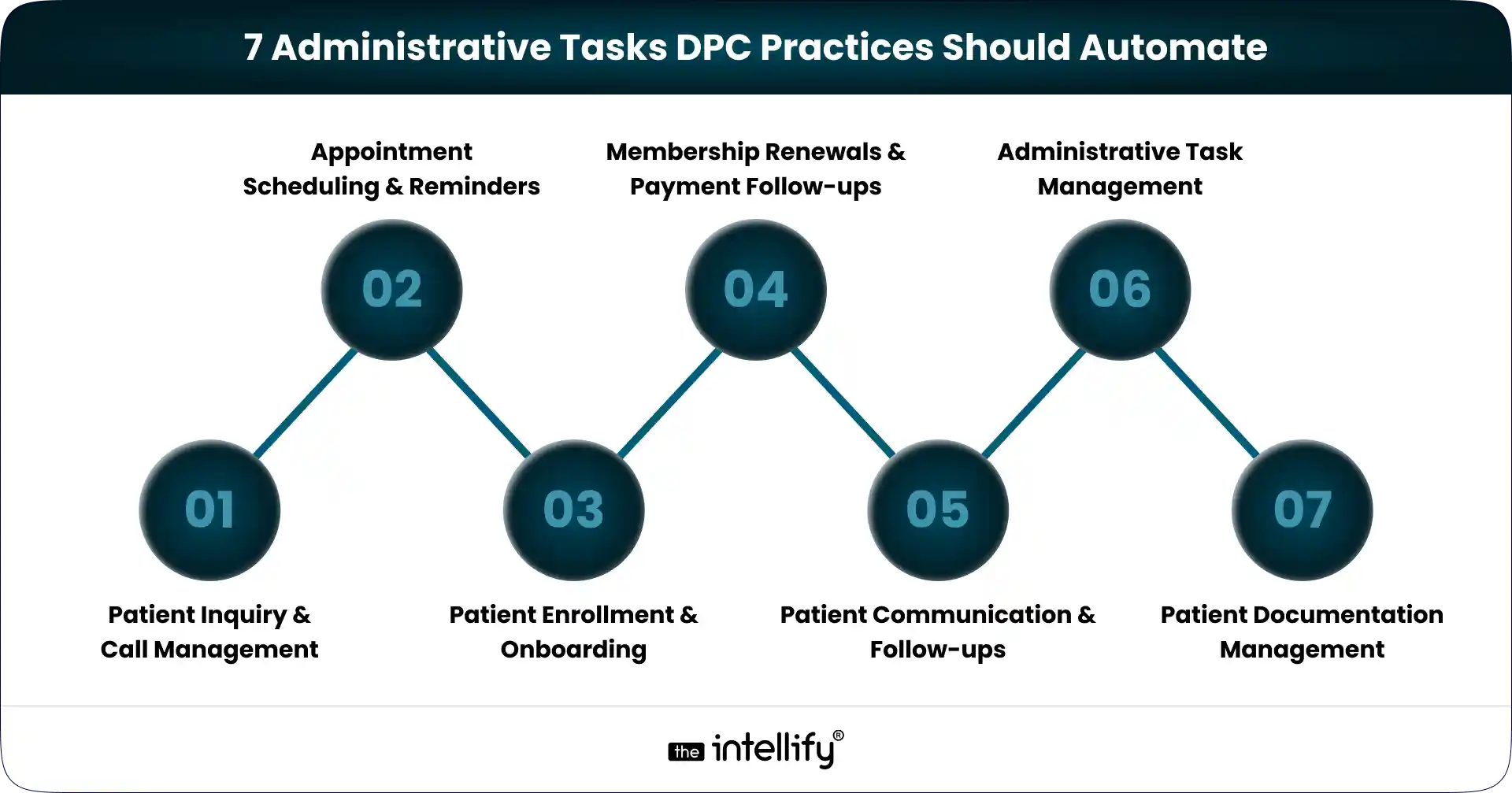
Not every workflow needs automation immediately. A better starting point is to identify repetitive tasks that consume staff time and frequently require follow-ups.
Here are seven areas worth considering.
1. Patient Inquiry and Call Management
Phone calls remain an important communication channel for many primary care practices.
Potential members may call to ask about membership fees, included services, appointment availability, or how DPC works. Existing patients may also call with scheduling requests or general administrative questions.
When staff members are busy, or the clinic is closed, these calls can go unanswered.
AI voice agents can help manage this communication by answering incoming calls, responding to common questions using approved clinic information, capturing inquiry details, and directing requests to the appropriate team member.
For example, if someone calls to understand how a DPC membership works, an AI voice agent can provide basic information and capture their contact details for a follow-up.
This gives practices another way to handle incoming inquiries without requiring someone to answer every call manually.
2. Appointment Scheduling and Reminders
Appointment management involves more than finding an available time slot.
Staff may need to answer scheduling calls, confirm appointments, handle rescheduling requests, and remind patients about upcoming visits.
These activities are manageable at a smaller scale but can become time-consuming as membership grows. Automation can help by:
- Sending appointment confirmations.
- Sharing reminders before scheduled visits.
- Managing routine scheduling requests.
- Sending updates when appointments change.
- Notifying staff about requests that need attention.
For example, a patient who wants to reschedule an appointment can initiate a request through an approved communication channel. The system can check availability through an integrated scheduling platform and complete the change according to the clinic’s rules.
Automated reminders also help patients stay informed about upcoming appointments.
3. Patient Enrollment and Onboarding
Patient onboarding is one of the first experiences someone has with a DPC practice. A complicated enrollment process can create unnecessary friction before the patient even becomes a member.
Traditionally, onboarding may involve sharing registration forms, explaining membership terms, collecting information, confirming enrollment, and sending welcome instructions.
These steps can be organized into an automated workflow. For example:
- A prospective patient submits a membership inquiry.
- The clinic shares relevant membership information.
- The patient receives the appropriate enrollment instructions.
- The system sends reminders if required information is missing.
- Staff receives a notification when the enrollment process needs review.
Automation can make the process more consistent while allowing clinic staff to focus on questions that require personal attention.
4. Membership Renewals and Payment Follow-ups
Membership administration is an ongoing responsibility for DPC practices. Depending on the clinic’s membership terms, staff may need to monitor recurring payments, communicate upcoming renewal dates, follow up on failed transactions, and process cancellation requests.
When these activities depend entirely on manual tracking, important follow-ups can be delayed. Automated workflows can help by:
- Sending membership renewal reminders.
- Notifying patients when recurring payments fail.
- Sending follow-up messages based on payment status.
- Recording membership changes.
- Alerting staff when manual intervention is required.
For example, when a recurring membership payment fails, the system can trigger a notification and send an approved payment-update message.
Staff can then handle unresolved cases instead of checking every membership record individually.
5. Patient Communication and Follow-ups
Consistent communication is important in a membership-based care model.
However, clinics often have to manage several types of routine communication, including appointment reminders, administrative updates, membership information, and follow-up instructions.
Without a structured process, some messages may be delayed or overlooked. Workflow automation can help schedule and organize these communications.
For instance, after an administrative interaction, the system can create a follow-up task for the appropriate staff member. It can also send approved messages based on predefined workflows.
Practices should maintain clear boundaries here. Automated administrative communication should not be confused with clinical decision-making. Medical advice, symptom assessment, and treatment-related conversations should follow appropriate clinical protocols and involve qualified healthcare professionals.
6. Administrative Task Management
Not every task involves direct patient communication. DPC teams also manage internal responsibilities such as reviewing pending requests, processing forms, checking enrollment status, and coordinating follow-ups.
These activities often move between different staff members. An automated task management workflow can help assign responsibilities, track progress, and send reminders when an action is pending.
For example, when a new patient submits an enrollment form, the system can create a review task for the appropriate team member. Once the task is completed, the next step can be triggered automatically.
This reduces the need for repeated manual updates and makes it easier to identify outstanding work.
7. Patient Documentation and Information Management
Patient-related documentation is another area where administrative processes can become repetitive.
Staff may need to organize submitted forms, update administrative information, retrieve documents, and prepare information for internal review.
Automation can support these activities by organizing document workflows, extracting relevant administrative information, and creating tasks when additional action is required.
AI-powered document assistance can also help teams find information within approved documents without manually searching through multiple files.
However, patient documentation requires careful handling. Any system that creates, receives, maintains, or transmits electronic protected health information (ePHI) must be evaluated against applicable HIPAA requirements. Practices should implement appropriate access controls, safeguards, and risk assessments before automating these workflows.
How AI Agents Can Simplify DPC Practice Operations
Traditional automation generally follows predefined rules. For example, it sends an appointment reminder two days before a scheduled visit or creates a task when a payment fails.
AI agents can add another layer by understanding requests, handling conversations, and helping initiate actions across connected systems.
For DPC practices, this can be particularly useful in patient communication.
Consider an incoming call from someone interested in joining a clinic. An AI voice agent can answer the call, provide approved membership information, capture the caller’s details, and help initiate the next step.
Similarly, an AI-powered workflow can assist staff with document questions, email drafts, and task extraction.
This is where platforms such as Alris AI can support business operations.
Alris AI offers AI Work Assist and Voice Agents that can help businesses manage conversations and everyday tasks. For healthcare practices, relevant applications include handling incoming inquiries, supporting appointment-related workflows, and assisting teams with administrative work.
The exact workflows depend on the clinic’s systems, integrations, permissions, and configuration. Clinical decisions and sensitive patient interactions should remain subject to appropriate professional oversight.
For DPC practices exploring a more connected operating model, The Intellify’s DPC platform solutions provide a starting point for considering how technology can support membership-based healthcare operations.
What Should DPC Practices Automate First?
Automating everything at once is rarely a good starting point. A more practical approach is to identify workflows that create the most repetitive work or frequently require staff intervention.
Start by asking three questions:
1. Which tasks happen repeatedly?
Look for activities such as appointment reminders, patient inquiries, enrollment updates, and payment notifications.
2. Where do delays happen most often?
If missed calls, incomplete forms, or delayed follow-ups are common problems, prioritize those workflows.
3. Can the task be automated safely?
Consider the information involved, system integrations, staff permissions, and applicable privacy requirements before automating a process.
It is also important to establish measurable outcomes. Track indicators such as staff time spent on administrative tasks, unanswered calls, pending enrollment requests, and appointment-related communication.
These measurements can help determine whether automation is actually improving operations.
Common Mistakes to Avoid When Automating DPC Workflows
Even useful automation can create problems when implemented without proper planning. Here are a few mistakes DPC practices should avoid:
- Automating everything immediately: Start with a few high-volume workflows and expand gradually.
- Using disconnected tools: Multiple systems that don’t communicate can create additional administrative work.
- Ignoring patient experience: Automation should make communication easier, not make patients feel they cannot reach a real person.
- Overlooking HIPAA requirements: Evaluate vendors, integrations, access controls, and security safeguards before handling ePHI.
- Removing human oversight: Keep staff involved in sensitive requests, exceptions, and clinical decisions.
The best automation strategy is one that fits the clinic’s actual workflow rather than forcing the team to adapt to unnecessary technology.
Final Thoughts: Build a More Efficient DPC Practice
A successful DPC practice needs more than good clinical care. It also needs reliable administrative processes that support membership management, patient communication, and everyday operations.
Automating patient inquiries, appointment scheduling, onboarding, membership follow-ups, communication, internal tasks, and documentation can help reduce repetitive work.
The important thing is to start with the workflows that create the most friction.
AI agents and connected automation platforms can take this further by helping practices manage conversations and coordinate routine actions across their operations.
For DPC practices planning to grow, the opportunity isn’t simply to automate more tasks. It’s to create an operating model that gives healthcare teams more time to focus on patients.
Frequently Asked Questions (FAQs)
1. What is workflow automation in a DPC practice?
Workflow automation in a Direct Primary Care practice involves using software and connected systems to handle repetitive administrative activities, such as appointment reminders, patient inquiries, membership follow-ups, and internal task management.
2. What administrative tasks can DPC clinics automate?
DPC clinics can automate patient inquiry management, appointment scheduling, enrollment, membership reminders, payment notifications, routine communication, administrative task assignments, and document workflows.
3. How can AI help Direct Primary Care practices?
AI can help DPC practices manage incoming calls, answer common administrative questions, support appointment-related requests, assist with documentation, and organize routine follow-up tasks.
4. Can DPC practices automate patient scheduling and reminders?
Yes. With suitable scheduling integrations and predefined workflows, DPC practices can automate appointment confirmations, reminders, scheduling requests, and rescheduling processes.
5. Is workflow automation HIPAA-compliant?
Workflow automation itself does not guarantee HIPAA compliance. Practices must evaluate the technology, vendors, integrations, and safeguards involved in handling protected health information. Applicable HIPAA requirements include administrative, physical, and technical safeguards.
6. How much does it cost to automate a DPC practice?
Costs depend on the number of workflows, software subscriptions, integrations, customization requirements, and practice size. A small practice may start with basic scheduling and communication automation, while a larger operation may require a more connected platform.
Research references:
These are credible sources to support the article’s healthcare operations and compliance context.
- HHS – Summary of the HIPAA Security Rule
- HHS – Guidance on Risk Analysis
- NIST – Implementing the HIPAA Security Rule
- American Medical Association – 2024 Prior Authorization Physician Survey


Written By, Jalaj Shah
The COO and Co-Founder of The Intellify. Jalaj enjoys experimenting with new strategies. His posts are fantastic for businesses seeking innovative development ideas. Discover practical insights from his engaging content.

How to Automate Patient Onboarding in a Direct Primary Care Practice
Summary: Patient onboarding automation helps Direct Primary Care (DPC) practices simplify registration, digital intake forms, membership agreements, payment setup, and patient communication. This blog explains how to automate key onboarding workflows, integrate existing healthcare systems, protect patient information, and measure operational improvements. It also covers implementation best practices to help DPC practices reduce administrative work […]
How to Integrate AI Into an Existing DPC Platform Without Rebuilding It
Summary: This blog explains how to integrate AI into an existing Direct Primary Care (DPC) platform without rebuilding the entire system. It covers AI use cases, API integrations, implementation steps, HIPAA compliance, security considerations, common challenges, and costs. DPC practices can use these insights to modernize existing software, streamline administrative workflows, and improve operational efficiency. […]
How to Scale a Direct Primary Care Practice With Technology
Summary: This guide explains how technology can help Direct Primary Care practices scale without increasing administrative workload at the same pace. It covers DPC software, membership management, scheduling, billing, patient communication, automation, AI, and healthcare platform modernization, while outlining practical ways practices can build a more connected and scalable technology infrastructure. Running a Direct […]
How to Automate Patient Onboarding in a Direct Primary Care Practice
Summary: Patient onboarding automation helps Direct Primary Care (DPC) practices simplify registration, digital intake forms, membership agreements, payment setup, and patient communication. This blog explains how to automate key onboarding workflows, integrate existing healthcare systems, protect patient information, and measure operational improvements. It also covers implementation best practices to help DPC practices reduce administrative work […]
How to Integrate AI Into an Existing DPC Platform Without Rebuilding It
Summary: This blog explains how to integrate AI into an existing Direct Primary Care (DPC) platform without rebuilding the entire system. It covers AI use cases, API integrations, implementation steps, HIPAA compliance, security considerations, common challenges, and costs. DPC practices can use these insights to modernize existing software, streamline administrative workflows, and improve operational efficiency. […]
How to Scale a Direct Primary Care Practice With Technology
Summary: This guide explains how technology can help Direct Primary Care practices scale without increasing administrative workload at the same pace. It covers DPC software, membership management, scheduling, billing, patient communication, automation, AI, and healthcare platform modernization, while outlining practical ways practices can build a more connected and scalable technology infrastructure. Running a Direct […]
0
+0
+0
+0
+Committed Delivery Leads To Client Satisfaction
Client Testimonials that keep our expert's spirits highly motivated to deliver extraordinary solutions.

Christopher Seny
My experience working with The Intellify, has been a great experience. The team has a wealth of expertise in the tech space. Working with the intellify was a growing experience for me, I learned a lot. The team keeps great communication & responds fast to new ideas & suggestions. The team also provides great suggestions & solutions as well. I couldn’t imagine working with anybody else on this project & it has been a blessing working with, The Intellify.

Izandi Serdyn
The Intellify delivered a platform from scratch, involving the client at every stage. The team was communicative, responsive, and punctual throughout the engagement. Virtual meetings and emails ensured seamless project management. Customers can expect a team that can work fast.

Kya Johnson
The app serves as an effective introduction for users to the product and its characters. Responsive and faithful to initial requirements, The Intellify’s team exceeded initial expectations. Internal stakeholders were particularly pleased with their communication.

Stefan Wyk
Working with The Intellify to develop our website was an outstanding experience. Their team displayed exceptional professionalism, creativity, and technical expertise throughout the entire process. The final product exceeded our expectations, delivering a sleek, user-friendly, and highly functional website. We highly recommend The Intellify to anyone in need of top-tier web development services.

Steve Thorpe
The Intellify’s work has been met with high praise from internal and external stakeholders. The team is efficient, diligent, and reliable in their service. They go above and beyond in terms of communication and project management. The Intellify is a responsive vendor that gets the job done.

Tal Dotan
I’ve been working with The Intellify for the last 3 years. During this period of time we’ve planned and executed projects in both small and large scale. Working with The Intellify was and still is the best decision I’ve made when rising up Divo, I strongly recommend to work with them in any type of project.


 +1-302-803-4983