How to Automate DPC Membership Renewals and Failed Payments

By Darshak Doshi
November 18, 2026
Summary:
Direct Primary Care (DPC) practices can simplify membership renewals and failed payment recovery through automation. From recurring billing and renewal reminders to payment retries, card update requests, and automated follow-ups, the right tools help reduce administrative work, improve payment tracking, and maintain a more consistent membership management process.
Direct Primary Care (DPC) practices rely on recurring membership payments to maintain predictable revenue and deliver ongoing care to their members. But managing those payments isn’t always straightforward. Expired credit cards, declined transactions, missed renewal reminders, and outdated billing details can interrupt the process.
For smaller DPC practices, these issues often mean more administrative work. Staff members have to check payment records, contact patients, send reminders, and update membership statuses manually. It’s easy for a follow-up to get missed when the front desk is already busy.
This is where DPC membership billing automation helps. By automating recurring payments, renewal notifications, failed payment alerts, and follow-ups, practices can manage membership billing with less manual effort.
Let’s look at how DPC clinics can build a more reliable membership payment process.
Why DPC Membership Renewals and Payment Collection Need Attention
Unlike traditional fee-for-service healthcare, Direct Primary Care operates on a membership-based model. Members generally pay a recurring fee, often monthly or annually, in exchange for access to defined primary care services.
That makes consistent payment collection important. A missed transaction might seem like a small issue, but repeated failures can create unnecessary administrative work and uncertainty around membership records.
How Manual Membership Billing Creates Problems
When renewal tracking depends on spreadsheets, calendars, or staff reminders, things can slip through the cracks.
For example, a clinic might have 200 active members, each with a different billing date. Tracking every renewal manually becomes difficult, particularly when staff also manage appointments, patient inquiries, and enrollment.
Common problems include:
- Missing upcoming membership renewal dates.
- Forgetting to notify members before billing.
- Sending payment reminders manually.
- Maintaining separate payment and membership records.
These tasks aren’t particularly complicated, but they take time away from other clinic responsibilities.
What Happens When Membership Payments Fail?
A failed payment can leave a membership account unresolved until someone investigates it.
The clinic may need to contact the member, identify the payment issue, request updated details, and confirm whether another transaction succeeds.
If this process takes several days, staff may struggle to determine which memberships are current and which require attention. A consistent recovery process helps prevent these situations from becoming recurring problems.
Common Reasons DPC Membership Payments Fail
Before automating payment recovery, practices should understand why recurring transactions fail in the first place.
1. Expired or Replaced Credit and Debit Cards
This is one of the most common reasons for recurring payment failures. Members may receive replacement cards but forget to update their billing information.
2. Insufficient Funds and Bank Declines
A transaction can be declined because of insufficient funds, bank restrictions, or security checks. Not every decline means the member wants to cancel their membership.
3. Incorrect Payment Information
An incorrect card number, billing address, or expiration date can prevent a transaction from going through.
4. Outdated Billing Details and Missed Member Updates
Members may change their preferred payment method or contact information without updating the clinic. As a result, payment notifications may also fail to reach them.
Understanding these reasons helps DPC practices create better payment reminders and recovery workflows.
What Is DPC Membership Billing Automation?
DPC membership billing automation uses software to manage recurring membership charges, renewal notifications, payment failure alerts, and follow-up activities with minimal manual intervention.
Instead of asking staff to monitor every billing date, an automated system follows predefined rules and triggers actions when needed.
For example, it can schedule monthly membership payments, notify members before renewal dates, and send alerts when a transaction fails.
Depending on the payment processor and connected practice management software, these systems may also support payment retries, card update requests, and membership status tracking.
The goal isn’t to remove staff from the billing process entirely. It’s to reduce repetitive work while giving clinic teams better visibility into outstanding payments.
7 Ways to Automate DPC Membership Renewals and Failed Payments
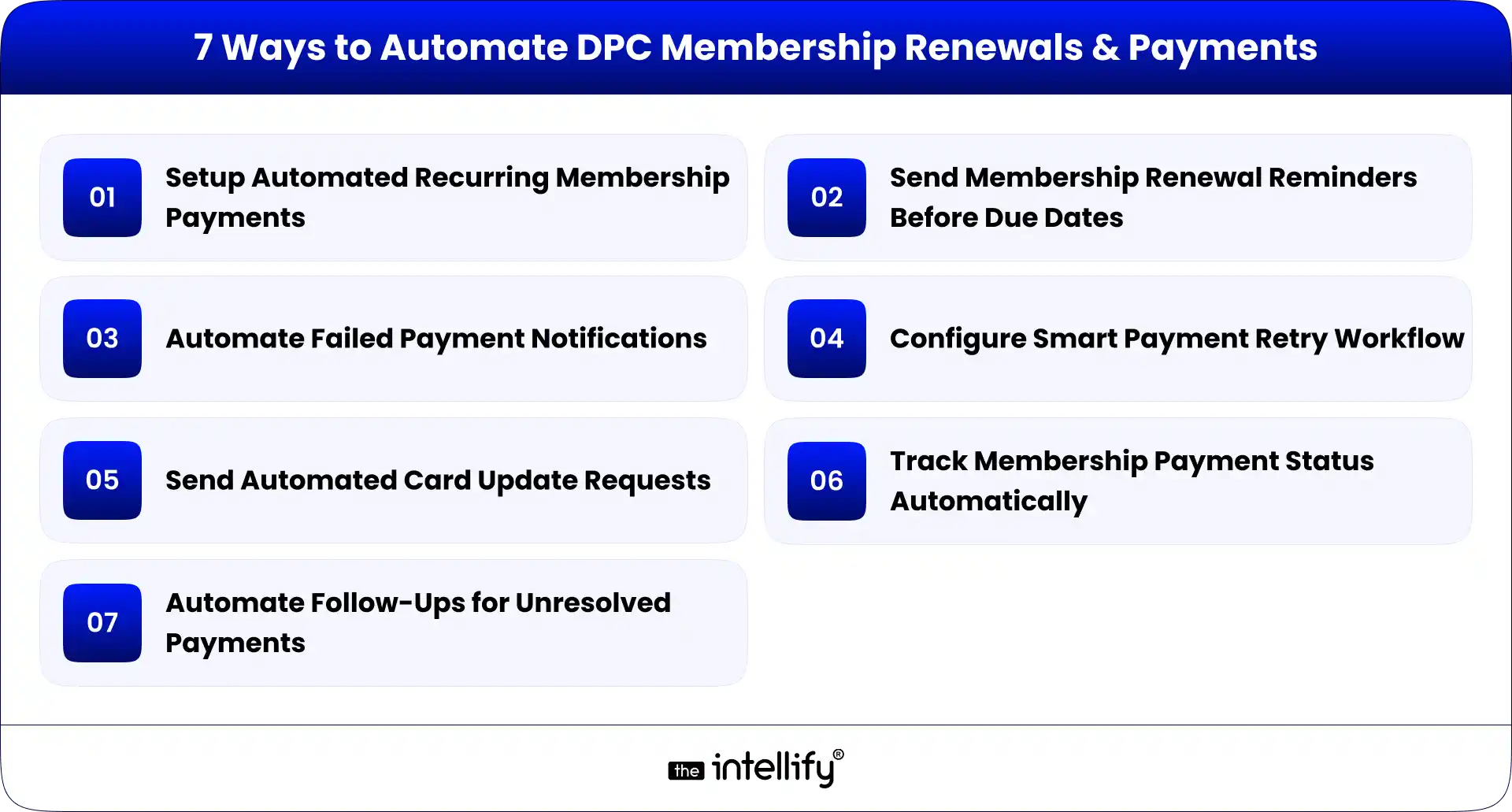
DPC practices don’t need an overly complicated system to improve membership billing. A few well-planned automations can make a noticeable difference.
1. Set Up Automated Recurring Membership Payments
Start by configuring recurring payment schedules through a suitable payment processor or membership management platform.
Practices can collect monthly, quarterly, or annual membership fees automatically, depending on their membership plans.
Once members authorize recurring payments, the system attempts transactions on their scheduled billing dates. This reduces the need for staff to initiate payments manually.
2. Send Membership Renewal Reminders Before Due Dates
A renewal reminder gives members time to review their upcoming payment and update their billing information if necessary.
Configure automatic email or SMS notifications before the renewal date. For example, a practice might send reminders seven days and one day before an annual renewal.
Keep these messages simple. Include the renewal date, expected amount, and instructions for updating payment details.
3. Automate Failed Payment Notifications
When a transaction fails, the member should know about it. Configure your system to trigger an immediate notification explaining that the payment wasn’t completed. Include a secure link or instructions to update their payment method.
Avoid sending sensitive payment details through ordinary email or text messages.
4. Configure Smart Payment Retry Workflows
A declined transaction doesn’t always require staff intervention. Some payment processors support automated retries based on configurable rules. For instance, a system might schedule another attempt after a few days, depending on the decline reason and processor capabilities.
However, avoid retrying every failed transaction blindly. Certain declines require the member to contact their bank or provide a different payment method.
5. Send Automated Card Update Requests
When an expired or replaced card causes a failure, the system can send a request asking the member to update their billing details.
A secure payment portal makes this process easier. Members can update their information without sharing card details directly with clinic staff.
6. Track Membership Payment Status Automatically
A centralized dashboard can help staff identify:
- Active memberships with successful payments.
- Upcoming renewals.
- Failed transactions.
- Pending payment updates.
- Unresolved billing issues.
This visibility is useful when a practice manages hundreds of memberships. Staff can focus on exceptions rather than checking every account individually.
7. Automate Follow-Ups for Unresolved Payments
Some payment issues won’t resolve after the first notification or retry. Create a follow-up workflow that sends another reminder after a defined period. If the payment remains unresolved, notify the responsible staff member.
This keeps the issue visible until someone reviews it.
Importantly, membership cancellation or suspension should follow the clinic’s disclosed membership agreement and established policies, not happen automatically after an arbitrary number of failed attempts.
How to Build an Automated Failed Payment Recovery Workflow for a DPC Practice
A failed payment recovery workflow connects payment events with member communication and staff notifications. Here’s a practical example:
- Payment attempt: The payment processor attempts the scheduled membership charge.
- Failure detection: The system receives a failed transaction notification.
- Member notification: An automated email or SMS informs the member about the unsuccessful payment.
- Payment retry: Another attempt is scheduled if the decline reason and processor rules allow it.
- Payment update: If necessary, the member receives a secure card update request.
- Staff notification: Unresolved cases are assigned to the appropriate clinic team member.
- Status update: Once payment succeeds or the clinic makes a decision, the membership record is updated.
This approach creates a clear process instead of relying on someone to remember every outstanding payment.
Essential Features to Look for in DPC Membership Billing Automation Software
Not every billing platform offers the same capabilities.
1. Before choosing one, DPC practices should evaluate whether it supports their actual membership model.
2. Look for recurring payment scheduling, automated renewal reminders, failed payment notifications, configurable retry rules,
secure payment updates, and membership status tracking.
3. Integration is equally important. If the billing system doesn’t connect with your existing DPC platform, staff may still need to update records across multiple applications.
4. The right solution should reduce duplicate work, provide reliable payment visibility, and fit into the clinic’s existing operations.
How AI Automation Can Simplify DPC Membership Follow-Ups
Payment processors handle transactions, but communication around those transactions often requires a separate workflow. This is where AI automation can help.
For example, Alris AI by The Intellify can support healthcare practices with AI-powered communication and operational workflows. A DPC practice can explore using AI agents to respond to routine membership questions, send follow-up communications, and notify staff when a member needs assistance.
The important distinction is that AI communication automation complements dedicated billing software. Payment credentials, transaction processing, and retry decisions should remain within appropriately secured and authorized payment systems.
Final Thoughts
Managing recurring membership payments shouldn’t require constant manual tracking. With the right automation, DPC practices can schedule renewals, notify members about failed transactions, manage payment retries, and keep outstanding issues visible.
The result is a more organized billing process and less repetitive work for clinic staff.
If your practice is also looking to automate patient communication and administrative operations, The Intellify can help you explore AI-powered solutions through Alris.
Frequently Asked Questions (FAQs)
1. How do DPC practices automate membership renewals?
DPC practices can use membership management software and payment processors to schedule recurring charges and automatically notify members before renewal dates.
2. What happens when a DPC membership payment fails?
The transaction is declined, and the practice should notify the member, investigate the reason, and follow an appropriate payment recovery process.
3. Can DPC practices automatically retry failed payments?
Yes. Many payment processors support configurable retry attempts. The timing and number of retries depend on the processor and the reason for failure.
4. How can clinics reduce failed recurring membership payments?
Clinics can send advance renewal reminders, request updated card details, configure suitable retry workflows, and notify members promptly when payments fail.
5. What software is used to manage DPC membership payments?
DPC practices typically use membership management platforms or practice management software integrated with recurring payment processors. The right choice depends on their billing requirements and existing systems.
6. Can AI automate membership payment reminders and follow-ups?
AI can support member communication, answer routine billing questions, and coordinate follow-ups. Actual payment processing and sensitive card handling should remain with secure payment providers.


Written By, Darshak Doshi
With over a decade of experience, Darshak is a technopreneur specializing in cloud-based applications and product development in healthcare, insurance, and manufacturing. He excels in AWS Cloud, backend development, and immersive technologies like AR/VR to drive innovation and efficiency. Darshak has also explored AI/ML in insurance and healthcare, pushing the boundaries of technology to solve complex problems. His user-focused, results-driven approach ensures he builds scalable cloud solutions, cutting-edge AR/VR experiences, and AI-driven insights that meet today’s demands while anticipating future needs.

DPC Workflow Automation: 7 Administrative Tasks to Automate First
Summary: Direct Primary Care practices often spend valuable time managing patient inquiries, appointments, memberships, and administrative follow-ups. This guide explores seven DPC workflow automation opportunities that can simplify daily operations, improve patient communication, and help healthcare teams focus more on delivering personalized care. Running a Direct Primary Care (DPC) practice is about building stronger […]
How to Automate Patient Onboarding in a Direct Primary Care Practice
Summary: Patient onboarding automation helps Direct Primary Care (DPC) practices simplify registration, digital intake forms, membership agreements, payment setup, and patient communication. This blog explains how to automate key onboarding workflows, integrate existing healthcare systems, protect patient information, and measure operational improvements. It also covers implementation best practices to help DPC practices reduce administrative work […]
How to Integrate AI Into an Existing DPC Platform Without Rebuilding It
Summary: This blog explains how to integrate AI into an existing Direct Primary Care (DPC) platform without rebuilding the entire system. It covers AI use cases, API integrations, implementation steps, HIPAA compliance, security considerations, common challenges, and costs. DPC practices can use these insights to modernize existing software, streamline administrative workflows, and improve operational efficiency. […]
DPC Workflow Automation: 7 Administrative Tasks to Automate First
Summary: Direct Primary Care practices often spend valuable time managing patient inquiries, appointments, memberships, and administrative follow-ups. This guide explores seven DPC workflow automation opportunities that can simplify daily operations, improve patient communication, and help healthcare teams focus more on delivering personalized care. Running a Direct Primary Care (DPC) practice is about building stronger […]
How to Automate Patient Onboarding in a Direct Primary Care Practice
Summary: Patient onboarding automation helps Direct Primary Care (DPC) practices simplify registration, digital intake forms, membership agreements, payment setup, and patient communication. This blog explains how to automate key onboarding workflows, integrate existing healthcare systems, protect patient information, and measure operational improvements. It also covers implementation best practices to help DPC practices reduce administrative work […]
How to Integrate AI Into an Existing DPC Platform Without Rebuilding It
Summary: This blog explains how to integrate AI into an existing Direct Primary Care (DPC) platform without rebuilding the entire system. It covers AI use cases, API integrations, implementation steps, HIPAA compliance, security considerations, common challenges, and costs. DPC practices can use these insights to modernize existing software, streamline administrative workflows, and improve operational efficiency. […]
0
+0
+0
+0
+Committed Delivery Leads To Client Satisfaction
Client Testimonials that keep our expert's spirits highly motivated to deliver extraordinary solutions.

Christopher Seny
My experience working with The Intellify, has been a great experience. The team has a wealth of expertise in the tech space. Working with the intellify was a growing experience for me, I learned a lot. The team keeps great communication & responds fast to new ideas & suggestions. The team also provides great suggestions & solutions as well. I couldn’t imagine working with anybody else on this project & it has been a blessing working with, The Intellify.

Izandi Serdyn
The Intellify delivered a platform from scratch, involving the client at every stage. The team was communicative, responsive, and punctual throughout the engagement. Virtual meetings and emails ensured seamless project management. Customers can expect a team that can work fast.

Kya Johnson
The app serves as an effective introduction for users to the product and its characters. Responsive and faithful to initial requirements, The Intellify’s team exceeded initial expectations. Internal stakeholders were particularly pleased with their communication.

Stefan Wyk
Working with The Intellify to develop our website was an outstanding experience. Their team displayed exceptional professionalism, creativity, and technical expertise throughout the entire process. The final product exceeded our expectations, delivering a sleek, user-friendly, and highly functional website. We highly recommend The Intellify to anyone in need of top-tier web development services.

Steve Thorpe
The Intellify’s work has been met with high praise from internal and external stakeholders. The team is efficient, diligent, and reliable in their service. They go above and beyond in terms of communication and project management. The Intellify is a responsive vendor that gets the job done.

Tal Dotan
I’ve been working with The Intellify for the last 3 years. During this period of time we’ve planned and executed projects in both small and large scale. Working with The Intellify was and still is the best decision I’ve made when rising up Divo, I strongly recommend to work with them in any type of project.


 +1-302-803-4983