DPC Patient Portal Development: Features Patients Actually Need

By Shravan Rajpurohit
November 26, 2026
Summary:
Developing a Direct Primary Care (DPC) patient portal requires more than basic appointment scheduling. Explore the essential features patients actually need, including secure messaging, membership management, online payments, health records, telehealth, family accounts, and automated reminders. Learn how to build a user-friendly, secure, and scalable patient portal that supports both patient experience and practice operations.
Direct Primary Care (DPC) gives patients a more accessible, relationship-driven approach to healthcare. But that experience shouldn’t stop when a patient leaves the doctor’s office. Patients still need to book appointments, ask questions, review lab results, manage memberships, and access their health information without unnecessary friction.
A well-designed DPC patient portal makes these interactions easier. It gives patients a convenient way to stay connected with their physician while helping practices manage everyday administrative tasks. However, building a useful portal isn’t about adding every feature available in healthcare software. It’s about choosing the tools patients actually use and making them simple to access.
In this guide, we’ll explore the essential features of DPC patient portal development, what patients expect from a digital healthcare experience, and how practices can build a portal that supports both patient satisfaction and daily operations.
Why a Patient Portal Matters in a Direct Primary Care Practice
A patient portal is more than a place to store medical records. In a DPC practice, it can serve as the digital connection between patients and their physician throughout the membership.
Unlike traditional healthcare models where communication may be limited by appointment schedules, DPC emphasizes ongoing access and continuity of care. Patients may need to ask a question, book a follow-up, check a lab result, or update their membership without calling the office every time.
A well-designed portal helps make these interactions manageable. It can reduce administrative work, keep patient information organized, and give patients more control over routine tasks.
For physicians and their staff, the portal also creates a more structured way to handle recurring requests. Instead of managing everything through phone calls, scattered emails, and manual records, the practice can centralize essential patient workflows.
Essential Features of a DPC Patient Portal
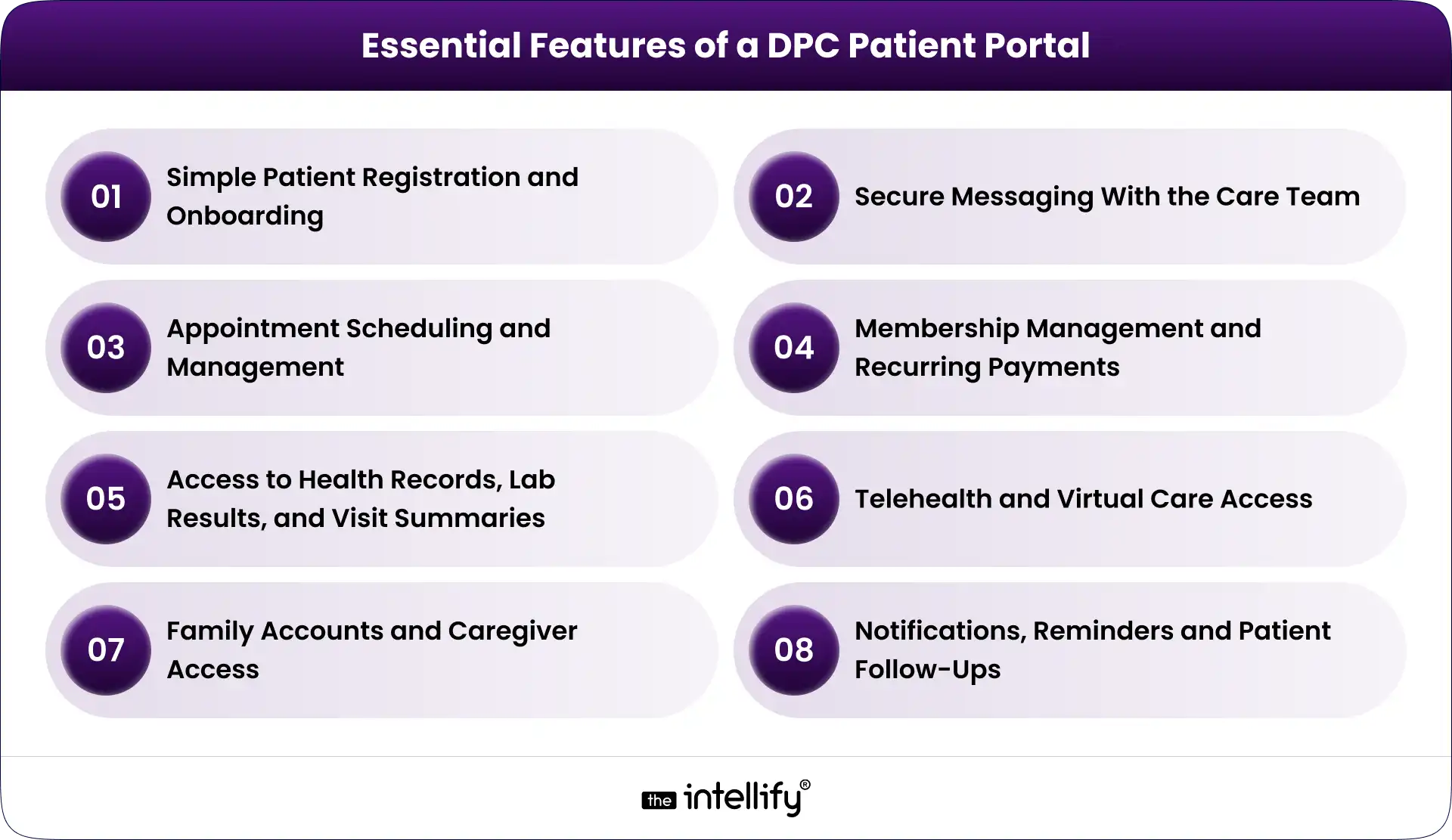
The right features depend on the size of the practice, its patient population, and how it delivers care. Still, several capabilities are useful across most Direct Primary Care practices.
1. Simple Patient Registration and Onboarding
Patient onboarding is often the first interaction someone has with a DPC practice beyond its website. If registration feels confusing or takes too long, it can create friction before the patient even starts receiving care.
A patient portal should make enrollment straightforward. Patients should be able to create an account, enter personal information, complete medical history forms, review membership terms, and submit consent forms digitally.
Useful onboarding capabilities include:
- Online registration and membership enrollment.
- Digital intake and medical history forms.
- Electronic consent forms and signatures.
- Mobile-friendly enrollment workflows.
- Account verification and secure login.
These features reduce paperwork for staff and help physicians collect information before the first consultation. Patients can complete the process at their convenience rather than filling out several forms in the waiting room.
2. Secure Messaging With the Care Team
Communication is one of the most important features of a DPC patient portal. Patients may need to ask questions about medications, share symptoms, request advice about next steps, or follow up after a consultation.
A secure messaging system allows patients to communicate with the practice without relying on ordinary email or repeatedly calling the front desk.
The portal should support two-way messaging, notifications, communication history, and secure sharing of relevant files or images where appropriate. Messages should be organized so the care team can manage incoming requests without losing important context.
Practices should also establish clear response expectations. Messaging is not an emergency service, and patients need to know what to do when they require urgent medical attention.
The goal is to make communication more accessible without creating an unmanageable workload for physicians.
3. Appointment Scheduling and Management
Patients shouldn’t have to call the office every time they want to book or reschedule an appointment.
A DPC patient portal should offer online scheduling that reflects actual provider availability, appointment types, and practice scheduling rules. Patients can select an available slot, receive confirmation, and manage upcoming appointments from their accounts.
Important scheduling capabilities include:
- Online appointment booking.
- Appointment rescheduling and cancellation.
- Provider-specific availability.
- Appointment reminders.
- Virtual appointment links.
Scheduling workflows should reflect how the practice operates. For example, a DPC physician may reserve specific slots for follow-ups, same-day requests, or longer consultations.
A flexible scheduling system helps patients access care while reducing routine scheduling work for staff.
4. Membership Management and Recurring Payments
Membership management is central to the DPC model. Unlike practices that primarily bill for individual services, DPC practices typically operate around recurring membership arrangements.
Patients should be able to view their membership details, understand their billing schedule, and update payment information without contacting the office for every change.
A useful membership management module may include:
- Membership plan details and pricing.
- Individual and family membership management.
- Recurring billing and payment methods.
- Invoice and payment history.
- Failed payment notifications.
- Membership renewal and cancellation workflows.
Patients should be able to understand what their membership includes and when payments are due. If a payment fails, automated notifications can help them update their payment details before staff needs to follow up manually.
These workflows can make membership administration more predictable for both the practice and its patients.
5. Access to Health Records, Lab Results and Visit Summaries
Patients often want to review information after an appointment. They may forget a physician’s instructions, need to check a medication, or want to understand what a lab result says.
A patient portal should provide secure access to relevant health information, including:
- Medical history and allergies.
- Medications and prescriptions, where supported.
- Lab results and test reports.
- Visit summaries and care instructions.
- Downloadable records and documents.
Lab results should be presented with appropriate context and physician review where necessary. Simply displaying a result without an explanation may leave patients confused or concerned.
The portal should also make it easy to locate older information. Patients shouldn’t have to navigate several menus to find a document from their previous visit.
6. Telehealth and Virtual Care Access
Virtual consultations are useful for DPC patients who cannot visit the office in person or need a convenient way to connect with their physician.
A portal should support a smooth transition from appointment booking to virtual consultation. Patients should be able to access the meeting link, check appointment details, and join the visit without navigating multiple unrelated applications.
Depending on the platform, telehealth capabilities may include:
- Secure video consultations.
- Virtual appointment scheduling.
- Pre-visit instructions.
- Mobile and desktop compatibility.
- Follow-up documentation.
Integrating virtual care into the patient portal makes the experience more consistent. Patients can manage appointments and communication from one place rather than switching between different tools.
7. Family Accounts and Caregiver Access
Many DPC practices serve families rather than only individual patients. Parents may manage appointments for children, and authorized caregivers may need access to specific patient information.
A portal should support family membership structures without compromising individual privacy. Useful capabilities include linked family profiles, dependent management, shared billing where applicable, and caregiver permissions. Access should be configurable according to authorization, applicable laws, and the patient’s age or circumstances.
For example, a parent may manage a child’s appointments and membership details, while access to certain health information may change as the child reaches an age where specific privacy protections apply.
This isn’t just an account management feature. It requires careful permission design and privacy-aware workflows.
8. Notifications, Reminders and Patient Follow-Ups
Patients often miss appointments, forget follow-up instructions, or overlook membership payment notifications. A portal can help practices communicate important reminders without manually contacting every patient.
Useful notification workflows include:
- Appointment reminders.
- Membership payment notifications.
- Follow-up reminders.
- Notifications about new messages or documents.
- Updates when lab results or visit summaries become available.
Notifications should be relevant and configurable. Patients should be able to manage their communication preferences, while practices should avoid sending unnecessary messages that become easy to ignore.
Automated follow-ups can also help practices maintain continuity of care when patients need to complete a task after a consultation.
Features That Make a DPC Patient Portal Easier to Use
Having the right features is only part of the job. Patients need to be able to find and use them without getting frustrated. A portal with complicated navigation can undermine even the most useful functionality.
Mobile-First Design
Many patients access healthcare information from their smartphones. A DPC portal should work well on smaller screens, with readable text, accessible navigation, and touch-friendly controls.
Patients should be able to send a message, check an appointment, or update payment information without needing a desktop computer. Mobile-first design also means avoiding unnecessarily long forms and making important actions easy to find.
Accessibility and Intuitive Navigation
A portal should accommodate patients with different levels of digital experience and accessibility needs. Clear labels, consistent layouts, keyboard navigation, readable contrast, and appropriate screen-reader support can make the platform easier to use.
Patients shouldn’t need instructions for every action. If they struggle to find basic functions, the interface needs improvement.
Personalization and Patient Preferences
A personalized dashboard can help patients see the information most relevant to them. Upcoming appointments, recent messages, membership details, and pending tasks can be displayed prominently.
Patients should also be able to manage notification preferences and basic account settings. Personalization should improve convenience without making the interface cluttered or overly complicated.
Security and HIPAA Considerations in DPC Patient Portal Development
A DPC patient portal may handle sensitive information, including medical records, lab results, prescriptions, messages, and billing details. Security must be considered throughout development, not added as an afterthought.
The HIPAA Security Rule requires applicable covered entities and business associates to implement appropriate administrative, physical, and technical safeguards to protect electronic protected health information (ePHI).
Key security considerations include:
- Access controls: Restrict access to patient information based on authorization and user roles.
- Authentication: Verify the identity of users accessing the portal.
- Encryption: Protect sensitive information in transit and at rest, based on the security design and risk assessment.
- Audit logs: Record and review access to sensitive information and relevant system activity.
- Data integrity: Protect records against unauthorized modification or destruction.
- Secure integrations: Assess third-party systems, vendors, and data-sharing workflows.
HIPAA compliance isn’t achieved simply by adding encryption or a login screen. It requires appropriate risk assessments, safeguards, policies, procedures, and ongoing security management.
How to Build a Patient Portal for a DPC Practice
Developing a patient portal requires more than designing screens and connecting a database. The platform should reflect the practice’s workflows and patients’ expectations.
1. Define Patient and Practice Requirements
Identify the challenges patients and staff face. Understand how the practice handles enrollment, communication, appointments, memberships, billing, and records. These requirements should guide the development scope.
2. Prioritize Core Portal Features
Start with the capabilities patients need most. Registration, messaging, scheduling, and membership management are often practical priorities. Additional features can be introduced as the platform evolves.
3. Design the Patient Experience
Map the patient journey from registration to ongoing care. Create intuitive interfaces, simplify common tasks, and validate the design with feedback from actual users.
4. Integrate With Existing Healthcare Systems
Determine how the portal will connect with EHR systems, billing platforms, payment gateways, telehealth tools, and communication services. Integration requirements should be evaluated early to avoid unnecessary development complications.
5. Test, Launch and Improve
Test usability, security, integrations, performance, and workflows before launch. After deployment, collect feedback from patients and staff, monitor usage patterns, and address problems through regular improvements.
Common Mistakes to Avoid When Developing a DPC Patient Portal
A patient portal can become difficult to use when development decisions focus on technical capabilities rather than patient needs. Some common mistakes include:
- Overloading the portal with features: Too many options can make routine tasks harder to complete.
- Ignoring mobile usability: A portal that works well on desktop but poorly on smartphones creates unnecessary friction.
- Prioritizing staff workflows over patient experience: Both sides need an intuitive system.
- Building disconnected integrations: Patients and staff shouldn’t need multiple platforms to manage basic interactions.
- Overlooking privacy and permissions: Family accounts, messaging, and health records require careful access management.
- Ignoring feedback after launch: Patient expectations and practice workflows change over time.
Avoiding these mistakes early can reduce rework and help build a portal that remains useful as the practice grows.
Conclusion
A successful DPC patient portal should make healthcare easier to access, communication simpler, and membership management more convenient. Features such as secure messaging, appointment scheduling, recurring payments, health records, telehealth, and family account management address practical needs that patients encounter throughout their membership.
The best portal isn’t necessarily the one with the most features. It’s the one that patients can use without frustration and that fits the practice’s day-to-day operations.
For DPC practices planning to develop or modernize their digital platform, investing in usability, security, integrations, and thoughtful feature prioritization can create a stronger foundation for long-term growth.
Frequently Asked Questions (FAQs)
1. What is a DPC patient portal?
A DPC patient portal is a secure digital platform that allows Direct Primary Care members to communicate with their physicians, manage memberships, schedule appointments, access health records, review billing information, and use virtual care services.
2. What features should a DPC patient portal include?
A DPC patient portal should include patient onboarding, secure messaging, appointment scheduling, membership and payment management, health record access, telehealth, family account management, and automated reminders.
3. How does a patient portal benefit a Direct Primary Care practice?
A patient portal helps DPC practices streamline administrative workflows, improve patient communication, simplify appointment scheduling, automate membership billing tasks, and provide patients with convenient access to relevant healthcare information.
4. Is a DPC patient portal required to be HIPAA-compliant?
Patient portals that handle electronic protected health information for HIPAA-regulated entities must comply with applicable HIPAA requirements. Appropriate safeguards, access controls, security policies, risk assessments, and secure data handling practices are necessary to protect patient information.
5. How much does it cost to develop a DPC patient portal?
The cost of developing a DPC patient portal depends on its features, complexity, design, integrations, security requirements, and development approach. A basic portal may require less investment than a custom platform with membership management, telehealth, EHR integrations, and automation.
6. Can a DPC patient portal support family memberships?
Yes. A DPC patient portal can support family memberships by allowing authorized users to manage dependent profiles, appointments, billing, and relevant patient information. Access permissions must be designed to respect applicable privacy laws and patient authorization requirements.
7. Can AI be integrated into a DPC patient portal?
Yes. AI can support a DPC patient portal through administrative automation, patient inquiry handling, appointment scheduling assistance, reminders, workflow automation, and patient support. Clinical workflows require appropriate safeguards and physician oversight.
Sources & References:
1. American Academy of Family Physicians (AAFP) – Direct Primary Care
2. U.S. Department of Health and Human Services – The HIPAA Security Rule
3. HHS – HIPAA Right of Access to Personal Health Information
4. National Institute of Standards and Technology (NIST) – Implementing the HIPAA Security Rule
5. World Wide Web Consortium (W3C) – Web Content Accessibility Guidelines (WCAG) 2.2
6. HHS – Guidance on HIPAA and Cloud Computing


Written By, Shravan Rajpurohit
Shravan Rajpurohit is the Co-Founder & CEO of The Intellify, a leading Custom Software Development company that empowers startups, product development teams, and Fortune 500 companies. With over 10 years of experience in marketing, sales, and customer success, Shravan has been driving digital innovation since 2018, leading a team of 50+ creative professionals. His mission is to bridge the gap between business ideas and reality through advanced tech solutions, aiming to make The Intellify a global leader. He focuses on delivering excellence, solving real-world problems, and pushing the limits of digital transformation.

How to Automate DPC Membership Renewals and Failed Payments
Summary: Direct Primary Care (DPC) practices can simplify membership renewals and failed payment recovery through automation. From recurring billing and renewal reminders to payment retries, card update requests, and automated follow-ups, the right tools help reduce administrative work, improve payment tracking, and maintain a more consistent membership management process. Direct Primary Care (DPC) practices […]
DPC Workflow Automation: 7 Administrative Tasks to Automate First
Summary: Direct Primary Care practices often spend valuable time managing patient inquiries, appointments, memberships, and administrative follow-ups. This guide explores seven DPC workflow automation opportunities that can simplify daily operations, improve patient communication, and help healthcare teams focus more on delivering personalized care. Running a Direct Primary Care (DPC) practice is about building stronger […]
How to Automate Patient Onboarding in a Direct Primary Care Practice
Summary: Patient onboarding automation helps Direct Primary Care (DPC) practices simplify registration, digital intake forms, membership agreements, payment setup, and patient communication. This blog explains how to automate key onboarding workflows, integrate existing healthcare systems, protect patient information, and measure operational improvements. It also covers implementation best practices to help DPC practices reduce administrative work […]
How to Automate DPC Membership Renewals and Failed Payments
Summary: Direct Primary Care (DPC) practices can simplify membership renewals and failed payment recovery through automation. From recurring billing and renewal reminders to payment retries, card update requests, and automated follow-ups, the right tools help reduce administrative work, improve payment tracking, and maintain a more consistent membership management process. Direct Primary Care (DPC) practices […]
DPC Workflow Automation: 7 Administrative Tasks to Automate First
Summary: Direct Primary Care practices often spend valuable time managing patient inquiries, appointments, memberships, and administrative follow-ups. This guide explores seven DPC workflow automation opportunities that can simplify daily operations, improve patient communication, and help healthcare teams focus more on delivering personalized care. Running a Direct Primary Care (DPC) practice is about building stronger […]
How to Automate Patient Onboarding in a Direct Primary Care Practice
Summary: Patient onboarding automation helps Direct Primary Care (DPC) practices simplify registration, digital intake forms, membership agreements, payment setup, and patient communication. This blog explains how to automate key onboarding workflows, integrate existing healthcare systems, protect patient information, and measure operational improvements. It also covers implementation best practices to help DPC practices reduce administrative work […]
0
+0
+0
+0
+Committed Delivery Leads To Client Satisfaction
Client Testimonials that keep our expert's spirits highly motivated to deliver extraordinary solutions.

Christopher Seny
My experience working with The Intellify, has been a great experience. The team has a wealth of expertise in the tech space. Working with the intellify was a growing experience for me, I learned a lot. The team keeps great communication & responds fast to new ideas & suggestions. The team also provides great suggestions & solutions as well. I couldn’t imagine working with anybody else on this project & it has been a blessing working with, The Intellify.

Izandi Serdyn
The Intellify delivered a platform from scratch, involving the client at every stage. The team was communicative, responsive, and punctual throughout the engagement. Virtual meetings and emails ensured seamless project management. Customers can expect a team that can work fast.

Kya Johnson
The app serves as an effective introduction for users to the product and its characters. Responsive and faithful to initial requirements, The Intellify’s team exceeded initial expectations. Internal stakeholders were particularly pleased with their communication.

Stefan Wyk
Working with The Intellify to develop our website was an outstanding experience. Their team displayed exceptional professionalism, creativity, and technical expertise throughout the entire process. The final product exceeded our expectations, delivering a sleek, user-friendly, and highly functional website. We highly recommend The Intellify to anyone in need of top-tier web development services.

Steve Thorpe
The Intellify’s work has been met with high praise from internal and external stakeholders. The team is efficient, diligent, and reliable in their service. They go above and beyond in terms of communication and project management. The Intellify is a responsive vendor that gets the job done.

Tal Dotan
I’ve been working with The Intellify for the last 3 years. During this period of time we’ve planned and executed projects in both small and large scale. Working with The Intellify was and still is the best decision I’ve made when rising up Divo, I strongly recommend to work with them in any type of project.


 +1-302-803-4983