AR-Driven Virtual Customer Support: Use Cases, Benefits & Business Value

Summary:
This blog explains how AR-driven virtual customer support helps businesses solve customer issues using visual, real-time guidance instead of long calls or text instructions. It covers how AR support works, where it’s used, and the business value it delivers across industries. The article also explores key benefits, implementation challenges, and what the future of AR-powered customer support looks like for modern, customer-focused organizations.

Customer support used to be simple. Someone had a problem, they called a number, waited on hold, and eventually spoke to a human. Slow? Yes. But expectations were lower. That’s no longer the case.

Today’s customers want help right now, without repeating themselves, without guessing what a support agent means, and without shipping a product back just because one tiny thing went wrong. And honestly, most support issues aren’t that complex. They’re just hard to explain using words alone.

That gap between what customers see and what support teams can explain is exactly where AR-driven virtual customer support fits in.


What Is AR-Driven Virtual Customer Support?

At its core, AR-driven virtual customer support uses augmented reality to guide users visually while they’re facing a problem. Instead of reading steps or listening to instructions, customers point their phone or tablet camera at the product. On-screen arrows, highlights, or notes show them exactly what to do.

No guessing. No back-and-forth. Just clear, visual help. Think about setting up a new Wi-Fi router. Support tells you, “Check the small port next to the reset button.” You look at the back of the device. There are five ports. They all look the same.

Now imagine the camera view highlighting the exact port in real time. That’s AR support. Simple, but powerful.


Why Businesses Are Moving Toward AR-Powered Customer Support

Customer expectations have changed. Fast. People are used to visual apps, video calls, and instant answers. A long support email or a scripted call feels… outdated. And expensive. At the same time, businesses are dealing with:

  • Higher support volumes
  • Global customers in different time zones
  • Rising costs of field service and on-site visits

AR-powered customer support solves several problems at once. It reduces confusion, shortens support calls, and helps customers fix things on their own without feeling lost. And when customers solve issues quickly, they remember that experience in a good way.


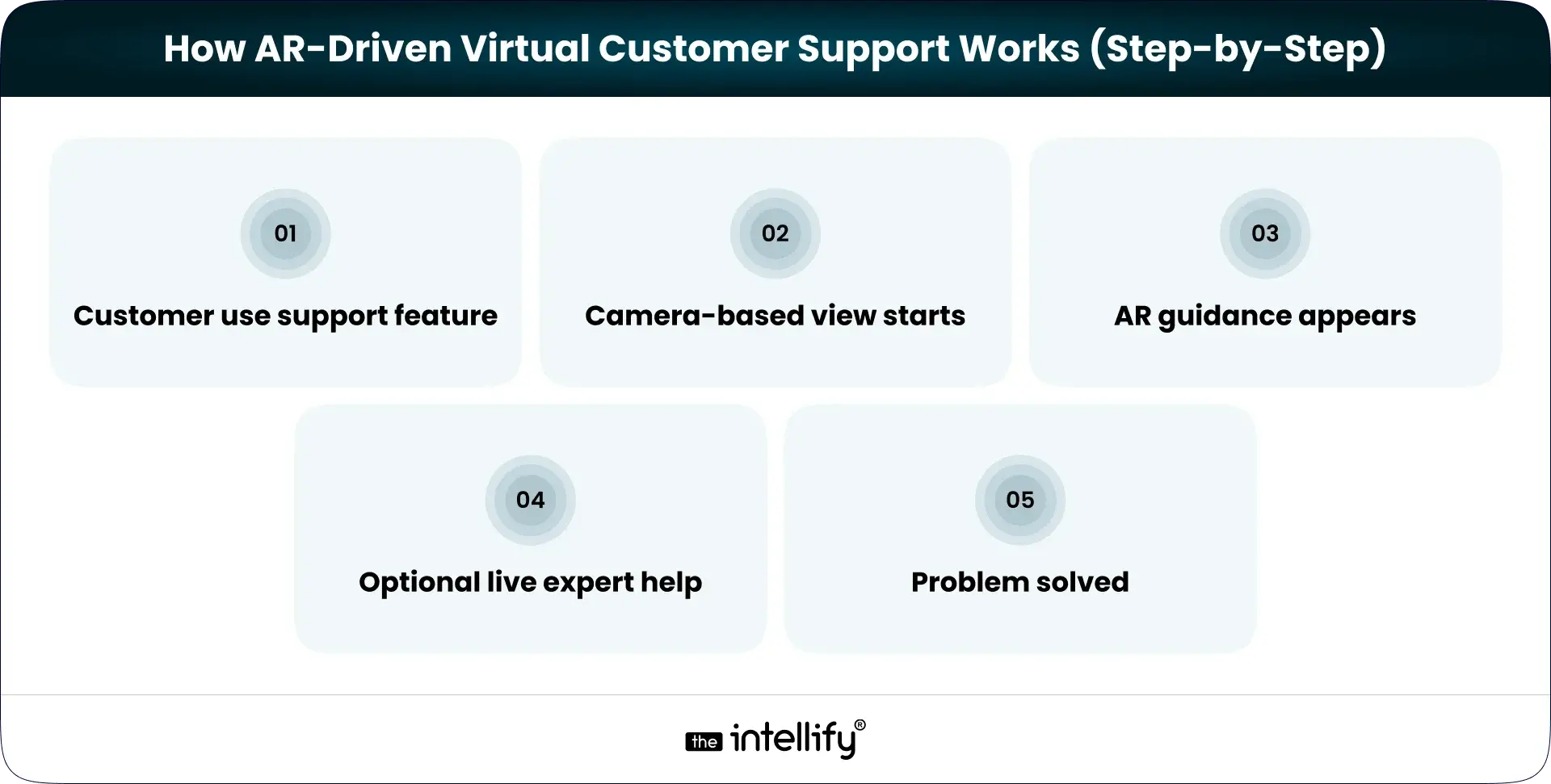
How AR-Driven Virtual Customer Support Works (Step-by-Step)
AR-Driven Virtual Customer Support Flow

The flow is usually straightforward. No complicated setup required.

1) Customer opens the support feature: This could be inside a mobile app or via a web-based AR experience.

2) Camera-based view starts: The customer points their device at the product or environment.

3) AR guidance appears: Visual cues like arrows, labels, or animations appear on the screen, aligned with real objects.

4) Optional live expert help: If needed, a remote support agent can see the same view and guide the user in real time.

5) Problem solved: Faster than a call. Less frustrating than trial and error.

It feels natural. Almost obvious once you see it in action.


Benefits of AR-Powered Virtual Customer Support for Businesses

Faster Issue Resolution

Most support delays come from misunderstanding. Visual guidance cuts explanation time dramatically. What takes 10 minutes on a call often takes 2 minutes with AR.

Lower Support Costs

Shorter interactions mean lower costs. Fewer repeat tickets mean less workload. And fewer on-site visits mean real savings, especially for businesses supporting physical products or equipment.

Better First-Contact Resolution

AR support increases the chance that issues are resolved the first time. Customers don’t need to call back because they “missed a step” or misunderstood instructions. First-contact resolution quietly improves, and support teams notice.

Reduced Product Returns

A surprising number of returns happen because customers think something is broken when it isn’t. Visual guidance helps them use products correctly, which reduces unnecessary returns and refunds.

Higher Customer Satisfaction

When support feels clear and helpful, customers feel taken care of. That trust doesn’t come from big promises. It comes from small moments that go smoothly.


Real-World Use Cases of AR-Driven Virtual Customer Support
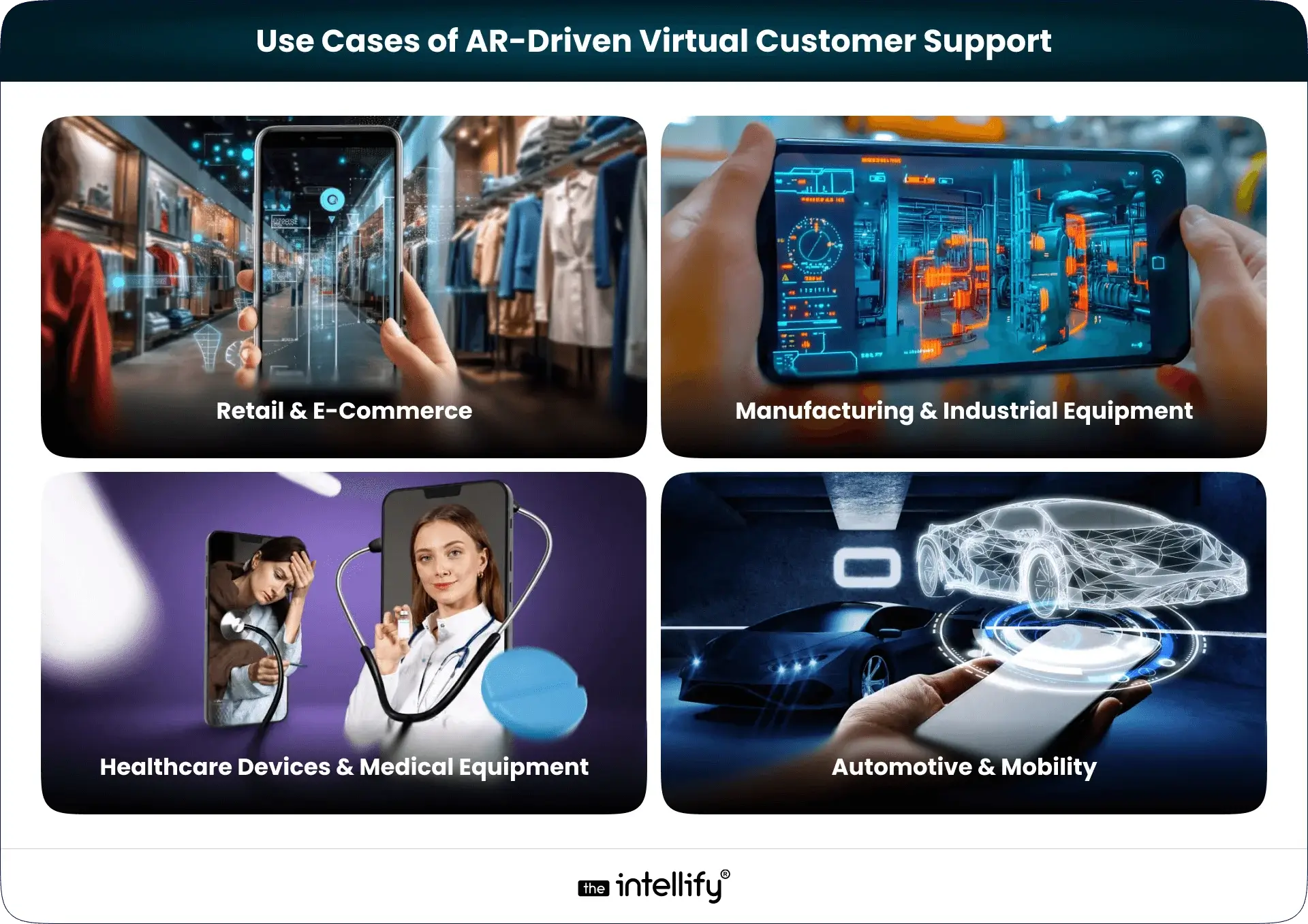
Use Cases of AR Virtual Customer Support

This isn’t theoretical. AR support is already being used across industries, quietly improving how support works.

Retail & E-Commerce

Customers use AR in retail & e-commerce guidance to assemble furniture, install appliances, or understand product features. It reduces confusion and cuts down on “I can’t figure this out” messages that clog support inboxes.

Consumer Electronics & Smart Devices

Smart devices are powerful, but setup can be frustrating. AR walks users through the process step by step, helping them avoid common mistakes without reading long manuals.

Manufacturing & Industrial Equipment

When machines go down, every minute matters. AR-driven support allows technicians and customers to troubleshoot issues remotely, reducing downtime and unnecessary travel.

Healthcare Devices & Medical Equipment

Clear usage matters here. AR helps guide users through safe operation and setup, especially during onboarding or remote assistance scenarios.

Automotive & Mobility

Instead of flipping through thick manuals, users can point their phone at a component and see exactly what it does or how to fix a minor issue. It’s practical, not flashy.


AR-Driven Virtual Customer Support vs Traditional Support Models

Traditional support relies heavily on explanation. AR relies on observation. With phone calls, customers describe problems in their own words, often imperfectly. With AR, support teams see the problem directly. That changes the conversation.

Compared to chatbots, AR handles real-world problems better. Compared to video calls, AR adds structure and clarity instead of open-ended conversation. AR doesn’t replace human support. It simply makes human support more effective.


Key Features to Include in an AR Virtual Customer Support App

A good AR support app doesn’t try to do everything. It focuses on what matters.

  • Real-time AR overlays should be accurate and stable. Nothing breaks trust faster than instructions floating in the wrong place.
  • Live expert collaboration should feel seamless, not intrusive. Customers should feel helped, not watched.
  • Multi-device compatibility matters more than fancy visuals. If it doesn’t work smoothly across common smartphones, adoption suffers.
  • Security and data privacy can’t be an afterthought, especially in regulated industries.
  • Analytics and insights: Businesses need to understand what issues occur most often and how AR support impacts resolution time and customer satisfaction.


Challenges in Implementing AR-Driven Virtual Support (And Solutions)

AR support isn’t magic. There are challenges.

1. User hesitation or unfamiliarity

Some users may feel unsure about using AR at first. Simple onboarding screens and clear prompts help ease them in.

2. Device compatibility limitations

Not all users have high-end devices. Designing lightweight AR experiences ensures broader accessibility.

3. Accuracy of AR overlays

Poor alignment breaks trust quickly. Careful testing and calibration are essential for reliable guidance.

4. Data privacy and security concerns

Especially in regulated industries, strong data protection and compliance practices must be built in from the start.

5. Trying to do too much at once

Overloading the experience with features can hurt adoption. Starting with a few high-impact use cases works better.


Future of AR-Powered Virtual Customer Support

Future of AR-Powered Virtual Customer Support

AR-powered customer support is slowly moving from being a “nice-to-have” feature to something customers will quietly expect. Not because it’s flashy, but because it makes getting help feel easier and more natural. As AR becomes more familiar on everyday devices, support experiences will feel less like technical sessions and more like guided assistance that just fits into the moment.

What’s coming next looks practical, not dramatic:

  • AR support shifting from reactive problem-solving to proactive guidance
  • Tighter integration with voice assistance for hands-free support
  • AI helping predict issues and suggest visual fixes before customers ask
  • More lightweight AR experiences that work smoothly across common devices
  • Wider adoption across industries, from consumer products to enterprise systems
  • AR is becoming a standard layer of customer support rather than a standalone feature

In the near future, customers won’t think about the technology behind the support. They’ll just notice that issues get resolved faster, with less effort and less frustration, and that’s exactly the point.


How to Get Started with AR-Driven Virtual Customer Support

Getting started with AR-driven virtual customer support doesn’t mean rebuilding your entire support system from scratch. In most cases, it works best when it grows out of real problems your customers already face, not big ideas on a whiteboard.

The first step is slowing down and observing where support actually breaks down. Most businesses already have the answers hidden in their tickets, call logs, and frustrated customer emails.

  • Review support tickets to spot issues customers struggle to explain using words alone.
  • Look for repetitive problems that take agents a long time to resolve.
  • Prioritize scenarios where visual guidance would clearly save time for both customers and support teams.
  • Decide whether AR support should live inside an existing mobile app or work as a standalone experience.
  • Start small with a pilot, focused on a few high-impact use cases, before scaling further.

This is also where choosing the right AR App development partner matters more than choosing flashy features.

An experienced AR app development company like The Intellify helps businesses think through the practical side of what should be visual, what should stay simple, and what will actually get used by customers. The focus isn’t on showing off AR, but on making support easier, faster, and less frustrating.

When AR is built around real user behavior, adoption follows naturally. And support teams feel the difference almost immediately.

 

AR Virtual Customer Support Solution


Conclusion

Customer support doesn’t have to be a cost center. With the right tools, it becomes quite a differentiator. AR-driven virtual customer support helps customers help themselves, with confidence. It saves time. Reduces frustration. And when support works quietly in the background, customers remember the brand for the right reasons. Not because something went wrong, but because fixing it felt easy.


Frequently Asked Questions (FAQs)

1) What is AR-driven virtual customer support?

AR-driven virtual customer support helps customers solve problems using visual, real-time guidance instead of text or phone instructions. Customers point their device camera at a product, and on-screen visuals show exactly what to do. This makes support faster, clearer, and less frustrating for both users and support teams.

2) How is AR-powered customer support different from chatbots or video support?

Chatbots explain. Video calls talk. AR-powered support shows. It adds visual cues directly onto real-world objects, making it easier to fix physical or setup-related issues. This works especially well when describing a problem with words isn’t enough.

3) Which industries benefit the most from AR-driven virtual customer support?

Industries with physical products benefit the most, including retail, consumer electronics, manufacturing, healthcare devices, automotive, and telecom. Any business where customers struggle with setup, usage, or troubleshooting can use AR to reduce support effort and improve outcomes.

4) Does AR-driven customer support reduce support costs?

Yes. AR support shortens resolution time, reduces repeat tickets, lowers product returns, and cuts down on on-site visits. Businesses that implement AR support thoughtfully often see measurable cost savings while maintaining better customer satisfaction.

5) Do customers need special devices to use AR customer support?

No. Most AR customer support solutions work on standard smartphones and tablets. Customers simply use their device camera through an app or browser-based experience, without needing special hardware or accessories.

6) Is AR-powered customer support secure?

It can be very secure when designed properly. AR support systems can limit camera access, protect session data, and follow industry compliance standards. Working with an experienced development partner like The Intellify helps ensure security is built in from the start.

7) How long does it take to build an AR virtual customer support solution?

Simple AR support features can be built in weeks, while more advanced solutions may take a few months. Most businesses start with one high-impact use case and expand gradually to see faster results and lower risk.
Augmented Reality for Real Estate: Future of Interactive Property Showcases

Summary:
This blog explains how augmented reality for real estate is transforming the way properties are showcased and explored. It covers what AR property experiences are, how they help buyers visualize spaces more clearly, and where they fit into modern real estate marketing. The article also highlights key benefits, real-world use cases, development considerations, costs, challenges, and future trends, helping real estate businesses understand when and how AR property showcases can add real value.


Property buying has always been emotional, exciting, stressful and sometimes confusing.

You walk into a space and try to imagine your life there. Where the couch would go. Whether sunlight hits the kitchen in the morning. If the bedroom feels too tight or just right.

Now compare that to scrolling through photos on a listing site. Flat images. Odd angles. A wide lens doing its best to make a small room look… hopeful.

That gap between seeing and understanding is where augmented reality for real estate quietly steps in. Not with noise. Not with hype. But with clarity.

AR property showcases are changing how people explore, evaluate, and emotionally connect with properties. And they’re doing it in a way that feels natural, not forced. Almost obvious once you see it.


What Is Augmented Reality in Real Estate?

Augmented Reality in Real Estate
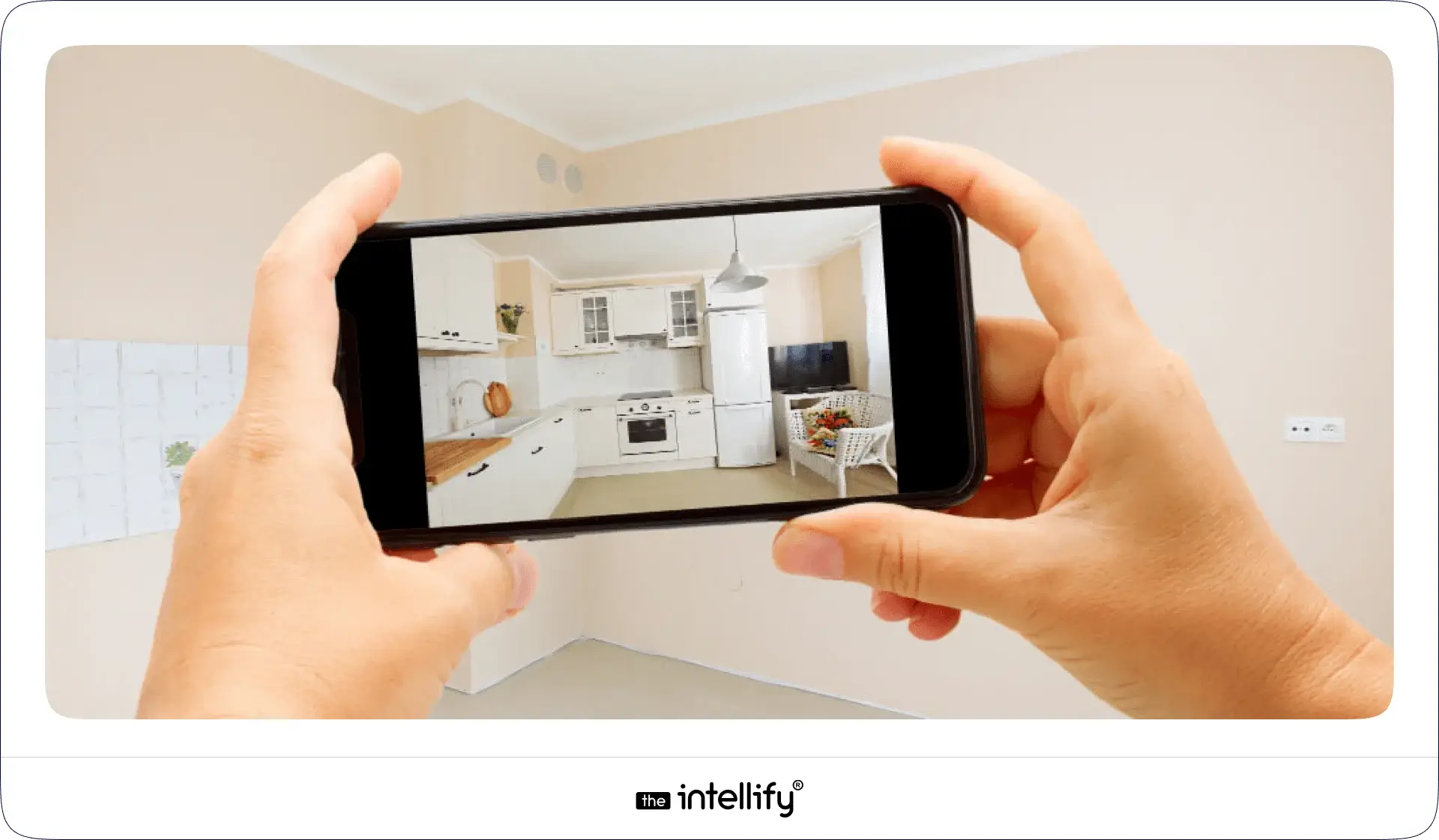
Augmented reality adds digital elements to the real world using a phone or tablet camera. That’s it. No headsets. No complicated setup.

In real estate, augmented reality in real estate means you can point a device at a space or even a printed floor plan and see something more layered on top of it. A furnished room. A finished building. A clearer picture.

It’s different from virtual reality, which pulls users into a fully digital world. AR keeps people grounded in their real surroundings. That’s why it works so well here.

You’re not escaping reality. You’re enhancing it. This small distinction is important. Buyers don’t want a tech demo. They want understanding. AR gives them that without asking too much in return.


The Rise of Interactive Property Experiences

Property discovery used to start with site visits. Now it often starts on a phone, late at night, half-distracted, maybe with coffee gone cold on the table. Buyers want answers fast. They want to know:

  • Will this space actually work for me?
  • Can I see beyond the staging?
  • Is this worth a visit or not?

Static listings struggle here. Videos help, sure. But they still push information one way. Interactive experiences changed that.

With AR in real estate, buyers explore at their own pace. They linger where they care. They skip what they don’t. That control builds trust. Quietly and trust moves deals forward.


What Are AR Property Showcases?

An AR property showcase is an interactive way to explore a property using augmented reality. Instead of flipping through images, users interact with the space.

They might:

  • View a full 3D apartment model on their living room table
  • Walk through an empty unit and see it furnished
  • Scan a brochure and watch a building rise, floor by floor

It’s simple on the surface. Powerful underneath. The experience feels personal. Almost hands-on and that’s the point.


Key Use Cases of Augmented Reality for Real Estate Property Showcases

1) AR Virtual Property Walk throughs

Not every buyer can visit every property. Distance, time, traffic it adds up. AR walkthroughs give buyers a strong first impression without stepping on-site. They explore layouts. Get a sense of flow. Decide if it’s worth the next step. That alone saves everyone time.

2) Visualizing Under-Construction & Pre-Launch Properties

This is where augmented reality for real estate really shines. An empty plot can feel abstract. Risky. Hard to believe in. AR replaces that doubt with visuals. Buyers see the finished building placed right there. Windows. Balconies. Height. Scale. Suddenly, it feels real.

3) Interior Design & Customization Using AR

Some buyers hesitate because they can’t see past the current setup. Or lack of one. AR lets them try things out. Furniture. Layouts. Colors. That moment when someone says, “Oh, this actually works” is powerful.

4) Interactive AR Floor Plans

Flat floor plans confuse people. Dimensions on paper don’t always translate well. AR floor plans show space in real scale. Buyers walk around them. Understand room relationships. Notice things they’d otherwise miss. Fewer surprises later.

5) On-Site AR Experiences for Sales & Events

During site visits or exhibitions, AR adds depth. A tablet. A phone. A quick scan. Information appears right where it’s needed. Clean. Visual. No long explanations. It keeps conversations focused and grounded.


AR for your property showcases


Benefits of Augmented Reality in Real Estate

1) Benefits for Property Buyers

AR reduces guesswork. Instead of mentally stitching together photos, dimensions, and descriptions, they see things clearly. They understand space. They feel orientation. They notice details they would otherwise miss like how close the dining area is to the kitchen or whether a bedroom feels cramped once a bed is placed. That clarity lowers anxiety, which is often the biggest hidden blocker in property decisions.

2) Benefits for Real Estate Agents

AR quietly improves lead quality. Buyers who spend time interacting with an AR property showcase usually come with better questions. They’ve already filtered themselves. Conversations become more focused, less repetitive, and far more productive. Fewer casual browsers. More serious intent.

3) Benefits for Developers & Builders

The benefit is scale. Physical show units, brochures, and repeated walkthroughs all cost time and money. AR property showcases work around the clock. They don’t wear out. They don’t need to be rebuilt every time a layout changes. And they allow teams to present future properties with confidence instead of promises.

In simple terms, augmented reality in real estate helps everyone waste less time and make better decisions faster.


How AR Property Showcases Improve Marketing & Sales Conversion

People spend more time with interactive content. That’s not theory. It’s behavior. AR experiences hold attention. Buyers explore longer. Ask better questions. Remember what they saw. That memory matters when decisions are made days or weeks later. Better understanding leads to fewer drop-offs. Fewer “maybe later” conversations.


Real-World Applications of AR Property Showcases

Real-World Applications of AR Property
AR property showcases are not limited to high-end or experimental projects. They’re being used wherever buyers need help visualizing value.

1) Residential apartments and villas

In residential real estate, AR helps buyers understand how an empty apartment could feel once lived in. It removes that awkward moment during site visits when someone says, “It looks smaller than I expected,” even though the dimensions were clearly mentioned online.

2) Commercial office spaces

In commercial properties, AR helps businesses visualize layouts, seating plans, or workspace flow. Decision-makers can see how a space supports daily operations rather than guessing from floor plans.

3) High-end and luxury projects

Luxury and premium developments use AR differently. Here, the focus is often on experience how the space feels at different times of day, how materials come together, how design choices affect mood. AR supports storytelling without overexplaining.

4) Development and Townships

Large-scale developments and townships use AR to show the bigger picture. Roads, green spaces, amenities, and connectivity become easier to understand when people can see them layered over reality.
Across all these cases, the goal is the same: reduce confusion and replace it with clarity.


How AR Property Showcase Apps Are Built

How AR Property Showcase Apps Are Built

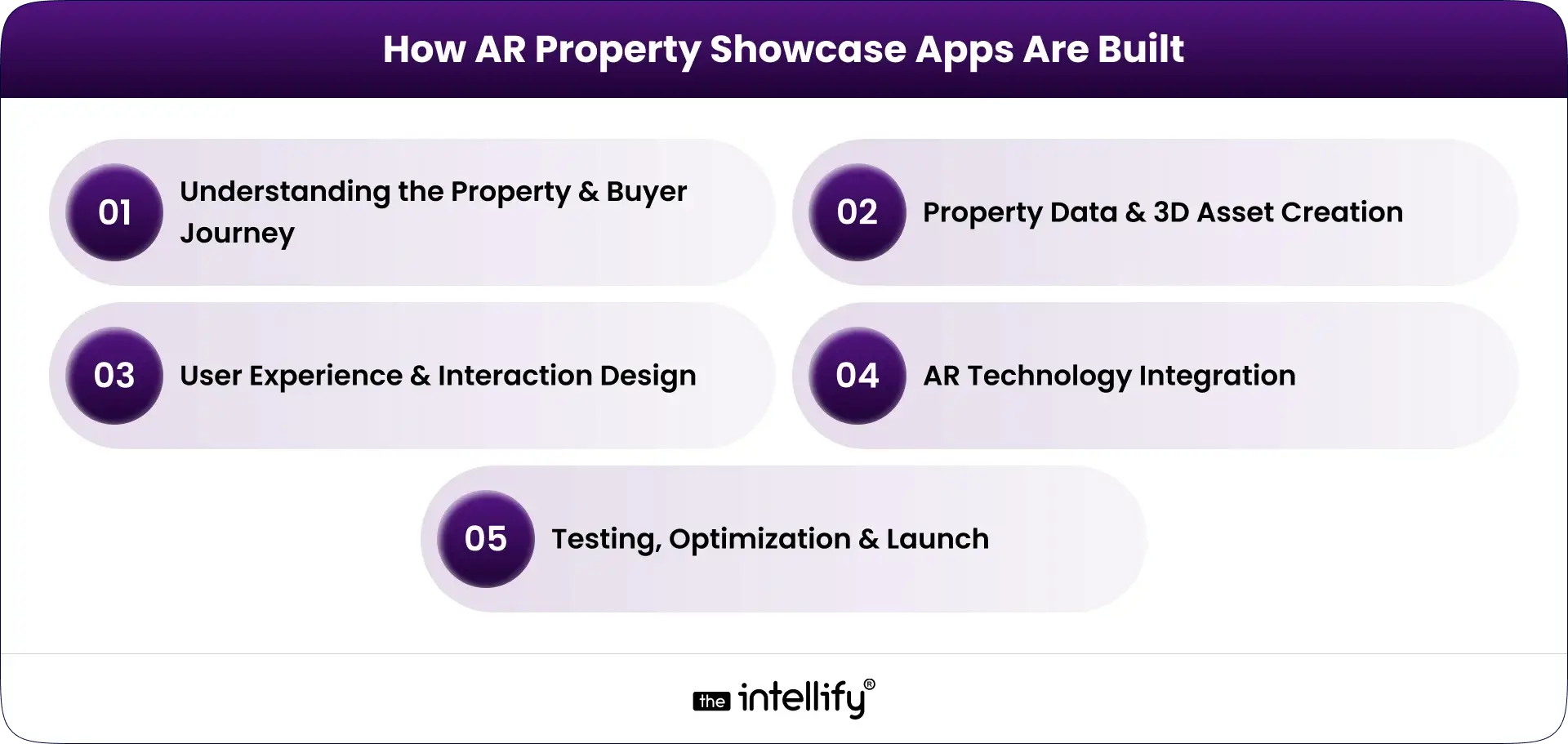
Building an AR property showcase app is a step-by-step process. Skipping steps usually leads to clunky experiences.

1. Understanding the Property & Buyer Journey

  • Identify the type of property (residential, commercial, mixed-use)
  • Map where AR fits in the buyer journey (discovery, comparison, site visit)
  • Define what buyers struggle to visualize today
  • Decide what the AR experience should clarify or simplify

2. Property Data & 3D Asset Creation

  • Convert floor plans and elevations into accurate 3D models
  • Maintain real-world scale and proportions
  • Optimize models for mobile performance (not just visual quality)
  • Validate designs with real property data to avoid mismatches

3. User Experience & Interaction Design

  • Keep navigation simple and obvious
  • Limit on-screen clutter and controls
  • Design flows for non-technical users
  • Focus on clarity, not “cool” effects

4. AR Technology Integration

  • Integrate AR functionality using platforms like ARKit and ARCore
  • Ensure stable object placement and tracking
  • Optimize performance for different lighting conditions
  • Test AR behavior in real physical environments

5. Testing, Optimization & Launch

  • Test across multiple devices and OS versions
  • Validate load times and interaction smoothness
  • Fix edge cases before public release
  • Prepare the app for future property updates and scalability


Cost & Timeline Factors for AR Real Estate App Development

There’s no fixed cost for AR real estate apps. Several factors influence both the budget and timeline. It depends on:

1) Key Cost Drivers

  • Number of properties to be showcased
  • Level of visual detail and realism
  • Type of interactions (walkthroughs, customization, animations)
  • Platform requirements (iOS, Android, or both)
  • Need for future scalability and updates

2) Timeline Influencers

  • Availability and accuracy of property data
  • Complexity of 3D modeling
  • Approval cycles and design iterations
  • Testing across different devices and conditions

3) Long-Term Cost Considerations

  • Maintenance and updates as properties evolve
  • Adding new projects or phases
  • Optimizing performance as devices change
  • Expanding features based on user feedback

Well-planned AR apps cost more upfront but save money over time by reducing physical marketing efforts and repeated manual work.


Challenges of Implementing Augmented Reality in Real Estate

AR brings value, but it also introduces practical challenges that need planning. Some common challenges are:

  • Device compatibility across older and newer smartphones
  • Performance issues in low-light or cluttered environments
  • Keeping 3D visuals aligned with real property dimensions
  • User hesitation toward new technology

Most AR issues aren’t technical limitations they’re experience design problems that improve with testing and refinement.


How to Choose the Right AR App Development Partner

When planning to build an AR property showcase, choosing the right AR app development company is critical. Look for teams that:

  • Experience with real estate or spatial visualization
  • Have experience in AR and 3D visualization
  • Focus on usability, not just technology
  • Offer long-term support and scalability

Think Beyond the First Version

Properties change over time. Your AR app should too.
Choose a partner who plans for updates, long-term support, and future growth. A good partner builds something practical, something buyers trust, and teams can rely on.


The Future of AR Property Showcases in Real Estate

AR in real estate is moving from novelty to normal. The focus is shifting away from “wow” moments and toward usefulness.

AR Will Become an Expectation

As buyers grow used to interactive experiences, static listings will feel incomplete. AR property showcases will slowly become part of the standard discovery process.

Experiences Will Feel More Personal

Future AR showcases will adapt to buyers instead of showing the same view to everyone. Layouts, styles, and information will adjust based on preferences.

AR Will Blend Into the Process

AR won’t feel like a separate tool. It will quietly support property discovery, site visits, and sales conversations without drawing attention to itself.


Quick Commerce App Development


Conclusion

Buying property is about confidence. When people clearly understand a space, decisions come faster, and they feel safer. Augmented reality helps remove uncertainty by showing properties as they truly are or as they will be. It improves how buyers explore, compare, and decide, without adding complexity.

For real estate businesses, AR property showcases are no longer experimental. They’re a practical way to communicate value, reduce friction, and stand out quietly. Now is a good time to adopt AR, not because it looks impressive, but because it makes property decisions easier for everyone involved.


Frequently Asked Questions (FAQs)

1. What is augmented reality for real estate?

Augmented reality for real estate lets buyers view digital property elements, such as 3D models or interiors, over real spaces using a smartphone. It helps people understand layouts, scale, and design more clearly before making property decisions.

2. How is AR different from virtual tours in real estate?

Virtual tours are fixed videos or images, while AR is interactive. AR allows buyers to move freely, explore spaces in real scale, and view properties from multiple angles in real time.

3. How do AR property showcases help real estate buyers?

AR property showcases help buyers visualize properties accurately, reduce confusion, and build confidence. This makes it easier to shortlist properties and make informed decisions faster.

4. Can augmented reality be used for under-construction properties?

Yes. AR can show completed buildings and interiors over real sites or floor plans, helping buyers understand how under-construction properties will look once finished.

5. Do AR property showcase apps work on normal smartphones?

Yes. Most AR property showcase apps work on standard smartphones and tablets that support modern AR features. No special devices are required.

6. How do I choose the right company to build an AR real estate app?

Choose a company with experience in real estate visualization, strong AR expertise, and a focus on usability, accuracy, and long-term scalability.

7. How can The Intellify help with AR property showcase development?

The Intellify builds custom AR property showcase apps that help buyers visualize spaces clearly and support real estate businesses with practical, scalable AR solutions.

AR Navigation App Development Guide 2025

Summary
This blog explores AR Navigation and its growing impact across industries. It explains how AR indoor navigation works, the technologies behind it, top use cases in airports, malls, hospitals, and logistics, and the business benefits such as improved user experience, increased revenue, and operational efficiency. The blog also highlights real-world examples, challenges, and the future of augmented reality navigation, while providing a step-by-step guide for developing your own AR navigation app.

Finding your way in today’s fast-moving world is no longer about unfolding paper maps or staring at confusing 2D navigation apps. With AR Navigation, directions are projected directly onto the real world through your smartphone, tablet, or even AR glasses. Whether it’s walking through an airport, shopping in a mega-mall, visiting a hospital, or driving in a new city, augmented reality navigation turns complex routes into clear, interactive guidance.
In this blog, we’ll explore what AR navigation is, why AR indoor navigation is gaining massive momentum, real-world examples, the app development process, challenges, and why 2025 is the right year for businesses to invest in AR-based indoor and outdoor navigation apps.


What is AR Navigation?

What is AR Navigation?

At its core, AR Navigation (Augmented Reality Navigation) uses the device camera and AR technology to project visual guidance into your real-world view. Instead of interpreting a flat map, you see:

  • 3D arrows on the ground showing where to walk
  • Floating signs labeling shops, gates, or rooms
  • Real-time details like distance, time, or promotions
  • Interactive points of interest (POIs) you can tap for more info

This works both indoors (airports, malls, offices) and outdoors (streets, tourist attractions, driving). Compared to traditional navigation, AR makes the experience immersive, intuitive, and less confusing.


Why AR Indoor Navigation Matters Now

Indoor navigation is notoriously difficult because GPS doesn’t work well inside buildings. With the rise of mega-malls, airports, hospitals, logistics hubs, and corporate campuses, the need for better indoor navigation has skyrocketed.

  • According to industry reports, the global indoor positioning and navigation market is projected to reach tens of billions of dollars by 2030, with AR navigation being one of the strongest growth drivers.
  • Businesses like malls and airports that adopted AR wayfinding already report better customer satisfaction, smoother operations, and even higher revenues due to increased footfall and conversions.
  • With smartphones becoming AR-ready and AR glasses emerging, 2025 marks the perfect time for businesses to adopt AR indoor navigation.


How AR Navigation Works

How AR Navigation Works

AR navigation works by blending the digital world with the physical environment in real time. Think of it as holding your phone or looking through AR glasses and seeing digital arrows, text, or 3D objects guiding you to your destination. Behind this seemingly simple experience lies a combination of advanced technologies:

  • Camera & Sensors: The camera constantly scans the environment while sensors (gyroscope, accelerometer, compass) track movement and orientation.
  • SLAM (Simultaneous Localization and Mapping): This technology builds a map of the environment while tracking the device’s location within it. SLAM ensures your AR overlay sticks precisely to the real world.
  • GPS & Beacons: Outdoors, GPS provides location accuracy. Indoors, where GPS often fails, Bluetooth beacons, Wi-Fi triangulation, or LiDAR-based positioning take over.
  • Cloud Anchors & 3D Mapping: AR navigation apps often use cloud anchors to store digital markers at physical spots. This helps multiple users see consistent AR guidance in the same location.
  • Rendering in AR: Once location and orientation are locked, digital arrows, lines, or instructions are overlaid in your camera view, guiding you naturally as if they exist in real life.

In simple words, AR navigation works like a live GPS map with visual overlays, ensuring users don’t just read directions but see them directly on their path.


Overview of Indoor Positioning Technologies

Since GPS doesn’t work indoors, AR-based indoor navigation relies on alternative technologies:

  • Wi-Fi Fingerprinting: Detects signal strength from Wi-Fi routers to locate users.
  • Bluetooth Beacons: Small devices installed around spaces to transmit location data.
  • Ultra-Wideband (UWB): Provides centimeter-level accuracy, ideal for airports and warehouses.
  • Visual Positioning Systems (VPS): Uses camera input + AI to recognize surroundings and place AR overlays.
  • Marker-Based Systems: Simple, cost-effective for smaller venues like museums.
  • Sensor Fusion: Combines data from accelerometers, gyroscopes, and magnetometers for better accuracy.

In practice, AR-based indoor navigation apps use a hybrid of these methods for maximum precision.


Top AR Navigation Use Cases

AR Navigation Use Cases
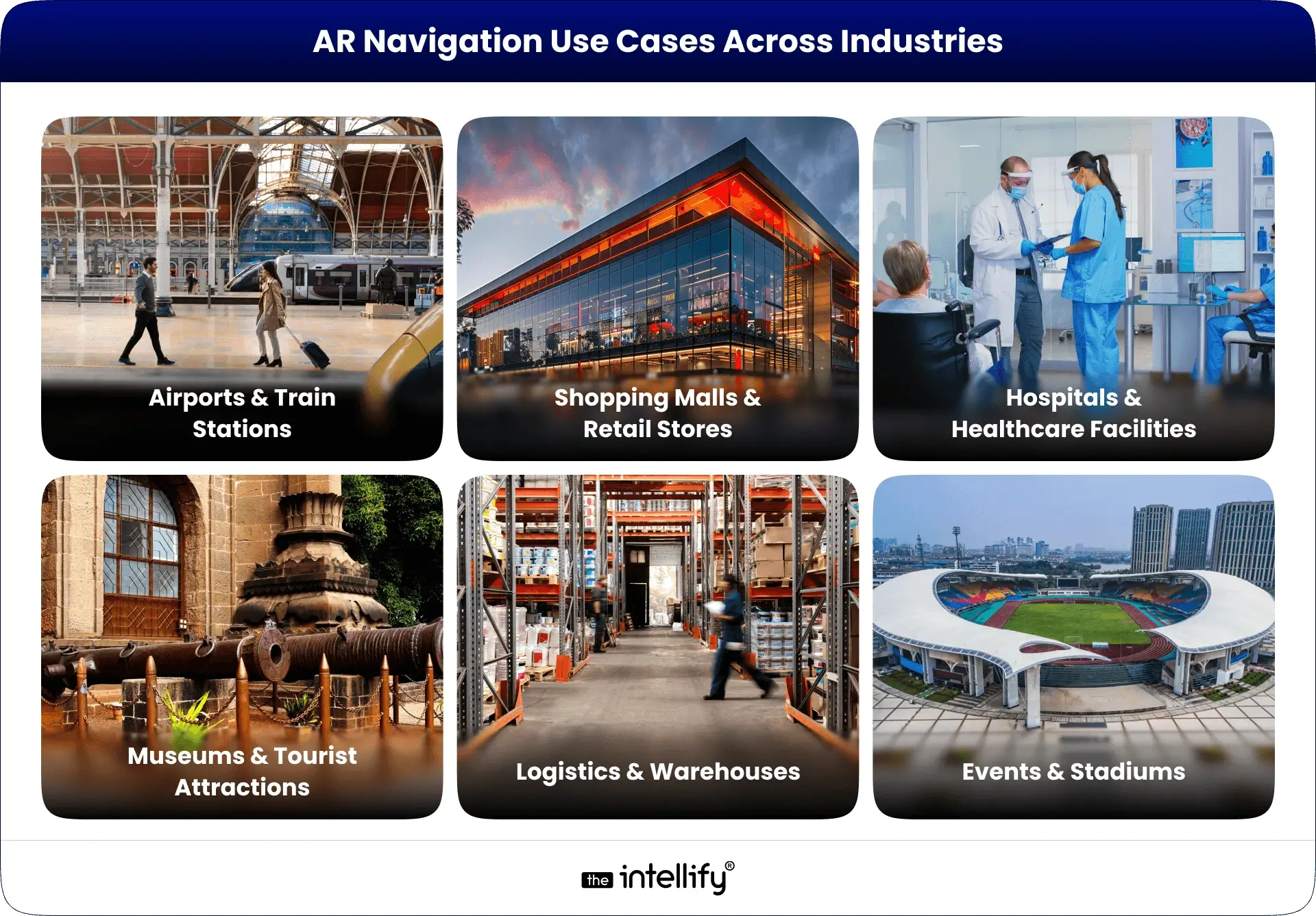
AR navigation isn’t just a futuristic gimmick, it’s already transforming industries. Here are the most promising use cases:

1. Airports & Train Stations

Large transit hubs are often overwhelming. AR navigation helps passengers quickly find gates, check-in counters, baggage claims, or even the nearest coffee shop.
For example, Gatwick Airport in London tested AR wayfinding to reduce passenger stress.

2. Shopping Malls & Retail Stores

Instead of wandering around, customers can follow AR directions to a specific store or even a product aisle. Retailers also use it to highlight promotions or guide shoppers to seasonal deals. Imagine walking in a mall and seeing a floating arrow guiding you straight to “50% off sneakers.”

3. Hospitals & Healthcare Facilities

Hospitals can be confusing for patients and visitors. AR indoor navigation ensures people easily find emergency rooms, wards, or doctors’ offices. It improves patient experience and reduces the burden on hospital staff.

4. Museums & Tourist Attractions

AR wayfinding enriches tours by guiding visitors to exhibits while also offering extra information in AR like a virtual guide standing beside a sculpture explaining its history.

5. Logistics & Warehouses

Workers in large warehouses can use AR glasses or mobile apps to locate goods quickly. Instead of scanning hundreds of racks, AR arrows guide them to the exact spot. DHL already uses AR for faster picking operations.

6. Events & Stadiums

At concerts, exhibitions, or sports stadiums, AR navigation helps attendees find seats, exits, restrooms, and food counters without confusion.


Business Benefits of AR Navigation

Companies adopting AR navigation unlock several advantages:

  • Improved User Experience (UX): Stress-free navigation reduces frustration.
  • Revenue Growth: Guided shoppers are more likely to discover and purchase.
  • Operational Efficiency: Staff spend less time answering “where is X?” questions.
  • Accessibility & Inclusivity: Tailored navigation for mobility-impaired visitors.
  • Data Insights: Heatmaps of visitor flows → smarter layout design.
  • Brand Differentiation: Innovative experience = stronger brand image.

In short, better navigation means happier customers, faster operations, and higher revenues.


Real-World Examples of Augmented Reality Navigation

Several global brands have already embraced AR navigation:

  • Google Maps AR (Live View): Google introduced AR overlays in Maps, letting users follow arrows through their camera view for walking navigation in cities.
  • Bing Maps AR: Microsoft also experimented with AR-driven navigation to enhance map usability.
  • Mercedes-Benz MBUX AR: This luxury car system overlays navigation arrows directly on the windshield, guiding drivers without distractions.
  • Hyundai & Nissan AR Dashboards: Both automakers are investing in AR-based driving navigation to improve safety and driving convenience.
  • DHL Logistics: DHL equips warehouse workers with AR glasses that guide them to the right shelves, reducing picking time.
  • Walmart: The retail giant is experimenting with AR indoor navigation to help shoppers locate products faster.

These examples show that AR navigation is already mainstream, and businesses across industries from transport to retail are betting on it for the future.


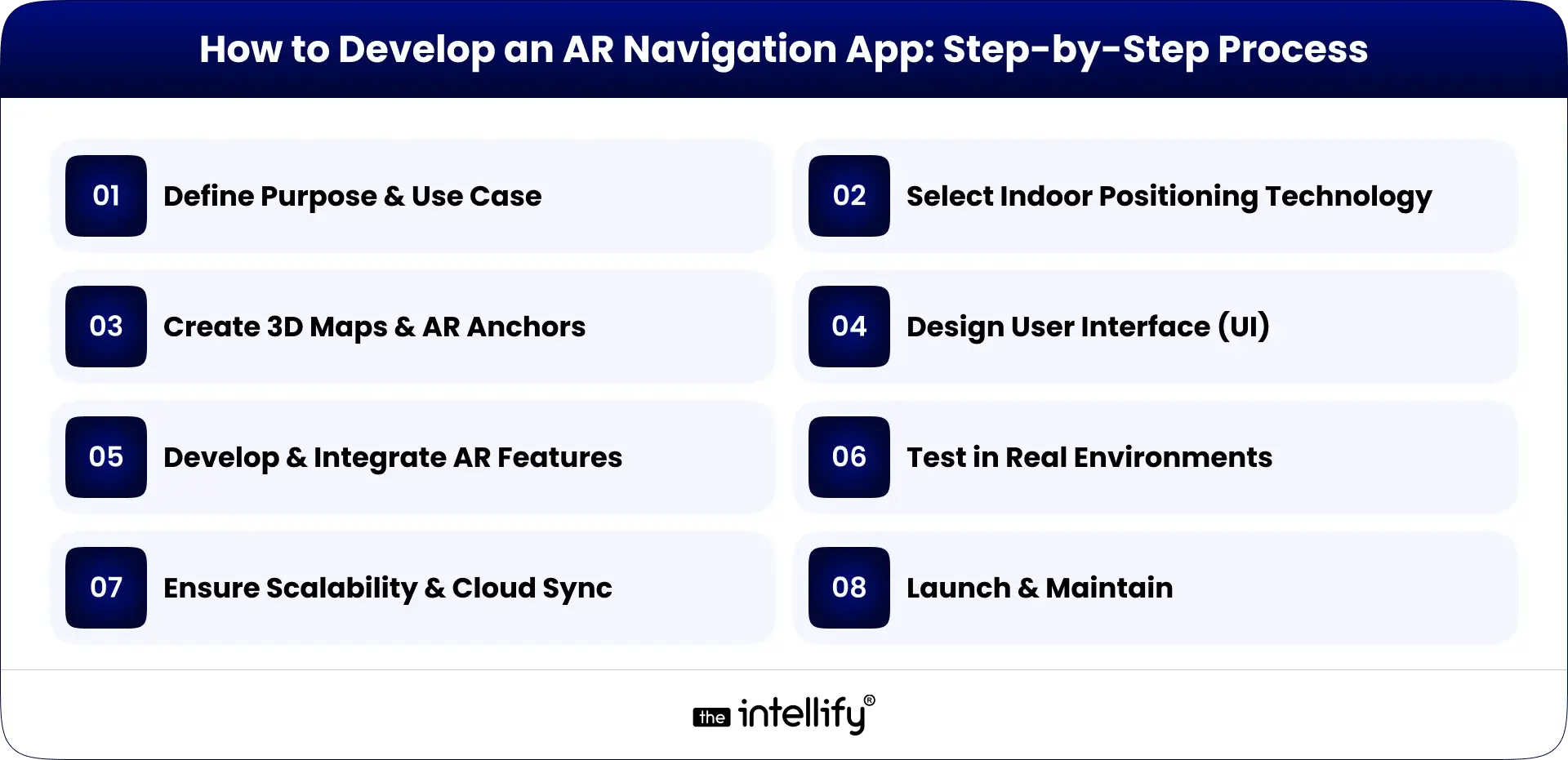
How to Develop an AR Navigation App: Step-by-Step Process

AR Navigation App Development Process

Building an AR navigation app involves multiple stages. Here’s a step-by-step guide:

1. Define Purpose & Use Case

  • Is your app for airports, malls, hospitals, or logistics?
  • Clear objectives shape the entire development.

2. Select Indoor Positioning Technology

  • GPS for outdoors, beacons, Wi-Fi, LiDAR, or visual markers for indoors.
  • The right choice ensures accuracy.

3. Create 3D Maps & AR Anchors

  • Developers build a digital twin of the environment.
  • Anchors are set at key points (entrances, corridors, exits) for AR overlays.

4. Design User Interface (UI)

  • Keep it simple: arrows, markers, text prompts.
  • Avoid clutter; the goal is clarity.

5. Develop & Integrate AR Features

  • Using ARKit, ARCore, or Unity for AR rendering.
  • Integrate with APIs like Google Maps or custom positioning systems.

6. Test in Real Environments

  • AR navigation needs real-world testing to fine-tune accuracy.
  • Developers simulate walking, driving, or indoor navigation scenarios.

7. Ensure Scalability & Cloud Sync

  • Cloud anchors allow multiple users to share the same AR guidance.
  • Essential for large venues like airports or malls.

8. Launch & Maintain

  • Once deployed, collect user feedback.
  • Regular updates improve accuracy and experience.

A successful AR navigation app balances accuracy, speed, and user-friendliness.


Common Challenges in AR Indoor Navigation

  • GPS Limitations Indoors: GPS signals weaken inside buildings, making alternative tech (beacons, Wi-Fi, LiDAR) necessary.
  • High Development Costs: Building accurate 3D maps and AR experiences requires time and investment.
  • Battery & Device Performance: Continuous AR rendering drains battery quickly. Developers need to optimize apps for efficiency.
  • User Privacy & Data Security: Location tracking raises privacy concerns. Businesses must ensure compliance with data regulations.
  • Scalability Issues: AR navigation for small venues is simpler, but scaling to entire airports or cities is complex.
  • Maintenance of Maps: Indoor layouts often change. Apps need regular updates to remain accurate.

Solution: Work with experienced AR developers, use hybrid positioning, and build easy content management systems.


Future of Augmented Reality Navigation

Future of AR Navigation

The future of AR navigation looks bright and promising:

  • Integration with AR Glasses: Devices like Apple Vision Pro or Meta’s AR glasses could make AR navigation hands-free and more natural.
  • 5G & Edge Computing: Faster data transfer enables real-time updates, reducing latency in AR overlays.
  • AI + AR Navigation: Artificial intelligence can predict user behavior and suggest smarter routes (e.g., avoiding crowded areas in malls).
  • City-Wide AR Navigation: Imagine walking anywhere in a city with AR overlays guiding you, replacing traditional maps entirely.
  • Accessibility Improvements: AR navigation will help people with disabilities. e.g., visually impaired users can get voice + AR guidance for safer mobility.

By 2025 and beyond, augmented reality navigation will move from “nice-to-have” to standard expectation in airports, malls, hospitals, and smart cities.


Why Choose The Intellify for AR Navigation App Development

If you’re considering AR navigation development, you need a trusted partner. That’s where The Intellify stands out:

  • Proven Expertise: With years of experience in AR/VR and mobile app solutions, The Intellify has built AR apps for global clients.
  • Custom Solutions: We don’t offer one-size-fits-all apps. Every AR navigation solution is tailored to the client’s venue, business goals, and users.
  • Cutting-Edge Tech: Our developers leverage ARKit, ARCore, Unity, and AI-powered positioning for unmatched accuracy.
  • Focus on UX: We prioritize intuitive, human-centric designs that users love.
  • Scalable Solutions: Whether you need AR navigation for a single hospital or an entire airport, we deliver apps that scale.
  • End-to-End Support: From consultation and design to deployment and maintenance, we stay with you throughout.

With The Intellify, you don’t just get an app, you get a strategic AR partner helping you lead the digital future.
Learn more on our AR Navigation App Solution page.


AR Navigation Development Company

Final Thought

Navigation has evolved from paper maps to GPS, and now to AR navigation where the real and digital worlds merge seamlessly. From AR GPS drive walk navigation outdoors to AR-based indoor navigation for malls, airports, hospitals, and warehouses, businesses are discovering both user experience and revenue gains.
As AR adoption accelerates in 2025, the question is no longer “Should we adopt AR navigation?” but rather “How fast can we implement it?”
If you’re ready to enhance customer journeys, optimize operations, and future-proof your business, The Intellify is your partner in building world-class AR navigation apps.


Frequently Asked Questions (FAQs)

1. What is AR Navigation?

AR Navigation, or augmented reality navigation, overlays digital directions on real-world surroundings through phones, AR glasses, or in-car displays. Instead of a flat map, users see arrows and markers guiding them in real time. From malls to airports, it makes movement easier. The Intellify builds AR navigation apps tailored for industries like retail, logistics, and automotive.

2. How does AR indoor navigation work?

AR indoor navigation uses Wi-Fi, Bluetooth beacons, QR codes, or visual markers to pinpoint a user’s location where GPS fails. It then overlays arrows and signs on a live camera feed to guide users through halls, gates, or rooms. The Intellify designs these systems to simplify complex spaces such as airports, malls, and hospitals.

3. What are the top use cases of AR navigation?

AR navigation is widely used in:

  • Airports & Stations – Easy wayfinding to gates and exits.
  • Malls & Retail – Store discovery and promotions.
  • Hospitals – Quick routes to wards and labs.
  • Museums & Exhibitions – Interactive visitor experiences.
  • Logistics – Faster item picking and routing.

The Intellify builds industry-specific AR navigation apps for these scenarios.

4. What are the benefits of AR navigation for businesses?

Key benefits include:

  • Better visitor experience.
  • Increased customer engagement.
  • Higher sales via AR promotions.
  • Operational efficiency in logistics and healthcare.
  • Stronger brand image.

With The Intellify’s AR expertise, businesses can gain these advantages while staying future-ready.

5. What challenges exist in AR indoor navigation?

Challenges include GPS inaccuracy indoors, reliance on Wi-Fi/beacons, higher development costs, device compatibility, and frequent updates. Still, with expert partners like The Intellify, businesses can overcome these hurdles through advanced tech and scalable solutions.

6. What is the future of AR navigation?

The future is immersive and hands-free with AR glasses, AI, and 5G. Soon, navigation will project directly on windshields, store aisles, or museum floors in real time. Early adopters will stand out, and The Intellify is already helping brands build future-ready AR navigation apps.

Top AR App Development Trends Every U.S. Business Must Know

Augmented Reality (AR) is no longer science fiction. It’s transforming business operations, customer engagement, and value creation, particularly in the U.S. markets. AR applications span diverse sectors from virtual clothing fitting to assisting physicians with real-time anatomical visualizations.

The development of AR applications in 2025 is more accelerated, intelligent, and profit driven. If you belong to retail, healthcare, real estate, or any service industry, understanding the upcoming innovations in AR is crucial to staying competitive.

This technology presents boundless opportunities, and through this article we will discuss the major trends and use cases while outlining what businesses need to know to leverage these insights.


AR Is Getting Smarter (And More Useful)

AI is now collaborating with AR to facilitate personalized and context-aware applications. AR apps no longer use overlays; by 2025 they consider user data, behavior, and object recognition to provide relevant assistance.

For example:

  • Augmented reality training programs can modify the level of challenge dynamically based on the user’s execution level.
  • Virtual apps for designing spaces can offer prompt suggestions for optimal arrangements based on room measurements.
  • AR medical applications can identify limbs and digitally annotate relevant pathology for precise evaluation.

This intelligence capability transforms AR from simply a visual supplement into a tool used for decision-making, increasing productivity, and self-analysis. Smarter AR is being embraced by organizations to help execute sophisticated undertakings, facilitate learning, and improve customer service.

As AI technology advances further, anticipate AR engagements becoming more seamless and less technological.


Mobile-First AR Experiences

Accessing AR is still primarily done via smartphones. As a matter of fact, mobile AR is forecasted to have over 2.4 billion users by 2025, with the US being at the forefront of adoption particularly in commerce and social media.

This is the reason for the current trend in developing modern AR applications: they focus on mobile phones first before moving on to other devices such as smart glasses and headsets.

Examples of mobile-first AR features are:

  • Face filters and product try-ons in social media
  • Retail, mall, and public place AR navigation aides
  • Real estate and museum interactive guides

These portable and easy-to-use experiences do not require expensive equipment, making it easier for businesses to adopt AR and users to embrace the technology. As 5G technology becomes more widespread, mobile AR technology’s ability to deliver graphics, real-time interactions without lagging, and smoother visuals will only improve.

For businesses in the United States, the takeaway is clear: your AR experience must align with mobile access if your customers utilize mobile devices.


AR Integration Across Industries

One of the most notable changes for 2025 is that AR is now transcending a few technologically inclined industries. At present, the AR business development model is being embraced across several sectors that, until recently, were considered digitally untouched.

AR Integration Across Industries

Real Estate:

Augmented reality (AR) in real estate enables virtual tours of properties, allowing prospective buyers to see potential alterations such as renovations, furniture arrangement, or even visualization of entire houses before actual entry. This technology helps reduce sales cycles and boosts confidence levels in buyers.

Retail and E-Commerce:

The seamless shopping experience is augmented with virtual try-ons, AR product demostrations, and AR-based instore navigation. Further, customers can scan product catalogs from the comfort of their homes and order new items through AR-embedded vending machines within shops.

Healthcare:

Augmented reality (AR) is revamping training, diagnostics, and patient education. Surgeons are utilizing AR overlays for procedural guidance. Moreover, AR in healthcare enables patients to understand treatments and conditions visually, enhancing comprehension.

Manufacturing & Logistics:

AR provides aid with assembly, equipment maintenance, and navigating warehouses one step at a time in terms of providing instructions through augmented reality systems. It increases precision and decreases downtime.

Education:

AR education apps aimed at younger audiences and adults have made learning interactive and more accessible than before.

The focus on cross-industry converging is in itself indicative of how efficient and effective augmented reality technology has become. In 2025, the question isn’t whether your sector “suits” augmented reality tech, but how imaginatively you apply it.


Faster, Cheaper Development

The expanding AR app market may be traced to a critical reason: augmented reality app development is more cost-effective and quicker than ever.

The widespread availability of cloud services, open-source tools, and proprietary frameworks such as ARKit, ARCore, and WebAR have greatly reduced development time.

Some Key Trend:

  • No-code/low-code platforms: These allow businesses to create basic AR experiences without a full engineering team.
  • WebAR: This form of Augmented Reality provides services thru mobile browsers rather than requiring an application download.
  • Reusable assets: 3D models, UI templates, and animation libraries save time and money.
  • Cloud streaming for AR: This facilitates the delivery of even complicated augmented reality features from the internet without the need for excessive local storage space on using devices.

Businesses will not need large amounts of investment for launching AR features. Development timelines have greatly improved while investment requirements have lowered significantly.

This ease of access lowers barriers to entry and makes undergoing exploratory research more appealing to businesses.


Rise of Augmented And Virtual Reality Shopping

The shift from reading product descriptions to virtual experiences using AR or VR is truly remarkable. Shopping is still acquiring its taste but one thing is for sure – augmented shopping is here to stay.

Virtual Try-On AR Shopping

Through AR-powered immersive shopping, customers can:

  • Using their phone camera, try on clothes, glasses, or makeup
  • Preview furniture in their space before purchase
  • Interact with 3D models of modern gadgets, appliances, or cars.
  • Use AR navigation apps and guides for in-store shopping navigation

These have been shown to boost customer confidence, reduce returns, and increase conversion rates. Retailers that use AR technologies are seeing 2 to 3 times customer engagement when compared to traditional e-commerce.

By 2026, immersive shopping is going to be an expectation rather than a novelty, especially for the younger audience. Businesses that provide AR shopping frameworks have better customer engagements, providing enhanced loyalty and advocacy.


Real-World AR Use Cases in the U.S.

AR technologies are already being utilized across different sectors within the US, and producing results. The following are some case studies demonstrating how organizations are leveraging AR for business growth and problem-solving.

Education:

An AR storytelling app is aiding kids aged 2-12 to learn by using animated characters and interaction. Parents and teachers utilize it to foster reading and cultural appreciation making learning enjoyable and impactful.

Healthcare:

In primary care platforms, AR enhances understanding of services and medical bills. Intuitive dashboards and streamlined workflows have improved user satisfaction and reduced the need for support.

Retail:

Users can identify and track their pets using unique QR codes with AR-based tracking systems. This feature accelerates the reunion process between pets and owners which alleviates distress and fosters trust.

Real Estate:

Potential buyers can remotely tour homes using 360° AR walkthroughs equipped with interactive features such as paint and furniture placement. This accelerates the buying decision.

The practicality and capacity to scale these solutions demonstrate that AR is not only a passing trend but is changing the way businesses operate.


Benefits of Integrating Augmented Reality into Business Processes:

Beyond novelty value, the implementation of AR technologies provides tangible advancements. These include:

Benefits of Integrating AR into Business

1. Better User Engagement: Through interaction with AR features, participants remain more engaged compared to traditional methods.

2. Smarter Decisions: With everything laid out clearly in AR, clients are presented with options and make swift, informed choices. This reduces regret and returns.

3. Enhanced Training Programs: Employees can practice real-life situations and develop their skills without incurring the costs of physical setups through AR simulations.

4. Higher Conversion Rates: Increased sales and reduced cart abandonment rates occurs through interactive previews and virtual demonstrations of products.

5. Stronger Brand Perception: Companies using advanced technologies are perceived as more trustworthy, more innovative, and more authoritative.

AR adds value at every level of your business, and its advantages encompass both externally-facing and internal perspectives. It enhances your customer engagement capabilities in immeasurable ways.


Ready to Explore AR for Your Business?

If engaging, smarter, and faster experiences is the goal for 2025, then AR is one of the optimal ways to achieve it. Perhaps you aim to:

  • Boost revenue with virtual try-ons
  • Improve productivity while training your employees
  • Refine the service delivery process using visual aids
  • Enhance customer support with walk-throughs hint guides

AR enables all of the above with amazing agility and minimal friction.

Need assistance determining how to effectively integrate AR in your business processes?


AR App development company


Final Thought

AR is not just a tech trend—it’s a business tool. And in 2025, it’s evolving into something smarter, simpler, and more accessible. If you’re looking to enhance user experiences, improve efficiency, and stay ahead of the competition, AR app development should be high on your strategy list.

View
Case Study