Customer Experience Automation Platform: Automate Work & Accelerate Experience

By Jalaj Shah
April 11, 2026
Summary:
Customer Experience Automation helps businesses handle customer interactions faster and more efficiently by combining AI and workflow automation. This blog explains how automation works across support, engagement, and service processes, along with its key capabilities, real-world use cases, and business impact. It also covers implementation steps, platform selection criteria, and emerging trends, helping businesses build scalable and consistent customer experience systems without increasing operational complexity.
Customer Experience Automation: A Practical Overview for Modern Businesses
Customer experience automation isn’t as complex as it sounds. In practical terms, it’s about making customer interactions faster and smoother without depending entirely on manual effort.
When a customer reaches out, the system understands the request and either responds instantly or triggers the next step. That’s the foundation.
Automating tasks vs automating experiences
There’s a clear difference here. Automating tasks means handling individual actions like sending emails or updating tickets. Automating experiences connects those actions into a complete journey from the first interaction to resolution and follow-ups.
That shift is where real value comes in.
Instead of disconnected tools, businesses start linking support systems, communication channels, and backend operations. Everything works together, even if the customer doesn’t notice it directly.
Role across the customer journey
Automation supports different stages without breaking the flow. Before a purchase, it answers questions quickly. During usage, it guides and assists. After interactions, it resolves issues and collects feedback.
It’s less about speed alone and more about removing friction completely.
Why Customer Experience Automation Is Becoming a Business Priority
This shift has been building for a while.
Customers expect quick responses and consistent experiences. They don’t want to repeat themselves or wait across channels. Whether it’s chat, email, or apps everything should just work.
On the business side, the pressure looks different.
- Rising customer expectations: Customers now expect instant, accurate, and consistent replies across all touchpoints. Delays or mismatched responses quickly lead to frustration.
- Increasing interaction volume: The number of customer queries has grown significantly, especially with multiple communication channels in play.
- Limitations of manual processes: Support teams often get stuck handling repetitive queries. Over time, response times slow down and service quality becomes inconsistent.
- Scaling challenges without increasing cost: Hiring more people isn’t always sustainable. Businesses need ways to scale without increasing operational costs.
- Competitive pressure: Companies that offer faster and smoother experiences naturally gain an advantage.
At some point, it becomes clear manual systems alone can’t keep up anymore.
How Customer Experience Automation Works
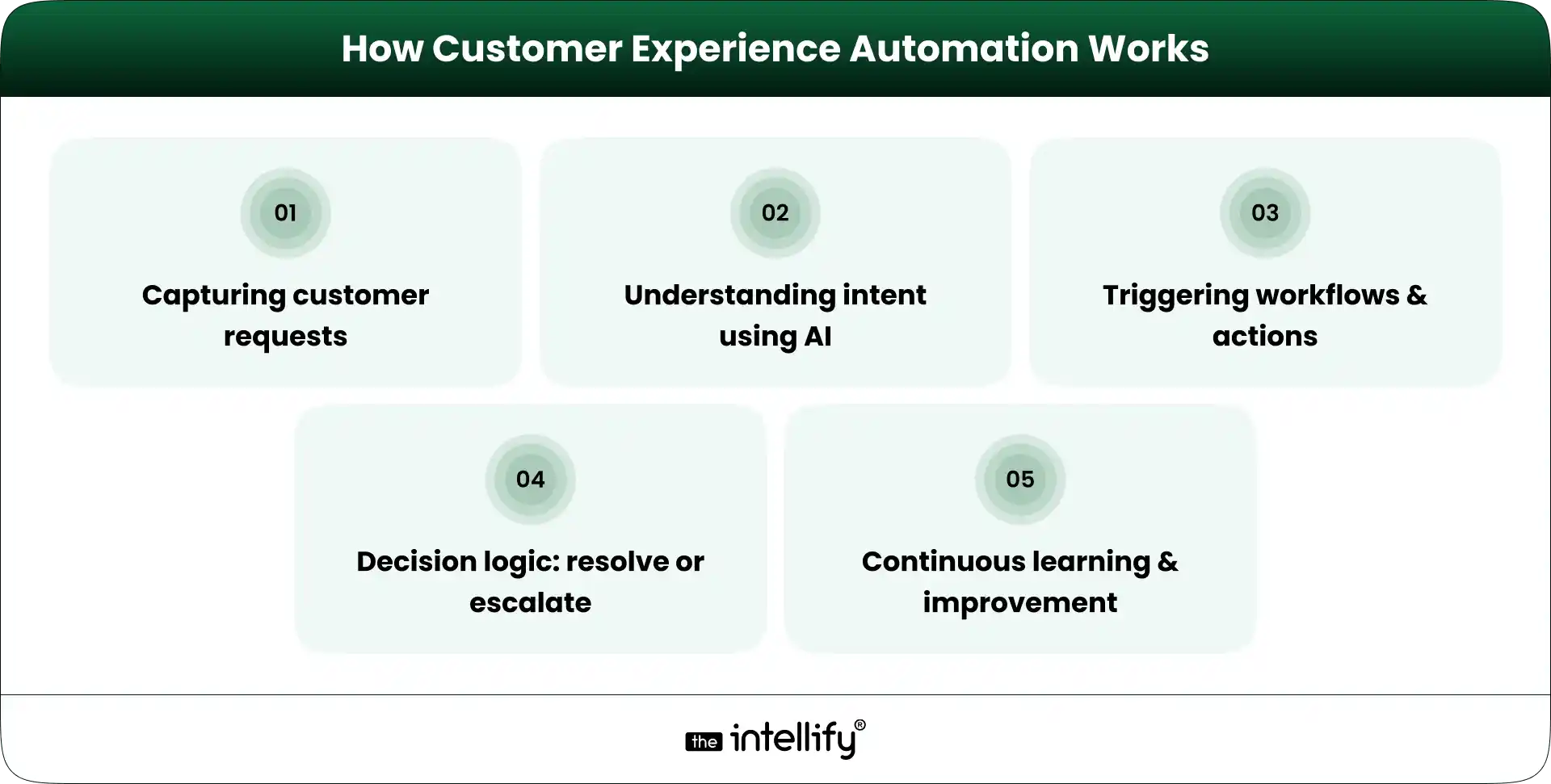
The process behind customer experience automation is structured and logical.
Capturing customer requests
Customer queries come in through channels like chat, email, apps, or support portals. The system collects and centralizes them.
Understanding intent using AI
AI analyzes the request and identifies what the customer actually needs, not just the keywords used.
Triggering workflows and actions
Based on intent, predefined workflows are activated. These could include responses, updates, or backend actions.
Decision logic: resolve or escalate
Simple queries are resolved automatically. More complex issues are routed to the appropriate human agent.
Continuous learning and improvement
The system improves over time by learning from past interactions and refining its responses.
It may look seamless, but there’s a structured engine working behind it.
Core Capabilities That Power Customer Automation Solutions
A Customer Experience Automation Platform relies on several core capabilities.
- Conversational AI : AI chatbots and virtual assistants enables real-time conversations with customers, handling queries naturally rather than through rigid scripts.
- Workflow automation engines: Manage actions such as routing requests, triggering notifications, and updating systems.
- Omnichannel communication handling: Ensures consistent interactions across chat, email, apps, and other platforms.
- CRM and system integrations: Connects with internal tools to fetch and update customer data in real time.
- Analytics and performance tracking: Provides insights into response times, resolution rates, and overall performance.
- Personalization through customer data: Uses historical data to tailor responses and improve relevance.
These capabilities work together to create a unified system.
Key Customer Journeys That Can Be Automated End-to-End
Customer experience automation applies across multiple journeys, not just support.
New user onboarding and guidance
Helps users get started with step-by-step assistance without manual involvement.
Handling common support queries instantly
Resolves frequently asked questions quickly, reducing wait times.
Order, booking, or service status updates
Provides real-time updates without requiring customers to ask repeatedly.
Scheduling, reminders, and confirmations
Automates appointments, alerts, and follow-ups.
Feedback collection and follow-ups
Captures feedback at the right time, improving response quality.
Complaint handling with escalation paths
Ensures complex issues are escalated properly while maintaining structure.
When these journeys are connected, the experience feels smooth rather than fragmented.
Key Benefits of Customer Experience Automation for Businesses
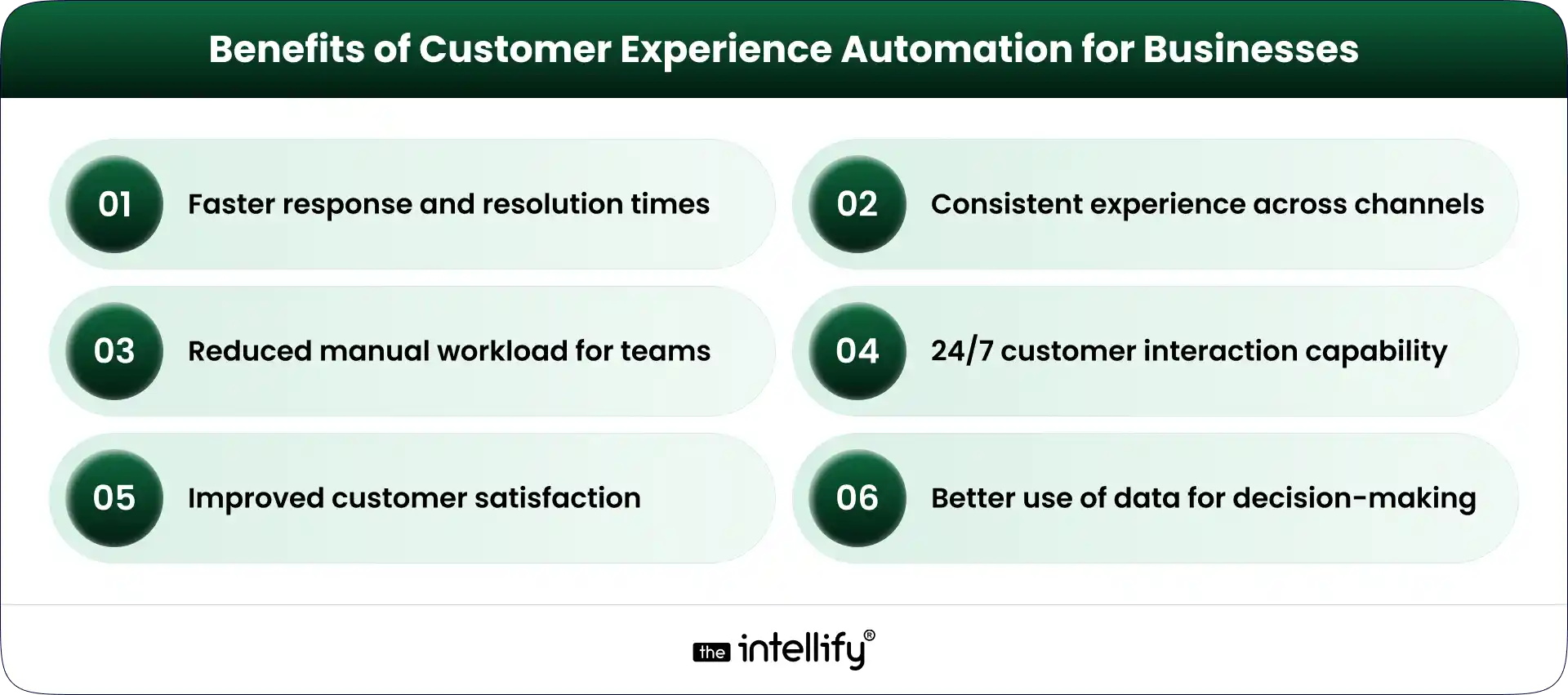
The impact becomes visible in everyday operations.
Faster response and resolution times
Customers receive immediate assistance without waiting in queues.
Consistent experience across channels
The quality of interaction remains the same, regardless of the platform.
Reduced manual workload for teams
Teams can focus on complex tasks instead of repetitive queries.
24/7 customer interaction capability
Support remains available at all times.
Improved customer satisfaction and retention
Faster and smoother interactions lead to better customer experiences.
Better use of data for decision-making
Every interaction generates insights that help improve processes.
These are practical improvements businesses notice quickly.
Industry Applications of Customer Experience Automation in Action
Customer experience automation is applied differently across industries.
1. E-commerce & Retail: Supports order tracking, returns, and high query volumes during peak periods.
2. Banking & Financial Services: Handles account queries, transaction updates, and secure communication.
3. Healthcare Providers: Manages appointment scheduling, patient communication, and reduces administrative workload.
You can also explore case study – AI Carebot: Healthcare Chatbot that personalizes patient interactions and enhances care delivery.
4. Insurance: Helps with claims tracking and policy-related queries while managing large volumes.
5. Travel & Hospitality: Supports bookings, cancellations, and real-time travel updates.
6. Telecom & Subscription Services: Handles billing queries, service requests, and plan management.
7. SaaS & Digital Platforms: Improves onboarding, product guidance, and subscription lifecycle communication.
Each industry uses it differently, but the goal stays the same efficiency with consistency.
Operational Challenges That Indicate the Need for Automation
Some challenges clearly signal the need for automation.
1. Slow response times and inconsistent service: Customers experience delays and uneven support quality.
2. Overloaded support teams: Teams spend most of their time handling repetitive queries.
3. Fragmented customer data: Information is scattered across systems, making it harder to respond accurately.
4. Difficulty scaling during high-demand periods: Operations struggle to handle spikes in demand.
5. Limited personalization capabilities: Without unified data, personalization becomes difficult.
These issues tend to grow if not addressed early.
How to Choose the Right Customer Experience Automation Platform
Choosing the right platform requires focusing on fit, not just features.
- Ease of integration with existing systems: The platform should work smoothly with your current tools.
- Flexibility in designing workflows: It should allow changes as your processes evolve.
- Accuracy of AI in understanding queries: The system must correctly interpret customer intent.
- Support for multiple communication channels: Ensures consistency across platforms.
- Real-time visibility into performance: Helps track and improve system efficiency.
- Data security and compliance readiness: Critical for protecting sensitive customer information.
The right platform should support your operations, not complicate them.
Steps to Successfully Implement Customer Experience Automation
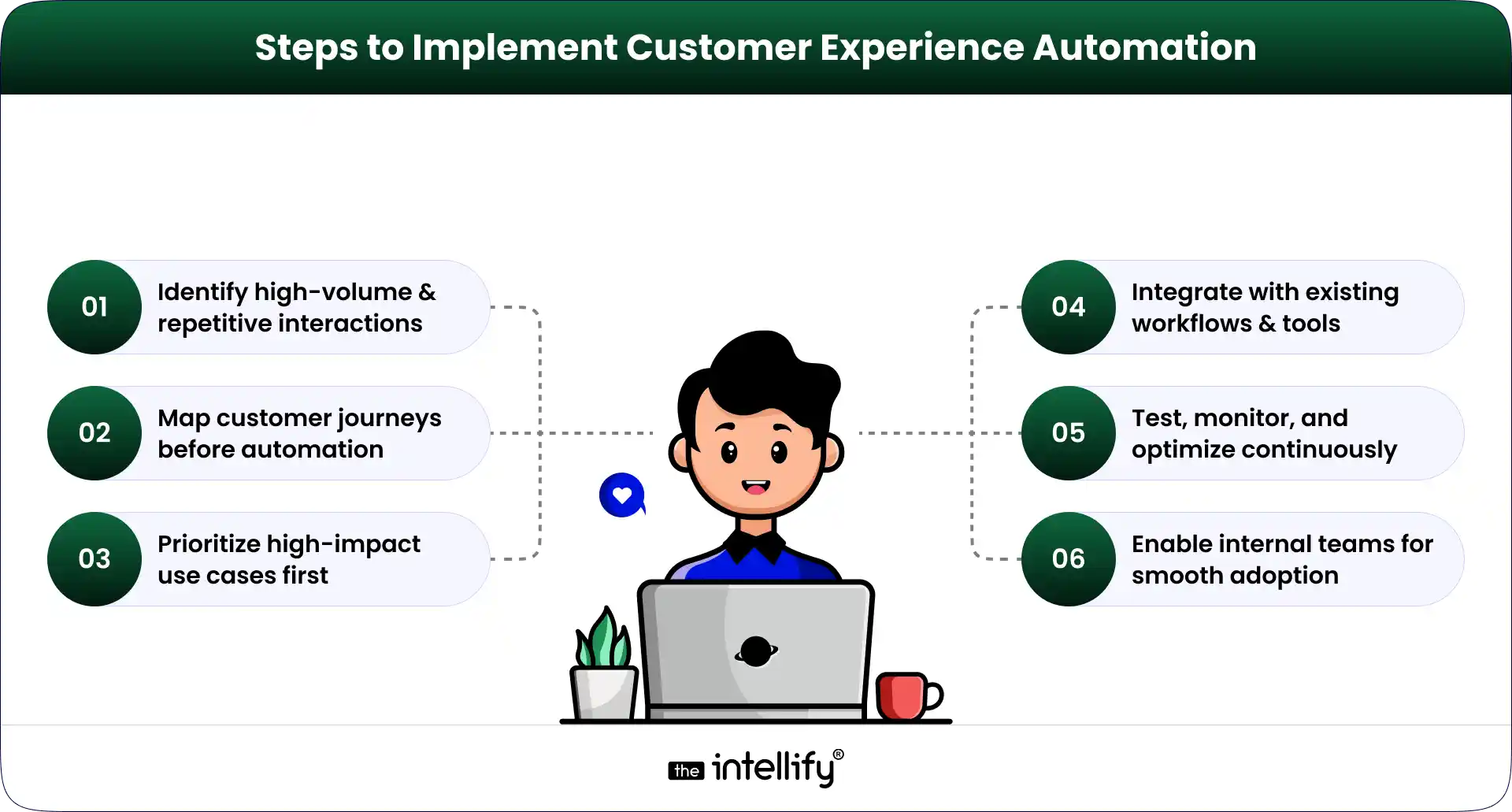
Implementation requires a structured approach.
- Identify high-volume and repetitive interactions: Start with areas that have the most impact.
- Map actual customer journeys before automation: Avoid assumptions focus on real behavior.
- Prioritize high-impact use cases first: Start small and scale gradually.
- Integrate with existing workflows and tools: Ensure smooth adoption without disruption.
- Test, monitor, and optimize continuously: Automation improves over time with consistent refinement.
- Enable internal teams for smooth adoption: Teams should understand how to work alongside automation.
Skipping structure here usually creates more problems later.
Ensuring the Right Balance Between Automation and Human Support
Automation works best when balanced with human involvement.
- Defining boundaries for automation: Not every interaction should be automated.
- Handling complex or sensitive interactions manually: Human judgment is still essential in certain cases.
- Creating seamless transitions between systems and agents: Customers shouldn’t have to repeat their issues.
- Maintaining personalization and empathy: Even automated responses should feel relevant and thoughtful.
Customers can easily sense when experiences feel too robotic.
Emerging Trends in CX Automation
Customer experience automation continues to evolve.
- Predictive and proactive support systems: Systems identify and resolve issues before customers ask.
- AI-driven personalization at scale: Experiences are tailored based on customer data.
- Growth of conversational interfaces: Chat and Voice AI are becoming primary interaction channels.
- Automation beyond support: Expanding into the full customer lifecycle.
- Deeper integration with business operations: CX systems are becoming part of core business processes.
The shift is clearly moving toward proactive engagement.
How Businesses Are Structuring Scalable Customer Experience Systems
Businesses are moving toward more connected systems.
- From standalone tools to connected systems: Tools are no longer used in isolation.
- Combining AI with workflow automation: Both are used together to create efficient processes.
- Aligning customer experience with backend operations: Ensures consistency across the entire system.
- Building scalable and adaptable frameworks: Flexibility is becoming a priority.
- Focusing on long-term efficiency: Businesses are moving away from quick fixes.
It’s less about tools and more about building systems that last.

Final Thought
Customer experience automation is no longer optional it’s becoming essential. The key is not just adopting it, but implementing it properly.
Start with clear use cases, scale gradually, and focus on real customer journeys. At the same time, maintain the balance between automation and human interaction.
In the end, customers don’t think about the technology behind the scenes. They just expect things to work quickly, smoothly, and without friction.
Frequently Asked Questions (FAQs)
1. What is Customer Experience Automation, and how does it work?
Customer Experience Automation uses AI and automation to handle customer interactions automatically. It captures queries, understands intent, and responds or triggers actions in real time, helping businesses resolve requests faster and more efficiently.
2. What is a Customer Experience Automation Platform?
A Customer Experience Automation Platform combines AI, workflows, and communication channels into one system. It helps businesses manage customer interactions end-to-end across support, engagement, and service processes.
3. How is customer service automation different from customer experience automation?
Customer service automation focuses only on support tasks like answering queries. Customer experience automation covers the full journey, including onboarding, engagement, and follow-ups, creating a more connected experience.
4. What are the key benefits of Customer Experience Automation?
It improves response times, ensures consistent communication, reduces manual workload, and enables 24/7 support. It also helps businesses scale operations while maintaining customer satisfaction.
5. Where can Customer Experience Automation be used in a business?
It can be used for onboarding, handling support queries, order updates, scheduling, feedback collection, and complaint management across different customer touchpoints.
6. How do you choose the right Customer Experience Automation Platform?
Choose a platform that integrates easily with your systems, offers flexible workflows, supports multiple channels, and provides accurate AI understanding along with strong data security.


Written By, Jalaj Shah
The COO and Co-Founder of The Intellify. Jalaj enjoys experimenting with new strategies. His posts are fantastic for businesses seeking innovative development ideas. Discover practical insights from his engaging content.

Where AI Voice Agents Fit Into a Modern DPC Platform
Summary: AI voice agents can become a practical part of a modern Direct Primary Care (DPC) platform by handling routine phone interactions, appointment scheduling, membership questions, reminders, and call routing. This guide explains where voice AI fits within the DPC technology stack, what tasks it should and shouldn’t handle, HIPAA considerations, integration requirements, and how […]
AI Appointment Scheduling in Healthcare: How It Works, Key Benefits & Costs in 2026
Summary: AI appointment scheduling helps healthcare organizations automate booking, reduce no-shows, optimize provider schedules, and improve patient access to care. This guide explains how AI scheduling works, its key benefits, essential features, implementation costs, EHR integration requirements, and future trends shaping healthcare operations in 2026. A missed appointment doesn’t just create an empty slot in […]
How to Build AI for Real Estate Investment and Market Analysis
Summary: AI for real estate investment is helping investors and property businesses make smarter, faster, and more data-driven decisions. This guide explains how to build an AI-powered real estate investment platform, covering essential features, data sources, AI technologies, market analysis capabilities, development steps, business benefits, and future trends shaping the real estate industry. Real […]
Where AI Voice Agents Fit Into a Modern DPC Platform
Summary: AI voice agents can become a practical part of a modern Direct Primary Care (DPC) platform by handling routine phone interactions, appointment scheduling, membership questions, reminders, and call routing. This guide explains where voice AI fits within the DPC technology stack, what tasks it should and shouldn’t handle, HIPAA considerations, integration requirements, and how […]
AI Appointment Scheduling in Healthcare: How It Works, Key Benefits & Costs in 2026
Summary: AI appointment scheduling helps healthcare organizations automate booking, reduce no-shows, optimize provider schedules, and improve patient access to care. This guide explains how AI scheduling works, its key benefits, essential features, implementation costs, EHR integration requirements, and future trends shaping healthcare operations in 2026. A missed appointment doesn’t just create an empty slot in […]
How to Build AI for Real Estate Investment and Market Analysis
Summary: AI for real estate investment is helping investors and property businesses make smarter, faster, and more data-driven decisions. This guide explains how to build an AI-powered real estate investment platform, covering essential features, data sources, AI technologies, market analysis capabilities, development steps, business benefits, and future trends shaping the real estate industry. Real […]
0
+0
+0
+0
+Committed Delivery Leads To Client Satisfaction
Client Testimonials that keep our expert's spirits highly motivated to deliver extraordinary solutions.

Christopher Seny
My experience working with The Intellify, has been a great experience. The team has a wealth of expertise in the tech space. Working with the intellify was a growing experience for me, I learned a lot. The team keeps great communication & responds fast to new ideas & suggestions. The team also provides great suggestions & solutions as well. I couldn’t imagine working with anybody else on this project & it has been a blessing working with, The Intellify.

Izandi Serdyn
The Intellify delivered a platform from scratch, involving the client at every stage. The team was communicative, responsive, and punctual throughout the engagement. Virtual meetings and emails ensured seamless project management. Customers can expect a team that can work fast.

Kya Johnson
The app serves as an effective introduction for users to the product and its characters. Responsive and faithful to initial requirements, The Intellify’s team exceeded initial expectations. Internal stakeholders were particularly pleased with their communication.

Stefan Wyk
Working with The Intellify to develop our website was an outstanding experience. Their team displayed exceptional professionalism, creativity, and technical expertise throughout the entire process. The final product exceeded our expectations, delivering a sleek, user-friendly, and highly functional website. We highly recommend The Intellify to anyone in need of top-tier web development services.

Steve Thorpe
The Intellify’s work has been met with high praise from internal and external stakeholders. The team is efficient, diligent, and reliable in their service. They go above and beyond in terms of communication and project management. The Intellify is a responsive vendor that gets the job done.

Tal Dotan
I’ve been working with The Intellify for the last 3 years. During this period of time we’ve planned and executed projects in both small and large scale. Working with The Intellify was and still is the best decision I’ve made when rising up Divo, I strongly recommend to work with them in any type of project.


 +1-302-803-4983