How Augmented Reality in Education is Transforming Learning Apps for Kids

Summary:
Augmented Reality in education is transforming how children learn by making lessons more interactive, visual, and engaging. Instead of relying only on text or videos, AR allows kids to explore 3D models, animations, and real-world simulations, improving understanding and retention. This blog covers how AR learning apps work, their key features, real-world applications, benefits, challenges, and how they are shaping the future of digital learning experiences for children.


The Shift Toward Interactive Digital Learning for Kids

Kids today are growing up in a world where technology naturally helps them learn. Digital tools are helping kids learn about new things in fun and interesting ways, both in the classroom and at home. Mobile learning apps have been a useful part of this change because they let kids practice math, language, and science outside of the classroom.

But a lot of educational apps still mostly use videos, reading, or quizzes. These tools can give kids useful information, but they don’t always keep them interested. Young learners often learn better when they can do things with what they learn instead of just reading about them.

This is where Augmented Reality (AR) is starting to change the way we learn. AR lets kids explore visual models, animations, and interactive objects in the real world by mixing digital and real-world elements. This makes learning more interesting and keeps kids interested in what they’re learning.


Understanding Augmented Reality in Education

Augmented Reality (AR) in Education

Using a smartphone or tablet camera, augmented reality (AR) adds digital things like 3D models, animations, or visual objects to the real world. The app can put interactive digital content on the screen when kids scan a surface or an image. This makes learning more visual and fun.

AR lets students learn about ideas in educational apps by letting them interact with them instead of just reading about them. Instead of looking at pictures that don’t move, kids can see and touch things like planets, animals, or scientific models. This hands-on method helps kids learn better and makes learning more fun.

Businesses and educational platforms looking to implement this technology can explore dedicated AR for education solutions to create interactive and scalable learning experiences.


Why AR Learning Apps Are Growing in Children’s Education

People are using AR learning apps more and more because they make digital learning more fun. Children can learn by looking at and touching things instead of just watching lessons or reading explanations.

Parents and teachers also like tools that keep kids interested while they learn important things. AR learning apps help with this by encouraging kids to be curious, explore, and take part, which keeps them interested and involved in the learning process.


Core Features That Make AR Educational Apps Effective

AR educational apps include several features that help turn simple lessons into engaging learning experiences.

Interactive 3D models allow children to explore objects such as planets, animals, or historical landmarks from different angles. This helps them understand structure and movement more clearly.

Real-world object recognition is another useful capability. Some apps can recognize images or objects through the device camera and display additional information or animations related to the topic.

Other helpful features include:

  • Interactive storytelling, where storybooks come alive with animated scenes
  • Gamified learning activities that motivate children through small challenges
  • Visual simulations that simplify complex subjects like science or geography

These features help create learning experiences that feel both educational and engaging.


How AR Learning Apps Help Kids Understand Complex Concepts

Some educational topics can be hard for kids to understand when they are only shown in text or diagrams. AR makes these ideas easier to understand by letting students see and interact with them.

For example, A kid who is learning about space can look at a 3D model of the solar system and see how the planets move around the sun. They don’t have to guess how the system works; they can see it in action and touch the model.

AR learning apps also make people want to learn more. Kids become more interested in a subject when they touch and play with things. Learning is more fun and memorable when you do things like look at 3D models of the human body or find real-world objects to learn new words.

 

AR Education App Development Services


Real-World Applications of AR in Children’s Learning Apps

Augmented Reality is already being used in many educational apps designed for children. These applications demonstrate how AR can make learning more interactive across different subjects.

Some common examples include:

  • AR storybooks that bring characters and scenes to life while children read
  • Science and STEM learning apps that display interactive models of animals, planets, or experiments
  • Language learning apps that connect words with real-world objects
  • Geography and history tools that visualize maps, landmarks, and historical environments
  • Creative exploration apps where children can see their drawings appear in the real environment

These experiences allow children to explore concepts in a more active and engaging way.

One example is the RainbowMe AR storytelling app, where kids scan storybook pages and watch characters come to life around them. This turns reading into an interactive experience, making stories easier to follow and more enjoyable to learn from. You can learn more about this real-world example here:- https://theintellify.com/work/rainbowme-ar-application-for-storytelling/


Key Considerations When Building AR Educational Apps for Kids

It takes a lot of thought and planning to make AR educational apps for kids. The goal is not just to use cutting-edge technology, but also to make learning experiences that are easy to understand and useful.

One important thing to consider is creating age-appropriate interfaces that are right for kids. Kids should be able to use the app without any trouble thanks to clear visual cues and easy-to-follow instructions.

Another important thing is to find a balance between learning and entertainment. Engaging visuals can help grab people’s attention, but the main goal should always be to help them learn.

Developers also need to make sure that the app works well on a variety of devices. Experiences that kids and parents can trust are those that have good performance, easy-to-use controls, and a safe place to learn.

If you’re planning to build a scalable and child-friendly AR solution, working with experts in AR app development can help you avoid common challenges and accelerate your product launch.


Challenges in Developing AR Learning Apps for Children

Although AR offers exciting opportunities for education, developing these apps can also present challenges. Integrating AR technology requires specialized development tools and careful testing to ensure that digital objects appear correctly in the real environment.

Device compatibility is another challenge because not all smartphones or tablets support advanced AR features. This can limit accessibility for some users.

Another important challenge is creating meaningful educational content. AR visuals alone cannot guarantee effective learning. Developers must carefully design lessons and interactions so children truly understand the concepts being presented.


The Future of AR-Powered Learning Apps for Kids

As technology keeps getting better, the future of AR in kids’ education looks bright. As mobile devices get better, AR learning experiences should become more realistic and seamless.

In the future, educational apps may offer personalized learning experiences by changing lessons based on how kids interact with the material. Combining with AI-powered learning platforms could also help make educational tools that are more flexible and responsive.

Augmented reality (AR) may also become more common in classrooms, where teachers use interactive visual models to help students understand difficult topics. Over time, this mix of digital and real-world learning could change the way kids learn about things.


Conclusion

Augmented Reality is gradually transforming how children interact with educational apps. By blending digital content with the real world, AR creates learning experiences that are interactive, visual, and engaging.

Instead of simply reading information, children can explore concepts through interactive models and animations. This approach often helps them understand ideas more clearly while making the learning process more enjoyable.

As educational technology continues to evolve, AR-powered learning apps are likely to play an important role in the future of digital education. By encouraging curiosity, exploration, and visual learning, AR has the potential to make learning more meaningful for young learners.

 

AR learning app solutions


Frequently Asked Questions (FAQs)

1. How do AR learning apps make digital learning more interactive for kids?

AR learning apps make digital learning more interactive by using 3D models and real-world overlays. Kids can explore, move, and interact with objects instead of just reading or watching. This hands-on experience improves understanding, boosts curiosity, and makes learning more engaging and fun.

2. What makes AR learning apps different from regular learning apps?

AR learning apps differ from regular apps by offering immersive, interactive experiences. Instead of static text or videos, they allow kids to interact with virtual objects in real environments. This helps learners better visualize concepts and improves retention compared to traditional digital learning methods.

3. What subjects benefit the most from AR educational apps?

Subjects that rely on visualization benefit the most from AR educational apps. These include science, geography, astronomy, and language learning. AR helps students understand complex topics by turning abstract ideas into interactive 3D experiences that are easier to grasp and remember.

4. Why do AR-based learning apps keep kids more engaged?

AR-based learning apps keep kids engaged by turning lessons into interactive experiences. Children can touch, explore, and experiment with digital objects, making learning feel like play. This active involvement increases attention span and helps kids retain information more effectively.

5. Can AR learning apps be used outside the classroom?

Yes, AR learning apps can be used anywhere with a smartphone or tablet. They allow students to learn at home, while traveling, or during free time. This flexibility encourages continuous learning and helps kids stay engaged even outside traditional classroom settings.

6. How will AR shape the future of children’s learning apps?

AR will shape the future of learning apps by making education more immersive and personalized. As technology advances, apps will adapt to individual learning styles and provide real-time interactive experiences. This will make learning more effective, engaging, and tailored to each child’s needs.

How Augmented Reality Is Redefining the Furniture Industry

Summary
Augmented Reality is changing how people explore and buy furniture by allowing them to visualize products in their own spaces before making a purchase. This technology helps reduce uncertainty, improves buying confidence, and creates a more interactive shopping experience. In this blog, we explore how AR is being used across the furniture industry, its benefits for businesses and customers, and what the future of AR in furniture retail may look like.

Augmented Reality(AR) puts digital elements into the real world, using a smartphone or tablet. Rather than wonder how a piece of furniture might appear in your house, AR shows you immediately.

Imagining what it will look like in one’s home has always been part of buying furniture. We imagine how a sofa will sit in the living room or if a table will coordinate with the wall colour. Even online shopping sounds doubtful, and that’s with all of its ease.

Customers demand greater certainty before making a purchase, particularly when buying high-value products. They want confidence, not guesswork. AR is becoming so crucial, which is the reason. It’s not just enhancing the shopping experience it’s transforming how furniture is experienced, marketed and sold.


The Furniture Industry Before AR

Furniture retail relied on physical showrooms before AR.” Customers needed to visit stores to try products, touch materials and understand size.

Shopping moved online, and convenience improved, but so did uncertainty. Photos and measurements were helpful, but a lot of shoppers still found it difficult to picture how a product would look in their own homes.

This often led to hesitation. It takes a lot of confidence to buy big purchases such as beds, wardrobes, or sofas. Without it, buyers postpone decisions or skip purchases entirely.

Return rates, too, became a problem. Products returned when expectations and reality failed to align. Resource taxes increased the burden on brands, creating additional costs and operational pressure.


 What Augmented Reality Means for the Furniture Industry

From a broader business perspective, AR in furniture is more than a feature. It connects digital browsing with the real-world environment. Instead of relying only on static images, customers can interact with products. They can place furniture inside their own rooms and see how it fits before buying.

This shifts the buying journey from imagination-based to experience-based. Customers move from guessing to seeing.

AR also supports a connected retail journey. A shopper may explore online, visualize at home, and visit a store for final confirmation. Since AR works directly on smartphones, it is far more practical for furniture retail than more complex technologies.


How Augmented Reality Is Transforming the Customer Experience

Real-Time Room Visualization

One of the biggest advantages of AR is true-to-scale placement. Customers can position furniture in their room and view it from different angles.

They can check spacing, alignment, and overall fit. This makes measurements easier to understand because the product appears in context.

Personalization & Customization

AR enables customers to test different colors, finishes, and materials. A wooden table will always look darker or lighter.

Customers can experiment with layout options and compare styles without needing to move tangible goods. It turns the process of writing to engage with readers.

Confident Buying Decisions

Customer skepticism naturally diminishes when they can visualize how a product will fit in their own home. They are more confident in their decision. The clearer the visualization, the clearer the decision.


Business Benefits of AR for Furniture Brands

1. Increased Conversion Rates

If customers are confident, they will make the purchase. AR eliminates ambiguity that can lead to indecision.

2. Reduced Product Returns

More visualization leads to fewer surprises later in delivery. This means decreasing return rates when customers know what to expect.

3. Higher Customer Engagement

Interactive experiences increase dwell time on websites and apps. In fact, customers are more engaged when they proactively explore products.

4. Stronger Brand Positioning

Offering AR makes brands look innovative and customer-focused. This creates an image that is modern and aspirational.

5. Improved Customer Retention

Positive buying experiences create trust. Happy customers are returning customers and potential brand advocates.


AR for furniture solutions


Examples of Augmented Reality in the Furniture Industry

IKEA

After all, IKEA was among the first furniture brands to come up with AR by introducing the IKEA Place app. An app that lets you see life-sized models of furniture sitting in your living room using your smartphone camera.

This allows shoppers to visualize how a sofa, chair or table would look and fit in their space before buying it. This new feature employed early is what helped IKEA make online furniture shopping more feasible and assured.

Wayfair

Wayfair embeds augmented reality directly in its mobile app, allowing shoppers to see how furniture would look in their homes. Users can put items in their room and see them from various angles to measure size and placement.

Because Wayfair sells furniture primarily online, this feature assists customers in sorting through their options more easily and feeling more confident about selecting large items.

Overstock

Similarly, Overstock implemented augmented reality to enhance the online shopping for furniture. The mobile app allows customers to visualize furniture items in their own rooms before they place an order.

That makes it easier to conceptualize scale and layout, which in turn reduces uncertainty when ordering furniture online.

Amazon

AR View a feature that enables customers to see what furniture and home products would look like in their homes with a smartphone.

Shoppers can move virtual items around and see how they compare with other furniture. This functionality enhances the online browsing of products and aids customers in faster purchase decision-making with confidence.

KisTag

KisTag has explored augmented reality to help customers visualize kitchen furniture and storage solutions within their space. This allows users to understand layout, size, and placement before selecting a product.

Kis Tag also collaborated with The Intellify to implement an AR experience for kitchen furniture visualization. To explore the complete project implementation and results, readers can view the detailed case study.:-  https://theintellify.com/work/kistag-ar-and-vr-solution/.


How to Incorporate AR into Your Furniture Business

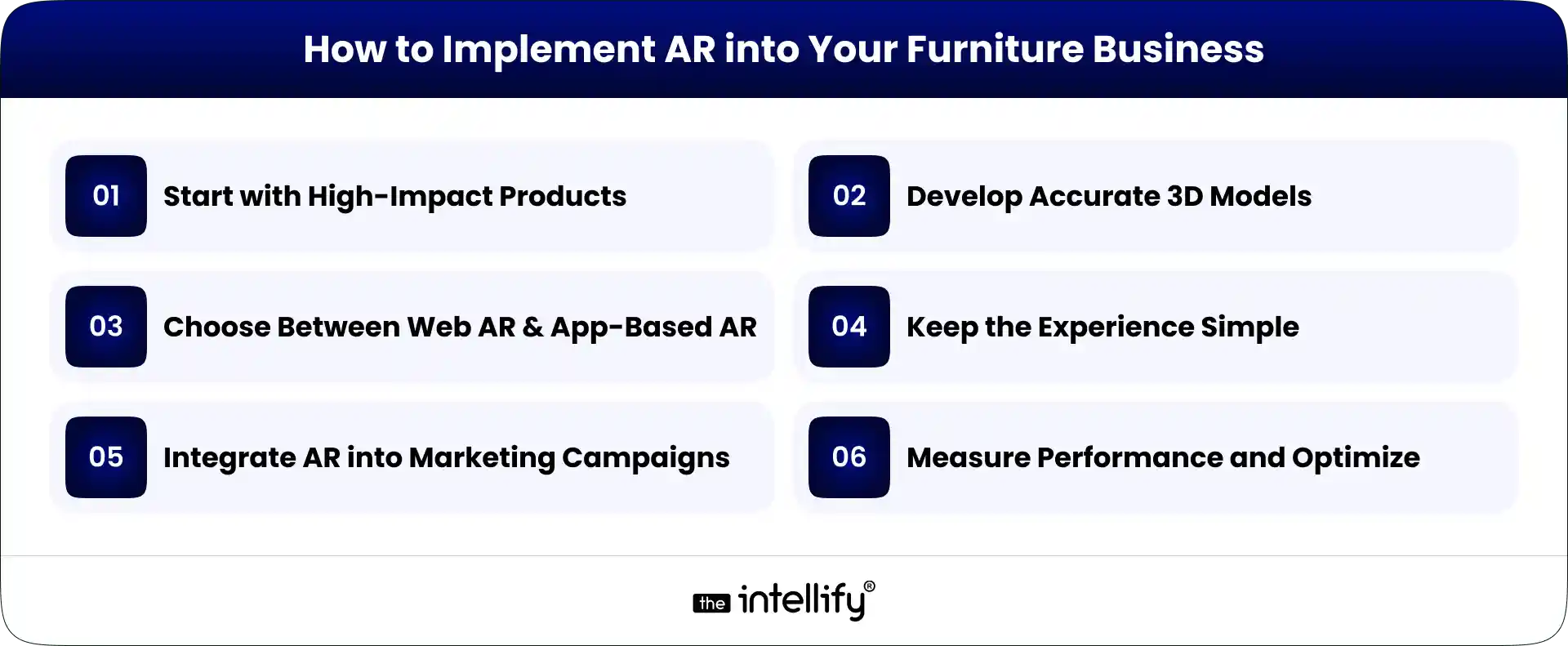
Implement AR into Furniture Business

Start with High-Impact Products

First, focus on products in which size and fit are of the greatest importance, like sofas, beds and dining tables. These matters are best aided through visualization. Launching AR with selected products allows you to test impact before expanding further.

Develop Accurate 3D Models

Accuracy builds trust. Models have to closely mirror real-world item dimensions, materials and colors. When customers see realistic visuals, confidence increases. Poor rendering can create confusion instead.

Choose Between Web AR and App-Based AR

Web AR enables customers to use the feature straight from a browser. That way you don’t have to download it. App-based AR can have more additional features, so the right option is highly dependent on your customer behavior and goals.

Keep the Experience Simple

It should be a simple and straightforward process. If customers find this feature hard to activate, they might just not use it. How easy it is to figure things out, whether the program loads up quickly.

Integrate AR into Marketing Campaigns

Clearly advertise AR on product pages, ads and social channels. Customers must know that it exists. Showcasing the advantage of viewing items within their own environment boosts interaction.

Measure Performance and Optimize

Analyze metrics like engagement time, conversions, and return rates post-AR implementation. Utilize these insights to progressively enhance models, broaden features and user experience.


AR in Physical Stores and Hybrid Retail

AR also enhances in-store experiences. Interactive displays allow customers to browse more choices without adding physical inventory.
Endless aisle concepts enable shoppers to digitally browse even more products as they’re in the store. It is also a boon for hybrid shopping, linking online and offline elements into one seamless journey.

A customer may research a product online, see how it looks in their own home through AR, and visit the store to complete the purchase.


Challenges of Implementing AR in Furniture

This effort also involves investment in 3D modeling and technology integration. But furniture brands have to plan the implementation well in advance so that it works seamlessly within their digital platforms.

There are also potential compatibility issues for devices. Some customers may require some help to use the feature comfortably. It is therefore also important to maintain the outlook, having accurate sizing, textures, and details of the product helps in building trust and improving the experience.


 Opportunities and Emerging Trends

Adoption of AR use cases requires 3D modeling and technology integration investment. Long-term, this will add value to their e-commerce platforms, but it needs to be implemented carefully so that the infrastructure can accommodate and deliver it successfully.

There could also be some compatibility challenges on different devices. Certainly, some customers will require help using the feature. It is also crucial to stay true to the visuals, as accurate sizing, textures and product details build trust and enhance the overall experience.


The Future Outlook for AR in Furniture

AR is gradually becoming part of core retail strategy rather than an optional feature. As customers expect more clarity and interaction before buying, visualization tools will likely become standard across online furniture platforms.

In the future, AR may also support design planning and help brands understand customer preferences based on how people interact with products in their own spaces.

Companies that invest thoughtfully in AR today are likely to build stronger competitive positioning tomorrow, as furniture shopping continues to shift from guessing about products to experiencing them before purchase.


AR Furniture App solutions


Conclusion

Augmented Reality is redefining the furniture industry by reducing uncertainty and improving clarity. It helps customers make confident decisions while also supporting brands through better engagement and overall performance.

AR-powered visualization tools enhance the buying experience and reduce hesitation during the purchase process. As customer expectations continue to evolve, AR will become increasingly common across furniture retail. Businesses that adopt it strategically and focus on delivering real value will be better positioned to meet changing customer expectations and remain competitive in the market.


Frequently Asked Questions (FAQs)

1. How is augmented reality used in the furniture industry?

Augmented reality is used to let customers place virtual furniture inside their real rooms using a smartphone or tablet. It helps them see how a sofa, table, or bed will look and fit before buying. Brands use AR to improve shopping confidence, reduce returns, and make the buying experience more interactive.

2. How does AR help customers choose the right furniture?

AR allows customers to visualize furniture in their own space at true scale. They can check size, layout, and style instantly. This removes guesswork and makes decision-making easier, especially for large or expensive items.

3. How accurate is augmented reality for furniture placement?

Most AR tools are quite accurate when placing furniture in a room. They use your phone’s camera and sensors to measure space and adjust the size correctly. While lighting and room setup can slightly affect precision, the preview is usually reliable enough to help customers make confident decisions.

4. How does augmented reality improve online furniture conversion rates?

AR improves conversion rates by reducing hesitation during the buying process. When customers can visualize products in their own space, they feel more confident and are more likely to complete their purchase rather than abandon their cart.

5. Is AR expensive for furniture companies to implement?

There is an initial investment in creating 3D models and integrating the technology. However, many brands see long-term value through higher sales and lower return costs. Over time, AR often becomes a smart strategic investment rather than just a tech upgrade.

6. Can customers customize furniture using augmented reality?

Yes, many AR tools allow customers to change colors, materials, and finishes in real time. This makes the experience more personal and helps buyers choose styles that match their home decor.

How AR Virtual Try-On Improves Online Shopping Experience

Summary:
AR virtual try-on is reshaping online shopping by letting customers preview products on themselves or in their real environment before purchasing. This guide breaks down how virtual try-on works, the technology behind it, and where it’s used across e-commerce. It also explores business and customer benefits, development steps, key challenges, and how virtual try-on is becoming a standard feature in modern digital retail experiences.

Does this shade suit my skin tone? Will these glasses slide down my nose? Is that sofa too big for the corner near the window?

Most shoppers guess. Many guess wrong. That’s why returns keep growing.

Virtual try-on changes that dynamic. As augmented reality becomes more common in e-commerce and retail, brands are realizing that customers don’t want more images or videos. They want context. They want to see the product on them or in their space.

AR virtual try-on bridges the gap between physical and digital shopping. It removes imagination from the process and replaces it with clarity, and that shift is redefining how people buy online.


What Is an AR Virtual Try-On Solution?

An AR virtual try-on solution lets customers preview products using their device camera before making a purchase.

Using augmented reality, digital versions of products like makeup, eyewear, apparel, or furniture are overlaid onto real people or real environments in real time. The product responds naturally as the user moves, turns, or changes angles.

This experience is very different from static product images or photo uploads. Static previews show what a product looks like. Real-time AR shows how it fits, sits, or feels.

Virtual try-on experiences can be web-based (WebAR) or app-based. WebAR offers quick access with no downloads, while native apps allow deeper customization and performance control. Both approaches work when aligned with the right use case.


How AR Works in Virtual Try-On Experiences

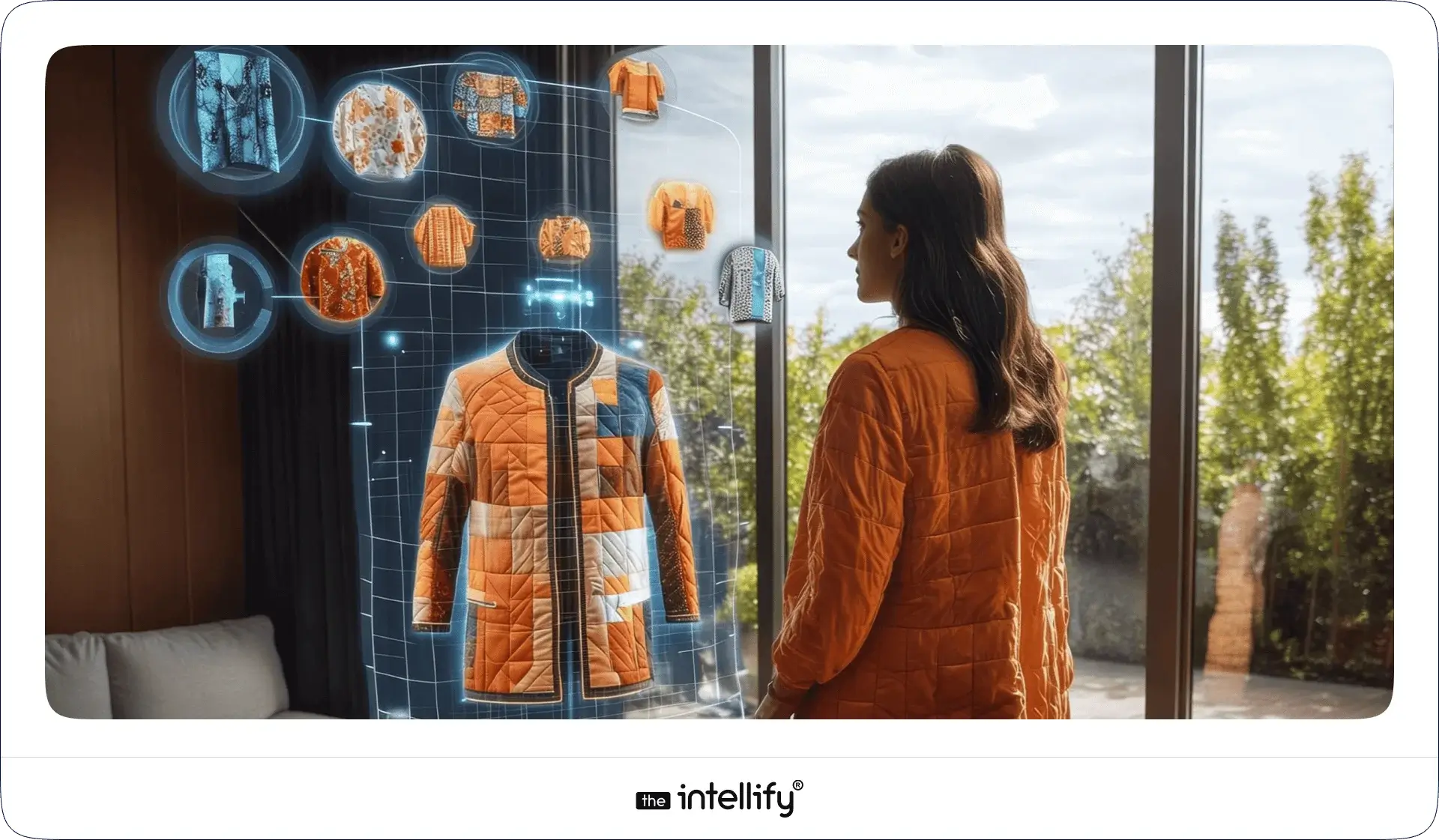
AR Virtual Try-On Experience

1. Core Technology Behind Virtual Try-On

Several technologies work together behind the scenes.

Computer vision enables the system to recognize faces, bodies, hands, or physical spaces. Object tracking keeps products aligned as users move. Detection models map facial landmarks, body proportions, or room dimensions. Real-time rendering ensures smooth visuals without lag.

When tracking slips or rendering slows, users notice immediately. A reliable virtual try-on experience depends on precision as much as speed.

2. User Journey Flow

From the user’s perspective, the flow feels simple.

  • They activate the camera.
  • They select a product.
  • They see a live preview instantly.

Most users instinctively adjust their position, tilting their head, stepping back, or rotating the phone. A good AR try-on responds without delay. From there, users can save a look, share it, or move straight to purchase. The best experiences stay out of the way and let curiosity do the work.


Key Components of an AR Virtual Try-On for E-Commerce

3D product models

High-quality 3D product models are the foundation of any virtual try-on experience. They need to look close to the real product, showing details clearly without feeling heavy or artificial. When models are realistic, customers trust what they’re seeing and stay engaged longer.

Accurate sizing and alignment

Correct sizing and alignment matter more than visual effects. Products should sit naturally on the user’s face, body, or space. Even small misalignment can break trust, while proper scaling helps customers feel confident about how the product will look in real life.

Device and browser compatibility

Virtual try-on should work smoothly across phones, tablets, and browsers. Users won’t troubleshoot technical issues just to try a product. Broad compatibility ensures more people can access the experience without friction.

Performance and load optimization

Speed plays a quiet but important role. Slow loading or laggy visuals quickly frustrate users. A fast, responsive experience keeps attention focused on the product instead of the technology behind it.

Analytics and behavior tracking

Analytics help businesses understand how customers use virtual try-on features. Tracking interactions, drop-offs, and popular products makes it easier to improve the experience and guide better decisions over time.

Integration with product pages and carts

Virtual try-on should connect directly to product pages and shopping carts. When users can move from trying a product to buying it without extra steps, the experience feels natural and conversions improve.


Real-World Examples of Successful Virtual Try-On

Beauty & cosmetics brands

Beauty brands such as L’Oréal and Sephora use virtual try-on to let customers test makeup shades in real time. Shoppers can switch colors, compare looks, and experiment freely without wiping off lipstick or guessing how a product might look under different lighting.

Eyewear and accessories

Eyewear brands like Warby Parker rely on AR virtual try-on to show how frames fit different face shapes. Customers can see how glasses sit on their nose, how wide the frames feel visually, and whether the style matches their features before placing an order.

Fashion and footwear

Fashion and footwear retailers, including Zara and Nike, use virtual try-on to improve product discovery. These experiences help shoppers preview styles, understand proportions, and feel more confident about fit and appearance when shopping online.

Furniture and Home décor

Brands like IKEA use AR to help customers place furniture in their actual living spaces. This allows shoppers to check size, layout, and visual balance before buying, which is especially useful when shopping for larger home items online.

What these brands achieved

Across industries, virtual try-on has led to stronger engagement, higher conversion rates, and fewer product returns. More importantly, shoppers feel confident about their choices, reducing hesitation and second thoughts during checkout.


Steps to Build an AR Virtual Try-On Solution

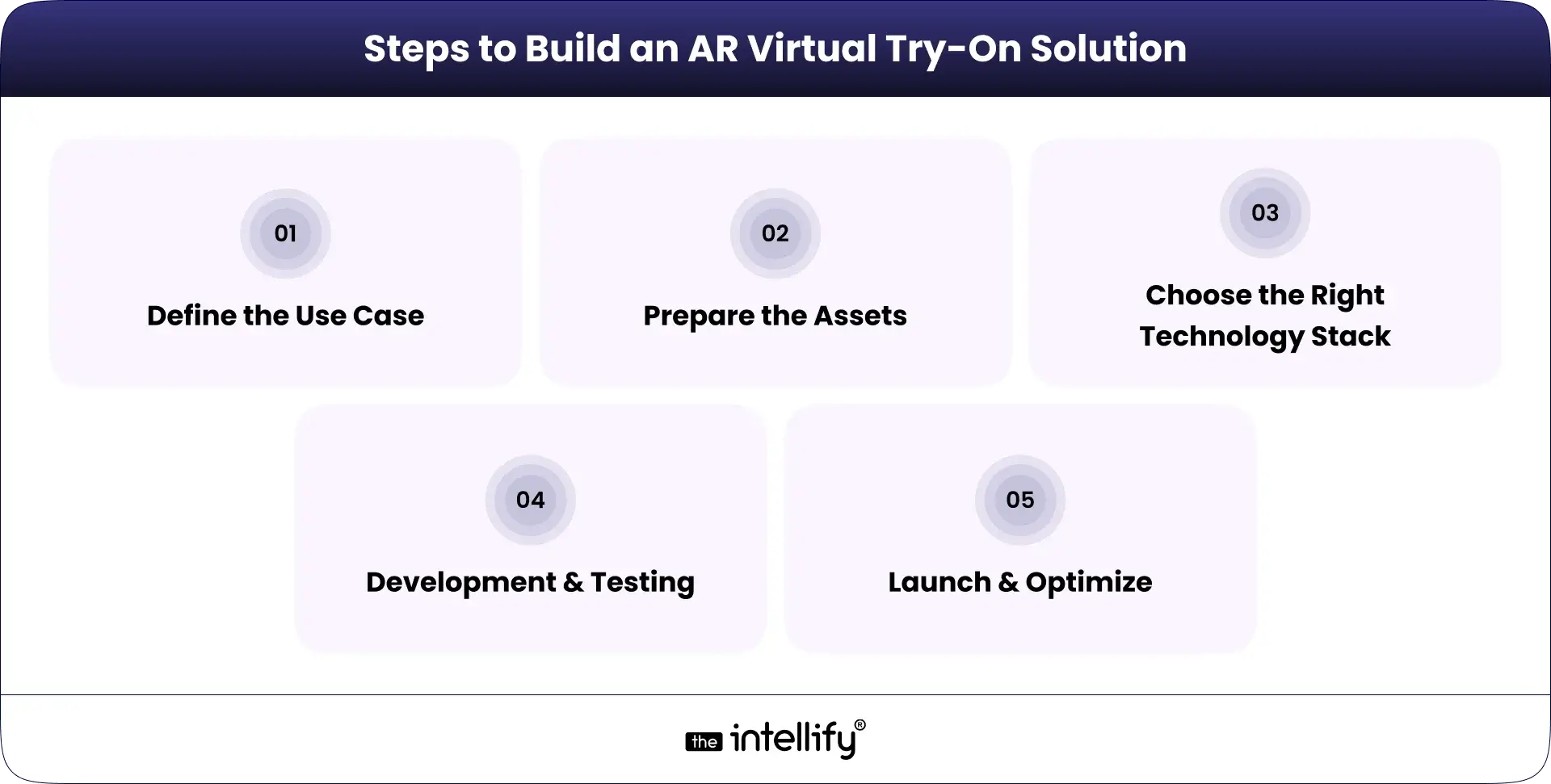
Steps to Build AR Virtual Try-On

1. Define the Use Case

  • Product category: Pinpoint which products would benefit most from AR.
  • Platform (web, app, in-store): Decide if the solution will be web-based, app-based, or both.
  • Customer journey stage: Identify where in the customer journey AR fits best.

2. Prepare the Assets

  • Product scanning or 3D modeling: Get high-quality 3D images to ensure realism.
  • Texture and material accuracy: Make sure the materials look authentic and true to life.

3. Choose the Right Technology Stack

  • WebAR vs native AR: Choose the right approach based on your resources and desired user experience.
  • SDKs, frameworks, and engines: Select the tools that best align with your platform choice.

4. Development & Testing

  • Tracking accuracy: Test how well the AR aligns with user movements.
  • Performance across devices: Ensure a uniform performance on various devices.
  • UX refinement: Collect feedback for ongoing improvements.

5. Launch & Optimize

  • A/B testing: Try out different features to see which ones resonate best with users.
  • Analytics-driven improvements: Use data insights to continually refine the experience.


Virtual Try-On Solutions


Benefits of Virtual Try-On for Businesses

Higher conversion rates: When customers can see how a product looks or fits before buying, they feel more confident. That confidence often turns into completed purchases.

Reduced product returns: Virtual try-on sets clearer expectations. When products match what customers saw during try-on, returns naturally drop.

Lower customer hesitation: Letting shoppers try before they buy removes doubt. Decisions feel easier, and checkout happens faster.

Increased time on site: Interactive try-on experiences encourage users to explore more products, spend more time browsing, and stay engaged longer.

Stronger brand differentiation: Offering virtual try-on helps brands stand out in crowded markets by providing a more useful and memorable shopping experience.


Benefits of Virtual Try-On for Customers

Try before buying from anywhere: Customers can preview products from home, at work, or on the move. Seeing items on themselves or in their space helps them feel more comfortable before buying.

Better confidence in purchase decisions: Real-time previews reduce guesswork. When shoppers know what to expect, trust increases and second thoughts decrease.

Fun, interactive shopping experience: Virtual try-on adds an interactive layer to shopping. Instead of scrolling endlessly, customers can explore products in a more engaging way.

Fewer sizing and style mistakes: AR helps shoppers choose items that fit their size, style, and space more accurately, reducing the chance of ordering the wrong product.

Faster decision-making: Quick, clear previews make decisions easier. Customers spend less time doubting and more time moving forward with their purchase.


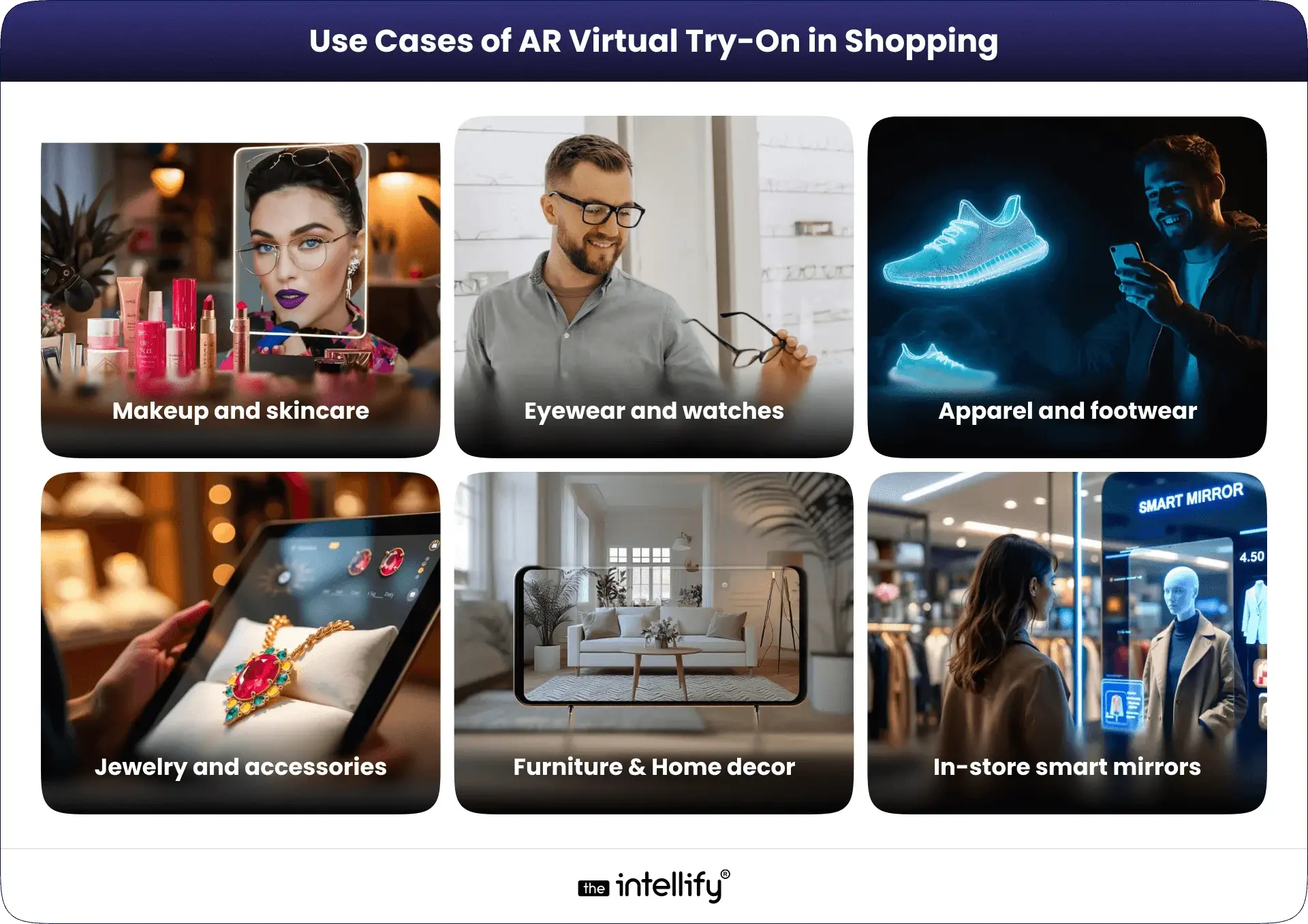
Use Cases of AR Virtual Try-On in Shopping

Use Cases of AR Virtual Try-On in Shopping

1. Makeup and skincare: Virtual try-on lets shoppers test shades, finishes, and tones in real time, helping them find what suits their skin without physical samples.

2. Eyewear and watches: AR helps customers see how frames or watches look on their face or wrist, making it easier to judge style and fit before buying.

3. Apparel and footwear: Shoppers can preview how clothes or shoes sit on their body, giving a better sense of proportions and overall look.

4. Jewelry and accessories: Virtual try-on allows users to see how rings, necklaces, or earrings complement their outfit and personal style.

5. Furniture placement at home: AR helps customers place furniture or décor items in their actual living space, making size and layout easier to judge.

6. In-store smart mirrors: Interactive smart mirrors allow shoppers to try products digitally inside physical stores, blending online convenience with in-store browsing.

You can also read our detailed blog on virtual try-on use cases


Impact on Customer Experience & Business Operations

1. Customer Experience

Virtual try-on reduces guesswork and builds trust. Customers feel informed rather than pressured. That sense of control leads to stronger engagement and satisfaction.

2. Business Operations

On the operational side, fewer returns reduce logistics costs. Try-on data supports better merchandising and inventory decisions. Customer support teams face fewer pre-purchase questions, streamlining workflows.


Challenges & Limitations to Consider

Accuracy expectations: Customers often expect virtual try-on results to perfectly match real-life products. When visuals feel even slightly off, trust can drop quickly.

Device performance differences: Not all smartphones or browsers handle AR at the same level. Older devices may struggle with tracking, speed, or visual quality.

3D content creation cost: Creating accurate, high-quality 3D product models takes time and resources, especially for large or frequently changing catalogs.

Privacy and camera permissions: Some users hesitate to enable camera access. Clear communication about data use is important to reduce concerns and build confidence.

User onboarding friction: If instructions feel confusing or setup takes too long, users may drop off early. A simple, guided entry into the experience makes a noticeable difference.


The Future of Virtual Try-On in Retail

The future of AR virtual try-on is moving toward more accurate and personalized experiences. Better AI integration will improve sizing, tracking, and product recommendations, making try-ons feel more natural and responsive. As these technologies mature, virtual try-on will shift from being a helpful feature to an expected part of online shopping, especially for brands focused on reducing friction and building customer confidence.


From Idea to Experience: How Brands Begin with Virtual Try-On

Building a virtual try-on experience starts long before development. Brands need clarity on what problem they are solving, which products benefit most from try-on, and where the experience fits in the customer journey.

Key early steps usually include:

  • Defining clear business and user goals
  • Understanding target audiences and device usage
  • Deciding whether the experience should live on the web, in an app, or in-store

Once the direction is clear, working with experienced AR teams helps reduce trial-and-error. This is where teams like The Intellify support brands by validating use cases, selecting the right technology approach, and testing early prototypes with real users. The focus stays on building something useful, stable, and easy to adopt, not just visually impressive.


Build an virtual try-on


Conclusion: Virtual Try-On Is Becoming a Shopping Standard

AR virtual try-on is no longer an experiment or a short-term trend. It’s becoming a practical part of how people shop online. By reducing guesswork, improving engagement, and helping customers feel confident before buying, virtual try-on solves real problems for both shoppers and retailers.

For brands exploring how to adopt this approach, starting with the right strategy and technology matters. Teams like The Intellify often help businesses assess where virtual try-on fits best, test ideas, and build experiences that are useful, not overcomplicated.


Frequently asked questions

1. What is AR virtual try-on and how does it work?

AR virtual try-on uses your camera and augmented reality to show how a product might look on you or in your space. Instead of just photos, you see a live preview that moves with you, helping you decide before you buy.

2. How does virtual try-on make online shopping better?

It helps reduce guesswork. When you can see how something actually looks or fits, you feel more confident buying it. That often leads to happier customers, fewer returns, and faster decision-making.

3. Do I need to download a special app to use virtual try-on?

Not always. Many brands now let you use AR try-on right in your phone or laptop browser without an app. All you usually need is camera access and a product page that supports it.

4. Is virtual try-on accurate for all types of products?

Accuracy depends on the product and technology. It’s very good for things like eyewear, jewelry, makeup, watches, and furniture placement. For clothing, it helps with style and look, but size and fit might still need traditional size guides.

5. Can virtual try-on help reduce product returns?

Yes. When shoppers can preview items realistically, they are less likely to be surprised when the product arrives. That means fewer returns and less disappointment for customers and retailers alike.

6. Is my privacy safe when using virtual try-on tools?

In most cases, yes. Good virtual try-on tools only use your camera temporarily to generate a live preview and don’t store your personal image unless you choose to save or share it. Always check the privacy notes if you’re unsure.

7. What kinds of products benefit the most from virtual try-on?

Products where appearance matters most benefit the most like glasses, hats, jewelry, makeup, shoes, and even home items such as furniture. These are things where seeing it “on you” or “in your room” really helps your choice.

View
Case Study