Summary:
Patient onboarding automation helps Direct Primary Care (DPC) practices simplify registration, digital intake forms, membership agreements, payment setup, and patient communication. This blog explains how to automate key onboarding workflows, integrate existing healthcare systems, protect patient information, and measure operational improvements. It also covers implementation best practices to help DPC practices reduce administrative work and deliver a smoother patient enrollment experience.
Patient onboarding sets the tone for the entire patient-provider relationship. In a Direct Primary Care (DPC) practice, it also involves more than filling out registration forms. Patients may need to review membership agreements, provide medical history, authorize recurring payments, and learn how to communicate with their physician.
When these steps rely on emails, paper forms, spreadsheets, and manual follow-ups, the process can quickly become difficult to manage. Staff spend time chasing missing information instead of helping patients, while new members may be left wondering what to do next.
DPC Patient onboarding automation offers a practical way to address these problems. By connecting digital intake forms, membership enrollment, payment setup, and patient communication, DPC practices can reduce repetitive administrative work and create a more consistent enrollment experience.
The goal isn’t to remove the personal touch that makes Direct Primary Care appealing. It’s to make the administrative side of joining a practice simpler for everyone.
Why Patient Onboarding Matters in Direct Primary Care
Direct Primary Care operates on a membership-based model in which patients typically pay their physician or practice a recurring fee for defined primary care services. That makes enrollment an important part of both practice operations and the patient experience.
Before a new member can begin using the practice’s services, the team may need to collect contact information, review medical history, obtain signed agreements, configure billing, and explain how to schedule appointments or contact the care team.
If these steps happen across disconnected systems, even a straightforward enrollment can involve unnecessary back-and-forth.
A patient might submit a registration form but forget the membership agreement. Another might complete every document but fail to finish payment authorization. Staff then have to identify the missing step and follow up manually.
A structured onboarding workflow helps prevent these gaps. It gives patients clear instructions and helps staff see which tasks are complete and which still need attention.
For growing DPC practices, that consistency matters. Adding more members shouldn’t automatically mean adding the same amount of administrative work.
Common Patient Onboarding Challenges in DPC Practices
Many DPC practices begin with simple tools and manual processes. These may work well when membership numbers are small, but problems can emerge as enrollment increases.
Common challenges include:
- Manual registration: Staff enter the same patient details into multiple systems, increasing the chance of errors.
- Incomplete intake forms: Missing medical history, contact information, or consent documents can delay enrollment.
- Membership agreement delays: Teams spend time sending documents, requesting signatures, and checking whether agreements have been completed.
- Disconnected billing and scheduling: Payment records, membership status, and appointment systems may not stay synchronized.
- Inconsistent follow-ups: Some patients receive several reminders, while others may receive none.
- Limited workflow visibility: Staff struggle to determine which patients are ready for onboarding completion and which require assistance.
These issues aren’t always caused by poor software. Sometimes, the process itself needs attention.
For example, automating a confusing enrollment process won’t necessarily make it better. The practice should first identify unnecessary steps, clarify responsibilities, and decide which activities can safely happen without manual intervention. Once the workflow is clear, automation becomes much easier to implement.
How to Automate Patient Onboarding in a Direct Primary Care Practice
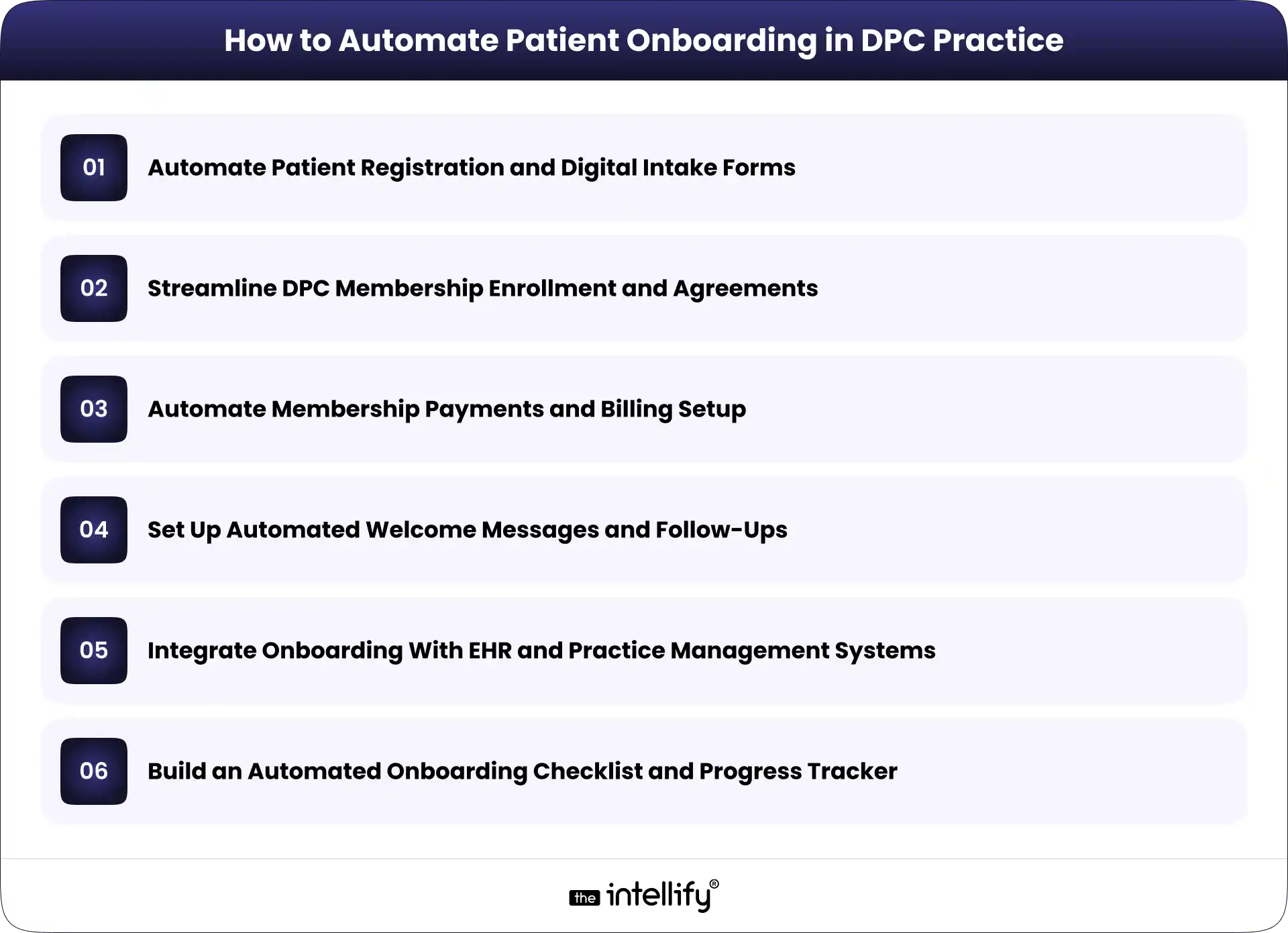
The most effective approach is to automate individual onboarding tasks while keeping the entire patient journey connected. Here are six practical ways to do that.
1. Automate Patient Registration and Digital Intake Forms
Start with the first information a practice collects from a prospective or newly enrolled member.
Digital patient intake forms allow patients to submit contact details, demographics, medical history, relevant health information, and communication preferences through a secure online process.
Instead of manually transferring information from paper forms, the practice can route submitted data into its designated patient management system, where supported.
A well-designed form should also make completion easier. Conditional questions can display relevant fields based on previous answers, while required-field validation can flag missing information before submission.
For instance, a new patient may be asked to provide current medications and relevant medical history. If a particular section doesn’t apply, the form can avoid presenting unnecessary follow-up questions.
Keep the process manageable. A lengthy form that asks for everything at once may discourage completion, especially on mobile devices.
The goal is to collect the information the practice actually needs, explain why it’s needed, and avoid asking patients to enter the same details repeatedly.
2. Streamline DPC Membership Enrollment and Agreements
Membership enrollment is another strong candidate for automation because it involves several steps that follow a predictable sequence.
A typical workflow may include:
- Sending the membership agreement to the patient.
- Providing clear instructions for reviewing the terms.
- Collecting an electronic signature.
- Recording the agreement’s completion status.
- Updating the patient’s enrollment record.
With an integrated workflow, completing one step can trigger the next action. For example, a signed agreement may update the enrollment record and notify staff that the patient is ready for the next stage. Practices can also configure reminders for unsigned agreements, reducing the need for staff to check each record manually.
However, automation should not replace clear communication. Membership terms, fees, covered services, cancellation policies, and other relevant conditions should be easy to understand before patients agree to them.
Unusual cases, incomplete agreements, or questions about membership terms should still reach the appropriate staff member.
3. Automate Membership Payments and Billing Setup
Payment setup is a key part of many DPC onboarding workflows. Depending on the practice’s model, patients may need to authorize recurring monthly payments or select another available payment arrangement.
Automated billing workflows can help practices collect payment authorization, send confirmation messages, update membership records, and notify staff when an issue needs attention.
Consider a new member who completes registration and signs the membership agreement. Once the required conditions are met, the system can direct the patient to a supported payment processor and update the onboarding status after receiving confirmation.
If a payment fails, the workflow can send an appropriate notification and create a follow-up task rather than leaving staff to discover the issue later.
It’s important to keep payment handling secure. Practices should use suitable payment processing services and avoid storing unnecessary payment information in patient records.
Billing rules also need to reflect the practice’s actual membership policies. Automation should not activate a membership, charge a patient, or change payment terms without the appropriate authorization and conditions being met.
4. Set Up Automated Welcome Messages and Follow-Ups
Patients shouldn’t have to guess what happens after they sign up.
A welcome message can explain the next steps, provide instructions for accessing the patient portal, describe how to schedule appointments, and outline the appropriate ways to contact the practice.
These messages can be triggered by specific events, such as successful enrollment or completion of required forms. For example, a DPC practice might configure the following sequence:
- After registration: Send a confirmation and explain the remaining steps.
- After agreement completion: Confirm receipt and provide the next instructions.
- After enrollment completion: Send a welcome message with relevant practice information.
- When required information is missing: Send a reminder with a secure way to complete the outstanding task.
This approach helps patients receive relevant information at the right time without requiring staff to write every message individually.
Still, more messages don’t necessarily mean better communication. Keep reminders limited, useful, and easy to understand. Avoid including sensitive medical details in ordinary email or text notifications unless the communication method and workflow have been appropriately evaluated.
Automation should handle routine updates, while questions about symptoms, treatment, or other clinical concerns should be routed through the practice’s appropriate communication process.
5. Integrate Onboarding With EHR and Practice Management Systems
Automation becomes much more useful when information can move between the systems a DPC practice already uses.
These may include an electronic health record (EHR), practice management software, a patient portal, a membership platform, a scheduling tool, and a payment processor.
Without integration, staff may need to enter the same information into several places. That creates extra work and makes inconsistencies more likely.
An integrated onboarding workflow can transfer approved registration data to the appropriate system, create or update patient records, synchronize enrollment status, and trigger relevant notifications.
For example, when a patient’s enrollment is confirmed, the system might update the membership platform and notify the team that the record is ready for review.
The technical approach depends on what the existing systems support. Available APIs, built-in integrations, data formats, and vendor restrictions will influence the options.
Before connecting systems, define which platform owns each type of information, how duplicate records will be handled, and what happens when a synchronization fails.
The workflow should also include appropriate access controls and error reporting. Integration isn’t just about moving data quickly; it’s about making sure information reaches the correct destination and remains reliable.
6. Build an Automated Onboarding Checklist and Progress Tracker
Even with automated forms, agreements, and notifications, staff need a clear view of the patient’s overall onboarding status. A centralized checklist can track important milestones, such as:
- Registration form submitted.
- Required information reviewed.
- Membership agreement signed.
- Payment authorization completed.
- Patient record created or updated.
- Welcome communication sent.
- Outstanding issues resolved.
Each task can have a defined status, such as pending, completed, or requiring review.
When a patient misses a required step, the system can trigger a reminder or create a task for the appropriate staff member. When an exception occurs, such as conflicting patient information, the workflow can pause for manual review.
This is particularly useful when several staff members share onboarding responsibilities. Everyone can see what has been completed without searching through email threads or asking colleagues for updates.
A progress tracker also helps practice owners identify recurring bottlenecks. If membership agreements regularly remain unsigned, for example, the practice can review the wording, delivery timing, or signing experience.
The objective is straightforward: give staff visibility into the process while allowing routine tasks to move forward automatically.
Step-by-Step Process to Implement Patient Onboarding Automation
A successful implementation doesn’t require automating every task at once. Start with the biggest operational problems and expand as the practice learns what works.
Step 1: Map the existing onboarding workflow.
Document the journey from initial inquiry to completed enrollment. Include forms, agreements, billing, record creation, communication, and staff responsibilities.
Step 2: Identify repetitive tasks and delays.
Look for duplicate data entry, frequent follow-ups, missing documents, and steps that regularly require manual intervention. These are potential automation opportunities.
Step 3: Prioritize the highest-impact processes.
Choose one or two manageable starting points, such as digital intake forms or automated agreement reminders. Consider how often a task occurs, how much time it consumes, and the consequences of an error.
Step 4: Select or customize suitable software.
Evaluate existing tools before purchasing replacements. Consider integration options, security requirements, usability, maintenance, and the ability to support the practice’s actual workflow.
Step 5: Test the workflow before rolling it out.
Use realistic test scenarios, including incomplete forms, failed payments, duplicate records, and system errors. Confirm that expected actions occur and that exceptions reach the right person.
Step 6: Train staff and refine the process.
Explain how the new workflow operates, when manual review is required, and how staff should report problems. Review performance regularly and adjust the process as needed.
A phased approach makes it easier to identify problems early without disrupting the entire enrollment process.
Best Practices for Secure and Patient-Friendly Onboarding Automation
Automation involves patient information, so security and usability must be considered from the beginning.
For US practices subject to HIPAA, the HHS Security Rule requires appropriate safeguards for electronic protected health information. These include administrative, physical, and technical protections designed to preserve the confidentiality, integrity, and availability of that information. See the HHS HIPAA Security Rule guidance.
Keep these practices in mind:
- Review vendor responsibilities: Determine whether software providers or integration partners qualify as business associates and whether a business associate agreement is required.
- Control access: Give staff access according to their responsibilities and use appropriate authentication.
- Protect data transfers: Evaluate encryption, audit logging, and other safeguards across connected systems.
- Design for mobile users: Make forms readable, accessible, and easy to complete on a phone.
- Maintain human oversight: Route unusual cases, data discrepancies, and sensitive questions to staff.
- Limit unnecessary communication: Send useful reminders without overwhelming patients or exposing sensitive information.
The HHS guidance on business associates provides further information about vendor relationships and contractual responsibilities.
One important distinction: using software advertised as HIPAA-compliant does not automatically make an entire onboarding workflow compliant. The practice must evaluate its actual configuration, policies, vendors, and data-handling procedures.
How The Intellify Can Help Automate DPC Patient Onboarding
Automating patient onboarding often involves more than adding a digital form or scheduling a few reminders. The real challenge is connecting the right processes while keeping existing systems, patient information, and staff responsibilities aligned.
The Intellify helps businesses explore healthcare software development, system integration, and workflow automation solutions based on their operational needs.
For a DPC practice, this may involve connecting digital intake forms with membership records, streamlining enrollment workflows, integrating existing practice management systems, or building a centralized view of onboarding progress.
The right approach depends on the software already in place, the practice’s enrollment process, and its technical and security requirements. A full platform replacement isn’t always necessary.
Want to simplify patient onboarding in your DPC practice? Discuss your current workflow with The Intellify to identify practical opportunities for automation and integration.
Conclusion
Patient onboarding automation can help Direct Primary Care practices reduce repetitive administrative work, organize enrollment tasks, and give new members a clearer path into the practice. The key is to focus on the processes that create the most friction, connect systems where practical, and preserve human oversight when it matters.
Start with a clear workflow, measure the results, and expand automation based on actual needs rather than assumptions.
If your practice is spending too much time managing forms, agreements, payments, and follow-ups, we can help you explore a more connected approach to DPC patient onboarding.
Frequently Asked Questions (FAQs)
1. What is patient onboarding automation in Direct Primary Care?
Patient onboarding automation uses software to manage repetitive enrollment tasks, such as collecting registration information, sending membership agreements, tracking completion, setting up payment workflows, and delivering welcome messages. It helps DPC practices reduce manual work while maintaining oversight of important patient information.
2. What parts of DPC patient onboarding can be automated?
Practices can automate digital intake forms, agreement reminders, electronic signature workflows, payment confirmations, welcome messages, checklist updates, and supported data transfers between connected systems. Tasks involving clinical judgment, unusual circumstances, or sensitive questions should remain subject to appropriate human review.
3. Is patient onboarding automation HIPAA-compliant?
It can be designed to support HIPAA compliance, but compliance depends on the complete workflow. Practices must evaluate applicable requirements, vendor responsibilities, access controls, security safeguards, and how patient information is stored and transferred. A software product alone cannot guarantee compliance.
4. Can a DPC practice automate onboarding without replacing its existing software?
Yes, depending on the capabilities of the current systems. Built-in integrations, APIs, and other supported connections may allow a practice to automate selected workflows without replacing its entire platform. A technical assessment can help determine which options are practical.
5. How long does it take to implement patient onboarding automation?
Implementation time varies according to workflow complexity, integration requirements, existing software capabilities, security reviews, and testing needs. A simple reminder workflow may be quicker to implement than a solution connecting multiple systems. Defining the scope and starting with a focused pilot can make the process more manageable.