How to Integrate AI Into an Existing DPC Platform Without Rebuilding It

Summary:
This blog explains how to integrate AI into an existing Direct Primary Care (DPC) platform without rebuilding the entire system. It covers AI use cases, API integrations, implementation steps, HIPAA compliance, security considerations, common challenges, and costs. DPC practices can use these insights to modernize existing software, streamline administrative workflows, and improve operational efficiency.


Direct Primary Care (DPC) practices are looking for ways to make everyday operations easier. From answering patient calls to managing memberships and scheduling appointments, there is plenty of work that happens outside the exam room. AI can help with some of these tasks, but adding it to an existing platform can feel like a major technical project.

The good news? You don’t necessarily need to rebuild your entire DPC platform to start using AI.

With the right integration strategy, practices can introduce AI capabilities while keeping their existing software, patient records, and core workflows in place. The key is understanding which tasks need improvement, how current systems exchange data, and where AI can fit without creating new problems.

This guide explains how to integrate AI into an existing DPC platform, the technologies involved, the security considerations to address, and when modernization makes more sense than a complete rebuild.


Why DPC Platforms Need AI Integration

DPC practices operate differently from traditional fee-for-service medical practices. Their membership-based model depends on ongoing patient relationships, accessible care, and predictable administrative processes.

However, managing those relationships still requires time. Staff members handle appointment requests, membership questions, payment issues, patient messages, and follow-ups. When these tasks pile up, they can take attention away from patients.

AI integration offers a way to reduce some of that workload without changing the entire operating model.

Growing Administrative Workloads in DPC Practices

A growing DPC practice may receive more calls, messages, scheduling requests, and membership inquiries than its team can comfortably manage. Even routine questions can interrupt staff throughout the day.

AI voice agents, automated messaging, and workflow assistants can help handle repetitive tasks, such as answering common questions, collecting appointment preferences, and routing requests to the right team member.

For example, an AI voice agent could answer basic questions about office hours and collect a patient’s preferred appointment time. Staff can then review or confirm the request through the existing scheduling system.

The goal isn’t to automate every interaction. It’s to reduce repetitive work while keeping personal care at the center of the DPC experience.

Limitations of Traditional DPC Software

Many established DPC platforms already support essential functions, including membership management, billing, scheduling, and patient communication. But these systems may lack advanced automation or intelligent assistance.

Some platforms also operate in separate environments. Patient messages might live in one system, while scheduling and membership information sit in another. This can make routine tasks harder to coordinate.

AI integration can help connect these workflows, provided the underlying systems offer suitable APIs, data access, or other supported integration methods.


Which AI Capabilities Can You Add to an Existing DPC Platform?
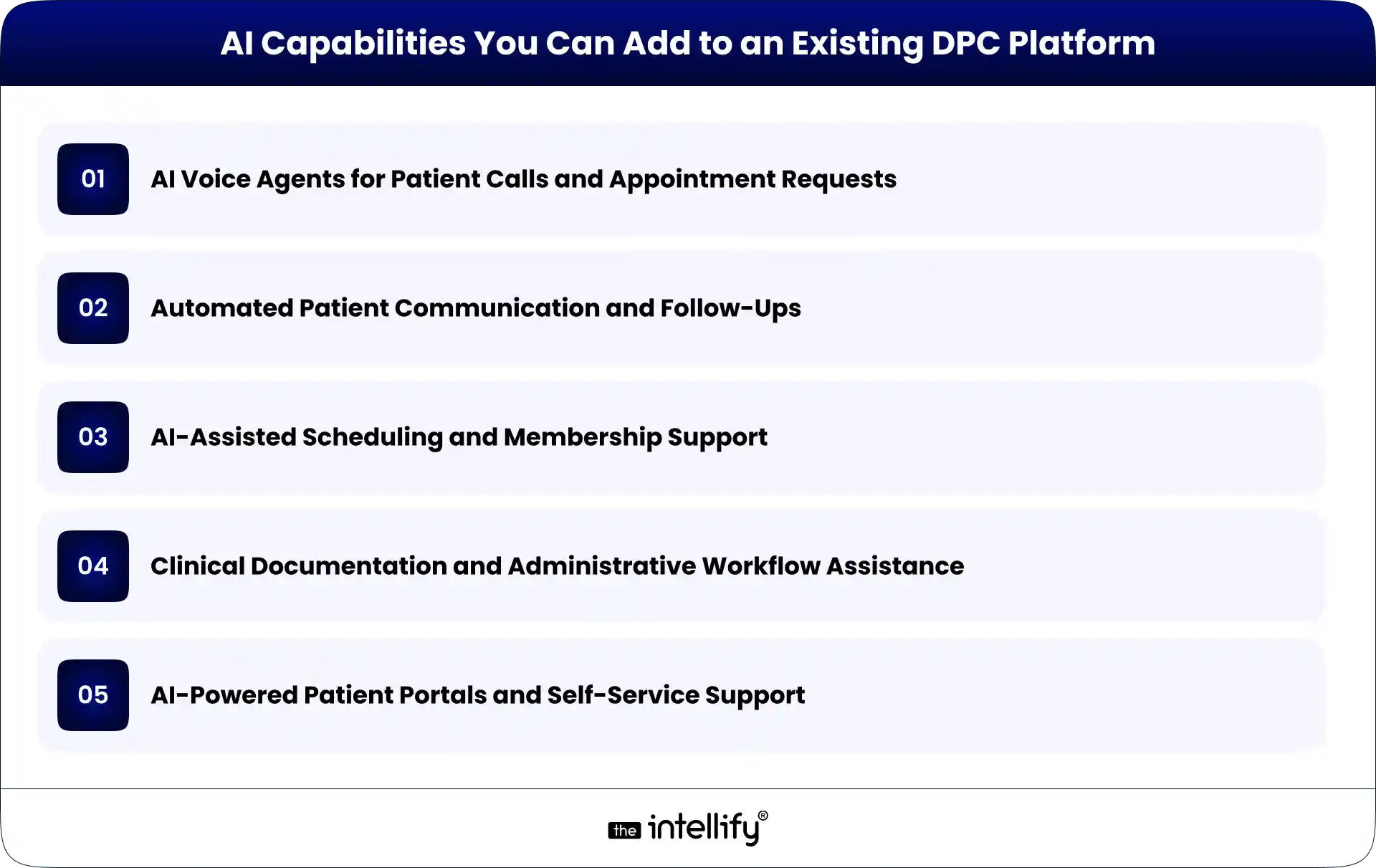
AI Capabilities You Can Add to an Existing DPC Platform

The best AI features depend on a practice’s operational challenges, software architecture, and patient needs. Rather than adding AI simply because it’s available, start with tasks that consume time and follow reasonably clear rules.

AI Voice Agents for Patient Calls and Appointment Requests

AI voice agents can answer incoming calls, respond to common questions, collect information, and route callers based on their needs.

When integrated with the appropriate systems, they may also check appointment availability or submit scheduling requests. Access to patient information and the ability to make changes should be limited to authorized workflows.

For medical concerns that require clinical judgment, the system should direct patients to qualified staff or established clinical escalation procedures.

Automated Patient Communication and Follow-Ups

AI-assisted communication can help practices manage appointment reminders, routine follow-ups, and frequently asked questions.

For example, a platform could trigger an approved reminder after an appointment is scheduled. An AI assistant may also help draft responses to common administrative questions.

Messages involving sensitive health information need appropriate safeguards, and clinical communications should receive human review when necessary.

AI-Assisted Scheduling and Membership Support

Scheduling tools can help patients find suitable appointment times, while membership support assistants can answer questions about enrollment, renewals, billing processes, and membership policies.

These capabilities work best when they use current information from the relevant systems. If membership status or appointment availability is outdated, the AI may provide an incorrect answer.

Integration should therefore include reliable data access and clear rules for when the system must defer to a staff member.

Clinical Documentation and Administrative Workflow Assistance

AI tools can assist with drafting clinical notes, summarizing permitted information, and organizing administrative documentation.

However, clinical documentation requires greater oversight than routine scheduling. Providers must be able to review and correct AI-generated content before it becomes part of the official record.

The technology should support clinical work, not independently make decisions that require professional judgment.

AI-Powered Patient Portals and Self-Service Support

An AI assistant within a patient portal can help users navigate available services, locate relevant information, and understand administrative processes.

With appropriate authentication and permissions, it may retrieve specific information from connected systems.

The assistant should not expose information from another patient’s record or provide clinical guidance beyond its approved scope. Clear escalation options are important, especially when a question falls outside the assistant’s capabilities.


How to Integrate AI Into an Existing DPC Platform: Step by Step

Successful AI integration starts with understanding the existing platform. The technology comes later.

Step 1: Audit Your Existing DPC Technology Stack

Document the software currently used for membership management, billing, scheduling, patient communication, EHRs, and reporting.

Identify where information is stored, which systems exchange data, and where staff still rely on manual work. This assessment helps uncover integration opportunities and potential limitations before development begins.

Step 2: Identify the Right AI Use Cases

Choose one or two workflows that create a clear operational burden.

For example, if staff spend considerable time answering routine calls, an AI voice agent may be a suitable starting point. If repeated appointment reminders are the bigger problem, communication automation could offer a better fit.

Define measurable outcomes, such as fewer manual call-handling tasks, shorter response times, or reduced administrative processing time.

Step 3: Check APIs and Integration Options

Next, determine how the existing platform allows external tools to connect.

REST APIs, webhooks, approved data exports, and middleware are common integration options. The appropriate choice depends on the platform’s capabilities and security requirements.

If APIs are unavailable, alternatives may exist, but they require careful evaluation. Direct database access or fragile screen-based automation can create maintenance and security problems. Don’t assume every system can support real-time AI integration. Verify the available interfaces first.

Step 4: Choose Between Third-Party AI Tools and Custom Development

Third-party AI tools may be suitable for standard needs, such as voice interactions or routine message handling. They can reduce the amount of custom development required.

Custom development makes more sense when workflows are specific to the practice, existing systems require specialized integration, or off-the-shelf tools cannot meet the requirements.

The decision should consider integration effort, data handling, customization, vendor dependencies, ongoing costs, and long-term maintenance.

Step 5: Connect AI With Existing Workflows

Once the approach is selected, define how information will move between the AI component and the DPC platform.

For instance, a voice agent might collect an appointment request, send the required information through an API, and create a pending request in the scheduling system.

The integration should specify which data can be accessed, which actions are permitted, and what happens when a request fails.

AI should not receive unrestricted access to patient records or the ability to change important information without appropriate authorization.

Step 6: Test, Validate, and Roll Out Gradually

Test the integration using realistic scenarios before making it available to patients. Check whether information is transferred correctly, permissions work as intended, errors are handled safely, and staff can intervene when necessary.

A limited pilot is often a sensible first step. For example, a practice could enable an AI assistant for routine administrative calls during selected hours before expanding its availability. Collect staff feedback and review patient experiences before increasing the scope.

Step 7: Measure Performance and Improve

After launch, compare results against the original goals. Useful measures may include administrative time saved, call-handling outcomes, scheduling accuracy, escalation rates, staff satisfaction, and patient feedback.

Review failed interactions and recurring issues. Update approved responses, integration rules, and escalation procedures as needed.

AI integration isn’t a one-time task. Ongoing monitoring helps ensure that the system remains useful as the practice and its software evolve.
 

AI integration in DPC platforms


How AI Integrates With Core DPC Platform Components

AI generally works best as an additional layer that interacts with existing systems through defined interfaces.

Membership Management and Recurring Billing

AI assistants can answer approved membership questions and help staff locate relevant account information. Connected workflows may also support billing inquiries or membership renewal reminders.

Financial changes, cancellations, and other consequential actions should follow established authorization and confirmation processes.

Patient Portals and Communication Systems

AI can help patients navigate portal features, find administrative information, and submit requests.

Integration may use APIs or middleware to exchange permitted information between systems. Authentication, role-based permissions, and appropriate session controls help protect patient data.

Scheduling, EHRs, and Practice Management Software

Scheduling integrations can support appointment requests and availability checks. EHR integrations may support approved documentation or information retrieval workflows.

These systems should remain authoritative for their respective records. AI-generated information should be validated before it updates official data, particularly when clinical information is involved.

Reporting, Analytics, and Operational Dashboards

AI can help summarize operational trends, categorize routine requests, and identify recurring administrative bottlenecks.

For example, a practice could analyze aggregated call data to understand when demand is highest. Reports should use appropriate access controls and data minimization, especially when patient information is involved.


Security, HIPAA, and Patient Data Considerations

Healthcare AI integration requires more than a working technical connection. Patient privacy and security must be part of the design from the beginning.

For U.S. DPC practices, relevant considerations include:

  • HIPAA obligations: Determine which HIPAA requirements apply to the practice and the systems involved. When a vendor acts as a business associate, a business associate agreement may be required.
  • Access controls: Limit AI systems to the minimum information and permissions needed for their specific tasks.
  • Data protection: Use appropriate encryption, secure authentication, and protected data transmission.
  • Audit logs: Record relevant access and system actions so incidents can be investigated.
  • Vendor review: Understand how patient data is stored, processed, retained, and used by AI providers.
  • Human oversight: Define when staff must review outputs, approve changes, or take over an interaction.

Avoid sending identifiable patient information to an AI service without confirming that its use is permitted and appropriately safeguarded.

HIPAA compliance is not automatic just because a vendor offers healthcare AI features. The practice must assess the complete workflow, contractual arrangements, and applicable obligations.


AI Integration vs. Rebuilding Your DPC Platform

The right approach depends on the condition of the existing software and the changes the practice needs.

Factor AI integration Complete rebuild
Initial scope Focused on selected capabilities Replaces or redesigns much of the platform
Existing workflows Largely retained May require significant changes
Implementation Can be phased Usually involves broader development and migration
Technical flexibility Depends on current architecture Greater freedom to redesign
Main risk Integration limitations Migration, adoption, and implementation complexity

AI integration is often the better starting point when core systems remain reliable and support suitable integration methods.

A rebuild may be justified when the architecture is fundamentally unsuitable, critical components are no longer supported, or ongoing limitations prevent necessary business changes.

There is also a middle ground: modernize selected components while retaining the rest of the platform. The decision should follow a technical assessment, not an assumption that newer software is always better.


How Much Does It Cost to Integrate AI Into a DPC Platform?

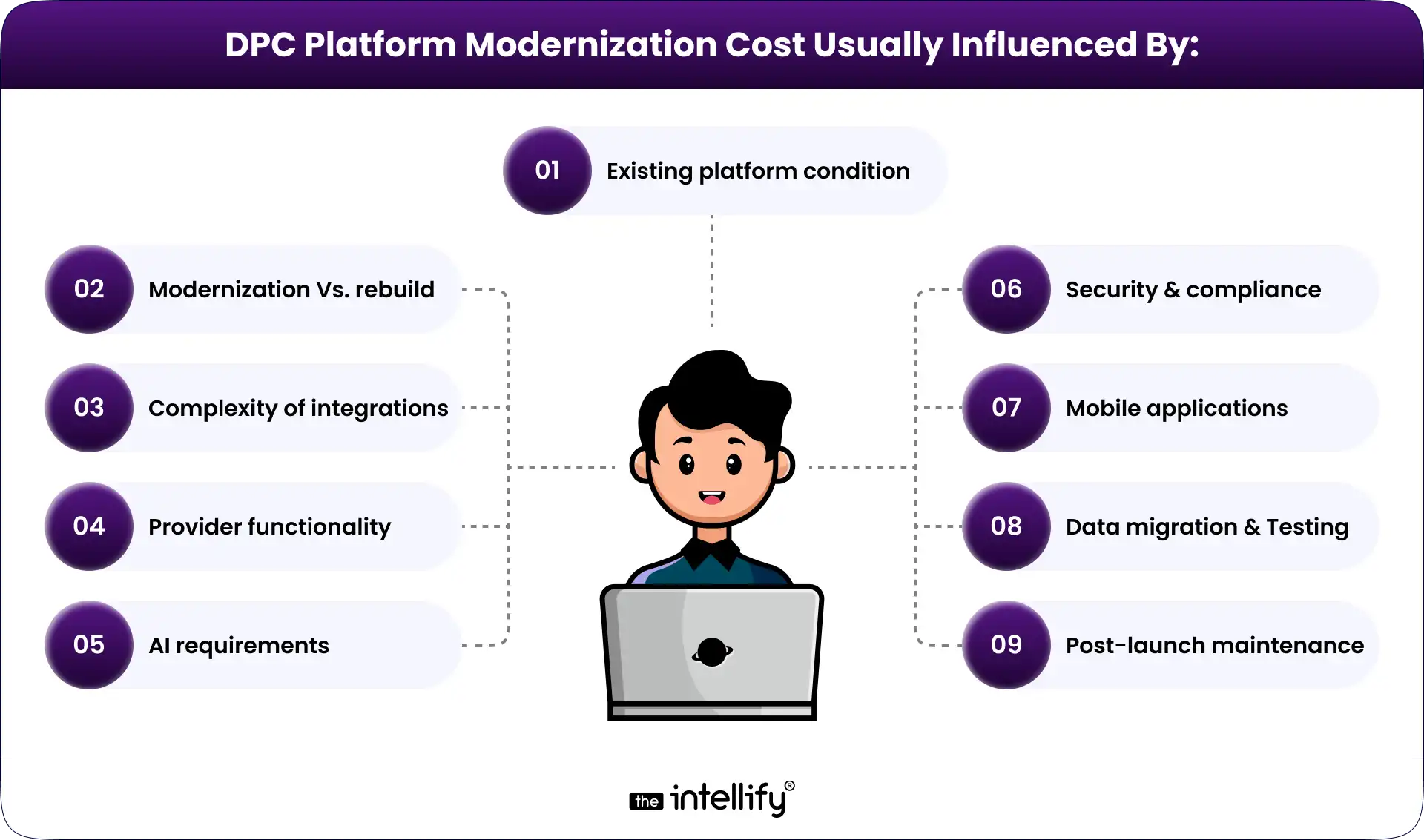
There is no single price for AI integration. A simple administrative assistant connected to one system requires a different level of effort than a voice agent that interacts with scheduling, membership records, and multiple healthcare systems.

The main cost factors include:

  • Complexity of the selected AI use case.
  • Availability and quality of APIs.
  • Number of systems that need to connect.
  • Data preparation and migration requirements.
  • Security reviews, testing, and compliance obligations.
  • AI usage fees, infrastructure, monitoring, and maintenance.

A limited pilot can help establish realistic costs before a practice commits to a larger rollout. When evaluating proposals, consider the total cost of ownership rather than development fees alone. Ongoing support, vendor charges, system updates, and future integration needs can all affect the budget.


How The Intellify Can Help Modernize Your DPC Platform

Adding AI to an existing DPC platform requires a clear understanding of the current architecture, operational needs, and integration options.

The Intellify helps businesses explore healthcare software modernization opportunities, including ways to improve existing DPC platforms through targeted development and integration.

Depending on the platform and requirements, a DPC modernization engagement may involve:

  • Assessing existing software architecture and integration limitations.
  • Identifying suitable AI use cases and automation opportunities.
  • Planning API integrations and connections between systems.
  • Developing custom capabilities around existing workflows.
  • Evaluating security requirements and testing integrations before rollout.

The first step is to understand what your current platform already does well and where it falls short. That makes it easier to prioritize useful improvements instead of investing in a complete rebuild without a clear reason.


Final Thoughts

Integrating AI into an existing DPC platform doesn’t have to begin with a complete rebuild. In many cases, practices can start by identifying a specific operational problem, connecting a suitable AI capability, and improving the workflow over time.

The important part is choosing the right use case, checking system compatibility, protecting patient information, and testing each integration before expanding it.

Some platforms will need only a few targeted improvements. Others may require bigger architectural changes. A technical assessment helps determine the difference.

The goal is straightforward: make your existing technology more useful, reduce avoidable administrative work, and give your team more time to focus on patients.
 

DPC platform modernization solution


Frequently Asked Questions (FAQs)

1. Can you add AI to an existing DPC platform without rebuilding it?

Yes. AI can often be added through APIs, middleware, or integrations with existing software. The available options depend on the platform’s architecture, data access, and security requirements.

2. What AI features are most useful for Direct Primary Care practices?

Useful options include AI voice agents, automated patient communication, scheduling assistance, membership support, and administrative documentation tools. The best starting point is a workflow that consumes significant staff time and can be automated safely.

3. Is AI integration into a DPC platform HIPAA compliant?

AI integration can be designed to support HIPAA compliance, but using an AI tool does not automatically make the complete system compliant. Practices must assess data handling, access controls, vendor agreements, security safeguards, and applicable legal obligations.

4. How long does it take to integrate AI into DPC software?

Timelines vary based on the AI capability, system compatibility, API availability, security requirements, and testing needs. A focused integration with a well-documented system may be simpler than a project involving several legacy systems. A technical assessment is the best way to estimate the timeline.

How to Scale a Direct Primary Care Practice With Technology

Summary:
This guide explains how technology can help Direct Primary Care practices scale without increasing administrative workload at the same pace. It covers DPC software, membership management, scheduling, billing, patient communication, automation, AI, and healthcare platform modernization, while outlining practical ways practices can build a more connected and scalable technology infrastructure.


Running a Direct Primary Care (DPC) practice is different from running a traditional fee-for-service practice. The membership model can give physicians more predictable revenue and more time with patients. But growth brings its own problems.

More members mean more appointments, messages, payments, onboarding tasks, reminders, and questions for the practice team to handle.

At first, these tasks may be manageable with spreadsheets, email, phone calls, and a few separate software tools. Then the practice grows. Suddenly, the same processes that worked for 200 members start creating friction at 500 or 1,000.

That is where DPC technology becomes important.

A well-designed Direct Primary Care platform can connect membership management, scheduling, billing, communication, patient self-service, and reporting in one operational environment. The goal isn’t to add technology for the sake of it. It is to make growth easier to manage without allowing administrative work to take over the practice.


What Does Scaling a Direct Primary Care Practice Actually Mean?

Scaling a DPC practice isn’t simply about adding more patients.

The real question is: Can the practice support more members without increasing administrative complexity at the same rate?

If every additional 100 members requires another large increase in staff time, phone calls, manual data entry, and billing work, the practice may be growing without actually becoming more efficient.

Growth Isn’t Just About Adding More Patients

Sustainable DPC growth usually involves several things happening together:

  • Increasing membership without compromising care quality
  • Making appointments easier to manage
  • Keeping physicians focused on patient care
  • Reducing repetitive administrative work
  • Collecting recurring membership payments reliably
  • Giving patients convenient ways to communicate with the practice
  • Understanding what is happening across the practice through useful data

A growing DPC practice needs operating processes that can handle a higher volume. Technology can support those processes, but only when it is designed around how the practice actually works.

Where Traditional DPC Operations Start to Struggle

Many practices begin with simple tools. A calendar handles appointments. A payment system handles memberships. Email handles communication. Staff maintain spreadsheets to track information.

That setup isn’t necessarily wrong. The trouble starts when these systems don’t communicate with one another.

Staff may need to enter the same information several times. A patient’s membership status might sit in one system while billing information lives somewhere else. Appointment changes may require manual follow-up.

Those small inefficiencies add up. And when something goes wrong, figuring out where the problem started can be frustrating.


Why Technology Matters as a DPC Practice Grows

Technology should solve operational problems, not create another layer of them. The right DPC software can take routine work away from staff, make information easier to access, and give patients more control over simple tasks.

Reduce Repetitive Administrative Work

Consider patient onboarding. Without automation, a new member may require a staff member to send forms, check whether they were completed, update records, confirm payment, send instructions, and schedule an initial visit.

A connected workflow can handle much of that process automatically. The staff still has oversight, but they aren’t manually pushing every step forward.

The same idea applies to appointment reminders, membership notifications, payment follow-ups, and other routine tasks.

Give Patients More Ways to Manage Their Care

Patients are used to handling many everyday services online. Healthcare is no exception. A DPC patient portal can let members:

  • View or request appointments
  • Complete forms
  • Send secure messages
  • Review relevant information
  • Receive practice updates
  • Manage certain account details

This doesn’t mean every patient interaction should become digital. Some people will always want to call. That’s fine. The point is to give patients options while reducing unnecessary work for the front desk.

Give Physicians and Staff Better Operational Visibility

As membership grows, practice leaders need more than individual records. They need to see what is happening across the business.

A modern DPC platform can bring information about memberships, appointments, billing, communication, and operational activity into a more connected view.

That makes it easier to identify issues early instead of discovering them after they become bigger problems.


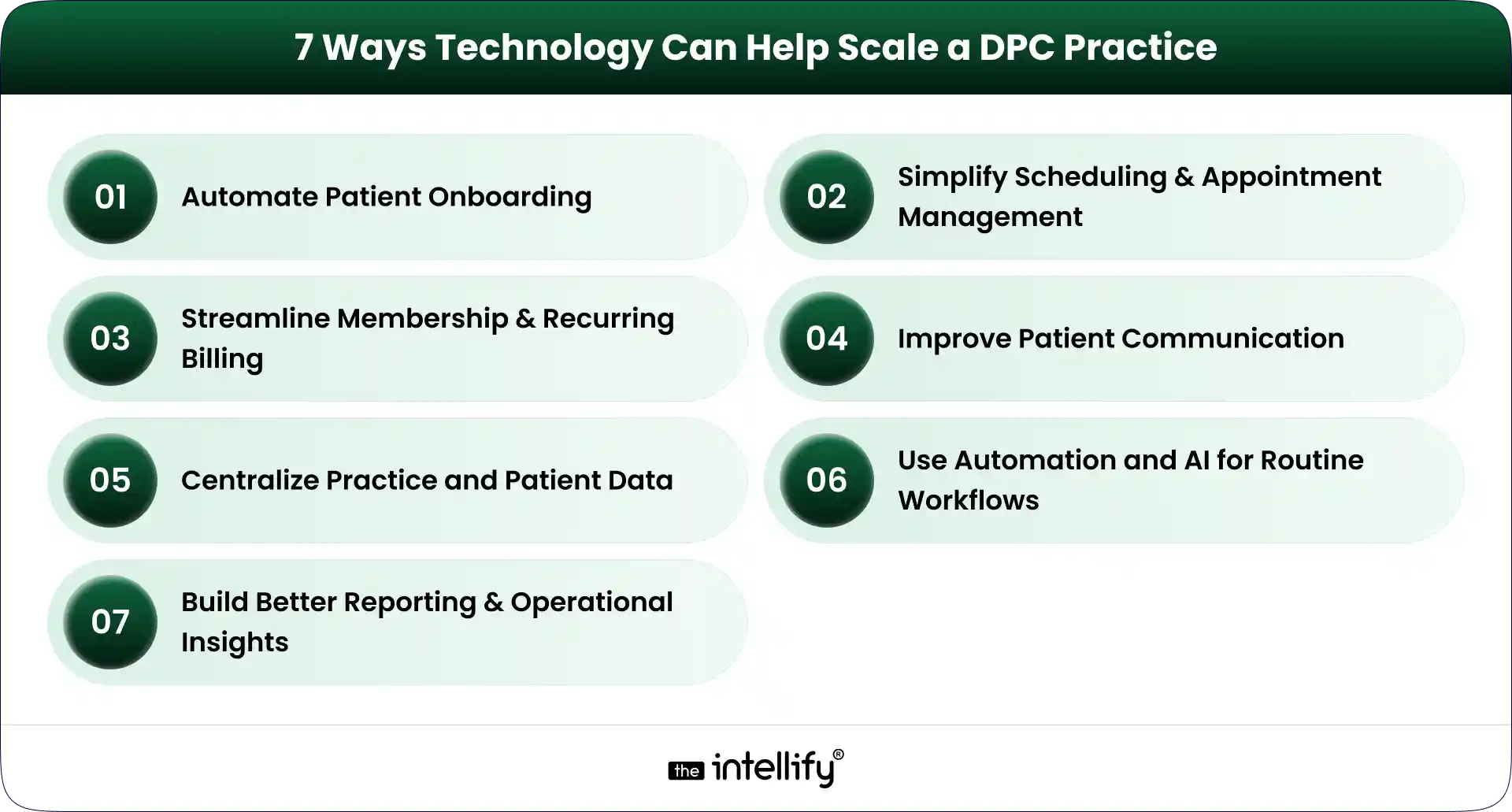
7 Ways Technology Can Help Scale a DPC Practice

7 Ways to Scale a DPC Practice

Technology can support nearly every part of the DPC member journey. But seven areas tend to have the biggest operational impact.

1. Automate Patient Onboarding

Patient onboarding is one of the first places where manual processes become difficult to maintain.

A DPC membership platform can guide a new member through registration, forms, consent, payment, and initial appointment scheduling.

For example, a new member could:

  1. Register online.
  2. Select a membership plan.
  3. Complete required information.
  4. Submit payment details.
  5. Receive onboarding instructions.
  6. Schedule an initial appointment.

The workflow can then notify staff when human attention is actually needed. This creates a better experience for the patient and reduces repetitive work for the practice team.

2. Simplify Scheduling and Appointment Management

Scheduling sounds simple until appointment volume increases. Phone calls, cancellations, rescheduling, reminders, provider availability, and different appointment types can quickly become a daily headache.

DPC scheduling software can give patients online access to available appointment slots while allowing staff to maintain control over scheduling rules. Useful capabilities can include:

  • Online appointment booking
  • Automated reminders
  • Rescheduling
  • Cancellation workflows
  • Calendar integration
  • Provider availability management
  • Appointment-type configuration

The objective is not to remove staff from scheduling. It is to stop staff from spending their day doing tasks that patients can safely handle themselves.

3. Streamline Membership and Recurring Billing

Membership billing is central to the DPC model. A DPC billing software solution can help practices manage recurring payments, membership status, payment failures, invoices, and account changes.

Automated payment workflows can also reduce the awkward situation where staff have to repeatedly contact members about missed payments.

A good billing workflow should make it clear:

  • Who is an active member?
  • Which plan are they enrolled in?
  • When is the next payment due?
  • Did the payment succeed?
  • Is an account past due?
  • Has a membership been paused or canceled?

The more members a practice has, the more important this visibility becomes.

4. Improve Patient Communication

Patient communication doesn’t stop when an appointment ends. Members may have questions, need follow-up information, or simply need to know what happens next.

A DPC patient portal can provide a secure channel for appropriate communication between patients and the practice.

Automated messages can also handle routine updates such as appointment reminders, onboarding instructions, and payment notifications.

For practices with higher call volumes, AI-powered or automated communication can potentially help with common administrative questions and routing. But clinical questions still need appropriate clinical oversight. That distinction matters.

5. Centralize Practice and Patient Data

Disconnected systems create unnecessary work. When membership data, scheduling, billing, patient communication, and clinical information sit in separate systems, staff often end up acting as the bridge between them.

A connected DPC platform can reduce that problem by integrating the systems and workflows that the practice depends on.

The exact architecture will vary by practice. Some may use an existing EHR and add a membership layer. Others may need deeper integrations or a more customized platform.
The goal is the same: reduce unnecessary movement of information between systems.

6. Use Automation and AI for Routine Workflows

AI is becoming part of healthcare operations, but it needs to be used carefully. For DPC practices, practical use cases can include:

  • Handling common administrative questions
  • Appointment reminders
  • Basic patient routing
  • Follow-up notifications
  • Intake assistance
  • Voice-based administrative interactions
  • Staff workflow automation

The best use cases are often the less glamorous ones. If a staff member answers the same five questions 30 times a week, that is a potential automation opportunity.

AI shouldn’t be treated as a replacement for physicians. It should handle appropriate routine work so clinicians and staff can spend more time on tasks that actually require their expertise.

7. Build Better Reporting and Operational Insights

Growth becomes difficult to manage when practice leaders can’t see what is happening. A modern DPC technology stack can provide reporting around areas such as:

  • Membership growth
  • Membership churn
  • Appointment volume
  • No-shows
  • Payment collection
  • Outstanding balances
  • Patient engagement
  • Staff workload

These numbers don’t need to become a giant dashboard nobody checks. A smaller set of useful metrics is often better.

For a multi-provider or multi-location DPC organization, however, this visibility becomes increasingly important. Leaders need to understand which locations are growing, where operational bottlenecks exist, and whether processes are keeping pace.


Direct Primary Care platform


What Should a Modern DPC Technology Stack Include?

A modern DPC platform doesn’t necessarily mean one giant piece of software that does everything. It means the important systems work together.

Capability What It Helps With
Patient portal Patient self-service and communication
Scheduling Appointment booking and reminders
Membership management Enrollment and member lifecycle
Billing Recurring payments and payment tracking
EHR/clinical integration Patient and clinical data workflows
Automation Repetitive administrative processes
Analytics Practice performance and growth
Communication Patient engagement and notifications

The right combination depends on the practice. A small single-location clinic may need a relatively simple setup. A larger DPC organization may require deeper integrations, custom workflows, centralized reporting, and more sophisticated automation.

That is why choosing DPC software should start with operational requirements rather than a feature checklist.


When Should a DPC Practice Consider Upgrading Its Technology?

There isn’t one membership number that automatically means a practice needs new software. Instead, look for operational signals.

1. Your Team Is Spending Too Much Time on Manual Tasks

If staff repeatedly copy information between systems, manually send reminders, or chase routine paperwork, it may be time to rethink the workflow.

2. Patient Volume Is Growing Faster Than Operations

If membership is increasing but administrative work is increasing even faster, the current technology setup may not be scaling properly.

3. You Are Managing Too Many Disconnected Tools

Five tools aren’t necessarily better than one. When those tools don’t share information, however, the practice can end up paying for integration problems with staff time.

4. You Are Opening Additional Locations

Multi-location DPC practices usually need stronger centralized systems for memberships, billing, scheduling, reporting, and user management.

What works for one location may become messy across three or five.

5. Your Existing Software Limits New Workflows

Sometimes the problem isn’t that the existing system is bad. It may simply have been designed for an earlier stage of the practice.

If you can’t introduce a workflow you now need because the software doesn’t support it, modernization may be worth considering.

6. Patients Expect More Digital Self-Service

Patients increasingly expect convenient digital options for scheduling, communication, forms, and account management.

A practice doesn’t need to digitize everything. But basic self-service capabilities can remove friction for both patients and staff.


Buy DPC Software or Build a Custom DPC Platform?

This is one of the bigger technology decisions a growing DPC practice can face. There isn’t a universal answer.

When Off-the-Shelf DPC Software Makes Sense

Off-the-shelf DPC software can be a practical choice when:

  • Your workflows are relatively standard
  • You need to implement quickly
  • You don’t need extensive customization
  • Existing integrations meet your requirements
  • Your practice is comfortable adapting some processes to the software

The main advantage is simplicity. You aren’t responsible for building and maintaining every feature yourself.

When a Custom DPC Platform May Be Better

Custom DPC development becomes more relevant when the practice has requirements that standard products can’t handle well. That may include:

  • A unique membership model
  • Complex billing rules
  • Multiple locations or entities
  • Specialized integrations
  • A highly customized patient experience
  • Existing legacy systems
  • Proprietary workflows
  • Specific reporting requirements

Custom doesn’t automatically mean better. It means the technology can be designed around the practice instead of forcing the practice to work around the software.

A Hybrid Approach Can Also Work

There is another option: modernize in stages.

A practice might keep its existing EHR while improving its membership, billing, scheduling, patient portal, or communication layer.

This approach can make sense when the underlying clinical system still works, but the surrounding technology has become outdated.

That is where healthcare platform modernization can be useful. Instead of throwing everything away, the practice can identify what needs to change and improve those areas first.


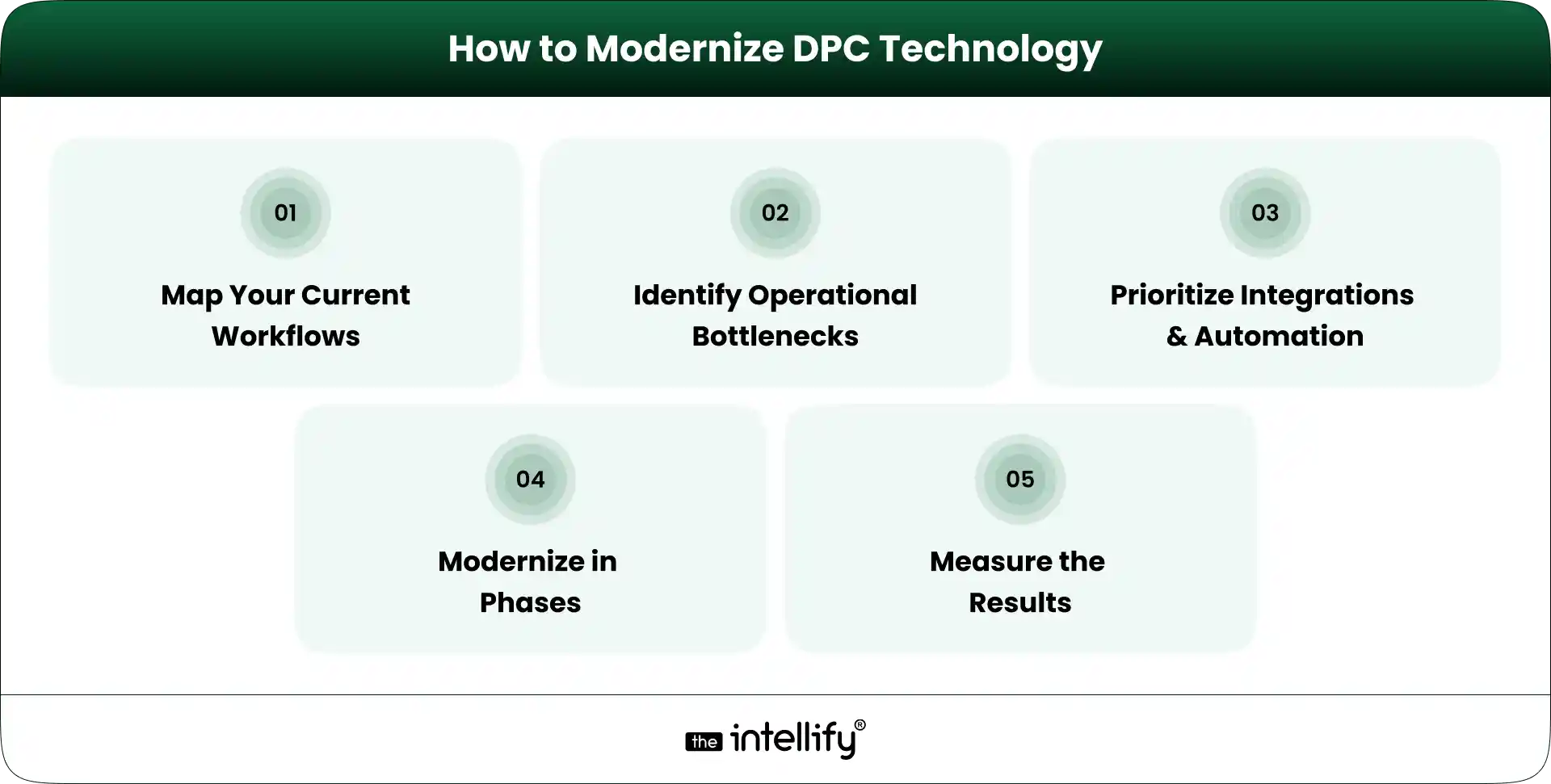
How to Modernize DPC Technology Without Disrupting Patient Care

How to Modernize DPC Technology

Technology projects can become disruptive when practices try to change too much at once. A phased approach is usually easier to manage.

1. Map Your Current Workflows

Document what actually happens today. Follow the member journey from registration to onboarding, appointment scheduling, billing, communication, and ongoing care.

Don’t just document what the software is supposed to do. Document what staff actually do. That difference can be revealing.

2. Identify the Biggest Operational Bottlenecks

Look for tasks that consume significant staff time or regularly create errors. For example:

  • Manual data entry
  • Payment follow-ups
  • Appointment coordination
  • Patient inquiries
  • Repetitive reporting
  • Duplicate information across systems

3. Prioritize Integrations and Automation

Not every workflow needs automation. Prioritize tasks that are repetitive, predictable, high-volume, and relatively low-risk.

At the same time, identify which systems need to exchange data. Integration can be just as important as automation.

4. Modernize in Phases

Instead of replacing everything in one project, establish clear phases. For example:

Phase 1: Membership and onboarding
Phase 2: Scheduling and patient communication
Phase 3: Billing and payment workflows
Phase 4: Reporting and automation
Phase 5: Advanced AI or voice workflows

The exact order should depend on the practice’s bottlenecks.

5. Measure the Results

Technology should produce measurable operational improvements. Useful KPIs can include:

  • Administrative time per member
  • Scheduling time
  • Payment collection rate
  • Patient response time
  • Membership retention
  • Staff workload

If a new system doesn’t improve the workflow, it’s worth asking why.


Common Technology Mistakes DPC Practices Should Avoid

Technology can solve problems, but a poorly planned implementation can create new ones.

Adding Too Many Disconnected Tools

More software doesn’t automatically mean better operations. Every new system introduces another login, workflow, integration, and potential failure point.

Automating Before Fixing the Workflow

Automating a bad process simply makes the bad process happen faster. Map the workflow first. Then decide what should be automated.

Ignoring the Patient Experience

A practice may save staff time while making things harder for patients. That is not a successful technology project. Test workflows from the member’s perspective, too.

Treating Security and Compliance as an Afterthought

Healthcare technology handles sensitive information. Security, access controls, data protection, auditability, and applicable healthcare compliance requirements need to be considered from the beginning, not added at the end.

Choosing Software That Cannot Scale With the Practice

A tool that works for 150 members may not work for 1,500. Before selecting a DPC platform, consider where the practice expects to be in the next few years.

Replacing Everything at Once

A complete technology replacement can create unnecessary risk. If an existing system still works well, keep it where practical and modernize the parts that are holding the practice back.


How The Intellify Can Help Modernize a DPC Practice

The technology needs of every DPC practice are a little different. The Intellify can help practices and healthcare organizations evaluate those requirements and build or modernize technology around their actual workflows.

That can include:

  • Custom DPC platform development
  • DPC platform modernization
  • Patient-facing digital experiences
  • Workflow automation
  • Third-party integrations
  • Scheduling and billing workflows
  • Patient portals
  • Scalable application architecture
  • AI and automation for appropriate operational use cases

The starting point shouldn’t be a list of features. It should be the practice’s current workflow, its biggest operational problems, and where it wants to go next.


Final Thoughts: Scale the Practice, Not the Administrative Burden

Scaling a Direct Primary Care practice is not just a matter of bringing in more members.

The operating model has to scale, too. Scheduling, onboarding, billing, communication, reporting, and patient self-service all become more important as membership grows. If those processes remain heavily manual, growth can create a surprising amount of administrative pressure.

The right DPC technology strategy can change that. A modern DPC platform should connect the workflows that matter, automate appropriate repetitive tasks, and make information easier for staff and patients to access. But there is no single technology stack that works for every practice.

Start with the bottlenecks. Understand the workflows. Decide what should be integrated, automated, replaced, or left alone.

Then build from there. The goal is simple: help the practice grow without making the administrative burden grow at the same speed.


DPC modernization solutions


Frequently Asked Questions (FAQs)

1. How can DPC software help a practice scale?

DPC software can reduce repetitive administrative work, automate recurring processes, support online scheduling and payments, improve patient communication, and provide better visibility into membership and practice operations.

2. Can DPC practices automate membership billing?

Yes. DPC practices can use billing technology to manage recurring membership payments, track payment status, handle failed transactions, and maintain membership billing records. The specific capabilities depend on the software and payment infrastructure being used.

3. Should a DPC practice buy software or build a custom platform?

It depends on the practice’s requirements. Off-the-shelf DPC software can be suitable for standard workflows and faster implementation. A custom DPC platform may make more sense when a practice needs unique workflows, specialized integrations, complex membership models, or greater control over the patient experience.

4. How can AI help a Direct Primary Care practice?

AI can support appropriate administrative tasks such as routine inquiries, appointment workflows, patient routing, reminders, intake assistance, and voice-based interactions. Clinical decisions and sensitive patient situations still require appropriate human oversight.

5. How do you modernize an existing DPC platform?

Start by mapping existing workflows and identifying bottlenecks. Then prioritize integrations, automation, and patient-facing improvements. A phased modernization approach can allow the practice to improve outdated components without replacing every system at once.

How to Modernize a Direct Primary Care (DPC) Platform

Summary:
This guide explains how to modernize a Direct Primary Care (DPC) platform for better scalability, security, patient experience, and operational efficiency. It covers essential DPC software features, legacy system assessment, platform integrations, AI opportunities, HIPAA considerations, modernization costs, common challenges, and practical steps for deciding between modernization and a complete rebuild.


Direct Primary Care (DPC) has changed how many patients access primary care in the U.S. Instead of relying on traditional fee-for-service models, DPC practices typically use membership-based care, giving patients more direct access to their providers.

But there’s a catch: a DPC practice can have a modern care model while still running on outdated technology.

A slow patient portal, disconnected billing system, manual scheduling, or an aging database can quickly become a problem as membership grows. Staff spend more time on administrative work, patients face unnecessary friction, and providers have less time for care.

That’s where DPC platform modernization comes in.

Modernizing a DPC platform is not simply about replacing old software. It means improving the underlying technology, workflows, integrations, security, and user experience so the platform can support the practice today and as it grows.


What Is DPC Platform Modernization?

DPC platform modernization is the process of upgrading an existing Direct Primary Care platform to make it more scalable, secure, connected, and easier to use.

It can involve replacing outdated components, redesigning the patient experience, connecting third-party systems, improving infrastructure, automating repetitive processes, or rebuilding parts of the platform.

A useful distinction is this:

Software upgrade: Improve or replace a specific component.

Platform modernization: Look at the entire technology ecosystem and improve how its components work together.

For example, a DPC practice may already have scheduling, billing, patient communication, and member management tools. If these systems don’t share data, staff may still have to move information manually between them.

A modern DPC platform should reduce that friction. The goal isn’t to add technology for the sake of it. The goal is to make everyday work simpler for patients, providers, and administrative teams.


Why DPC Practices Need to Modernize Their Platforms

1. Legacy Systems Create Operational Bottlenecks

Older DPC software often develops around the needs of a smaller practice. As membership increases, those early design decisions can become limitations.

Staff may have to:

  • Enter the same patient information into multiple systems
  • Manually track membership status
  • Reconcile payments
  • Send appointment reminders
  • Manage schedules across separate tools
  • Generate reports manually

None of these tasks seem huge individually. Together, they consume a surprising amount of time. Modernization can connect these workflows and reduce unnecessary manual work.

2. Patient Expectations Have Changed

Patients are accustomed to managing many services digitally. They expect convenient scheduling, timely notifications, mobile-friendly experiences, and simple access to information.

A DPC membership model naturally supports a closer patient-provider relationship, so the technology supporting that relationship matters.

A modern DPC patient portal can allow members to schedule appointments, communicate securely, manage their information, review documents, and handle other routine tasks without calling the practice for every small request.

That doesn’t replace personal care. It removes avoidable administrative friction around it.

3. Scaling Becomes Harder With Outdated DPC Software

A platform that works for 500 members may struggle when a practice reaches several thousand.

More members can mean more appointments, payments, messages, providers, locations, and data. If the underlying DPC technology wasn’t designed to scale, performance and maintenance issues can appear at the worst possible time.

Modern architecture helps practices add functionality and capacity without constantly rebuilding the foundation.

4. Data and Integration Gaps Limit Growth

A DPC practice rarely operates with one system. It may use an EHR/EMR, payment processor, telehealth service, laboratory system, communication provider, analytics platform, and other healthcare tools. If these systems don’t communicate properly, staff become the integration layer. That’s expensive and error-prone.

DPC platform integration through secure APIs and appropriate data exchange can create a more connected workflow.


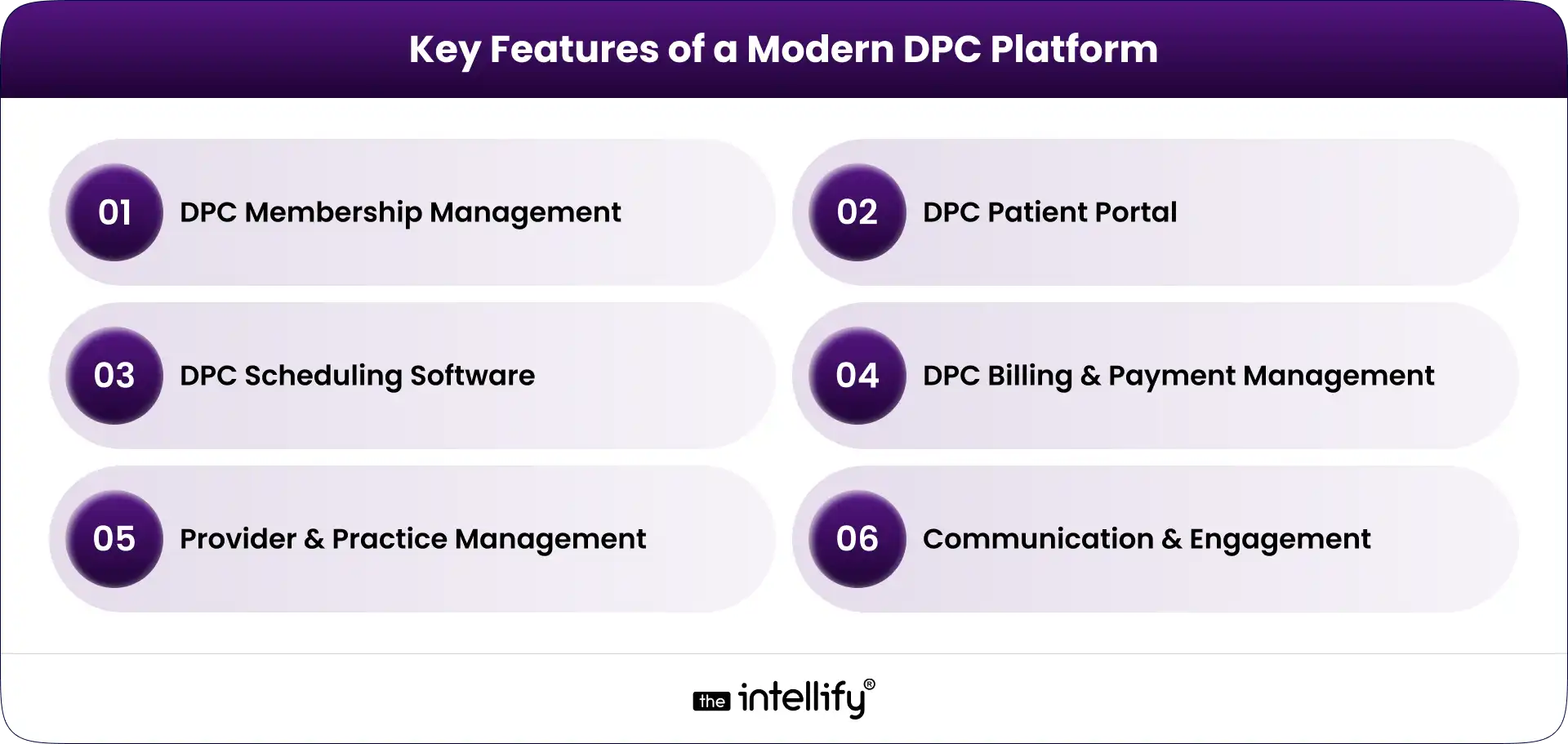
Key Features of a Modern DPC Platform

Key Features of a Modern DPC Platform

A modern DPC platform should support the core operations of a membership-based primary care practice while leaving room for future integrations and automation.

DPC Membership Management

Membership management is at the center of a DPC business model. The platform should support:

  • Individual and family memberships
  • Membership plans
  • Enrollment and cancellation
  • Member status tracking
  • Subscription renewals
  • Eligibility and account information

Automation is particularly useful here. When membership changes, related billing, communication, and access permissions should update without requiring several manual steps.

DPC Patient Portal

The DPC patient portal is often the part of the platform patients interact with most. A useful portal can provide:

  • Patient profiles
  • Secure messaging
  • Appointment access
  • Forms and documents
  • Care-related information
  • Account and membership details

The experience should also work well on smartphones. Patients shouldn’t have to zoom, pinch, and fight their way through a desktop-only interface just to book an appointment.

DPC Scheduling Software

Good DPC scheduling software should make appointments easier for both patients and staff. Important capabilities include:

  • Online appointment booking
  • Provider availability
  • Calendar management
  • Appointment reminders
  • Rescheduling and cancellation
  • In-person and virtual appointment support

Scheduling rules can also be configured around different appointment types, providers, locations, and availability.

DPC Billing and Payment Management

Membership billing is another area where automation can remove repetitive work. A modern DPC billing software component may support:

  • Recurring membership payments
  • Invoices and receipts
  • Payment processing
  • Failed-payment handling
  • Subscription changes
  • Payment history

The exact workflow depends on the practice’s business model and payment providers, but the objective remains the same: reduce manual reconciliation and give staff better visibility into membership revenue.

Provider and Practice Management

Providers and administrators need different views of the same underlying data. A modern platform can provide role-based dashboards for:

  • Provider schedules
  • Member lists
  • Tasks
  • Practice activity
  • Operational reports
  • User permissions

This helps keep the platform useful without giving every user access to information they don’t need.

Communication and Engagement

Communication can be built into the DPC platform instead of scattered across separate tools. Depending on the use case, this may include SMS and email notifications, secure patient messaging, appointment reminders, follow-ups, and automated administrative communications.

The important part is control. Patients should receive useful communication, not a pile of automated messages they eventually ignore.


How to Modernize a DPC Platform: Step-by-Step

1. Audit the Existing DPC Platform

Start with discovery, not development. Review the current technology stack, database, workflows, integrations, security controls, performance, user experience, and technical debt.

Talk to the people who use the system every day. They usually know where the real problems are. The audit should answer a basic question:

What should we keep, what should we improve, and what needs to go?

2. Identify What Should Be Rebuilt, Replaced, or Integrated

A full rebuild isn’t always the right answer. Some legacy components may still work perfectly well. Others may be impossible to maintain or integrate with modern systems.

Separate the platform into components and evaluate each one. A phased approach can reduce disruption while allowing the practice to modernize the areas causing the most pain first.

3. Design a Scalable DPC Platform Architecture

Architecture matters because modernization shouldn’t create another technology problem five years from now.

A modern DPC platform may use modular services, cloud infrastructure, secure APIs, scalable databases, and centralized identity and access management.

An API-first approach can also make future DPC platform integration easier.

The architecture should be designed around the practice’s actual requirements, not whatever technology happens to be popular this month.

4. Modernize the Patient and Provider Experience

Technology can be technically sound and still frustrating to use. Review the main workflows from the user’s perspective:

  • How does a new member enroll?
  • How does a patient book an appointment?
  • How does a provider find member information?
  • How does staff update membership status?
  • How does someone handle a failed payment?

Remove unnecessary steps wherever possible.

5. Connect the DPC Platform With Existing Systems

The goal isn’t necessarily to replace every tool. A modern platform should connect with the systems the practice already depends on, using secure and appropriately governed integrations.

This can include EHR/EMR systems, payment providers, laboratories, pharmacies, telehealth platforms, and communication services.

6. Add Automation and AI Where It Makes Sense

AI for Direct Primary Care can be useful when applied to repetitive, administrative, or assistive workflows. Examples include:

  • Scheduling assistance
  • Patient intake support
  • Administrative communication
  • Internal staff assistants
  • Information summarization
  • Operational insights

AI should not be added simply because a platform needs an “AI feature.”

For clinical workflows, appropriate validation, human oversight, privacy controls, and governance are especially important. The technology should support healthcare professionals rather than quietly making high-stakes decisions without oversight.

7. Test, Secure, and Gradually Roll Out the Modernized Platform

Don’t wait until launch week to discover that something breaks. Test core workflows, integrations, permissions, performance, security, and data migration before going live.

A phased rollout can also reduce risk. Start with a controlled group, monitor the results, fix issues, and expand. Modernization is a process, not a single launch event.


DPC Platform Modernization Solutions


DPC Platform Integration: What Should You Connect?

A modern DPC platform may need to integrate with several systems depending on the practice. Common categories include:

  • EHR/EMR systems
  • Payment and subscription platforms
  • Telehealth solutions
  • Laboratory systems
  • Pharmacy services
  • SMS and email providers
  • Identity and authentication services
  • Analytics and reporting platforms

APIs are particularly important because they allow systems to exchange information without forcing staff to manually move data between applications.

However, integration isn’t just a technical exercise. Healthcare data requires careful consideration of privacy, security, authorization, data mapping, error handling, and auditability.


Where AI Fits Into a Modern DPC Platform

AI can become a useful layer within a modern DPC platform, particularly for administrative workflows.

For example, an AI assistant could help answer routine membership questions, guide patients through scheduling, support intake workflows, or help staff summarize information.

A practice could also use AI to identify operational patterns, such as appointment demand or recurring administrative bottlenecks. But there’s a line worth keeping clear.

AI that helps someone find an appointment is very different from AI making an autonomous clinical decision.

For DPC practices, a sensible starting point is often low-risk, high-volume administrative work. From there, practices can evaluate more advanced use cases based on evidence, governance, security, and clinical oversight.


Security and Compliance Considerations for DPC Platform Modernization

Healthcare software modernization has to treat security as part of the architecture, not a final checkbox. A DPC platform handling protected health information may need appropriate safeguards around:

  • HIPAA requirements
  • Data encryption
  • Authentication
  • Role-based access
  • Audit logs
  • Secure APIs
  • Data backups
  • Disaster recovery
  • Vendor and business associate relationships
  • Ongoing security monitoring

HIPAA compliance itself isn’t achieved simply by adding encryption or signing a vendor agreement. The platform, organization, workflows, policies, and vendors all need appropriate controls.

For that reason, security and compliance requirements should be considered during discovery and architecture rather than added after development is finished.


How Much Does DPC Platform Modernization Cost?

There isn’t a reliable one-size-fits-all price for DPC platform modernization. A platform with a stable architecture and a few outdated components will have very different requirements from a heavily customized legacy system that needs migration and multiple integrations.

DPC Platform Modernization Cost

The best way to estimate the investment is to conduct a technical and workflow assessment first. That creates a clearer scope before development begins.


Common Challenges in Legacy DPC Platform Modernization

Data migration: Older databases may contain inconsistent or duplicated information. Data needs to be mapped, cleaned, validated, and migrated carefully.

Legacy integrations: Some older systems may have limited APIs or outdated interfaces. Integration planning needs to account for these constraints.

Downtime: Practices cannot simply stop serving members while a new system is deployed. A phased migration and rollback plan can reduce operational risk.

Staff adoption: A technically better system can still fail if employees don’t understand how to use it. Training and usability testing matter.

Technical debt: Old code can hide dependencies that aren’t obvious during the initial assessment. This is one reason a proper technical audit is valuable.

Security risks: Modernization can introduce new endpoints, integrations, and access paths. Security needs to be tested throughout the process.


Modernize or Rebuild: Which Approach Is Right for Your DPC Platform?

There are three common approaches.

Approach Best When Main Advantage Main Risk
Modernize existing platform Core technology is still viable Less disruption Some legacy limitations remain
Partial rebuild Only certain components are outdated Balanced approach Architecture requires careful planning
Full rebuild Platform is heavily constrained Clean technical foundation Higher migration and implementation effort

The right choice depends on the condition of the existing platform. If the database, architecture, and core workflows are still sound, rebuilding everything may create unnecessary risk.

On the other hand, continuously patching a fundamentally outdated platform can become expensive too. The decision should come from a technical assessment rather than a preference for “new” technology.


Final Thoughts

A modern DPC platform doesn’t need every new technology available. It needs to work well.

Patients should be able to interact with the practice without unnecessary friction. Providers should have access to the information they need. Staff shouldn’t have to spend hours moving data between disconnected systems. And the technology should be able to grow with the practice.

That’s the real purpose of DPC platform modernization.

For practices working with an aging platform, the first step isn’t choosing a technology stack. It’s about understanding what’s currently slowing the business and where modernization will create the most value.

The Intellify can help DPC organizations assess existing systems, plan modernization, develop DPC software, build patient and provider experiences, integrate healthcare systems, and introduce automation or AI where appropriate.


Direct primary care modernization platform


Frequently Asked Questions About DPC Platform Modernization

1. How do I modernize a legacy DPC platform?

Start with a technical and workflow audit. Identify outdated components, integration gaps, security risks, and user pain points. Then determine what should be modernized, replaced, integrated, or rebuilt before creating a phased implementation roadmap.

2. What features should a modern DPC platform have?

Common features include membership management, a DPC patient portal, scheduling, billing and payments, provider management, secure communication, reporting, integrations, and appropriate automation.

3. Should I modernize my existing DPC software or rebuild it?

It depends on the condition of the existing platform. If its core architecture is still viable, modernization or a partial rebuild may be more practical. If the platform has severe technical debt or architectural limitations, a full rebuild may make more sense.

4. Can AI be integrated into a DPC platform?

Yes. AI can support administrative and assistive workflows such as scheduling, intake, communication, summarization, and operational analysis. Higher-risk clinical use cases require appropriate validation, governance, privacy controls, and human oversight.

5. How long does DPC platform modernization take?

The timeline varies significantly based on platform complexity, integrations, migration requirements, and the scope of the rebuild. A small modernization project can be much shorter than a complete platform redevelopment with multiple healthcare integrations.

6. How can I make a DPC platform HIPAA-compliant?

HIPAA compliance requires appropriate administrative, physical, and technical safeguards for protected health information. The platform should incorporate suitable access controls, security measures, audit capabilities, policies, vendor management, and risk processes rather than treating compliance as a single development task.

Digital Transformation in Healthcare: Strategy for Membership Platforms

Summary:
Digital transformation is helping healthcare organizations build modern membership platforms that improve patient experience and operational efficiency. This blog explains how technologies like telehealth, AI, secure patient portals, and subscription billing systems support the growth of membership-based healthcare models. It also explores key platform components, implementation strategies, industry challenges, and future trends. With the right digital approach, healthcare providers can create scalable platforms that deliver continuous care and strengthen long-term patient relationships.

Why Membership-Based Healthcare Is Rapidly Evolving

The healthcare landscape is experiencing significant changes. We’re seeing a leap from traditional care models to subscription and membership platforms, fundamentally reshaping how services are delivered and consumed. With patients increasingly demanding convenience, transparency, and digital access, healthcare providers are under pressure to boost operational efficiency and retain their clientele. As we gear up for 2026, this year stands as a pivotal moment for modernizing healthcare platforms, making it essential for decision-makers to craft effective strategies.

In this guide, we’ll delve into what digital transformation means for healthcare membership platforms and how you can navigate this shifting landscape to enhance patient outcomes and drive business performance.


What Digital Transformation in Healthcare Means for Membership Platforms

Digital transformation in healthcare goes beyond simple digitization; it’s about creating connected experiences that weave together clinical, administrative, and customer functions. This integration paves the way for smoother patient journeys, allowing for preventive, continuous, and personalized care models.

Aligning technology with your business goals and focusing on member value is crucial. When organizations do this, they’re better equipped to meet the needs of their subscribers and foster a more engaged and loyal patient base.


Key Drivers Accelerating Digital Transformation in Healthcare

Several key factors are pushing this transformation in healthcare:

  •  Demand for Virtual Care: More patients prefer remote access to healthcare services, prompting platforms to expand their telehealth options.
  • Value-Based Care models: As these models gain popularity, healthcare organizations must adopt data-driven approaches to improve care quality and patient outcomes.
  • Competitive pressure: Providers face growing competition from digital first health solutions that cater to modern patient needs more effectively.
  • Regulatory Requirements: Compliance mandates are driving the need for robust systems focusing on data management and security.
  • Workforce Shortages: The rising demand for healthcare services often surpasses available resources, making automation critical.


Core Components of a Modern Healthcare Membership Platform

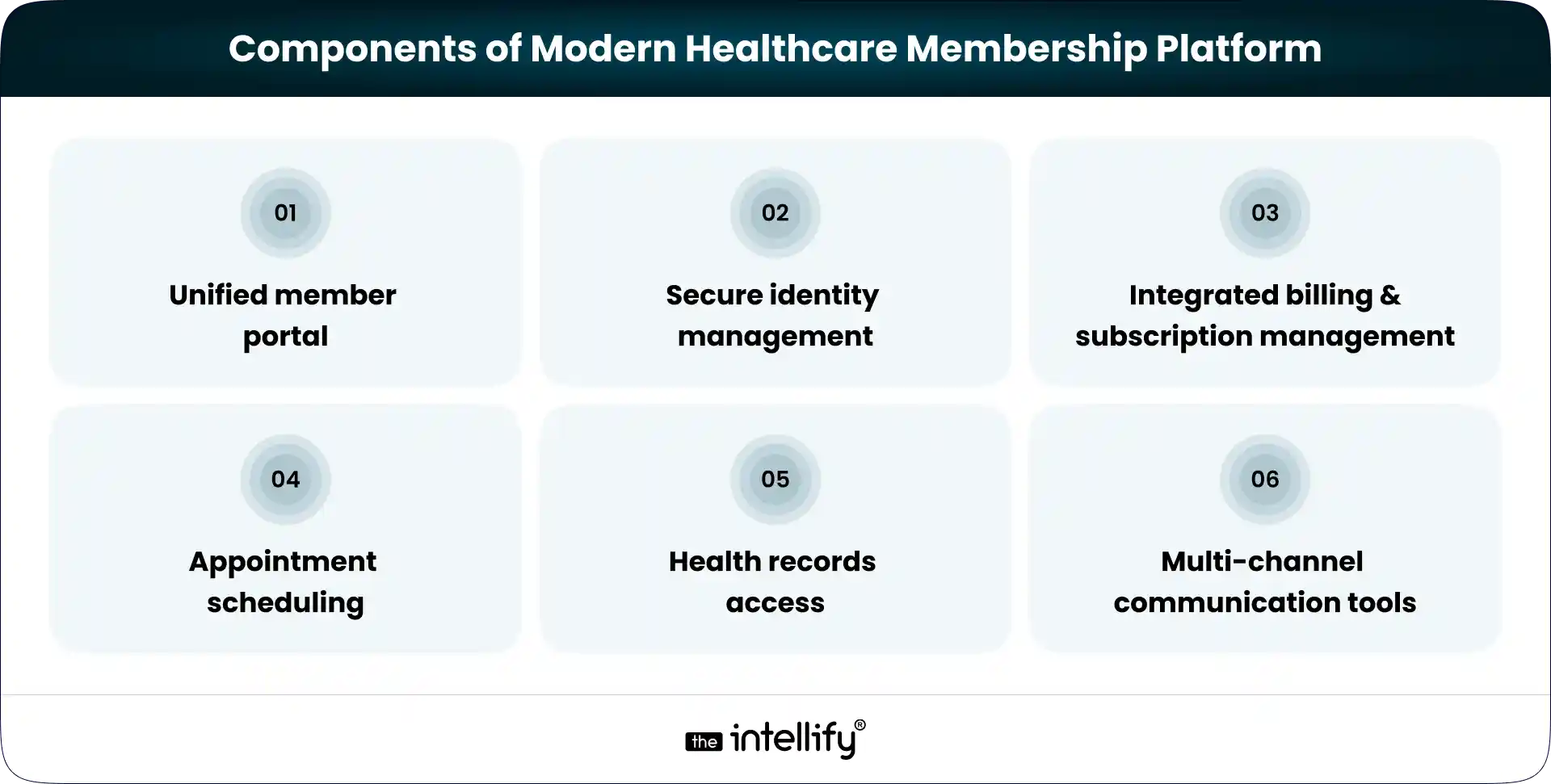
A contemporary healthcare membership platform should feature several essential components:

1. Unified member portal:- A central hub for services, plans, and communication can significantly enhance the user experience.

2. Secure identity management:- Safeguarding member information through secure access protocols is absolutely essential.

3. Integrated billing and subscription management:- Streamlined payment processes boost operational efficiency.

4. Appointment scheduling:- It should be easy for users to select telehealth services or in-person visits.

5. Health records access:- Allowing members to view and manage their health records fosters a sense of ownership.

6. Multi-channel communication tools:- Incorporating chat, messaging, and notifications keeps members engaged and informed.


Build Healthcare Membership Platform


Building a Practical Digital Transformation Strategy for Healthcare Organizations

To thrive in this transition, organizations should follow these key steps:

  • Assess current platform maturity: Identify any technology or workflow gaps that might be holding the organization back.
  • Define clear objectives: Understand what success looks like for you, improved patient satisfaction, or heightened engagement levels.
  • Prioritize improvements: Focus on high-impact changes that can deliver quick wins.
  • Secure leadership buy-in: Getting alignment across departments promotes unified efforts during this transition.
  • Plan budget and timelines: Having realistic financial and operational plans helps pave the way for smoother implementation.


Digital Healthcare Solutions That Deliver Real Member Value

The best digital healthcare solutions genuinely add value for members, including:

  • Mobile-first access: Make sure services are available on mobile devices, allowing patients to engage with healthcare wherever they are.
  • AI-supported tools: Such tools can assist in triaging symptoms and streamlining care.
  • Wellness tracking integration: Real-time health monitoring empowers patients to take charge of their wellness.
  • Simplified payment processes: Minimize the friction often encountered during claims processes.


Step-by-Step Implementation Plan

To implement a digital transformation strategy effectively, consider these phases:

Phase 1: Discovery: Engage stakeholders to gather requirements and align on clear objectives.

Phase 2: Technology selection: Select technologies that will work in harmony to support your goals.

Phase 3: Pilot programs: Begin with controlled rollouts to test systems and processes.

Phase 4: Staff training: Equip your team with the skills they’ll need for a successful transition.

Phase 5: Full deployment: Launch the platform in full and concentrate on ongoing optimization.

Navigating change management throughout this journey is vital.


Use Cases of Digital Transformation for Healthcare Membership Models

1. Concierge care:- Subscription based models that provide comprehensive care.

2. Corporate wellness programs:- Employee health initiatives that offer preventive care while lowering healthcare costs.

3. Chronic disease management:-  Memberships dedicated to managing long-term health conditions.

4. Integrated care networks:- Bundled services that enhance complementary care options.

5. Community based initiatives:- Programs focusing on public health and wellness.


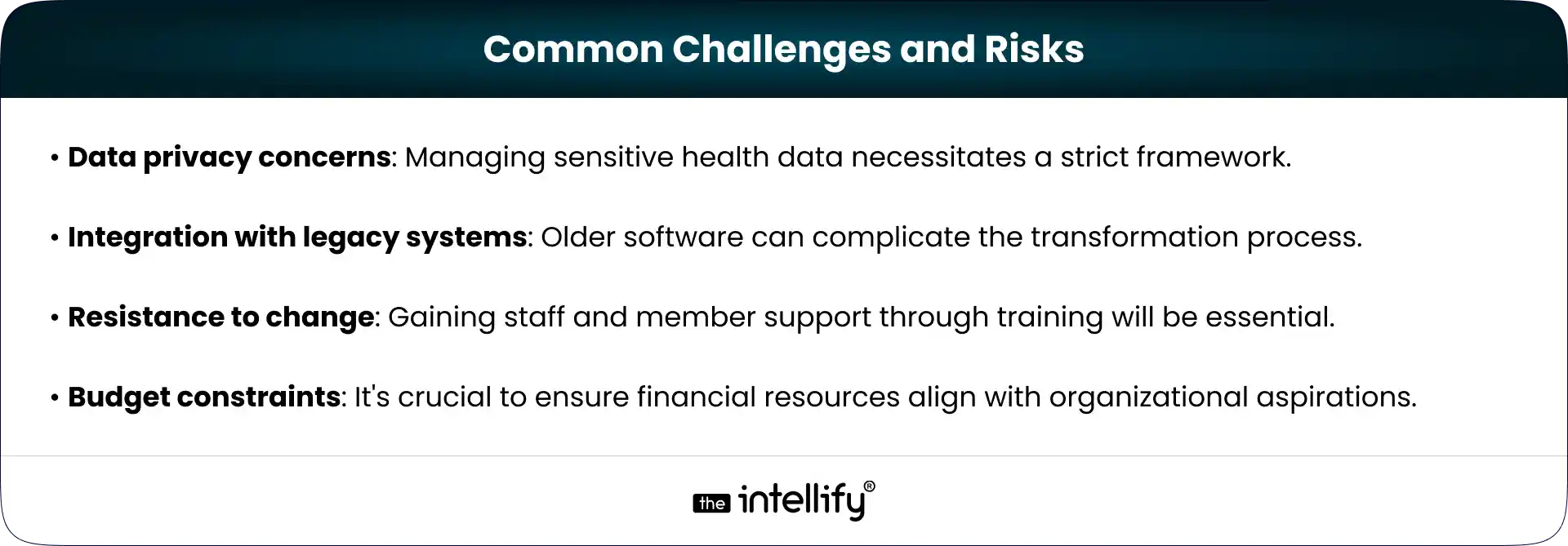
Common Challenges and Risks


Measuring Success: KPIs That Actually Matter

To understand whether digital transformation is truly working, healthcare organizations need to track a few meaningful performance indicators rather than just surface level metrics. Some of the most useful KPIs include:

Member acquisition and retention: how effectively the platform attracts new members and keeps existing ones engaged over time.

Engagement and platform usage: how frequently members use features like appointments, messaging, or health records.

Operational efficiency: improvements in workflows, response times, and overall service delivery.

Reduction in administrative workload: the extent to which automation reduces manual tasks for staff.

Patient satisfaction and experience: feedback, ratings, and overall member experience with the platform.

Subscription revenue growth: whether membership programs are generating stable and increasing recurring revenue.


Future Trends Shaping Healthcare Membership Platforms in 2026 & Beyond

Healthcare membership platforms will keep evolving as patient expectations, technology, and care delivery models change. A few trends are already shaping what the next phase may look like.

Expansion of hybrid care models

Many providers are blending virtual consultations with in person visits. This hybrid approach gives patients flexibility while still allowing clinics to handle physical care when it’s needed.

Greater use of predictive analytics and AI

Healthcare platforms are starting to rely more on AI and predictive analytics to identify potential health risks early and support better clinical decisions.

Interoperability across healthcare ecosystems

Platforms will increasingly need to connect with labs, pharmacies, insurers, and other systems so patient information can move smoothly across the care journey.

Personalized preventive care programs

Membership models are gradually shifting toward prevention. Using patient data, providers can design wellness programs tailored to individual health needs.

Integration with wearables and home devices

Wearables and remote monitoring tools are becoming part of everyday healthcare. These devices help providers track health signals continuously and respond earlier.

Shift toward outcome-focused services

Rather than focusing only on the number of visits, healthcare organizations are paying more attention to long-term health outcomes and patient experience.


Healthcare digital transformation Solutions


Conclusion:

Digital transformation in healthcare is essential for organizations aiming to stand out in a competitive landscape. By implementing effective membership platforms, healthcare providers can enhance patient care and improve operational efficiency. As expectations continue to evolve, many organizations are also working with experienced digital teams like The Intellify to modernize systems in a way that supports both clinical and operational needs without disrupting existing services.

The strategic steps you take now will build a robust foundation for a patient centered future in healthcare. Over time, this approach helps build trust, improve outcomes, and ensure healthcare delivery remains sustainable in an increasingly digital world.


Frequently Asked Questions (FAQs)

1) Why are subscription and membership models becoming popular in healthcare?

Many patients want predictable costs, faster access to care, and ongoing support instead of one-time visits. Membership models offer scheduled checkups, preventive care, virtual consultations, and wellness services under a single plan, which feels more convenient and reassuring.

2) What are the first steps to start digital transformation for a healthcare membership platform?

Most organizations begin by evaluating their current systems, identifying gaps in patient experience, and defining clear goals. Instead of replacing everything at once, successful teams prioritize high-impact improvements like online scheduling, secure communication, and digital payments.

3) How can digital tools improve member retention in healthcare programs?

Digital tools make services easier to use and more responsive. Features like reminders, personalized health tips, quick support chat, and smooth renewals help members stay engaged. When people feel supported between visits, they are far more likely to continue their subscription.

4) Is digital transformation necessary for existing healthcare membership programs, or only for new ones?

Digital transformation benefits both. Established programs can modernize outdated systems, improve member experience, and reduce operational costs, while new programs can launch with scalable digital foundations from the start.

5) How can providers ensure patient data stays secure during transformation?

Security must be built into every stage, from system design to daily operations. This includes encryption, strict access controls, compliance with regulations, regular audits, and staff training. Trust is critical in healthcare, so privacy protection cannot be an afterthought.

6) What common mistakes should organizations avoid when modernizing their platforms?

A frequent mistake is focusing only on technology while ignoring user experience. Another is trying to implement too many changes at once. Successful transformations balance innovation with simplicity and involve both staff and patients in the process.

View
Case Study