How to Scale a Direct Primary Care Practice With Technology

Summary:
This guide explains how technology can help Direct Primary Care practices scale without increasing administrative workload at the same pace. It covers DPC software, membership management, scheduling, billing, patient communication, automation, AI, and healthcare platform modernization, while outlining practical ways practices can build a more connected and scalable technology infrastructure.


Running a Direct Primary Care (DPC) practice is different from running a traditional fee-for-service practice. The membership model can give physicians more predictable revenue and more time with patients. But growth brings its own problems.

More members mean more appointments, messages, payments, onboarding tasks, reminders, and questions for the practice team to handle.

At first, these tasks may be manageable with spreadsheets, email, phone calls, and a few separate software tools. Then the practice grows. Suddenly, the same processes that worked for 200 members start creating friction at 500 or 1,000.

That is where DPC technology becomes important.

A well-designed Direct Primary Care platform can connect membership management, scheduling, billing, communication, patient self-service, and reporting in one operational environment. The goal isn’t to add technology for the sake of it. It is to make growth easier to manage without allowing administrative work to take over the practice.


What Does Scaling a Direct Primary Care Practice Actually Mean?

Scaling a DPC practice isn’t simply about adding more patients.

The real question is: Can the practice support more members without increasing administrative complexity at the same rate?

If every additional 100 members requires another large increase in staff time, phone calls, manual data entry, and billing work, the practice may be growing without actually becoming more efficient.

Growth Isn’t Just About Adding More Patients

Sustainable DPC growth usually involves several things happening together:

  • Increasing membership without compromising care quality
  • Making appointments easier to manage
  • Keeping physicians focused on patient care
  • Reducing repetitive administrative work
  • Collecting recurring membership payments reliably
  • Giving patients convenient ways to communicate with the practice
  • Understanding what is happening across the practice through useful data

A growing DPC practice needs operating processes that can handle a higher volume. Technology can support those processes, but only when it is designed around how the practice actually works.

Where Traditional DPC Operations Start to Struggle

Many practices begin with simple tools. A calendar handles appointments. A payment system handles memberships. Email handles communication. Staff maintain spreadsheets to track information.

That setup isn’t necessarily wrong. The trouble starts when these systems don’t communicate with one another.

Staff may need to enter the same information several times. A patient’s membership status might sit in one system while billing information lives somewhere else. Appointment changes may require manual follow-up.

Those small inefficiencies add up. And when something goes wrong, figuring out where the problem started can be frustrating.


Why Technology Matters as a DPC Practice Grows

Technology should solve operational problems, not create another layer of them. The right DPC software can take routine work away from staff, make information easier to access, and give patients more control over simple tasks.

Reduce Repetitive Administrative Work

Consider patient onboarding. Without automation, a new member may require a staff member to send forms, check whether they were completed, update records, confirm payment, send instructions, and schedule an initial visit.

A connected workflow can handle much of that process automatically. The staff still has oversight, but they aren’t manually pushing every step forward.

The same idea applies to appointment reminders, membership notifications, payment follow-ups, and other routine tasks.

Give Patients More Ways to Manage Their Care

Patients are used to handling many everyday services online. Healthcare is no exception. A DPC patient portal can let members:

  • View or request appointments
  • Complete forms
  • Send secure messages
  • Review relevant information
  • Receive practice updates
  • Manage certain account details

This doesn’t mean every patient interaction should become digital. Some people will always want to call. That’s fine. The point is to give patients options while reducing unnecessary work for the front desk.

Give Physicians and Staff Better Operational Visibility

As membership grows, practice leaders need more than individual records. They need to see what is happening across the business.

A modern DPC platform can bring information about memberships, appointments, billing, communication, and operational activity into a more connected view.

That makes it easier to identify issues early instead of discovering them after they become bigger problems.


7 Ways Technology Can Help Scale a DPC Practice
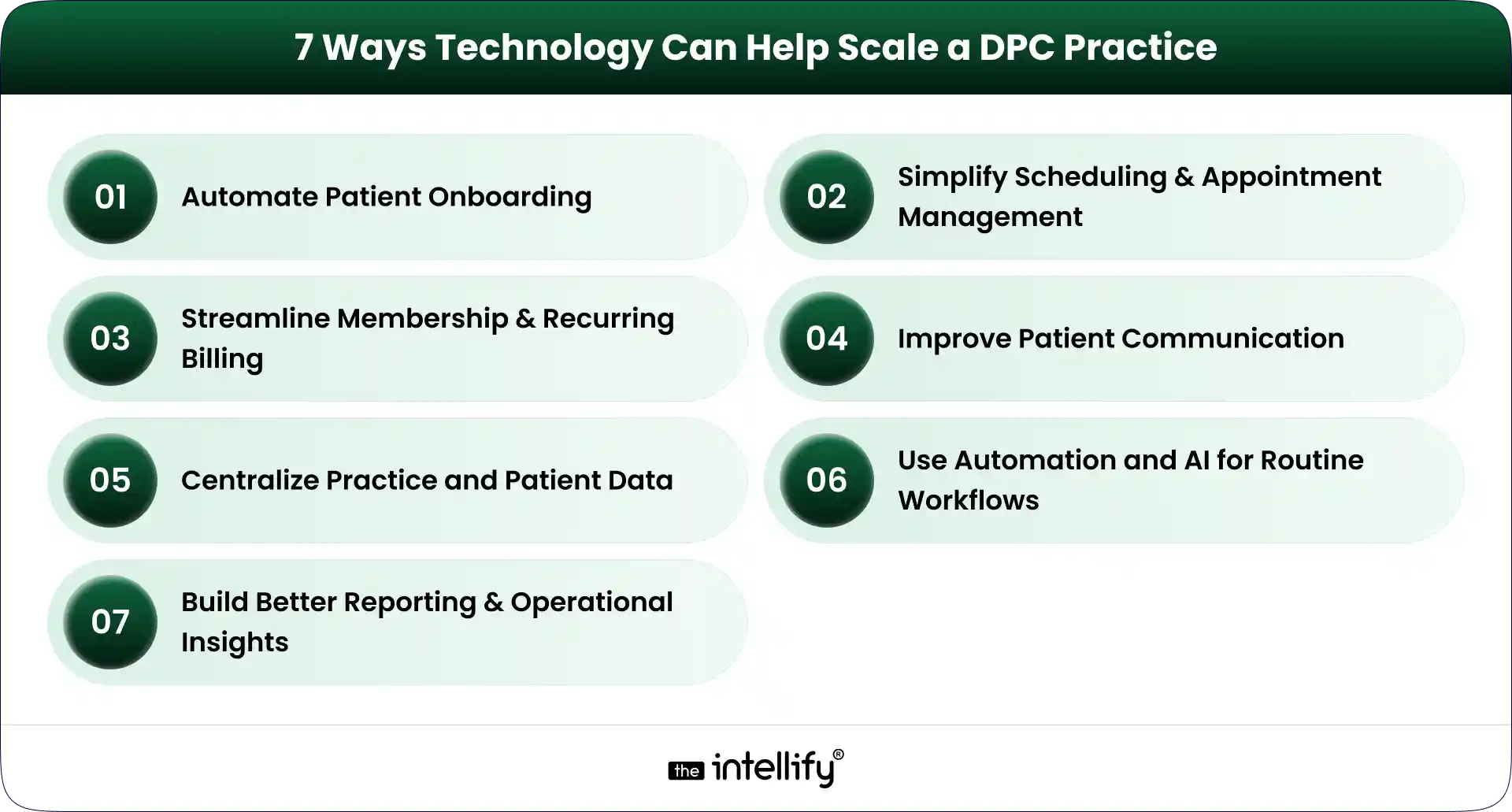
7 Ways to Scale a DPC Practice

Technology can support nearly every part of the DPC member journey. But seven areas tend to have the biggest operational impact.

1. Automate Patient Onboarding

Patient onboarding is one of the first places where manual processes become difficult to maintain.

A DPC membership platform can guide a new member through registration, forms, consent, payment, and initial appointment scheduling.

For example, a new member could:

  1. Register online.
  2. Select a membership plan.
  3. Complete required information.
  4. Submit payment details.
  5. Receive onboarding instructions.
  6. Schedule an initial appointment.

The workflow can then notify staff when human attention is actually needed. This creates a better experience for the patient and reduces repetitive work for the practice team.

2. Simplify Scheduling and Appointment Management

Scheduling sounds simple until appointment volume increases. Phone calls, cancellations, rescheduling, reminders, provider availability, and different appointment types can quickly become a daily headache.

DPC scheduling software can give patients online access to available appointment slots while allowing staff to maintain control over scheduling rules. Useful capabilities can include:

  • Online appointment booking
  • Automated reminders
  • Rescheduling
  • Cancellation workflows
  • Calendar integration
  • Provider availability management
  • Appointment-type configuration

The objective is not to remove staff from scheduling. It is to stop staff from spending their day doing tasks that patients can safely handle themselves.

3. Streamline Membership and Recurring Billing

Membership billing is central to the DPC model. A DPC billing software solution can help practices manage recurring payments, membership status, payment failures, invoices, and account changes.

Automated payment workflows can also reduce the awkward situation where staff have to repeatedly contact members about missed payments.

A good billing workflow should make it clear:

  • Who is an active member?
  • Which plan are they enrolled in?
  • When is the next payment due?
  • Did the payment succeed?
  • Is an account past due?
  • Has a membership been paused or canceled?

The more members a practice has, the more important this visibility becomes.

4. Improve Patient Communication

Patient communication doesn’t stop when an appointment ends. Members may have questions, need follow-up information, or simply need to know what happens next.

A DPC patient portal can provide a secure channel for appropriate communication between patients and the practice.

Automated messages can also handle routine updates such as appointment reminders, onboarding instructions, and payment notifications.

For practices with higher call volumes, AI-powered or automated communication can potentially help with common administrative questions and routing. But clinical questions still need appropriate clinical oversight. That distinction matters.

5. Centralize Practice and Patient Data

Disconnected systems create unnecessary work. When membership data, scheduling, billing, patient communication, and clinical information sit in separate systems, staff often end up acting as the bridge between them.

A connected DPC platform can reduce that problem by integrating the systems and workflows that the practice depends on.

The exact architecture will vary by practice. Some may use an existing EHR and add a membership layer. Others may need deeper integrations or a more customized platform.
The goal is the same: reduce unnecessary movement of information between systems.

6. Use Automation and AI for Routine Workflows

AI is becoming part of healthcare operations, but it needs to be used carefully. For DPC practices, practical use cases can include:

  • Handling common administrative questions
  • Appointment reminders
  • Basic patient routing
  • Follow-up notifications
  • Intake assistance
  • Voice-based administrative interactions
  • Staff workflow automation

The best use cases are often the less glamorous ones. If a staff member answers the same five questions 30 times a week, that is a potential automation opportunity.

AI shouldn’t be treated as a replacement for physicians. It should handle appropriate routine work so clinicians and staff can spend more time on tasks that actually require their expertise.

7. Build Better Reporting and Operational Insights

Growth becomes difficult to manage when practice leaders can’t see what is happening. A modern DPC technology stack can provide reporting around areas such as:

  • Membership growth
  • Membership churn
  • Appointment volume
  • No-shows
  • Payment collection
  • Outstanding balances
  • Patient engagement
  • Staff workload

These numbers don’t need to become a giant dashboard nobody checks. A smaller set of useful metrics is often better.

For a multi-provider or multi-location DPC organization, however, this visibility becomes increasingly important. Leaders need to understand which locations are growing, where operational bottlenecks exist, and whether processes are keeping pace.
 

Direct Primary Care platform


What Should a Modern DPC Technology Stack Include?

A modern DPC platform doesn’t necessarily mean one giant piece of software that does everything. It means the important systems work together.

Capability What It Helps With
Patient portal Patient self-service and communication
Scheduling Appointment booking and reminders
Membership management Enrollment and member lifecycle
Billing Recurring payments and payment tracking
EHR/clinical integration Patient and clinical data workflows
Automation Repetitive administrative processes
Analytics Practice performance and growth
Communication Patient engagement and notifications

The right combination depends on the practice. A small single-location clinic may need a relatively simple setup. A larger DPC organization may require deeper integrations, custom workflows, centralized reporting, and more sophisticated automation.

That is why choosing DPC software should start with operational requirements rather than a feature checklist.


When Should a DPC Practice Consider Upgrading Its Technology?

There isn’t one membership number that automatically means a practice needs new software. Instead, look for operational signals.

1. Your Team Is Spending Too Much Time on Manual Tasks

If staff repeatedly copy information between systems, manually send reminders, or chase routine paperwork, it may be time to rethink the workflow.

2. Patient Volume Is Growing Faster Than Operations

If membership is increasing but administrative work is increasing even faster, the current technology setup may not be scaling properly.

3. You Are Managing Too Many Disconnected Tools

Five tools aren’t necessarily better than one. When those tools don’t share information, however, the practice can end up paying for integration problems with staff time.

4. You Are Opening Additional Locations

Multi-location DPC practices usually need stronger centralized systems for memberships, billing, scheduling, reporting, and user management.

What works for one location may become messy across three or five.

5. Your Existing Software Limits New Workflows

Sometimes the problem isn’t that the existing system is bad. It may simply have been designed for an earlier stage of the practice.

If you can’t introduce a workflow you now need because the software doesn’t support it, modernization may be worth considering.

6. Patients Expect More Digital Self-Service

Patients increasingly expect convenient digital options for scheduling, communication, forms, and account management.

A practice doesn’t need to digitize everything. But basic self-service capabilities can remove friction for both patients and staff.


Buy DPC Software or Build a Custom DPC Platform?

This is one of the bigger technology decisions a growing DPC practice can face. There isn’t a universal answer.

When Off-the-Shelf DPC Software Makes Sense

Off-the-shelf DPC software can be a practical choice when:

  • Your workflows are relatively standard
  • You need to implement quickly
  • You don’t need extensive customization
  • Existing integrations meet your requirements
  • Your practice is comfortable adapting some processes to the software

The main advantage is simplicity. You aren’t responsible for building and maintaining every feature yourself.

When a Custom DPC Platform May Be Better

Custom DPC development becomes more relevant when the practice has requirements that standard products can’t handle well. That may include:

  • A unique membership model
  • Complex billing rules
  • Multiple locations or entities
  • Specialized integrations
  • A highly customized patient experience
  • Existing legacy systems
  • Proprietary workflows
  • Specific reporting requirements

Custom doesn’t automatically mean better. It means the technology can be designed around the practice instead of forcing the practice to work around the software.

A Hybrid Approach Can Also Work

There is another option: modernize in stages.

A practice might keep its existing EHR while improving its membership, billing, scheduling, patient portal, or communication layer.

This approach can make sense when the underlying clinical system still works, but the surrounding technology has become outdated.

That is where healthcare platform modernization can be useful. Instead of throwing everything away, the practice can identify what needs to change and improve those areas first.


How to Modernize DPC Technology Without Disrupting Patient Care
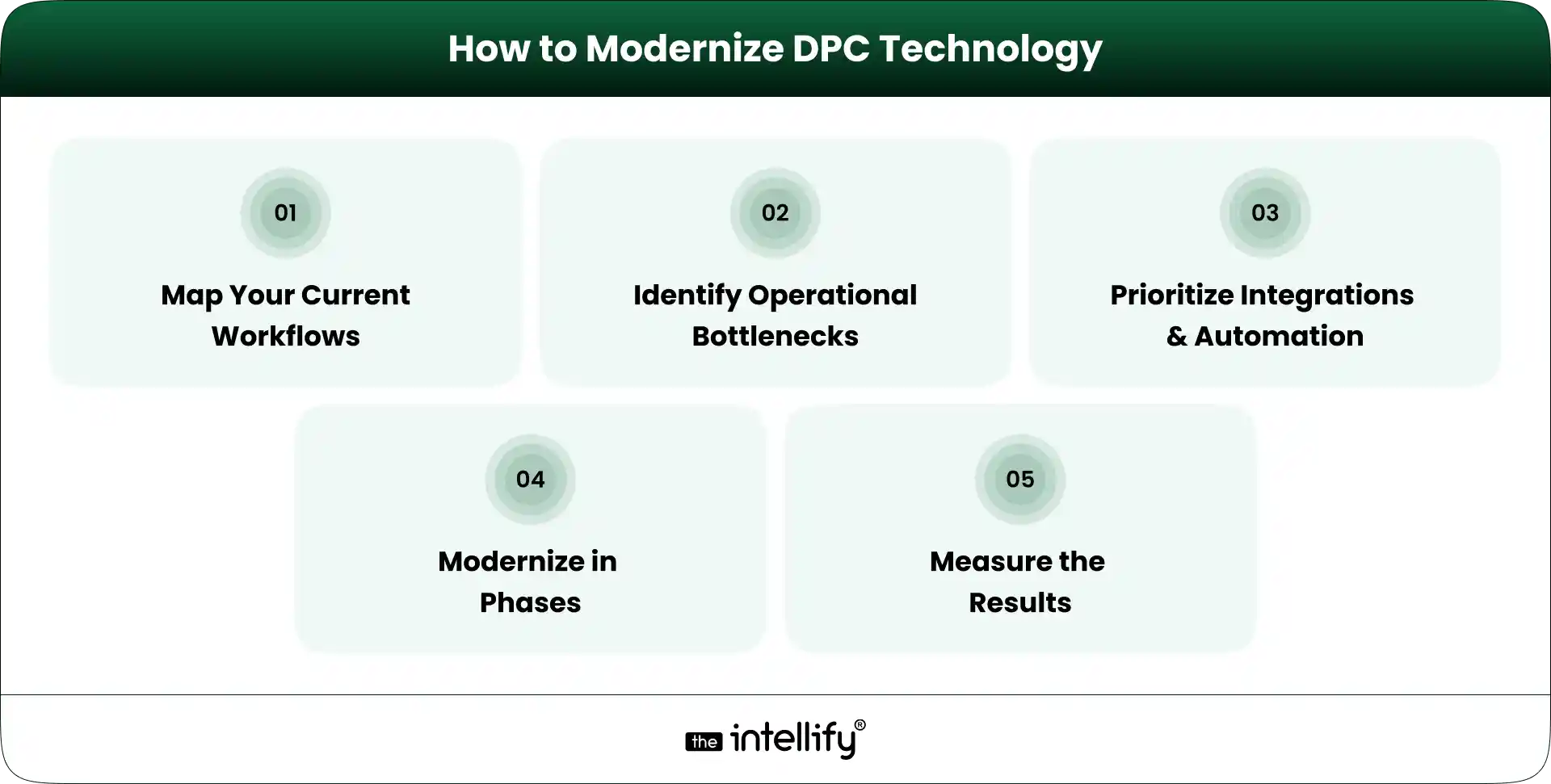
How to Modernize DPC Technology

Technology projects can become disruptive when practices try to change too much at once. A phased approach is usually easier to manage.

1. Map Your Current Workflows

Document what actually happens today. Follow the member journey from registration to onboarding, appointment scheduling, billing, communication, and ongoing care.

Don’t just document what the software is supposed to do. Document what staff actually do. That difference can be revealing.

2. Identify the Biggest Operational Bottlenecks

Look for tasks that consume significant staff time or regularly create errors. For example:

  • Manual data entry
  • Payment follow-ups
  • Appointment coordination
  • Patient inquiries
  • Repetitive reporting
  • Duplicate information across systems

3. Prioritize Integrations and Automation

Not every workflow needs automation. Prioritize tasks that are repetitive, predictable, high-volume, and relatively low-risk.

At the same time, identify which systems need to exchange data. Integration can be just as important as automation.

4. Modernize in Phases

Instead of replacing everything in one project, establish clear phases. For example:

Phase 1: Membership and onboarding
Phase 2: Scheduling and patient communication
Phase 3: Billing and payment workflows
Phase 4: Reporting and automation
Phase 5: Advanced AI or voice workflows

The exact order should depend on the practice’s bottlenecks.

5. Measure the Results

Technology should produce measurable operational improvements. Useful KPIs can include:

  • Administrative time per member
  • Scheduling time
  • Payment collection rate
  • Patient response time
  • Membership retention
  • Staff workload

If a new system doesn’t improve the workflow, it’s worth asking why.


Common Technology Mistakes DPC Practices Should Avoid

Technology can solve problems, but a poorly planned implementation can create new ones.

Adding Too Many Disconnected Tools

More software doesn’t automatically mean better operations. Every new system introduces another login, workflow, integration, and potential failure point.

Automating Before Fixing the Workflow

Automating a bad process simply makes the bad process happen faster. Map the workflow first. Then decide what should be automated.

Ignoring the Patient Experience

A practice may save staff time while making things harder for patients. That is not a successful technology project. Test workflows from the member’s perspective, too.

Treating Security and Compliance as an Afterthought

Healthcare technology handles sensitive information. Security, access controls, data protection, auditability, and applicable healthcare compliance requirements need to be considered from the beginning, not added at the end.

Choosing Software That Cannot Scale With the Practice

A tool that works for 150 members may not work for 1,500. Before selecting a DPC platform, consider where the practice expects to be in the next few years.

Replacing Everything at Once

A complete technology replacement can create unnecessary risk. If an existing system still works well, keep it where practical and modernize the parts that are holding the practice back.


How The Intellify Can Help Modernize a DPC Practice

The technology needs of every DPC practice are a little different. The Intellify can help practices and healthcare organizations evaluate those requirements and build or modernize technology around their actual workflows.

That can include:

  • Custom DPC platform development
  • DPC platform modernization
  • Patient-facing digital experiences
  • Workflow automation
  • Third-party integrations
  • Scheduling and billing workflows
  • Patient portals
  • Scalable application architecture
  • AI and automation for appropriate operational use cases

The starting point shouldn’t be a list of features. It should be the practice’s current workflow, its biggest operational problems, and where it wants to go next.


Final Thoughts: Scale the Practice, Not the Administrative Burden

Scaling a Direct Primary Care practice is not just a matter of bringing in more members.

The operating model has to scale, too. Scheduling, onboarding, billing, communication, reporting, and patient self-service all become more important as membership grows. If those processes remain heavily manual, growth can create a surprising amount of administrative pressure.

The right DPC technology strategy can change that. A modern DPC platform should connect the workflows that matter, automate appropriate repetitive tasks, and make information easier for staff and patients to access. But there is no single technology stack that works for every practice.

Start with the bottlenecks. Understand the workflows. Decide what should be integrated, automated, replaced, or left alone.

Then build from there. The goal is simple: help the practice grow without making the administrative burden grow at the same speed.

 

DPC modernization solutions


Frequently Asked Questions (FAQs)

1. How can DPC software help a practice scale?

DPC software can reduce repetitive administrative work, automate recurring processes, support online scheduling and payments, improve patient communication, and provide better visibility into membership and practice operations.

2. Can DPC practices automate membership billing?

Yes. DPC practices can use billing technology to manage recurring membership payments, track payment status, handle failed transactions, and maintain membership billing records. The specific capabilities depend on the software and payment infrastructure being used.

3. Should a DPC practice buy software or build a custom platform?

It depends on the practice’s requirements. Off-the-shelf DPC software can be suitable for standard workflows and faster implementation. A custom DPC platform may make more sense when a practice needs unique workflows, specialized integrations, complex membership models, or greater control over the patient experience.

4. How can AI help a Direct Primary Care practice?

AI can support appropriate administrative tasks such as routine inquiries, appointment workflows, patient routing, reminders, intake assistance, and voice-based interactions. Clinical decisions and sensitive patient situations still require appropriate human oversight.

5. How do you modernize an existing DPC platform?

Start by mapping existing workflows and identifying bottlenecks. Then prioritize integrations, automation, and patient-facing improvements. A phased modernization approach can allow the practice to improve outdated components without replacing every system at once.
How to Modernize a Direct Primary Care (DPC) Platform

Summary:
This guide explains how to modernize a Direct Primary Care (DPC) platform for better scalability, security, patient experience, and operational efficiency. It covers essential DPC software features, legacy system assessment, platform integrations, AI opportunities, HIPAA considerations, modernization costs, common challenges, and practical steps for deciding between modernization and a complete rebuild.


Direct Primary Care (DPC) has changed how many patients access primary care in the U.S. Instead of relying on traditional fee-for-service models, DPC practices typically use membership-based care, giving patients more direct access to their providers.

But there’s a catch: a DPC practice can have a modern care model while still running on outdated technology.

A slow patient portal, disconnected billing system, manual scheduling, or an aging database can quickly become a problem as membership grows. Staff spend more time on administrative work, patients face unnecessary friction, and providers have less time for care.

That’s where DPC platform modernization comes in.

Modernizing a DPC platform is not simply about replacing old software. It means improving the underlying technology, workflows, integrations, security, and user experience so the platform can support the practice today and as it grows.


What Is DPC Platform Modernization?

DPC platform modernization is the process of upgrading an existing Direct Primary Care platform to make it more scalable, secure, connected, and easier to use.

It can involve replacing outdated components, redesigning the patient experience, connecting third-party systems, improving infrastructure, automating repetitive processes, or rebuilding parts of the platform.

A useful distinction is this:

Software upgrade: Improve or replace a specific component.

Platform modernization: Look at the entire technology ecosystem and improve how its components work together.

For example, a DPC practice may already have scheduling, billing, patient communication, and member management tools. If these systems don’t share data, staff may still have to move information manually between them.

A modern DPC platform should reduce that friction. The goal isn’t to add technology for the sake of it. The goal is to make everyday work simpler for patients, providers, and administrative teams.


Why DPC Practices Need to Modernize Their Platforms

1. Legacy Systems Create Operational Bottlenecks

Older DPC software often develops around the needs of a smaller practice. As membership increases, those early design decisions can become limitations.

Staff may have to:

  • Enter the same patient information into multiple systems
  • Manually track membership status
  • Reconcile payments
  • Send appointment reminders
  • Manage schedules across separate tools
  • Generate reports manually

None of these tasks seem huge individually. Together, they consume a surprising amount of time. Modernization can connect these workflows and reduce unnecessary manual work.

2. Patient Expectations Have Changed

Patients are accustomed to managing many services digitally. They expect convenient scheduling, timely notifications, mobile-friendly experiences, and simple access to information.

A DPC membership model naturally supports a closer patient-provider relationship, so the technology supporting that relationship matters.

A modern DPC patient portal can allow members to schedule appointments, communicate securely, manage their information, review documents, and handle other routine tasks without calling the practice for every small request.

That doesn’t replace personal care. It removes avoidable administrative friction around it.

3. Scaling Becomes Harder With Outdated DPC Software

A platform that works for 500 members may struggle when a practice reaches several thousand.

More members can mean more appointments, payments, messages, providers, locations, and data. If the underlying DPC technology wasn’t designed to scale, performance and maintenance issues can appear at the worst possible time.

Modern architecture helps practices add functionality and capacity without constantly rebuilding the foundation.

4. Data and Integration Gaps Limit Growth

A DPC practice rarely operates with one system. It may use an EHR/EMR, payment processor, telehealth service, laboratory system, communication provider, analytics platform, and other healthcare tools. If these systems don’t communicate properly, staff become the integration layer. That’s expensive and error-prone.

DPC platform integration through secure APIs and appropriate data exchange can create a more connected workflow.


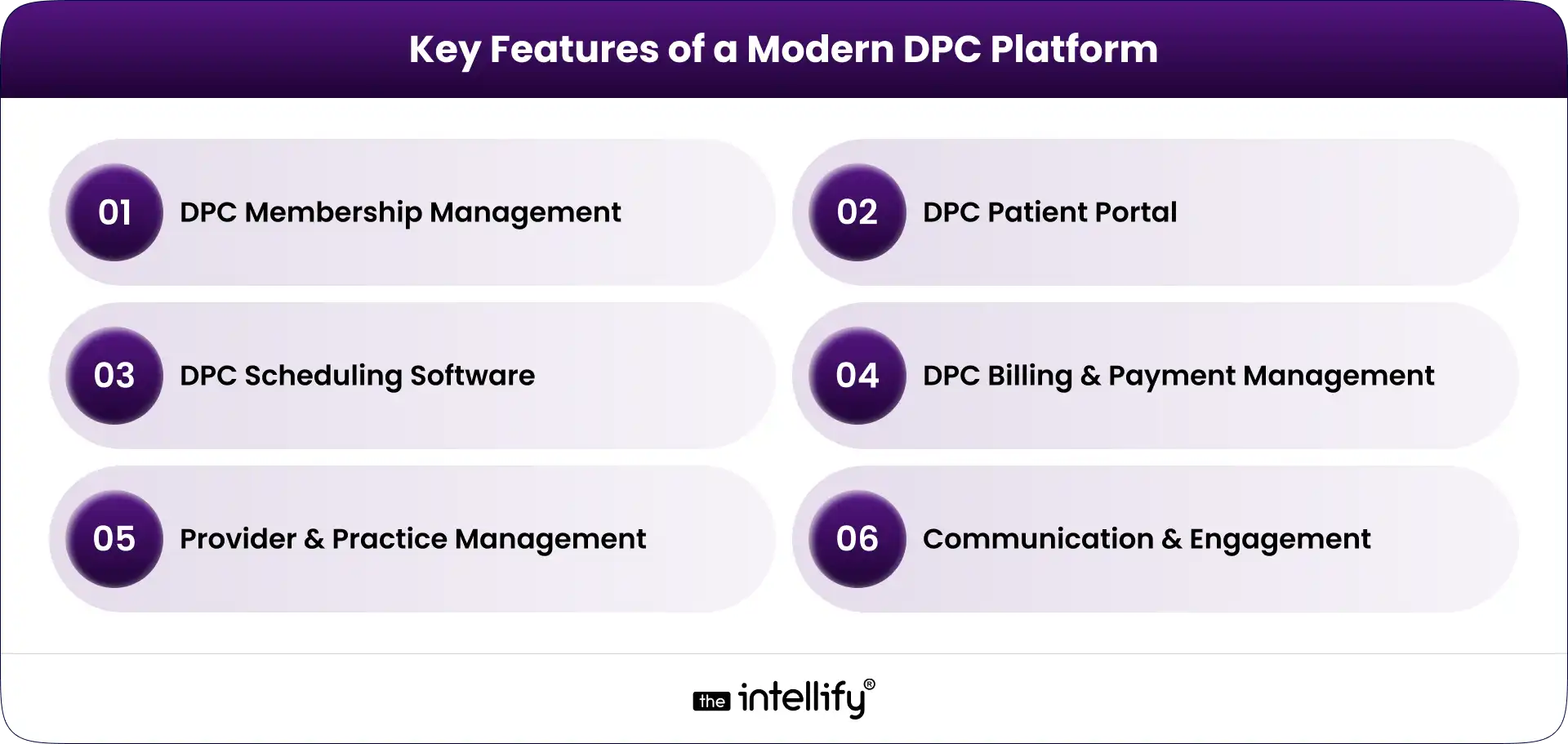
Key Features of a Modern DPC Platform

Key Features of a Modern DPC Platform

A modern DPC platform should support the core operations of a membership-based primary care practice while leaving room for future integrations and automation.

DPC Membership Management

Membership management is at the center of a DPC business model. The platform should support:

  • Individual and family memberships
  • Membership plans
  • Enrollment and cancellation
  • Member status tracking
  • Subscription renewals
  • Eligibility and account information

Automation is particularly useful here. When membership changes, related billing, communication, and access permissions should update without requiring several manual steps.

DPC Patient Portal

The DPC patient portal is often the part of the platform patients interact with most. A useful portal can provide:

  • Patient profiles
  • Secure messaging
  • Appointment access
  • Forms and documents
  • Care-related information
  • Account and membership details

The experience should also work well on smartphones. Patients shouldn’t have to zoom, pinch, and fight their way through a desktop-only interface just to book an appointment.

DPC Scheduling Software

Good DPC scheduling software should make appointments easier for both patients and staff. Important capabilities include:

  • Online appointment booking
  • Provider availability
  • Calendar management
  • Appointment reminders
  • Rescheduling and cancellation
  • In-person and virtual appointment support

Scheduling rules can also be configured around different appointment types, providers, locations, and availability.

DPC Billing and Payment Management

Membership billing is another area where automation can remove repetitive work. A modern DPC billing software component may support:

  • Recurring membership payments
  • Invoices and receipts
  • Payment processing
  • Failed-payment handling
  • Subscription changes
  • Payment history

The exact workflow depends on the practice’s business model and payment providers, but the objective remains the same: reduce manual reconciliation and give staff better visibility into membership revenue.

Provider and Practice Management

Providers and administrators need different views of the same underlying data. A modern platform can provide role-based dashboards for:

  • Provider schedules
  • Member lists
  • Tasks
  • Practice activity
  • Operational reports
  • User permissions

This helps keep the platform useful without giving every user access to information they don’t need.

Communication and Engagement

Communication can be built into the DPC platform instead of scattered across separate tools. Depending on the use case, this may include SMS and email notifications, secure patient messaging, appointment reminders, follow-ups, and automated administrative communications.

The important part is control. Patients should receive useful communication, not a pile of automated messages they eventually ignore.


How to Modernize a DPC Platform: Step-by-Step

1. Audit the Existing DPC Platform

Start with discovery, not development. Review the current technology stack, database, workflows, integrations, security controls, performance, user experience, and technical debt.

Talk to the people who use the system every day. They usually know where the real problems are. The audit should answer a basic question:

What should we keep, what should we improve, and what needs to go?

2. Identify What Should Be Rebuilt, Replaced, or Integrated

A full rebuild isn’t always the right answer. Some legacy components may still work perfectly well. Others may be impossible to maintain or integrate with modern systems.

Separate the platform into components and evaluate each one. A phased approach can reduce disruption while allowing the practice to modernize the areas causing the most pain first.

3. Design a Scalable DPC Platform Architecture

Architecture matters because modernization shouldn’t create another technology problem five years from now.

A modern DPC platform may use modular services, cloud infrastructure, secure APIs, scalable databases, and centralized identity and access management.

An API-first approach can also make future DPC platform integration easier.

The architecture should be designed around the practice’s actual requirements, not whatever technology happens to be popular this month.

4. Modernize the Patient and Provider Experience

Technology can be technically sound and still frustrating to use. Review the main workflows from the user’s perspective:

  • How does a new member enroll?
  • How does a patient book an appointment?
  • How does a provider find member information?
  • How does staff update membership status?
  • How does someone handle a failed payment?

Remove unnecessary steps wherever possible.

5. Connect the DPC Platform With Existing Systems

The goal isn’t necessarily to replace every tool. A modern platform should connect with the systems the practice already depends on, using secure and appropriately governed integrations.

This can include EHR/EMR systems, payment providers, laboratories, pharmacies, telehealth platforms, and communication services.

6. Add Automation and AI Where It Makes Sense

AI for Direct Primary Care can be useful when applied to repetitive, administrative, or assistive workflows. Examples include:

  • Scheduling assistance
  • Patient intake support
  • Administrative communication
  • Internal staff assistants
  • Information summarization
  • Operational insights

AI should not be added simply because a platform needs an “AI feature.”

For clinical workflows, appropriate validation, human oversight, privacy controls, and governance are especially important. The technology should support healthcare professionals rather than quietly making high-stakes decisions without oversight.

7. Test, Secure, and Gradually Roll Out the Modernized Platform

Don’t wait until launch week to discover that something breaks. Test core workflows, integrations, permissions, performance, security, and data migration before going live.

A phased rollout can also reduce risk. Start with a controlled group, monitor the results, fix issues, and expand. Modernization is a process, not a single launch event.


DPC Platform Modernization Solutions


DPC Platform Integration: What Should You Connect?

A modern DPC platform may need to integrate with several systems depending on the practice. Common categories include:

  • EHR/EMR systems
  • Payment and subscription platforms
  • Telehealth solutions
  • Laboratory systems
  • Pharmacy services
  • SMS and email providers
  • Identity and authentication services
  • Analytics and reporting platforms

APIs are particularly important because they allow systems to exchange information without forcing staff to manually move data between applications.

However, integration isn’t just a technical exercise. Healthcare data requires careful consideration of privacy, security, authorization, data mapping, error handling, and auditability.


Where AI Fits Into a Modern DPC Platform

AI can become a useful layer within a modern DPC platform, particularly for administrative workflows.

For example, an AI assistant could help answer routine membership questions, guide patients through scheduling, support intake workflows, or help staff summarize information.

A practice could also use AI to identify operational patterns, such as appointment demand or recurring administrative bottlenecks. But there’s a line worth keeping clear.

AI that helps someone find an appointment is very different from AI making an autonomous clinical decision.

For DPC practices, a sensible starting point is often low-risk, high-volume administrative work. From there, practices can evaluate more advanced use cases based on evidence, governance, security, and clinical oversight.


Security and Compliance Considerations for DPC Platform Modernization

Healthcare software modernization has to treat security as part of the architecture, not a final checkbox. A DPC platform handling protected health information may need appropriate safeguards around:

  • HIPAA requirements
  • Data encryption
  • Authentication
  • Role-based access
  • Audit logs
  • Secure APIs
  • Data backups
  • Disaster recovery
  • Vendor and business associate relationships
  • Ongoing security monitoring

HIPAA compliance itself isn’t achieved simply by adding encryption or signing a vendor agreement. The platform, organization, workflows, policies, and vendors all need appropriate controls.

For that reason, security and compliance requirements should be considered during discovery and architecture rather than added after development is finished.


How Much Does DPC Platform Modernization Cost?

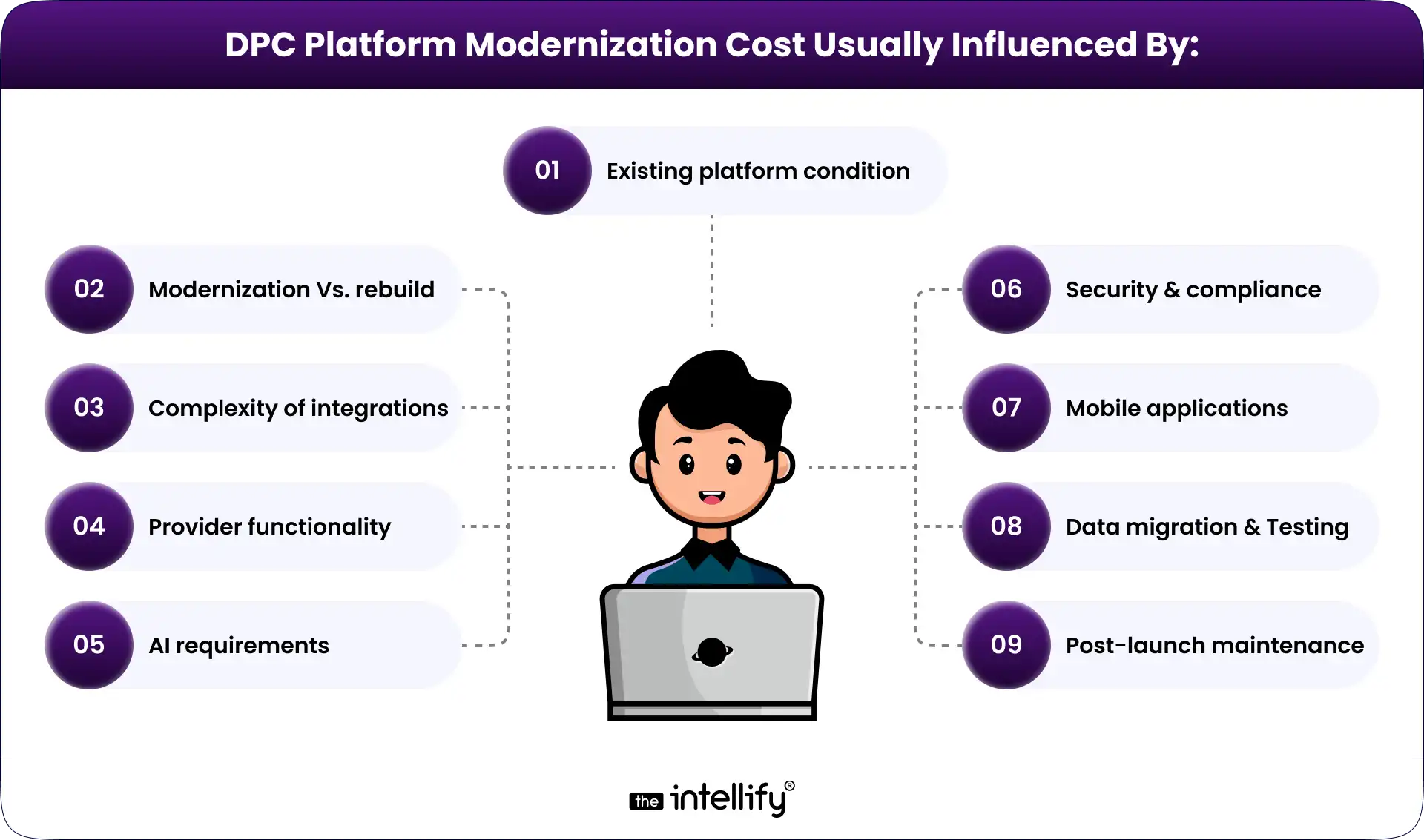
There isn’t a reliable one-size-fits-all price for DPC platform modernization. A platform with a stable architecture and a few outdated components will have very different requirements from a heavily customized legacy system that needs migration and multiple integrations.

DPC Platform Modernization Cost

The best way to estimate the investment is to conduct a technical and workflow assessment first. That creates a clearer scope before development begins.


Common Challenges in Legacy DPC Platform Modernization

Data migration: Older databases may contain inconsistent or duplicated information. Data needs to be mapped, cleaned, validated, and migrated carefully.

Legacy integrations: Some older systems may have limited APIs or outdated interfaces. Integration planning needs to account for these constraints.

Downtime: Practices cannot simply stop serving members while a new system is deployed. A phased migration and rollback plan can reduce operational risk.

Staff adoption: A technically better system can still fail if employees don’t understand how to use it. Training and usability testing matter.

Technical debt: Old code can hide dependencies that aren’t obvious during the initial assessment. This is one reason a proper technical audit is valuable.

Security risks: Modernization can introduce new endpoints, integrations, and access paths. Security needs to be tested throughout the process.


Modernize or Rebuild: Which Approach Is Right for Your DPC Platform?

There are three common approaches.

Approach Best When Main Advantage Main Risk
Modernize existing platform Core technology is still viable Less disruption Some legacy limitations remain
Partial rebuild Only certain components are outdated Balanced approach Architecture requires careful planning
Full rebuild Platform is heavily constrained Clean technical foundation Higher migration and implementation effort

The right choice depends on the condition of the existing platform. If the database, architecture, and core workflows are still sound, rebuilding everything may create unnecessary risk.

On the other hand, continuously patching a fundamentally outdated platform can become expensive too. The decision should come from a technical assessment rather than a preference for “new” technology.


Final Thoughts

A modern DPC platform doesn’t need every new technology available. It needs to work well.

Patients should be able to interact with the practice without unnecessary friction. Providers should have access to the information they need. Staff shouldn’t have to spend hours moving data between disconnected systems. And the technology should be able to grow with the practice.

That’s the real purpose of DPC platform modernization.

For practices working with an aging platform, the first step isn’t choosing a technology stack. It’s about understanding what’s currently slowing the business and where modernization will create the most value.

The Intellify can help DPC organizations assess existing systems, plan modernization, develop DPC software, build patient and provider experiences, integrate healthcare systems, and introduce automation or AI where appropriate.


Direct primary care modernization platform


Frequently Asked Questions About DPC Platform Modernization

1. How do I modernize a legacy DPC platform?

Start with a technical and workflow audit. Identify outdated components, integration gaps, security risks, and user pain points. Then determine what should be modernized, replaced, integrated, or rebuilt before creating a phased implementation roadmap.

2. What features should a modern DPC platform have?

Common features include membership management, a DPC patient portal, scheduling, billing and payments, provider management, secure communication, reporting, integrations, and appropriate automation.

3. Should I modernize my existing DPC software or rebuild it?

It depends on the condition of the existing platform. If its core architecture is still viable, modernization or a partial rebuild may be more practical. If the platform has severe technical debt or architectural limitations, a full rebuild may make more sense.

4. Can AI be integrated into a DPC platform?

Yes. AI can support administrative and assistive workflows such as scheduling, intake, communication, summarization, and operational analysis. Higher-risk clinical use cases require appropriate validation, governance, privacy controls, and human oversight.

5. How long does DPC platform modernization take?

The timeline varies significantly based on platform complexity, integrations, migration requirements, and the scope of the rebuild. A small modernization project can be much shorter than a complete platform redevelopment with multiple healthcare integrations.

6. How can I make a DPC platform HIPAA-compliant?

HIPAA compliance requires appropriate administrative, physical, and technical safeguards for protected health information. The platform should incorporate suitable access controls, security measures, audit capabilities, policies, vendor management, and risk processes rather than treating compliance as a single development task.

HIPAA Compliant Software Development Guide 2026

Summary:
This guide explains how to develop HIPAA-compliant software in 2026. It covers key requirements such as data encryption, access controls, audit logs, secure APIs, cloud security, BAAs, risk assessments, and security testing. It also includes a practical checklist to help healthcare organizations build secure software while addressing current HIPAA Security Rule requirements and emerging cybersecurity expectations.


Healthcare software now handles far more than patient records.

Patient portals, telehealth platforms, healthcare CRMs, mobile apps, remote monitoring tools, insurance systems, AI applications, and connected healthcare platforms all process sensitive information. When protected health information (PHI) or electronic protected health information (ePHI) is involved, security and privacy need to be considered from the beginning.

That is where HIPAA-compliant software development comes in.

HIPAA compliance is not a feature that can simply be switched on before launch. It involves how software collects, stores, accesses, transmits, and protects health information, along with the policies, processes, contracts, and safeguards surrounding the system.

There is also an important 2026 update.

The current HIPAA Security Rule remains in effect. HHS has proposed changes that would strengthen cybersecurity requirements for regulated entities, including proposed requirements around multi-factor authentication, encryption, vulnerability scanning, penetration testing, network segmentation, written risk analyses, and backup and recovery. These proposals are not the current Security Rule.

So, what should healthcare organizations and software teams actually check when developing or modernizing a healthcare application?


HIPAA Compliance in Healthcare Software Development

HIPAA compliance in healthcare software development means designing and maintaining software in a way that supports the HIPAA requirements applicable to the organization, the data it handles, and its role in the healthcare ecosystem.

HIPAA applies to covered entities and business associates. A software company can become a business associate when it performs certain functions or services involving PHI on behalf of a covered entity or another business associate.

The HIPAA Security Rule requires appropriate administrative, physical, and technical safeguards to protect ePHI and support its confidentiality, integrity, and availability.

For a software development team, this can translate into:

  • Secure authentication
  • Role-based access control
  • Encryption
  • Audit controls
  • Secure data transmission
  • Data integrity controls
  • Backup and recovery
  • Vulnerability management
  • Incident response
  • Secure APIs
  • Cloud security
  • Vendor management
  • Workforce security and training
  • Regular risk assessments

The important part is that these controls work together.

For example, an encrypted database does not solve the problem if unauthorized users can still access it. Similarly, signing a BAA with a vendor does not automatically make an application HIPAA compliant.

HIPAA compliance is a combination of technology, people, processes, and contractual responsibilities.


HIPAA Compliance Statistics

Healthcare organizations continue to face serious cybersecurity threats, particularly ransomware and hacking.

HHS reported that from 2018 to 2023, reports of large breaches increased by 102%, while the number of individuals affected increased by 1,002%. HHS reported that more than 167 million individuals were affected by large breaches in 2023.

The enforcement activity has continued in 2026.

In April 2026, HHS’s Office for Civil Rights announced four HIPAA Security Rule ransomware settlements involving breaches affecting more than 427,000 individuals. The settlements brought OCR’s completed ransomware investigations to 19 at that time.

There is also a software-specific example worth paying attention to.

In March 2026, OCR announced a settlement with MMG Fusion, a software company that operated as a business associate. The investigation involved PHI belonging to approximately 15 million individuals. OCR identified potential violations involving risk analysis, authentication, encryption, breach notification, and workforce training.

For healthcare software companies, the message is pretty clear:

Security and HIPAA responsibilities cannot simply be passed to the healthcare organization using the software.


HIPAA: A Brief Outline and Its Importance to Software Developers

HIPAA was enacted in 1996, but the way healthcare organizations create, store, exchange, and process health information has changed dramatically since then.

For software developers, the most relevant HIPAA areas include the Privacy Rule, Security Rule, and Breach Notification Rule.

HIPAA Privacy Rule

The HIPAA Privacy Rule establishes standards for protecting PHI and governs certain uses and disclosures of that information.

From a software perspective, this means applications should be designed so that users can access only the information appropriate for their role and purpose.

That connects closely with the principle of limiting access to what is necessary for the intended task.

HIPAA Security Rule

The Security Rule specifically addresses electronic protected health information.

It requires covered entities and business associates to implement appropriate administrative, physical, and technical safeguards. The technical safeguards include areas such as:

  • Access controls
  • Audit controls
  • Integrity controls
  • Person or entity authentication
  • Transmission security

The current Security Rule remains in effect in 2026.

HIPAA Breach Notification Rule

The Breach Notification Rule establishes requirements for notifying affected individuals, HHS, and, in certain circumstances, the media following breaches of unsecured PHI.

This is why an incident response plan should be considered during software architecture and operational planning rather than after an incident occurs.

Does HIPAA apply to every healthcare software application?

No. A software application being used in healthcare does not automatically mean the same HIPAA requirements apply to every situation.

The answer depends on factors such as:

  • Who operates the software
  • Whether the organization is a covered entity
  • Whether the software company is a business associate
  • What information does the system handle
  • What services does the company perform
  • How PHI is created, received, maintained, or transmitted
  • What contractual relationships exist

For a specific product or business model, legal and compliance counsel should determine the applicable obligations.


Steps To Make Software HIPAA-Compliant

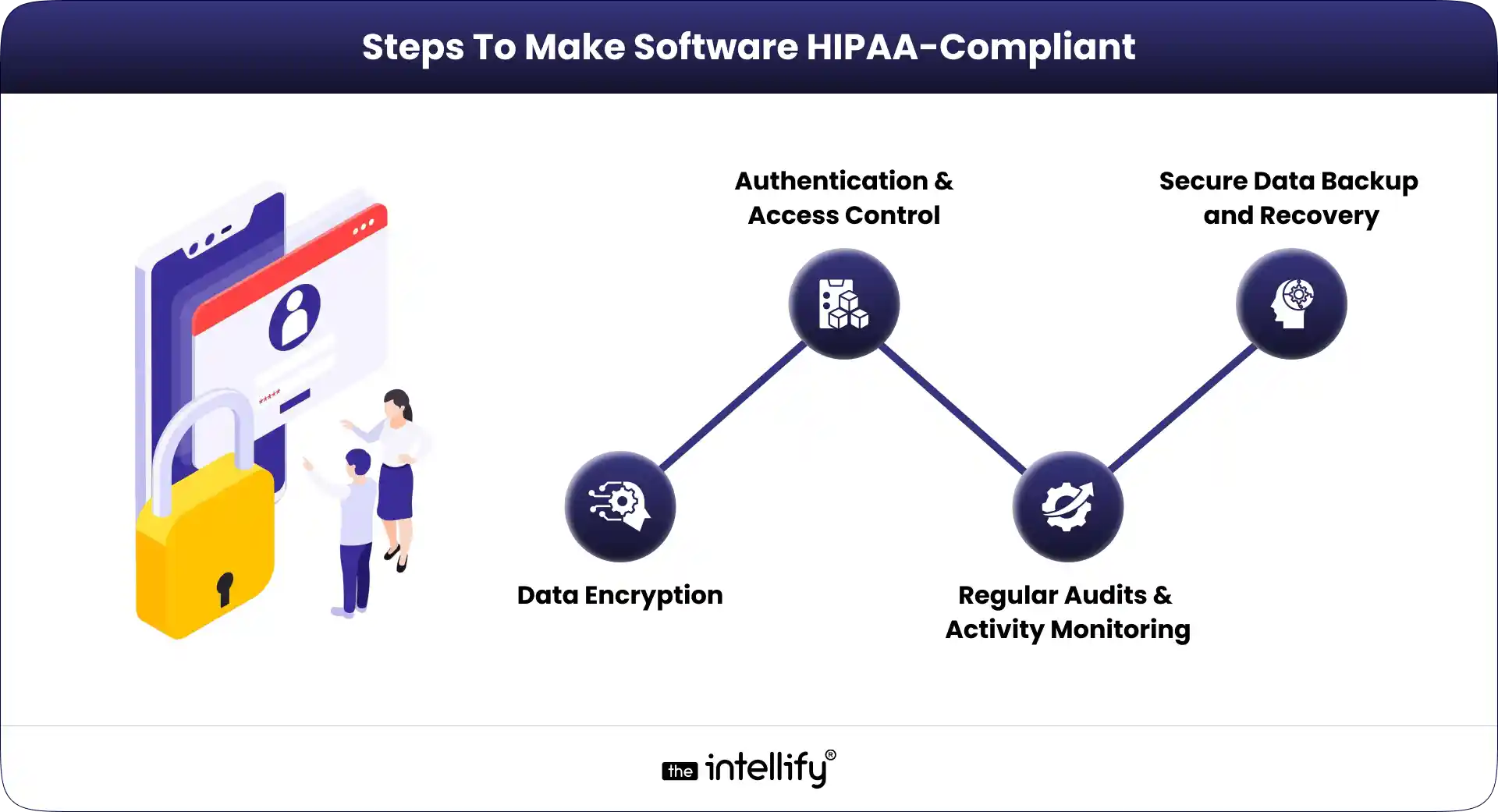
Steps To Make Software HIPAA-Compliant

There is no single technology stack, certification, or cloud platform that automatically makes software HIPAA compliant. Instead, development teams need to build appropriate safeguards into the application’s architecture and operations.

1. Data Encryption

Encryption helps protect sensitive information from unauthorized access. For healthcare applications, consider encryption for:

  • Data in transit
  • Data at rest
  • Databases
  • File storage
  • Backups
  • Application secrets and credentials
  • Communication between services

For data transmitted over networks, use modern secure transport protocols such as TLS.

For stored information, encryption should be implemented according to the organization’s risk assessment, architecture, and applicable requirements.

Encryption alone, however, is not enough. You also need to think about encryption keys.

  • Who can access them?
  • Where are they stored?
  • How are they rotated?
  • Can application developers access production keys?

These details can make a major difference to the security of the system.

2. Authentication and Access Control

Healthcare applications should make sure that only authorized users can access ePHI. Common controls include:

  • Strong authentication
  • Multi-factor authentication
  • Role-based access control
  • Least-privilege permissions
  • Session management
  • Account provisioning and deprovisioning
  • Privileged-access controls
  • Periodic access reviews

For example, a physician may need access to clinical information, while a billing employee may only need access to billing information.

Those permissions should be enforced by the application rather than relying on employees to decide what they should or should not open.

MFA is particularly worth considering for modern healthcare systems. HHS’s proposed Security Rule would require multi-factor authentication with limited exceptions, but that proposal has not replaced the current Security Rule.

3. Regular Audits and Activity Monitoring

A healthcare application should provide visibility into activity involving sensitive information.

A well-designed audit system should help answer questions such as:

  • Who accessed the record?
  • When was it accessed?
  • What action did the user take?
  • Was information changed?
  • Was information exported?
  • Were permissions modified?
  • Was the activity unusual?

The current Security Rule requires audit controls that record and examine activity in information systems containing or using ePHI.

Logging is only part of the process, though. Organizations also need a reasonable approach to reviewing important events and responding to suspicious activity.

4. Secure Data Backup and Recovery

Healthcare organizations need reliable access to their systems and information. A ransomware attack, infrastructure failure, accidental deletion, or other incident can disrupt operations very quickly.

A healthcare application should therefore have a documented backup and recovery strategy.

Consider:

  • Encrypted backups
  • Automated backup schedules
  • Multiple recovery points
  • Separate backup environments
  • Access controls for backup infrastructure
  • Backup integrity checks
  • Recovery testing
  • Defined recovery priorities
  • Documented disaster recovery procedures

And test those backups. A backup that cannot be restored when needed is not much help.

HHS’s proposed Security Rule includes more specific requirements for backup and recovery controls. Again, these are proposed changes rather than current requirements.


Functionalities That Characterize The HIPAA-Compliant Software

HIPAA-conscious software needs more than a login page and an encrypted database.

Its functionality should support controlled access, accountability, data integrity, secure communication, and protection throughout the data lifecycle.

1. Role-Based Access Control (RBAC)

Role-Based Access Control lets organizations assign permissions based on a user’s responsibilities.
For example:

User Role Example Access
Physician Clinical records and relevant patient information
Nurse Assigned patient records and clinical information
Billing Staff Billing and payment-related information
Receptionist Scheduling and limited demographic information
Administrator Technical administration based on assigned privileges
Patient Their own permitted health information


The exact model will depend on the application.

The principle is simple: Users should receive the access they need to perform their role, and no more than necessary.

2. Data Integrity Controls

Healthcare information needs to remain accurate and trustworthy. Software can support data integrity through:

  • Input validation
  • Database constraints
  • Transaction controls
  • Change tracking
  • Version history where appropriate
  • Authorization checks
  • Data validation rules
  • Controlled record modification workflows

The system should also make it possible to identify important changes and investigate them when necessary.

3. Audit Logs and Monitoring

Audit logs provide a record of important system activity. Depending on the application, logs may capture events such as:

  • Login attempts
  • Successful authentication
  • Failed authentication
  • Patient record access
  • Record changes
  • Data exports
  • Permission changes
  • Administrative actions
  • API requests
  • Configuration changes
  • Security events

Logs should also be protected from unauthorized alteration.

More importantly, organizations need a process for reviewing relevant events and responding to suspicious activity.

4. Data Transmission Security

Healthcare applications often connect with external systems. A patient portal may communicate with an API. A healthcare CRM may connect with an EHR. A telehealth application may use external communication infrastructure. Every integration introduces another potential attack surface.

Consider:

  • TLS
  • API authentication
  • API authorization
  • Secure tokens
  • Rate limiting
  • Input validation
  • Secrets management
  • Secure error handling
  • API monitoring
  • Data minimization

Third-party integrations deserve particular attention.

Before sending PHI to a third-party platform, determine what information is being transferred, why it is required, who receives it, and what contractual and technical safeguards apply.

5. Data Storage Security

Protecting stored healthcare information involves more than database encryption. Review:

  • Database permissions
  • Storage permissions
  • Encryption
  • Backup security
  • Network isolation
  • Credential management
  • Secrets management
  • Administrative access
  • Data retention
  • Data deletion
  • Logging and monitoring

The goal is to understand where ePHI resides and who can access it throughout the application’s lifecycle.


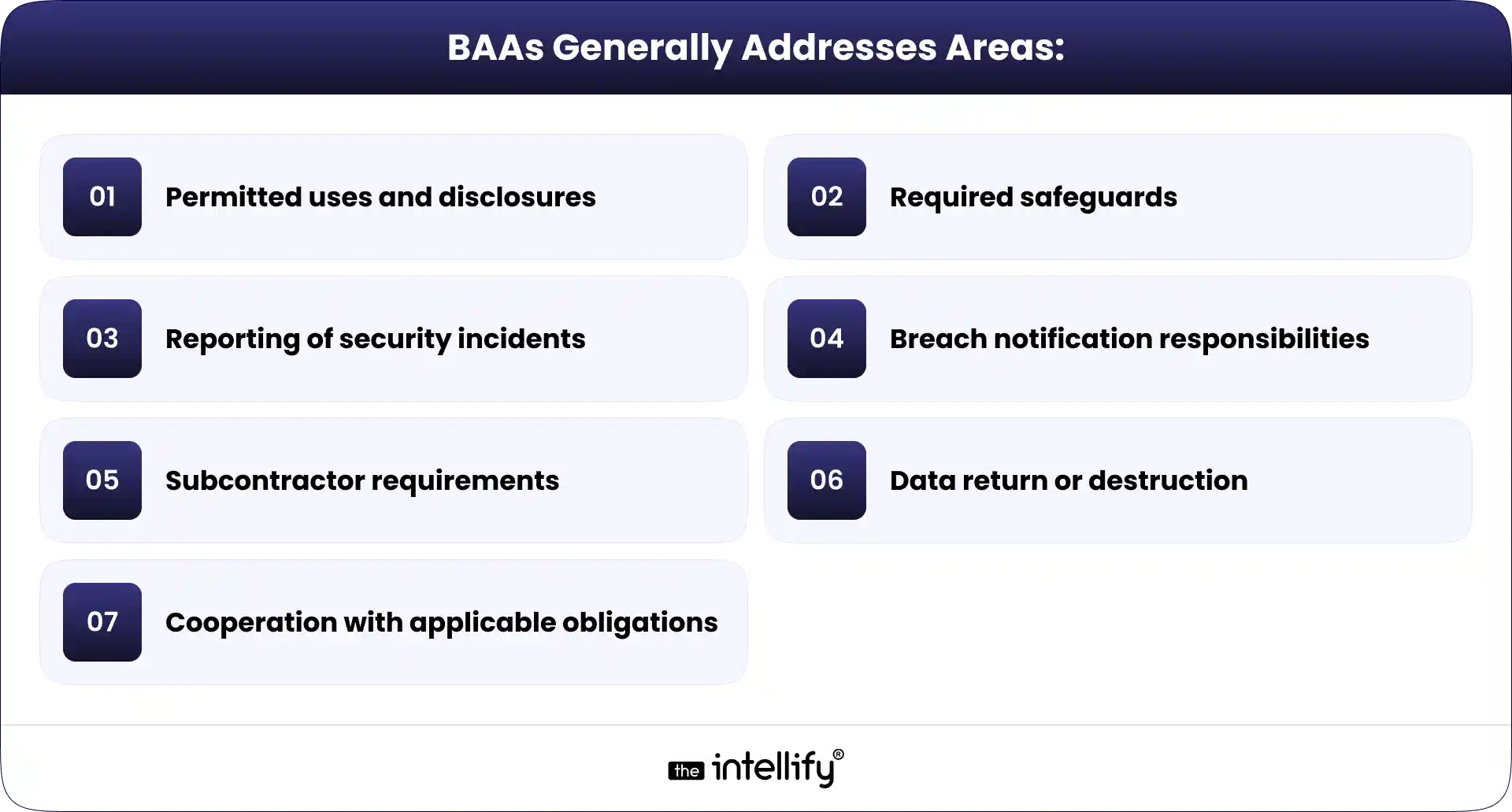
Business Associate Agreements (BAAs): HIPAA Rules – The Legal Foundation

A Business Associate Agreement, or BAA, establishes certain permitted uses and disclosures of PHI and assigns responsibilities between a covered entity and its business associate.

A software company may become a business associate when it performs certain services involving PHI on behalf of a covered entity or another business associate.

BAAs Generally Addresses AreasBut remember: A BAA does not make insecure software HIPAA compliant.

It establishes contractual responsibilities. The software still needs appropriate technical and operational safeguards.

The same applies to cloud providers. HHS states that a cloud service provider that creates, receives, maintains, or transmits ePHI on behalf of a covered entity or business associate can be a business associate, and an appropriate BAA is required.


The Role that Cloud Services Play in HIPAA Compliance

Cloud computing has become a normal part of modern healthcare software architecture. Healthcare applications may use cloud infrastructure for:

  • Application hosting
  • Databases
  • File storage
  • Backups
  • APIs
  • Analytics
  • Machine learning
  • Disaster recovery
  • Monitoring

Using the cloud does not automatically make a system non-compliant.

But it also does not automatically make it compliant. You need to understand how the cloud environment is configured and who is responsible for each security control.

What should you check with a cloud provider?

Before using a cloud service for a HIPAA-regulated workload, consider:

  • Whether the provider will enter into a BAA where applicable
  • Which services are covered
  • Where ePHI will be stored
  • How data is encrypted
  • How keys are managed
  • Who can access the environment
  • How logs are maintained
  • How backups are handled
  • How incidents are reported
  • How data is returned or deleted
  • What security responsibilities remain with your organization

HHS notes that a cloud service provider can be a business associate even when it does not have access to the encryption key for encrypted ePHI, depending on the circumstances and services provided.

This is why simply asking, “Is this cloud provider HIPAA compliant?” is not always the right question.

Ask instead: “How will this specific cloud architecture protect the ePHI we are responsible for?”

That leads to a much more useful conversation.


HIPAA Compliance for the Development of Healthcare CRM Software

Healthcare CRM platforms can handle a wide range of information, including:

  • Patient demographics
  • Appointment information
  • Communication history
  • Referral information
  • Insurance information
  • Billing-related information
  • Patient engagement activity
  • Support conversations
  • Outreach records

If PHI is involved, the CRM architecture needs to account for the applicable HIPAA requirements.

Secure patient profiles

Patient records should be protected through appropriate authentication, authorization, encryption, and access controls.

Permission-based workflows

Different teams may need different information.
A receptionist may need scheduling information.
A billing employee may need payment-related information.
A clinician may need clinical information.
The system should reflect those differences.

Secure communication

Healthcare CRM systems frequently include email, SMS, chat, notifications, and other communication channels.

Before using any communication channel for PHI, assess whether the channel and workflow provide appropriate protections and meet the organization’s legal and compliance requirements.

Auditability

The system should provide appropriate visibility into important access and modification events involving sensitive information.

Secure integrations

Healthcare CRMs often connect with EHRs, scheduling systems, payment platforms, patient portals, analytics tools, and other services. Each integration should be assessed for:

  • Authentication
  • Authorization
  • Encryption
  • Data minimization
  • Logging
  • Error handling
  • Vendor security
  • Contractual requirements


HIPAA Compliant Software Development


Ongoing Compliance: HIPAA Compliant Software Development – Lessons from the Field

HIPAA compliance is not a one-time development task. Applications change. Infrastructure changes. Employees change roles. Vendors change. New vulnerabilities appear.

A healthcare security program needs to change with them.

1. Employee Training

Employees are part of the security environment. Training should help people understand:

  • How to handle PHI
  • How to protect credentials
  • How to identify suspicious activity
  • How to report incidents
  • How to use healthcare systems securely
  • What their role-specific responsibilities are

Recent HHS enforcement activity involving MMG Fusion included workforce training as part of its corrective action plan, reinforcing that technical controls are only one part of a security program.

2. Risk Assessments

Risk analysis is a core requirement of the current Security Rule.

HHS states that regulated entities must conduct an accurate and thorough assessment of potential risks and vulnerabilities to the confidentiality, integrity, and availability of ePHI.

A useful assessment should look at:

  • Application architecture
  • Cloud infrastructure
  • APIs
  • User access
  • Devices
  • Third-party vendors
  • Data flows
  • Backup systems
  • Network architecture
  • Security monitoring
  • Incident response
  • Vulnerabilities
  • Unpatched components

HHS’s proposed Security Rule would make several risk-analysis expectations more specific, including written assessments, technology asset inventories, and network maps.

3. Incident Response Plan

A security incident is not the time to decide who should respond. A documented incident response plan should define:

  • How incidents are detected
  • Who is responsible for responding
  • How affected systems are isolated
  • How evidence is preserved
  • How compromised accounts are secured
  • How the incident is investigated
  • How affected parties are notified
  • How breach notification obligations are handled
  • How systems are recovered
  • How lessons learned are incorporated into future security improvements

HHS’s recent enforcement actions repeatedly highlight the importance of risk analysis, incident response, safeguards, and documented security processes.

4. Secure Software Development and Testing

Security testing should be part of the development lifecycle. Depending on the application and risk profile, this may include:

  • Secure code reviews
  • Dependency scanning
  • Static application security testing
  • Dynamic application security testing
  • API security testing
  • Vulnerability scanning
  • Penetration testing
  • Authentication testing
  • Authorization testing
  • Cloud configuration reviews
  • Secrets scanning
  • Backup recovery testing

HHS’s proposed Security Rule would require vulnerability scanning at least every six months and penetration testing at least once every 12 months. These remain proposed requirements, but they provide a useful benchmark for organizations strengthening their security programs.

5. Keep Track of Third-Party Vendors

Your application may be well protected while a connected vendor introduces another risk. Review vendors that handle or receive sensitive information, including:

  • Cloud providers
  • Communication platforms
  • Analytics tools
  • AI services
  • Payment providers
  • CRM platforms
  • EHR integrations
  • Storage providers
  • Customer support platforms

For every important vendor, understand:

  • What information they receive
  • Why they receive it
  • Where it is processed
  • How long is it retained
  • How is it protected
  • Whether a BAA is required
  • What happens after the relationship ends

This is especially important when introducing AI into healthcare workflows.

If an AI service receives PHI, evaluate its data flows, retention, access controls, contractual terms, and security practices before sending production healthcare data to it.


Conclusion

HIPAA-compliant software development in 2026 is about much more than adding encryption and a secure login.

Healthcare organizations and software vendors need to think about the complete lifecycle of PHI from collection and transmission to storage, access, monitoring, backup, incident response, and disposal.

HIPAA-Compliant Software Development Checklist for 2026

  • Determine whether HIPAA applies to the software and organization
  • Identify covered entity and business associate relationships
  • Map where PHI and ePHI enter, move, and reside
  • Conduct an accurate and thorough risk analysis
  • Implement appropriate access controls
  • Use strong authentication
  • Evaluate MFA based on the application’s security requirements
  • Implement appropriate encryption based on risk and applicable requirements
  • Maintain audit controls
  • Secure APIs and third-party integrations
  • Protect databases, storage, and backups
  • Review cloud architecture and responsibilities
  • Establish BAAs where required
  • Evaluate third-party vendors
  • Maintain backup and recovery procedures
  • Test security and recovery processes
  • Maintain an incident response plan
  • Train relevant workforce members
  • Review access permissions regularly
  • Monitor security events
  • Reassess risks as systems and environments change

The current HIPAA Security Rule remains in effect, while HHS’s proposed updates show the direction of federal healthcare cybersecurity policy. At the same time, current OCR enforcement demonstrates that risk analysis, security safeguards, breach response, and workforce responsibilities are already important compliance issues.

If you’re building a healthcare platform, modernizing an existing application, developing a healthcare CRM, connecting multiple systems, or introducing AI into a workflow that may involve PHI, security should be part of the architecture from the start.


HIPAA-compliant healthcare software development


Frequently Asked Questions (FAQs)

1. What makes software HIPAA compliant?

HIPAA-compliant software is designed and operated with appropriate safeguards for protected health information. Depending on the system and applicable requirements, this can include access controls, authentication, audit controls, integrity protections, transmission security, encryption, risk management, incident response, workforce policies, and appropriate vendor agreements.

2. Is encryption required for HIPAA compliance?

HIPAA’s Security Rule requires appropriate safeguards based on the applicable requirements and risk environment. Encryption is an important security measure for protecting ePHI, and HHS’s proposed Security Rule would make encryption of ePHI at rest and in transit more explicit, subject to limited exceptions. The proposed requirements are not currently the effective Security Rule.

3. Does a software company need a HIPAA BAA?

A software company may need a Business Associate Agreement when it qualifies as a business associate and handles PHI on behalf of a covered entity or another business associate. Whether a BAA is required depends on the specific services, data, and relationship.

4. How often should HIPAA security risk assessments be performed?

The HIPAA Security Rule requires an accurate and thorough assessment of potential risks and vulnerabilities to ePHI. Organizations should also reassess risks when their systems, technology, vendors, workflows, or threat environment changes. HHS’s proposed Security Rule would establish more specific requirements around written risk analyses.

5. Does HIPAA apply to healthcare mobile apps?

Not every healthcare mobile app is automatically subject to HIPAA. Applicability depends on factors such as who operates the application, whether the organization is a covered entity or business associate, what information the app handles, and how that information is used or disclosed.

6. Can AI software be HIPAA compliant?

AI software can be designed for use in HIPAA-regulated environments, but the technology itself is not automatically “HIPAA compliant.” Organizations need to evaluate the AI system’s data flows, access controls, security, retention, vendor relationship, contractual requirements, and how PHI is processed.

7. What is the biggest mistake when developing HIPAA-compliant software?

One common mistake is treating HIPAA compliance as a final-stage security review. Security requirements should influence the architecture, data model, access controls, APIs, cloud environment, logging, vendor selection, and operational processes from the beginning.

8. Is HIPAA compliance a one-time process?

No. HIPAA compliance requires ongoing risk management, security controls, policies, training, monitoring, testing, and updates. Healthcare applications change over time, and new vulnerabilities and operational risks can emerge.


Disclaimer: This article is intended for general informational purposes and does not constitute legal advice. HIPAA obligations depend on the specific organization, services, data flows, contracts, and circumstances involved. Consult qualified legal and compliance professionals for advice about your specific situation.


Sources & References:

1. HIPAA Security Rule – HHS

2. HIPAA Security Rule NPRM – HHS

3. HIPAA and Cloud Computing – HHS

4. Covered Entities and Business Associates – HHS

5. Business Associates – HHS

6. HIPAA Breach Notification Rule – HHS

7. HIPAA and Online Tracking Technologies – HHS

8. HIPAA Enforcement & Resolution Agreements – HHS

9. MMG Fusion HIPAA Settlement – HHS (2026)

How to Build a Direct Primary Care (DPC) Membership Platform

Summary:
This guide explains how to build a modern Direct Primary Care (DPC) membership platform, covering essential features such as patient onboarding, membership management, recurring billing, scheduling, EHR integration, and secure communication. It also explores how AI and voice agents can automate DPC workflows, reduce administrative workload, improve patient engagement, and help practices modernize existing DPC software.


Direct primary care (DPC) is changing how primary care practices handle access, payments, and patient relationships. Instead of fee-for-service billing, DPC uses a membership model where patients pay a recurring fee for ongoing care, creating more predictable revenue and simpler access.

While the model is simple, running a DPC practice is not. Many teams still struggle with daily tasks like managing memberships, payments, scheduling, communication, and follow-ups across multiple systems.

This is where a modern DPC platform becomes essential.

A strong DPC platform unifies patient management, billing, scheduling, communication, and operations in one system. With automation and AI, it can also reduce repetitive work and improve scalability.
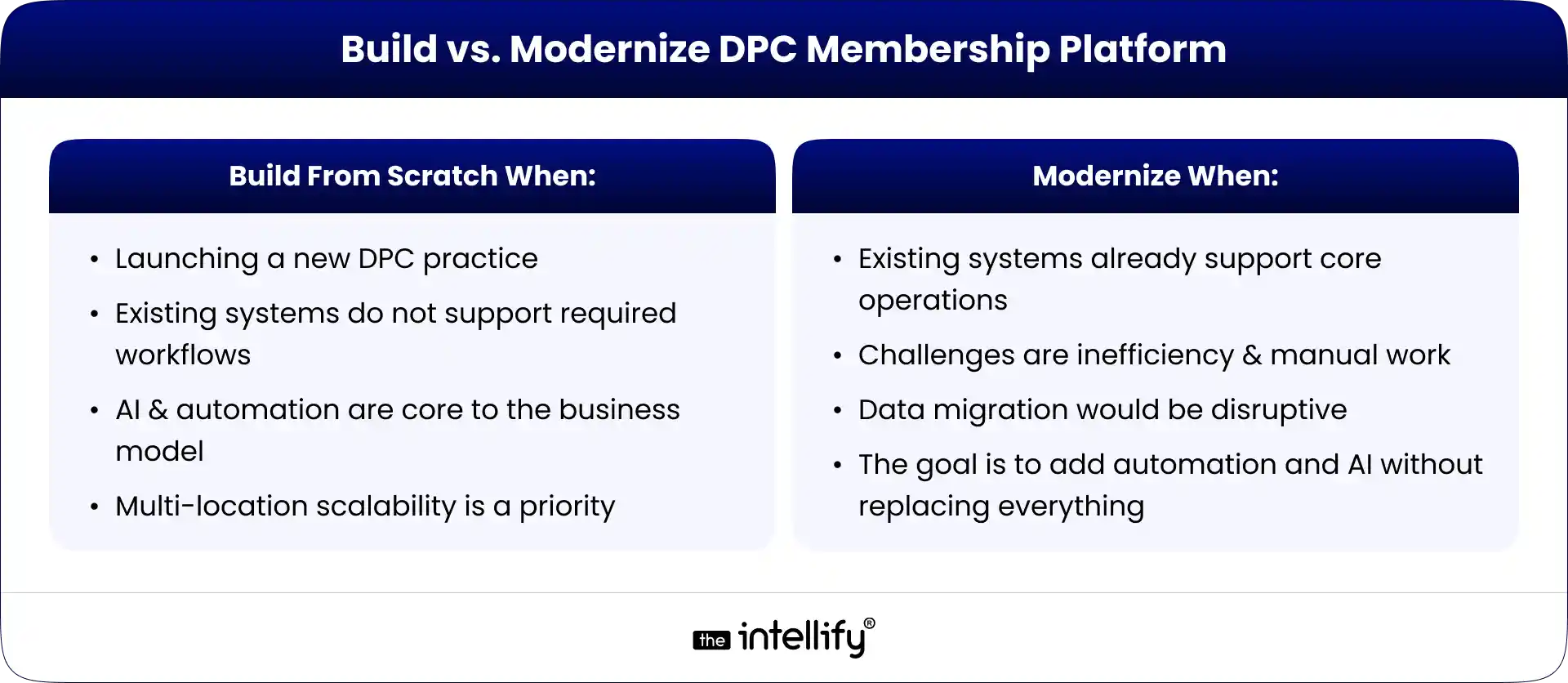
This guide covers how to build a DPC platform, key features, how AI and voice agents fit in, and when to modernize an existing system instead of building from scratch.


What Is a Direct Primary Care (DPC) Platform?

A Direct Primary Care platform is a digital system that manages both the operational and patient-facing workflows of a DPC practice. Unlike basic scheduling tools, it supports the ongoing membership relationship between patients and providers, which is central to the DPC model.

Patients typically pay a recurring fee for access to primary care services, so the platform must handle the full membership lifecycle, not just appointments. A DPC platform typically includes:

  • Patient onboarding and registration
  • Membership enrollment and billing
  • Appointment scheduling
  • Patient communication and messaging
  • Telehealth visits
  • Intake forms and consent management
  • Provider workflows
  • EHR integration
  • Notifications and reminders
  • Membership management (renewals, pauses, cancellations)
  • Reporting and analytics

In short, it serves as the operational backbone of a DPC practice, connecting business operations with patient care.


How Does a DPC Platform Work?

A well-designed DPC platform simplifies the entire patient journey, from the first interaction with the practice to long-term membership renewal. The goal is to reduce friction at every step while ensuring staff are not burdened with repetitive manual tasks.
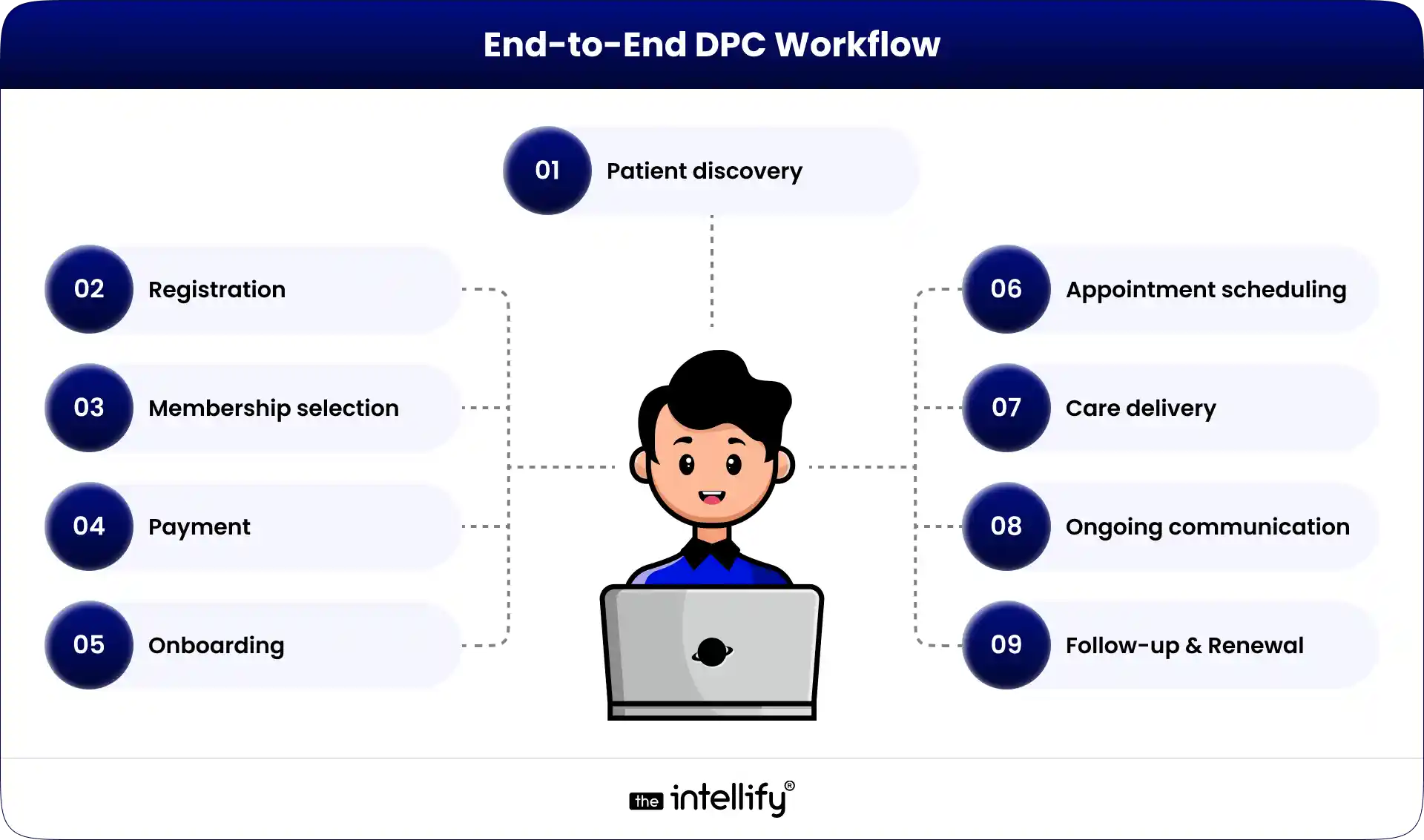
A typical end-to-end workflow looks like this:

End-to-End DPC Workflow

Each stage plays a specific role in maintaining both patient experience and operational efficiency.

1. Patient Registration

The journey begins when a prospective patient creates an account and submits basic information. Depending on the practice, this may include personal details, contact information, medical history, insurance details (if applicable), consent forms, and communication preferences.
The key objective at this stage is to eliminate unnecessary paperwork and reduce manual data entry for staff. A well-designed system ensures that information flows directly into the platform and is immediately usable for downstream workflows.

2. Membership Selection

Once registered, patients are presented with available membership plans. These plans may vary based on age, individual versus family coverage, employer arrangements, or included services.
A strong DPC platform clearly communicates what each plan includes, helping patients make informed decisions without needing staff intervention for basic explanations.

3. Payment and Enrollment

After selecting a plan, the system processes the initial payment and activates recurring billing. This is a critical part of the platform because it defines the financial relationship between the patient and the practice.
At this stage, the system must track membership status accurately, including whether a membership is active, pending, past due, paused, cancelled, or expired. This status directly impacts access to services and communication workflows.

4. Patient Onboarding

Once payment is complete, patients typically complete onboarding tasks such as intake forms, medical history questionnaires, and consent documentation. Automated reminders play an important role here, ensuring that patients complete onboarding without requiring constant manual follow-up from staff.

5. Appointment Scheduling

Patients should be able to view available appointment slots and book visits based on provider availability, appointment type, and scheduling rules defined by the practice. A well-designed scheduling system accounts for visit duration, new versus existing patients, telehealth availability, and cancellation policies.

6. Care Delivery

Care is delivered through in-person visits, telehealth sessions, phone consultations, or secure messaging depending on the practice model. The DPC platform should seamlessly connect these interactions with the underlying patient record and operational workflows.

7. Ongoing Communication

One of the defining characteristics of DPC is continuous access to care. Patients frequently reach out for questions, follow-ups, appointment changes, or general support. Without automation, this can quickly become a major operational burden.
A modern platform reduces this load by handling routine communication through structured workflows and intelligent automation.

8. Membership Renewal

Finally, the platform manages recurring billing and membership renewals. It tracks payment cycles, sends reminders for expiring cards or failed transactions, and ensures that staff are not manually chasing every renewal.
The goal is to maintain continuity of care while minimizing administrative overhead.


Why DPC Practices Need Modern Digital Platforms

While the DPC model simplifies insurance-related complexity, it does not eliminate operational workload. In fact, as a practice grows, the volume of administrative tasks often increases significantly.

For example, a practice with 1,500 members may receive daily inquiries about appointments, billing, membership details, prescriptions, lab results, and scheduling changes. Staff may also need to follow up on incomplete onboarding, failed payments, or missed communications.

Individually, these tasks are simple. At scale, they become a major operational challenge.

Common Operational Challenges in DPC Practices

Many DPC practices experience similar issues, including:

  • Manual membership onboarding and updates
  • Fragmented communication across phone, email, and messaging tools
  • Heavy reliance on phone-based scheduling
  • Failed or delayed recurring payments
  • Inconsistent renewal follow-ups
  • Repetitive patient inquiries
  • High administrative call volume
  • Disconnected software systems
  • Limited visibility into membership performance
  • Incomplete reporting and analytics

A modern DPC platform should not simply digitize these problems; it should actively reduce or eliminate them through workflow automation and system integration.


Essential Features of a DPC Platform

The exact feature set of a DPC platform depends on the size, structure, and goals of the practice. However, most modern systems should include a core set of capabilities that support both patient experience and operational efficiency.

Feature Purpose
Patient Registration Digital onboarding and data collection
Membership Management Plan creation, updates, and lifecycle tracking
Subscription Billing Recurring payments and financial management
Appointment Scheduling Self-service booking and provider availability
Patient Portal Centralized access for patients
Secure Messaging HIPAA-compliant communication
Telehealth Virtual care delivery
EHR Integration Clinical data synchronization
Notifications Reminders, alerts, and updates
Analytics Dashboard Operational and financial insights
Admin Dashboard Practice-level management tools
AI Automation Workflow optimization and task automation


Patient Registration

Registration should be fast, mobile-friendly, and intuitive. Patients should not be required to print, scan, or email forms, as these outdated workflows create unnecessary friction and increase administrative burden.

Membership Management

Membership management is the core of any DPC platform. It should support plan creation, pricing structures, billing cycles, enrollment tracking, renewals, pauses, cancellations, and family account management. Without strong membership logic, the entire DPC model becomes difficult to scale.

Subscription Billing

Recurring billing must be reliable and automated. The system should handle payment processing, failed transactions, retries, refunds, receipts, and billing notifications. Automated recovery workflows are especially important to reduce revenue leakage and manual follow-up.

Appointment Scheduling

Patients should be able to book appointments without calling the office. The system should enforce scheduling rules, manage provider availability, and support different appointment types, including telehealth and same-day visits.

Patient Portal

A centralized patient portal improves engagement and reduces administrative load. Patients should be able to manage appointments, update information, access documents, communicate securely, and view billing and membership details in one place.

Secure Messaging

Secure messaging replaces fragmented communication channels with a structured, compliant system. It ensures that patient-provider communication remains organized, trackable, and integrated with the rest of the platform.

Telehealth

Telehealth should be fully integrated into the platform rather than treated as a separate tool. This allows patients to schedule, attend, and follow up on virtual visits without switching systems.

EHR Integration

In most cases, a DPC platform should complement rather than replace an EHR. Integration ensures that clinical data remains centralized while operational workflows are managed separately but in sync.

Analytics Dashboard

Analytics provide visibility into key operational metrics such as active memberships, churn rate, revenue trends, appointment volume, no-show rates, and patient engagement. These insights are essential for scaling a DPC practice effectively.


DPC platform development company


How to Build a DPC Platform: Step-by-Step

Building a DPC platform should always begin with understanding real-world workflows rather than selecting technology first. The most successful systems are designed around how a practice actually operates.

1. Define the Business Model

Start by clearly defining how the practice operates, including membership types, pricing structures, billing cycles, included services, cancellation policies, and provider availability. This forms the foundation for all technical decisions.

2. Map End-to-End Workflows

Document the full patient journey from registration to renewal, along with all internal staff processes. This step often reveals hidden inefficiencies and manual tasks that can be automated.

3. Translate Workflows into Requirements

Convert operational workflows into clear system requirements. For example, instead of saying “add payment integration,” define how the system should behave when a payment fails, including notifications, status updates, and retry logic.

4. Design User Experience for Each Role

Different users require different experiences. Patients need simplicity, providers need clinical context, administrators need visibility, and staff need efficient task management tools.

5. Choose the Technology Architecture

A typical DPC platform includes frontend applications, backend services, databases, cloud infrastructure, authentication systems, payment gateways, integration layers, and AI components. The architecture should be flexible enough to evolve over time.

6. Integrate External Systems

Integrations with EHRs, payment processors, telehealth tools, messaging systems, and analytics platforms are critical. A clear integration strategy should be defined early to avoid fragmentation later.

7. Build Security and Compliance into the Core

Security should not be added at the end of development. It must be embedded into system design, including access control, encryption, monitoring, and audit capabilities.

8. Introduce AI and Automation Strategically

AI should be applied only where it improves efficiency or reduces manual workload. Common use cases include scheduling, patient communication, reminders, and administrative routing.

9. Test Across Real-World Scenarios

Testing should go beyond basic functionality and include edge cases such as failed payments, scheduling conflicts, system outages, and integration failures.

10. Launch and Continuously Improve

A DPC platform should evolve over time based on real usage data. Monitoring engagement, operational efficiency, and patient feedback is essential for long-term success.


How AI Can Modernize a DPC Platform

AI can significantly improve DPC operations when applied to the right workflows. The goal is not to replace clinical decision-making but to reduce repetitive administrative work.

AI-Powered Communication

AI can handle routine patient inquiries across chat, email, and messaging platforms, providing instant responses to common questions while escalating complex issues to staff when needed.

AI Scheduling Assistance

AI can simplify appointment booking by interpreting natural language requests and automatically matching patients with available time slots based on provider rules and preferences.

AI Voice Agents

AI voice agents can manage incoming phone calls, handle scheduling, answer common questions, and execute predefined workflows. This reduces call volume and allows staff to focus on higher-value tasks.

Automated Membership Workflows

AI can identify incomplete onboarding, failed payments, upcoming renewals, and other membership-related events, triggering automated reminders or staff tasks as needed.

Self-Service Patient Support

Many patient questions are repetitive and predictable. AI can provide instant answers using approved practice information, improving response times and reducing staff workload.

Workflow Automation

AI becomes most powerful when it connects multiple steps into a single automated workflow, such as updating membership status after a failed payment and triggering appropriate notifications and follow-ups.


Where AI Voice Agents Fit in a DPC Platform

Phone calls remain one of the largest operational bottlenecks in DPC practices. Patients often prefer calling for convenience, but this creates constant interruptions for staff.

An AI voice agent can act as the first point of contact, handling routine requests such as scheduling, cancellations, membership questions, and general practice information. It can identify intent, access relevant systems, execute approved workflows, and escalate complex cases when necessary.

However, clear boundaries are essential. AI voice agents should not provide medical diagnoses or handle emergency situations independently. Instead, they should follow predefined escalation protocols to ensure patient safety.


Build vs. Modernize: Choosing the Right Approach

Not every DPC practice needs to build a platform from scratch. In many cases, modernizing an existing system is more practical and cost-effective.

Build vs. Modernize DPC Membership Platform

A simple rule applies: if the foundation is strong, modernize it; if it is limiting growth, rebuild it.


How Much Does It Cost to Build a DPC Platform?

The cost of building a DPC platform varies widely depending on scope, integrations, and complexity. A basic system focused on membership, scheduling, and payments is significantly less expensive than an enterprise platform with EHR integration, AI automation, mobile apps, and voice agents.

Key cost drivers include the number of user roles, level of customization, integration requirements, security needs, and long-term maintenance expectations. Instead of focusing on a fixed price, it is more effective to define the workflows the platform must support and build estimates around those requirements.


Conclusion

A successful DPC platform is not just a digital scheduling tool; it is the operational foundation of a membership-based care model. It connects patients, providers, payments, communication, and administrative workflows into a single system designed for long-term scalability.

When built correctly, it reduces administrative burden, improves patient experience, and enables practices to grow without proportionally increasing staff workload. When enhanced with AI and automation, it can further streamline repetitive tasks and improve responsiveness across the entire patient journey.

The key is not to rebuild everything, but to focus on what actually needs improvement. Start with workflow mapping first; the technology should support the operation, not define it.


Modernize DPC platform


Frequently Asked Questions (FAQs)

1. How does DPC software manage memberships?

DPC software can manage membership plans, enrollment, billing frequency, payment status, renewals, cancellations, family memberships, and related patient communications.

2. Can a DPC platform integrate with an EHR?

Yes. A DPC platform can be designed to integrate with an existing EHR so that operational workflows and clinical systems can work together rather than requiring the practice to replace everything.

3. Can AI automate DPC appointment scheduling?

Yes. An AI assistant or AI voice agent can handle approved scheduling workflows, check availability, book appointments, reschedule visits, and send confirmations when connected to the appropriate scheduling system.

4. Can an AI voice agent handle DPC patient calls?

Yes. An AI voice agent can handle many routine administrative calls, including questions about memberships, scheduling, practice information, cancellations, and other approved workflows. Clinical or sensitive requests should be appropriately escalated.

5. Is DPC software required to be HIPAA compliant?

Healthcare organizations and their technology providers may have HIPAA obligations depending on how protected health information is handled. A DPC platform that handles ePHI needs appropriate safeguards and should be designed around applicable HIPAA requirements. HHS identifies risk analysis as a foundational requirement of the HIPAA Security Rule.

6. Should a DPC practice build or buy software?

It depends. Buying or configuring existing software can make sense when standard workflows are sufficient. Custom development becomes more attractive when a practice needs proprietary workflows, deeper integrations, custom membership logic, or advanced automation.

AI Appointment Scheduling in Healthcare: How It Works, Key Benefits & Costs in 2026

Summary:
AI appointment scheduling helps healthcare organizations automate booking, reduce no-shows, optimize provider schedules, and improve patient access to care. This guide explains how AI scheduling works, its key benefits, essential features, implementation costs, EHR integration requirements, and future trends shaping healthcare operations in 2026.

A missed appointment doesn’t just create an empty slot in a provider’s calendar. It can delay patient care, increase administrative workload, and reduce revenue. Now multiply that across hundreds or even thousands of appointments each month.

Healthcare organizations today face growing pressure to improve patient access while managing staffing shortages and rising operational costs. At the same time, patients expect the convenience of online booking, instant confirmations, and personalized communication.

This is why AI Appointment Scheduling is gaining traction across healthcare. By combining artificial intelligence, automation, and predictive analytics, healthcare providers can streamline scheduling, reduce no-shows, and improve the overall patient experience.

In 2026, AI-powered scheduling is no longer just a productivity tool. It has become an important part of modern healthcare operations, helping organizations deliver faster, more efficient, and patient-centric care.


Understanding AI Appointment Scheduling in Healthcare

What AI appointment scheduling is

AI appointment scheduling uses artificial intelligence to automate and optimize how healthcare appointments are booked, managed, and followed up.
Unlike traditional scheduling software that simply displays available time slots, AI-driven systems analyze provider availability, patient preferences, appointment types, historical scheduling data, and operational requirements to recommend the most suitable appointments.

How AI scheduling differs from traditional appointment management

Traditional scheduling relies heavily on administrative staff to manage bookings, cancellations, reminders, and rescheduling. AI scheduling platforms automate many of these tasks while continuously optimizing schedules. They can:

  • Recommend ideal appointment slots
  • Predict likely no-shows
  • Fill cancelled appointments automatically
  • Send personalized reminders
  • Manage waitlists in real time

Technologies powering intelligent scheduling systems

Several technologies make AI scheduling possible:

  • Machine Learning: Learns from historical scheduling data.
  • Predictive Analytics: Forecasts appointment demand and cancellation risks.
  • Conversational AI: Enables scheduling through chatbots and virtual assistants.
  • Workflow Automation: Automates reminders, confirmations, and follow-up actions.


How AI appointment scheduling works from booking to follow-up

Patients can book appointments through websites, apps, chatbots, or patient portals. The system analyzes scheduling factors and suggests the best available options.
After booking, automated reminders help reduce no-shows. If cancellations occur, AI can immediately offer those slots to patients on a waitlist. Following the appointment, the system can schedule follow-ups and trigger additional patient communication workflows.


Why Healthcare Organizations Need Smarter Scheduling Systems

Patient expectations have changed dramatically. Most people expect healthcare scheduling to be as simple as booking a flight or reserving a hotel room online. However, many healthcare organizations still struggle with:

  • Long call wait times
  • Scheduling conflicts
  • Double bookings
  • Appointment gaps
  • Last-minute cancellations
  • High no-show rates

These issues affect both patient satisfaction and operational performance.
Manual scheduling processes also place significant pressure on front-desk staff. As healthcare organizations grow, managing appointments across multiple providers and locations becomes increasingly difficult.
AI-powered healthcare software helps address these challenges by automating repetitive tasks, improving schedule utilization, and making it easier for patients to access care.


Key Benefits of AI Appointment Scheduling for Healthcare Providers

Benefits of AI Scheduling for Healthcare Providers

Reducing administrative workload

Administrative teams spend a large portion of their day handling scheduling-related tasks. AI in healthcare automation reduces the need for manual appointment booking, confirmations, reminders, and rescheduling. This allows staff to focus more on patient support and care coordination.

Optimizing provider schedules and appointment availability

AI scheduling systems help ensure providers’ calendars are used efficiently by minimizing gaps and balancing appointment demand. This can increase patient access without requiring additional clinical resources.

Improving resource utilization across departments

Healthcare scheduling often involves more than physicians. Exam rooms, imaging equipment, specialists, and support staff all need coordination. AI helps allocate these resources more effectively, reducing bottlenecks and operational inefficiencies.

Enhancing operational efficiency

Better scheduling leads to:

  • Fewer missed appointments
  • Reduced administrative costs
  • Faster patient access
  • Improved provider productivity

Even small improvements in scheduling efficiency can generate measurable operational benefits.

Supporting growth without increasing administrative burden

As healthcare organizations expand, AI scheduling allows them to manage larger patient volumes without proportionally increasing administrative staff. This scalability is one of the key reasons many providers are investing in intelligent scheduling solutions.


Features to Look for in AI Appointment Scheduling Software

When evaluating AI appointment scheduling software, healthcare organizations should prioritize features that improve both efficiency and patient experience.

Self-service patient scheduling

A strong AI appointment scheduling platform should allow patients to book, reschedule, and cancel appointments online at any time.

Intelligent appointment recommendations

AI should recommend appointments based on provider availability, appointment type, patient preferences, and urgency.

Automated reminders and notifications

Personalized reminders delivered through SMS, email, or voice calls help reduce missed appointments.

Smart waitlist management

Cancelled appointments can be automatically offered to patients seeking earlier availability.

Scheduling analytics and reporting

Look for dashboards that track appointment completion rates, cancellations, no-shows, and provider utilization.

Security, privacy, and compliance capabilities

The platform should support HIPAA-compliant workflows, secure data handling, audit trails, and role-based access controls.

Multi-location and multi-provider support

Organizations with multiple facilities should ensure the platform can manage scheduling across locations and providers from a centralized system.


AI Appointment Scheduling Cost in 2026: Pricing Models & ROI

Key factors that influence implementation costs

Several factors affect the cost of AI appointment scheduling:

  • Practice size
  • Number of providers
  • Integration requirements
  • Customization needs
  • Deployment model

Off-the-shelf vs custom scheduling solutions

Solution Type Estimated Cost
Small Clinic SaaS $100-$1,000/month
Multi-Location Practice $1,500-$5,000/month
Enterprise Health System $25,000-$250,000+ implementation
Custom AI Scheduling Platform $50,000-$300,000+

Understanding the total cost of ownership

Beyond software licensing, organizations should account for:

  • Implementation
  • Integration
  • Training
  • Maintenance
  • Ongoing support

Evaluating long-term return on investment

The ROI often comes from:

  • Reduced no-shows
  • Improved provider utilization
  • Lower administrative costs
  • Increased patient retention
  • Better scheduling efficiency

Hidden costs to watch out for

Organizations should also plan for data migration, workflow redesign, testing, and change management activities.


AI Appointment Scheduling Solutions


Reducing No-Shows and Scheduling Gaps

Missed appointments remain one of the biggest operational challenges in healthcare. AI scheduling platforms help reduce no-shows by identifying patients who are more likely to miss appointments and sending personalized reminders based on patient behavior.
Smart waitlists further improve efficiency by automatically filling cancelled slots with patients seeking earlier appointments. These capabilities help healthcare organizations:

  • Improve attendance rates
  • Reduce revenue loss
  • Increase provider utilization
  • Improve patient access to care

For many organizations, reducing no-shows alone can significantly improve scheduling performance.


Patient Impact: From Booking to Better Outcomes

The patient experience begins long before the appointment itself. AI-powered scheduling contributes to better outcomes by providing:

  • Faster appointment access
  • Reduced scheduling delays
  • Convenient self-service booking
  • Improved follow-up compliance
  • Personalized communication

When patients can access care quickly and easily, they are more likely to remain engaged throughout their treatment journey.
Improved engagement often translates into better adherence, stronger provider relationships, and higher satisfaction levels.


Real-World Applications Across Healthcare Settings

Real-World Applications Across Healthcare

AI appointment scheduling is not limited to one type of healthcare organization. Its value extends across multiple care environments.

Primary care practices

Primary care providers often manage high patient volumes and diverse appointment types. AI scheduling helps optimize calendars, reduce wait times, and improve access to preventive care.

Specialty clinics

Specialty practices often deal with complex scheduling requirements. Whether it’s cardiology, dermatology, orthopedics, or oncology, intelligent scheduling helps coordinate providers, resources, and patient demand more effectively.

Hospitals and health systems

Large healthcare systems face enormous scheduling complexity. AI supports enterprise-wide scheduling optimization across departments, facilities, and care teams.

Telehealth providers

Virtual care depends heavily on efficient scheduling. AI helps manage provider availability, virtual appointment coordination, and patient communications.

Diagnostic and imaging centers

Imaging services often require specialized equipment and coordinated staffing. AI scheduling improves resource utilization while reducing patient wait times.

Behavioral and mental health services

Mental health providers frequently encounter high cancellation rates and ongoing treatment plans. Intelligent scheduling helps maintain appointment continuity and improve patient engagement throughout long-term care programs.


AI Scheduling and EHR Integration: Building Connected Healthcare Workflows

Why EHR integration matters

Scheduling systems deliver the most value when connected to Electronic Health Records (EHRs). Integration allows appointment workflows to synchronize with patient records, provider availability, and care plans.

Benefits of combining scheduling and EHR systems

Organizations can benefit from:

  • Reduced duplicate data entry
  • Improved care coordination
  • Faster scheduling workflows
  • Better patient visibility
  • More accurate records

Important integration considerations for healthcare providers

Before implementation, providers should evaluate:

  • EHR compatibility
  • API availability
  • Data synchronization capabilities
  • Security requirements

HIPAA compliance and data security in EHR-connected workflows

Any AI scheduling solution handling patient data should support HIPAA-compliant processes, encryption, audit logging, access controls, and secure data management.
Organizations should also monitor evolving healthcare AI regulations, including requirements related to transparency and patient communication.


Measuring the Success of AI-Powered Scheduling

Healthcare organizations should establish performance metrics before implementation. Common KPIs include:

  • Appointment completion rates
  • No-show reduction percentages
  • Provider utilization levels
  • Schedule fill rates
  • Patient wait times
  • Patient satisfaction scores
  • Online scheduling adoption rates

Tracking these metrics helps organizations identify optimization opportunities and measure ROI.


Common Challenges & Best Practices for Successful Implementation

While AI scheduling offers significant benefits, implementation requires careful planning. Common challenges include:

  • Data privacy concerns
  • System integration complexity
  • Staff adoption issues
  • Workflow adjustments

Best practices include defining clear objectives, prioritizing patient experience, Training staff thoroughly, monitoring performance continuously, and maintaining strong governance and compliance processes.
Organizations that treat AI scheduling as a long-term operational initiative typically achieve the best results.


Future of AI Appointment Scheduling

The future of healthcare scheduling will become even more intelligent.

Predictive scheduling based on patient behavior

AI systems will increasingly anticipate scheduling needs based on patient history, treatment plans, and behavioral patterns.

Conversational scheduling assistants

Patients will book appointments through natural conversations using chatbots and virtual assistants.

Voice-enabled appointment management

Conversational Voice AI will make scheduling more accessible, particularly for older adults and patients who prefer phone interactions.

Personalized scheduling experiences

Future systems will tailor appointment recommendations based on individual preferences and healthcare needs.

The evolution of intelligent healthcare operations

Scheduling is becoming part of a broader healthcare automation strategy that includes patient engagement, workforce planning, care coordination, and operational optimization.


AI Scheduling Solutions


Conclusion

Appointment scheduling plays a bigger role in healthcare performance than many organizations realize. It affects patient access, provider productivity, operational efficiency, and revenue generation.
AI appointment scheduling helps healthcare providers move beyond manual processes by automating workflows, reducing no-shows, optimizing provider availability, and improving patient experiences.
As healthcare organizations continue their digital transformation in 2026, intelligent scheduling is becoming a strategic investment rather than simply an administrative upgrade.
Providers that embrace AI-driven scheduling today will be better positioned to deliver efficient, connected, and patient-centered care in the years ahead.


Looking to Build a Custom AI Appointment Scheduling Solution?

Every healthcare organization has unique scheduling challenges, workflows, compliance requirements, and patient engagement goals.
At The Intellify, we help healthcare providers design and develop custom AI-powered scheduling solutions that integrate with EHR systems, automate patient communications, reduce no-shows, and improve operational efficiency.
Whether you’re modernizing an existing scheduling process or building a fully connected patient access platform, our team can help create a solution tailored to your organization’s needs.


Frequently Asked Questions (FAQs)

1. How does AI make appointment booking easier for patients?

Patients can book appointments anytime, view available slots instantly, and avoid long phone calls or back-and-forth scheduling. AI-powered systems also provide automated confirmations, reminders, and rescheduling options, creating a more convenient healthcare experience.

2. Can AI scheduling software manage both in-person and virtual appointments?

Yes. Most AI scheduling solutions can manage in-person visits, telehealth appointments, and hybrid care models from a single platform. This helps healthcare organizations provide flexible scheduling options while maintaining a consistent patient experience.

3. Will AI appointment scheduling replace front-desk staff?

No. AI automates repetitive scheduling tasks such as appointment booking, reminders, and rescheduling. This allows front-desk staff to focus on patient support, care coordination, and other high-value responsibilities that require human interaction.

4. What should healthcare providers look for in an AI scheduling solution?

Healthcare providers should look for features such as EHR integration, automated reminders, self-service scheduling, reporting and analytics, HIPAA-compliant security, and scalability. The right solution should fit current operational needs while supporting future growth.

5. What is the biggest benefit of AI appointment scheduling in healthcare?

The biggest benefit is improved scheduling efficiency. AI helps reduce administrative workload, optimize provider availability, minimize no-shows, and make it easier for patients to access care. This leads to better patient experiences and more efficient healthcare operations.

Healthcare Membership Platform Development: Guide for Startups & DPC Providers

Summary:
Healthcare membership platform development is transforming how providers deliver continuous, subscription-based care. This guide explains how membership models help organizations improve patient engagement, generate predictable revenue, and streamline operations. It covers essential features, development strategies, integration needs, and the role of automation and AI in modern healthcare systems. Whether you’re a startup or a DPC provider, this blog offers practical insights to build scalable, compliant, and patient-centric healthcare membership platforms.

In today’s healthcare landscape, organizations are increasingly looking into healthcare membership platform development. This change highlights the rising demand for ongoing and accessible care, as well as the need for steady revenue and enhanced patient engagement. As expectations soar for digital-first healthcare services, many providers are moving beyond traditional systems to offer innovative solutions. This guide will delve into the essentials of creating effective healthcare membership platforms and how they can improve long-term service delivery for both startups and Direct Primary Care (DPC) providers.


Why Organizations Are Developing Membership-Based Healthcare Apps

Growing demand for continuous and accessible care

Patients today aren’t just looking for one-off visits; they want ongoing access to their healthcare providers. Membership-based platforms make it easier to connect, ensuring that patients receive continuous care tailored to their needs.

Need for predictable revenue and stronger patient engagement

Membership models create a steady stream of income, helping organizations forecast finances more effectively. By nurturing ongoing relationships, these models foster patient loyalty and engagement, leading to better health outcomes.

Rising expectations for digital-first healthcare services

With the surge of digital solutions in other industries, patients expect the same convenience from healthcare. Membership platforms can meet these expectations with features like telemedicine and online appointment scheduling.

Why many providers are moving beyond traditional systems

Many healthcare providers find their existing systems inadequate, prompting a shift toward modern solutions that enhance both operational efficiency and patient satisfaction.

How a membership platform supports long-term service delivery

By offering flexible membership options, healthcare providers can establish sustainable business models that prioritize long-term patient health while streamlining operations.


What Your Membership Platform Needs to Support

Feature of Healthcare Membership Platform

When planning your healthcare membership app development, keep these key functionalities in mind:

Ongoing patient relationships rather than one-time visits

Your platform should enable continuous engagement, allowing patients to easily reach out for advice or updates about their health.

Enrollment and management of membership plans

A smooth onboarding experience is key. Patients should find it easy to enroll in various membership plans, while providers should effortlessly manage these memberships.

Appointment scheduling and communication tools

Incorporate tools that let patients book appointments and communicate with their healthcare providers in real-time.

Access to care services and health information

Patients should have hassle-free access to their medical records and prescriptions, empowering them to take control of their health.

Billing for recurring subscriptions

Put in place a billing system that allows for automatic payments, reducing administrative tasks and enhancing the overall patient experience.

Acting as the central system for membership operations

Your platform should act as the hub for all membership-related activities, ensuring efficient management from enrollment to billing.


When and Why Companies Decide to Build One

The choice to invest in DPC platform development often varies between organizations and is frequently prompted by specific needs:

Launching new membership-based programs

If you’re looking to roll out new services, a dedicated membership platform can simplify that process.

Expanding telehealth or outpatient services

As telehealth gains traction, many providers recognize the need to broaden their digital offerings through membership applications.

Improving patient retention and accessibility

Membership models can help retain patients through enhanced engagement, making healthcare more accessible.

Creating scalable digital offerings

A well-crafted membership platform can easily adapt to growing needs, ensuring that your healthcare offerings expand alongside your business.

Responding to competitive pressure from modern providers

To maintain relevance, many organizations are updating their service models, and developing a membership platform is often a crucial step in that transformation.

A U.S.-based Direct Primary Care platform improved patient access and care coordination by implementing a secure digital solution across its services. The system streamlined operations for providers while keeping sensitive health data protected under strict privacy standards. This shows how modern AI-enabled technology can enhance healthcare delivery without compromising compliance. View the complete case study for more details: https://theintellify.com/work/healthcare2u/


Modernizing Legacy Systems for a Membership Model

Limitations of outdated healthcare software

Legacy modernization systems can become burdensome, hampering efficiency and negatively impacting the patient experience.

Fragmented tools and manual workflows

Fragmentation leads to inefficiencies and a higher likelihood of errors. Modernizing software can provide a unified solution.

Need for unified digital infrastructure

A centralized platform helps integrate various functionalities, streamlining operations across the board.

Options for modernization:

  • Replacing legacy systems: Sometimes, a full overhaul is necessary for highly outdated systems.
  • Integrating existing systems: Occasionally, it makes more sense to enhance and integrate what you already have.
  • Phased transition strategies: Gradually shifting to a modern system can help ensure ongoing service continuity.

Ensuring continuity of ongoing services

Transitioning to a new system requires careful planning to avoid interruptions in patient care.


Core Features Required for a Healthcare Membership App

To truly benefit your patients and staff, your healthcare membership app should include some essential features:

Patient Experience

  • Account creation and enrollment: A simple, frictionless sign-up process.
  • Appointment booking and management: Easy scheduling.
  • Secure messaging and communication: Direct lines to providers.
  • Access to records and service details: Empowerment through information.
  • Mobile-friendly interface: Accessibility on any device.

Provider & Staff Tools

  • Patient management dashboard: Streamlined oversight of patient interactions.
  • Care coordination features: Improved collaboration among healthcare providers.
  • Workflow tracking: Real-time progress monitoring.
  • Reporting and analytics: Insight into important operational metrics.

Membership & Billing Management

  • Subscription plans and tiers: Flexible options for patients.
  • Recurring payment processing: Automated billing features.
  • Plan upgrades, renewals, and cancellations: Easy management for both patients and providers.
  • Financial monitoring: Insight into membership performance.


Healthcare membership app development


Technology Architecture & Compliance Requirements

Cloud-based healthcare SaaS architecture:-  A cloud-based solution boosts accessibility while ensuring data security.

Data security and privacy considerations:- Health information is sensitive, so your platform must guard against unauthorized access.

HIPAA-compliant system design:-  Compliance with regulations is a must for navigating the healthcare landscape.

Role-based access and audit controls:- Set up access controls to protect data while still allowing your team the access they need.

Scalability and performance planning:-  Your platform should be designed to grow alongside your organization’s needs.


How Automation Streamlines Operations

How Automation Streamlines Operations

1. Reducing manual administrative tasks

Automating routine tasks can free up time for healthcare providers and support staff, ultimately leading to better patient care.

2. Automated scheduling and reminders

This can help reduce no-shows and keep patients informed about their upcoming appointments.

3. Billing and payment automation

An automated system simplifies financial processes, increasing both revenue and patient satisfaction.

4. Managing the full membership lifecycle

Efficient management of all membership stages from sign-up to renewal enriches the user experience.

5. Improving efficiency across departments

Streamlined workflows can enhance overall efficiency, benefiting both patients and providers.


The Role of AI in Advanced Membership Platforms

Intelligent scheduling and demand prediction:

AI can analyze patient data to optimize scheduling and predict demand for services.

Personalized patient engagement:

Harnessing AI allows for tailored content, significantly improving the patient experience.

Automated support and triage tools:

Chatbots can handle routine inquiries, letting clinical staff focus on complex cases.

Insights for operational planning:

AI can sift through operational metrics, guiding organizations in making informed decisions.

Enhancing decision-making while supporting clinicians:

AI tools can provide actionable insights to help healthcare providers improve care delivery.


Integration With Existing Healthcare Systems

  • Connecting with electronic health records:- Seamless integration ensures that all patient data is synchronized across platforms.
  • Integration with labs, pharmacies, and diagnostics:- Connecting with third-party services can streamline operations and elevate patient care.
  • Payment gateways and communication tools:- Make sure your platform can effectively manage transactions and facilitate communication.
  • Ensuring data consistency across platforms:- Data consistency helps prevent errors and enhances the user experience.
  • Importance of interoperability for smooth operations:- An interconnected healthcare landscape is crucial for continuity of care.


Development Approach: How Organizations Build the Platform

1. Defining scope and requirements:- Before diving into development, clarify what your platform needs to accomplish.

2. Choosing custom development or adapting existing solutions:- Evaluate whether a tailored solution or adapting a pre-existing platform fits your needs better.

3. Selecting internal teams or external partners:-  Decide whether to use in-house talent or hire external experts for development.

4. Designing for scalability and future expansion:- Ensure your system is robust enough to grow with your organization.

5. Testing and validation before launch:- Pilot testing is essential to ensure everything runs smoothly upon launch.


Implementation & Adoption Strategy

Preparing staff through training:- Thorough training is key to facilitating smooth transitions to new systems.

Updating workflows to align with the new system:- Make sure that all workflows are updated to maximize efficiency.

Educating patients about the membership model:- Open communication with patients regarding the new model is crucial for buy-in.

Phased rollout versus full launch:- Consider whether to roll out your platform gradually or all at once based on user feedback.

Monitoring early performance and feedback:- Collecting feedback post-launch can lead to necessary improvements.

Continuous improvements after deployment:- Keep assessing the platform to enhance its effectiveness over time.


Cost Considerations and Investment Factors

  • Key drivers of development costs:- Initial costs will cover development and compliance, but don’t forget to budget for ongoing maintenance.
  • Infrastructure and compliance expenses:- Investing now can lead to considerable long-term savings.
  • Integration complexity:- Complex integrations may require additional resources, impacting your initial investment.
  • Ongoing maintenance and support:- Ensure you set aside a budget for long-term support and maintenance needs.
  • Factors affecting long-term ROI:- Evaluate how your platform will generate revenue over time for a clearer picture of ROI.


Key Challenges to Plan for Early

1. Resistance to organizational change:- Get staff on board with new systems to facilitate a smoother transition.

2. Migrating data from legacy systems:-  This can be tricky, but it is essential for centralized information management.

3. Security and privacy considerations:- Continuous review of data protection measures is crucial.

4. Balancing customization with usability:- Find the right balance so the platform meets unique needs without overwhelming users.

5. Maintaining service continuity during transition:- Be proactive about ensuring service stays steady during the shift.


Conclusion

In summary, healthcare membership platform development is reshaping how organizations deliver care. By adopting this model, providers can boost patient engagement, streamline operations, and establish sustainable practices. Thoughtful planning and cross-team coordination are vital for long-term success. If you’re considering making the leap into membership-based healthcare services, now’s the perfect time to evaluate your readiness for this transformative journey!


Modernize healthcare platform


Frequently Asked Questions (FAQs)

1) What is a healthcare membership platform, and how does it work?

A healthcare membership platform is a digital system that allows providers to offer ongoing care through subscription plans instead of one-time visits. Patients enroll, pay recurring fees, and access services like appointments, communication, and care coordination through a single app or portal.

2) Who should consider building a healthcare membership app?

Organizations that want predictable revenue, stronger patient relationships, and scalable digital services benefit most. This includes clinics, telehealth providers, startups, and healthcare groups expanding preventive or continuous care programs.

3) How is a membership platform different from a traditional patient portal?

A traditional portal mainly supports appointment booking and records access. A membership platform manages the entire lifecycle, including enrollment, subscriptions, communication, billing, and ongoing care delivery, making it the operational core of membership-based services.

4) What core features are essential for a successful membership healthcare app?

Key capabilities include membership enrollment, recurring billing, appointment management, secure communication, patient records access, and administrative tools for providers. Without these, managing ongoing care relationships becomes difficult.

5) How does automation improve day-to-day operations?

Automation reduces manual tasks such as scheduling, reminders, billing, and membership renewals. This allows staff to focus more on patient care while improving accuracy and operational efficiency across departments.

6) How long does it typically take to develop and launch a membership platform?

Timelines vary depending on complexity, integrations, and compliance requirements. Many organizations start with a focused version, test it with a pilot group, and expand gradually to reduce risk and ensure smooth adoption.

7) What are the biggest challenges organizations face during implementation?

Common challenges include staff resistance to change, migrating data from older systems, ensuring security and compliance, and redesigning workflows. Careful planning and phased rollout strategies help overcome these issues.

Rise of VR Therapy for Mental Health & Wellness

Introduction
Virtual reality (VR) started as a device for game players and technology enthusiasts, but after some time it started to transform areas of our lives, most importantly, healthcare. VR therapy is now widely accepted by healthcare practitioners in the United States as a new way of providing therapy for people who are experiencing mental health issues, from anxiety disorders to general wellness.


What is VR Therapy?

VR therapy (Virtual Reality Therapy) is the use of computer-generated virtual environments representing real or fictitious places. These fantasies are achieved with the use of headsets which completely immerse the user into a different realm with the central aim of solving their psychological problems or helping them learn to cope. This may sound like science fiction, but it is actually happening and it is winning.

Immersive is one of the strongest characteristics of VR therapy. It enables the therapist to place the patient not only in situations that can be seen, but also heard and, in some cases, touched. Unlike traditional therapy which involves discussions and mental imagery, VR offers patients actual, tangible situations to engage with.


Psychology Behind Immersive Healing

Immersive environments allow the user to completely inhabit the scenario presented to them. This immersion triggers emotional and psychological events far more vividly than any form of therapy. CBT (Cognitive Behavioral Therapy) combined with VR is gaining acceptance because it provides an effective method for simulating negative triggers and reframing their recollections.


VR in Healthcare

How VR is Used to Treat Anxiety Disorders

The treatment of anxiety disorders is perhaps the most frequent application of VR therapy. These include social anxiety, panic disorders, phobias, and post-traumatic stress disorder (PTSD). VR devises situations in which patients confront their fears in gradual increments, a practice called exposure therapy.

For example, consider a person who has a fear of flying. Conventional therapy may suggest imagining a scenario where they would have to board an airplane. With VR, however, the individual can actually “experience” a flight while knowing they are safe in the therapist’s office. Receiving this type of attention multiple times helps desensitize and recondition the patient to accept these situations more easily in real life.

VR has also found applications in the treatment of PTSD for veterans. Through controlled virtual reality, veterans can safely revisit emotionally overwhelming captures of their traumatic experiences, enabling them to cope without flooding them with trauma-related feelings.


VR for Depression and Stress Management

VR for Depression and Stress Management

VR does not stop at addressing anxiety. It has also contributed to the management of depression and well-being. Specialized VR applications feature an array of guided meditations (e.g., deep breathing exercises or walks in nature framed by calming stimuli), all of which are available as Patient Education materials. Such simulations provide an alternative reality, along with comfort that is, at times, impossible to find within the confines of reality, particularly during stressful days.

Certain programs even offer interactive scenarios that guide learners on how to dispute negative self-talk or cultivate an attitude of gratitude. Such programs may complement therapy or be done individually as part of a wellness routine.


Mental Health & Wellness Apps

An increasing number of mental health and wellness apps now offer VR components. Such apps are purposefully crafted for ease of use, extending the usability of mental healthcare apps to broader age ranges. From teens experiencing school-related stresses to adults grappling with work-induced anxiety, these virtual tools offer a discreet, accessible way to receive aid.

Some widely used applications incorporate VR technology to deliver virtual therapy sessions, track moods, guide users through mindfulness exercises, and develop individualized wellness strategies. The goal is to provide therapy and support users around the world whenever they need it.


Key Players in the VR Therapy Ecosystem

Various established tech firms and startups are venturing into the VR mental healthcare sector. This includes software platform developers, manufacturers of more ergonomic headsets, and even research institutions studying long-term impacts.

The Intellify is a leader in immersive wellness solutions. Empowering both patients and professionals, The Intellify is developing tools that combine evidence-based therapeutic practices with design and evolving technology. Their mission is to enhance the accessibility, personalization, and effectiveness of mental health support.


The Benefits of Immersive Medical Tech

The beauty of the immersive medical system is that it enables a patient to undergo therapy in a virtual setting (VR) that makes it feel real.  With VR, patients don’t have to use their imagination to think of a stressful situation; instead, they can experience it in a safe and controlled environment. In this way, patients gain confidence when dealing with actual real-life stressful situations.

Here are some of the most important positive impacts of VR in treating mental health issues.

VR in Treating Mental Health Issues

VR Therapy in Educational and Workplace Settings

Educational institutions and corporations have also begun implementing VR therapy for their wellness programs. In the academic sphere, VR can assist pupils in coping with anxiety, bullying, and other forms of academic-related stress. Additionally, it equips educators with novel methods to comprehend the mental health of their students.

Within business settings, VR programs aimed at relieving stress and preventing burnout are gaining popularity. Employees can utilize VR meditation and stress management modules during breaks, which in turn lowers long-term health concerns and enhances productivity.


Healthcare Innovation in the USA

The adoption of VR therapy in healthcare innovation trends in the USA. As mental healthcare issues are escalated to focus, technology firms, researchers, and healthcare institutions are combining their efforts to design comprehensible and usable devices. Startups specializing in VR applications are receiving increased funding, and advertisements are beginning to examine potential coverage options.

Across the country, universities and research institutions also study the applicability of VR therapy. The findings so far have been encouraging. Research demonstrates VR therapy can significantly enhance treatment outcomes for anxiety, depression, and even chronic pain.


Challenges and the Road Ahead

The area of study with regard to VR therapy is notably nascent and under-researched. This presents potential hurdles to be overcome, such as making the technology more accessible and affordable, as well as ensuring adequate training for therapists to use the technology efficiently. Not every patient may experience the same positive outcomes from utilizing VR, which means it ought to be implemented in conjunction with other mental health strategies.

Also, how effective VR therapy can be in the long term raises questions. It is crucial to delve deeper into the diminishing of traditional methods over time, but based on initial feedback to virtual exposure therapy, patient accounts, and interest outlooks, it is likely that VR therapy will be viable for a long time.


VR Therapy for Mental Health


Conclusion

Investment in VR therapy utilizes advanced technology tailored to aid an individual’s personal therapeutic needs, all the while blending healthcare and innovation. It marks a shift towards a more positive use of technology aimed at improving mental health, while catering to those who previously felt trapped without a solution.

View
Case Study