DPC Workflow Automation: 7 Administrative Tasks to Automate First

Summary:
Direct Primary Care practices often spend valuable time managing patient inquiries, appointments, memberships, and administrative follow-ups. This guide explores seven DPC workflow automation opportunities that can simplify daily operations, improve patient communication, and help healthcare teams focus more on delivering personalized care.


Running a Direct Primary Care (DPC) practice is about building stronger relationships with patients. But as a practice grows, managing those relationships also means handling appointment requests, membership inquiries, payment follow-ups, patient communication, and everyday administrative work.

For many independent DPC practices, these tasks still involve a considerable amount of manual effort. Staff members answer calls, update records, send reminders, and follow up with patients while trying to keep daily operations running smoothly.

This is where DPC workflow automation can make a difference.

Instead of adding more administrative responsibilities to an already busy team, practices can automate repetitive tasks and create more consistent workflows. From handling patient inquiries to managing membership renewals, the right automation can help DPC clinics operate more efficiently without losing the personal touch that makes their care model different.

Let’s look at seven administrative tasks DPC practices should consider automating first.


Why DPC Practices Need Workflow Automation

The Direct Primary Care model gives patients a more direct relationship with their primary care provider, usually through a recurring membership fee rather than traditional fee-for-service billing for covered services.

However, running a membership-based practice still requires ongoing administrative work.

Consider what happens when a new patient contacts a clinic. Someone needs to answer the inquiry, explain membership options, share enrollment information, arrange an initial appointment, and follow up if the patient doesn’t complete registration.

Now multiply that process across dozens or hundreds of members.

The workload can become difficult to manage, particularly for small practices with limited administrative staff.

Automation helps connect these activities. Rather than handling every task manually, practices can use automated workflows to manage routine communication, scheduling, reminders, and internal follow-ups.

The goal isn’t to replace the personal relationship between a physician and patient. It’s to reduce the administrative work surrounding that relationship.


7 Administrative Tasks DPC Practices Should Automate First
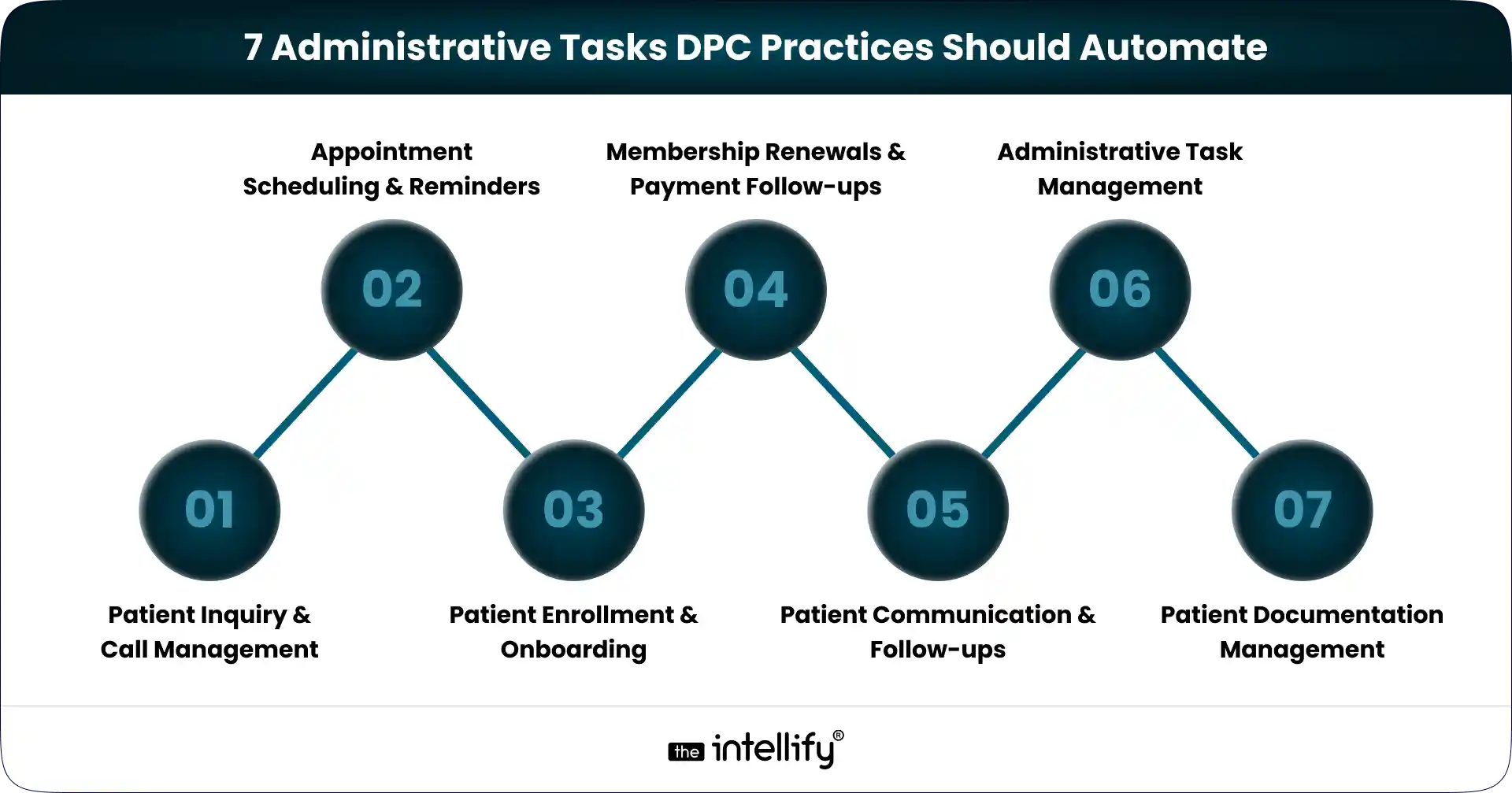
7 Administrative Tasks DPC Practices Should Automate

Not every workflow needs automation immediately. A better starting point is to identify repetitive tasks that consume staff time and frequently require follow-ups.

Here are seven areas worth considering.

1. Patient Inquiry and Call Management

Phone calls remain an important communication channel for many primary care practices.

Potential members may call to ask about membership fees, included services, appointment availability, or how DPC works. Existing patients may also call with scheduling requests or general administrative questions.

When staff members are busy, or the clinic is closed, these calls can go unanswered.

AI voice agents can help manage this communication by answering incoming calls, responding to common questions using approved clinic information, capturing inquiry details, and directing requests to the appropriate team member.

For example, if someone calls to understand how a DPC membership works, an AI voice agent can provide basic information and capture their contact details for a follow-up.

This gives practices another way to handle incoming inquiries without requiring someone to answer every call manually.

2. Appointment Scheduling and Reminders

Appointment management involves more than finding an available time slot.

Staff may need to answer scheduling calls, confirm appointments, handle rescheduling requests, and remind patients about upcoming visits.

These activities are manageable at a smaller scale but can become time-consuming as membership grows. Automation can help by:

  • Sending appointment confirmations.
  • Sharing reminders before scheduled visits.
  • Managing routine scheduling requests.
  • Sending updates when appointments change.
  • Notifying staff about requests that need attention.

For example, a patient who wants to reschedule an appointment can initiate a request through an approved communication channel. The system can check availability through an integrated scheduling platform and complete the change according to the clinic’s rules.

Automated reminders also help patients stay informed about upcoming appointments.

3. Patient Enrollment and Onboarding

Patient onboarding is one of the first experiences someone has with a DPC practice. A complicated enrollment process can create unnecessary friction before the patient even becomes a member.

Traditionally, onboarding may involve sharing registration forms, explaining membership terms, collecting information, confirming enrollment, and sending welcome instructions.

These steps can be organized into an automated workflow. For example:

  1. A prospective patient submits a membership inquiry.
  2. The clinic shares relevant membership information.
  3. The patient receives the appropriate enrollment instructions.
  4. The system sends reminders if required information is missing.
  5. Staff receives a notification when the enrollment process needs review.

Automation can make the process more consistent while allowing clinic staff to focus on questions that require personal attention.

4. Membership Renewals and Payment Follow-ups

Membership administration is an ongoing responsibility for DPC practices. Depending on the clinic’s membership terms, staff may need to monitor recurring payments, communicate upcoming renewal dates, follow up on failed transactions, and process cancellation requests.

When these activities depend entirely on manual tracking, important follow-ups can be delayed. Automated workflows can help by:

  • Sending membership renewal reminders.
  • Notifying patients when recurring payments fail.
  • Sending follow-up messages based on payment status.
  • Recording membership changes.
  • Alerting staff when manual intervention is required.

For example, when a recurring membership payment fails, the system can trigger a notification and send an approved payment-update message.

Staff can then handle unresolved cases instead of checking every membership record individually.

5. Patient Communication and Follow-ups

Consistent communication is important in a membership-based care model.

However, clinics often have to manage several types of routine communication, including appointment reminders, administrative updates, membership information, and follow-up instructions.

Without a structured process, some messages may be delayed or overlooked. Workflow automation can help schedule and organize these communications.

For instance, after an administrative interaction, the system can create a follow-up task for the appropriate staff member. It can also send approved messages based on predefined workflows.

Practices should maintain clear boundaries here. Automated administrative communication should not be confused with clinical decision-making. Medical advice, symptom assessment, and treatment-related conversations should follow appropriate clinical protocols and involve qualified healthcare professionals.

6. Administrative Task Management

Not every task involves direct patient communication. DPC teams also manage internal responsibilities such as reviewing pending requests, processing forms, checking enrollment status, and coordinating follow-ups.

These activities often move between different staff members. An automated task management workflow can help assign responsibilities, track progress, and send reminders when an action is pending.

For example, when a new patient submits an enrollment form, the system can create a review task for the appropriate team member. Once the task is completed, the next step can be triggered automatically.

This reduces the need for repeated manual updates and makes it easier to identify outstanding work.

7. Patient Documentation and Information Management

Patient-related documentation is another area where administrative processes can become repetitive.

Staff may need to organize submitted forms, update administrative information, retrieve documents, and prepare information for internal review.

Automation can support these activities by organizing document workflows, extracting relevant administrative information, and creating tasks when additional action is required.

AI-powered document assistance can also help teams find information within approved documents without manually searching through multiple files.

However, patient documentation requires careful handling. Any system that creates, receives, maintains, or transmits electronic protected health information (ePHI) must be evaluated against applicable HIPAA requirements. Practices should implement appropriate access controls, safeguards, and risk assessments before automating these workflows.
 

AI Automation for DPC Practices


How AI Agents Can Simplify DPC Practice Operations

Traditional automation generally follows predefined rules. For example, it sends an appointment reminder two days before a scheduled visit or creates a task when a payment fails.

AI agents can add another layer by understanding requests, handling conversations, and helping initiate actions across connected systems.

For DPC practices, this can be particularly useful in patient communication.

Consider an incoming call from someone interested in joining a clinic. An AI voice agent can answer the call, provide approved membership information, capture the caller’s details, and help initiate the next step.

Similarly, an AI-powered workflow can assist staff with document questions, email drafts, and task extraction.

This is where platforms such as Alris AI can support business operations.

Alris AI offers AI Work Assist and Voice Agents that can help businesses manage conversations and everyday tasks. For healthcare practices, relevant applications include handling incoming inquiries, supporting appointment-related workflows, and assisting teams with administrative work.

The exact workflows depend on the clinic’s systems, integrations, permissions, and configuration. Clinical decisions and sensitive patient interactions should remain subject to appropriate professional oversight.

For DPC practices exploring a more connected operating model, The Intellify’s DPC platform solutions provide a starting point for considering how technology can support membership-based healthcare operations.


What Should DPC Practices Automate First?

Automating everything at once is rarely a good starting point. A more practical approach is to identify workflows that create the most repetitive work or frequently require staff intervention.

Start by asking three questions:

1. Which tasks happen repeatedly?

Look for activities such as appointment reminders, patient inquiries, enrollment updates, and payment notifications.

2. Where do delays happen most often?

If missed calls, incomplete forms, or delayed follow-ups are common problems, prioritize those workflows.

3. Can the task be automated safely?

Consider the information involved, system integrations, staff permissions, and applicable privacy requirements before automating a process.

It is also important to establish measurable outcomes. Track indicators such as staff time spent on administrative tasks, unanswered calls, pending enrollment requests, and appointment-related communication.

These measurements can help determine whether automation is actually improving operations.


Common Mistakes to Avoid When Automating DPC Workflows

Even useful automation can create problems when implemented without proper planning. Here are a few mistakes DPC practices should avoid:

  • Automating everything immediately: Start with a few high-volume workflows and expand gradually.
  • Using disconnected tools: Multiple systems that don’t communicate can create additional administrative work.
  • Ignoring patient experience: Automation should make communication easier, not make patients feel they cannot reach a real person.
  • Overlooking HIPAA requirements: Evaluate vendors, integrations, access controls, and security safeguards before handling ePHI.
  • Removing human oversight: Keep staff involved in sensitive requests, exceptions, and clinical decisions.

The best automation strategy is one that fits the clinic’s actual workflow rather than forcing the team to adapt to unnecessary technology.


Final Thoughts: Build a More Efficient DPC Practice

A successful DPC practice needs more than good clinical care. It also needs reliable administrative processes that support membership management, patient communication, and everyday operations.

Automating patient inquiries, appointment scheduling, onboarding, membership follow-ups, communication, internal tasks, and documentation can help reduce repetitive work.

The important thing is to start with the workflows that create the most friction.

AI agents and connected automation platforms can take this further by helping practices manage conversations and coordinate routine actions across their operations.

For DPC practices planning to grow, the opportunity isn’t simply to automate more tasks. It’s to create an operating model that gives healthcare teams more time to focus on patients.
 

DPC platform modernization


Frequently Asked Questions (FAQs)

1. What is workflow automation in a DPC practice?

Workflow automation in a Direct Primary Care practice involves using software and connected systems to handle repetitive administrative activities, such as appointment reminders, patient inquiries, membership follow-ups, and internal task management.

2. What administrative tasks can DPC clinics automate?

DPC clinics can automate patient inquiry management, appointment scheduling, enrollment, membership reminders, payment notifications, routine communication, administrative task assignments, and document workflows.

3. How can AI help Direct Primary Care practices?

AI can help DPC practices manage incoming calls, answer common administrative questions, support appointment-related requests, assist with documentation, and organize routine follow-up tasks.

4. Can DPC practices automate patient scheduling and reminders?

Yes. With suitable scheduling integrations and predefined workflows, DPC practices can automate appointment confirmations, reminders, scheduling requests, and rescheduling processes.

5. Is workflow automation HIPAA-compliant?

Workflow automation itself does not guarantee HIPAA compliance. Practices must evaluate the technology, vendors, integrations, and safeguards involved in handling protected health information. Applicable HIPAA requirements include administrative, physical, and technical safeguards.

6. How much does it cost to automate a DPC practice?

Costs depend on the number of workflows, software subscriptions, integrations, customization requirements, and practice size. A small practice may start with basic scheduling and communication automation, while a larger operation may require a more connected platform.


Research references:

These are credible sources to support the article’s healthcare operations and compliance context.

How to Automate Patient Onboarding in a Direct Primary Care Practice

Summary:
Patient onboarding automation helps Direct Primary Care (DPC) practices simplify registration, digital intake forms, membership agreements, payment setup, and patient communication. This blog explains how to automate key onboarding workflows, integrate existing healthcare systems, protect patient information, and measure operational improvements. It also covers implementation best practices to help DPC practices reduce administrative work and deliver a smoother patient enrollment experience.


Patient onboarding sets the tone for the entire patient-provider relationship. In a Direct Primary Care (DPC) practice, it also involves more than filling out registration forms. Patients may need to review membership agreements, provide medical history, authorize recurring payments, and learn how to communicate with their physician.

When these steps rely on emails, paper forms, spreadsheets, and manual follow-ups, the process can quickly become difficult to manage. Staff spend time chasing missing information instead of helping patients, while new members may be left wondering what to do next.

DPC Patient onboarding automation offers a practical way to address these problems. By connecting digital intake forms, membership enrollment, payment setup, and patient communication, DPC practices can reduce repetitive administrative work and create a more consistent enrollment experience.

The goal isn’t to remove the personal touch that makes Direct Primary Care appealing. It’s to make the administrative side of joining a practice simpler for everyone.


Why Patient Onboarding Matters in Direct Primary Care

Direct Primary Care operates on a membership-based model in which patients typically pay their physician or practice a recurring fee for defined primary care services. That makes enrollment an important part of both practice operations and the patient experience.

Before a new member can begin using the practice’s services, the team may need to collect contact information, review medical history, obtain signed agreements, configure billing, and explain how to schedule appointments or contact the care team.

If these steps happen across disconnected systems, even a straightforward enrollment can involve unnecessary back-and-forth.

A patient might submit a registration form but forget the membership agreement. Another might complete every document but fail to finish payment authorization. Staff then have to identify the missing step and follow up manually.

A structured onboarding workflow helps prevent these gaps. It gives patients clear instructions and helps staff see which tasks are complete and which still need attention.

For growing DPC practices, that consistency matters. Adding more members shouldn’t automatically mean adding the same amount of administrative work.


Common Patient Onboarding Challenges in DPC Practices

Many DPC practices begin with simple tools and manual processes. These may work well when membership numbers are small, but problems can emerge as enrollment increases.

Common challenges include:

  • Manual registration: Staff enter the same patient details into multiple systems, increasing the chance of errors.
  • Incomplete intake forms: Missing medical history, contact information, or consent documents can delay enrollment.
  • Membership agreement delays: Teams spend time sending documents, requesting signatures, and checking whether agreements have been completed.
  • Disconnected billing and scheduling: Payment records, membership status, and appointment systems may not stay synchronized.
  • Inconsistent follow-ups: Some patients receive several reminders, while others may receive none.
  • Limited workflow visibility: Staff struggle to determine which patients are ready for onboarding completion and which require assistance.

These issues aren’t always caused by poor software. Sometimes, the process itself needs attention.

For example, automating a confusing enrollment process won’t necessarily make it better. The practice should first identify unnecessary steps, clarify responsibilities, and decide which activities can safely happen without manual intervention. Once the workflow is clear, automation becomes much easier to implement.


How to Automate Patient Onboarding in a Direct Primary Care Practice

How to Automate Patient Onboarding in DPC Practice

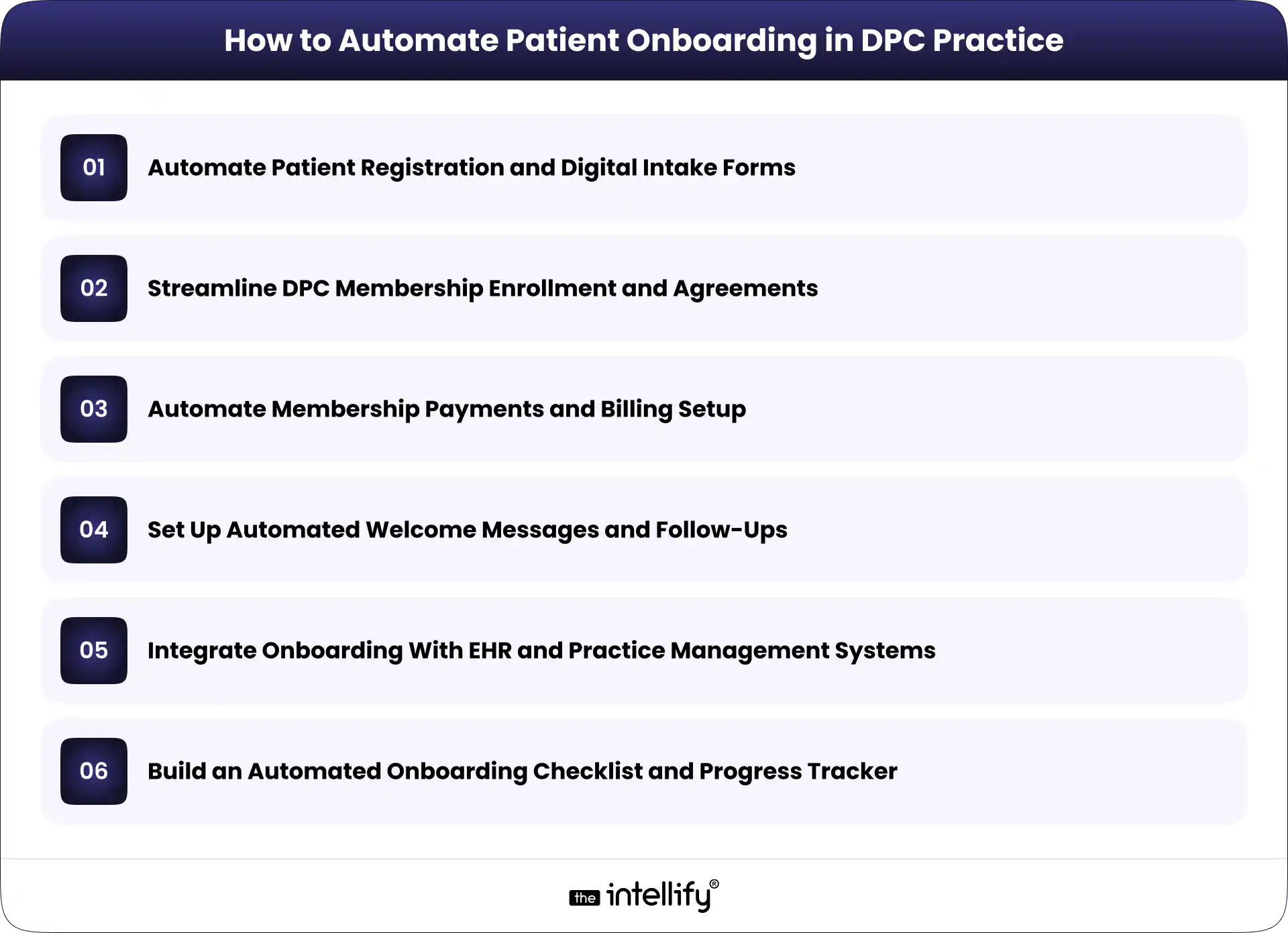
The most effective approach is to automate individual onboarding tasks while keeping the entire patient journey connected. Here are six practical ways to do that.

1. Automate Patient Registration and Digital Intake Forms

Start with the first information a practice collects from a prospective or newly enrolled member.

Digital patient intake forms allow patients to submit contact details, demographics, medical history, relevant health information, and communication preferences through a secure online process.

Instead of manually transferring information from paper forms, the practice can route submitted data into its designated patient management system, where supported.

A well-designed form should also make completion easier. Conditional questions can display relevant fields based on previous answers, while required-field validation can flag missing information before submission.

For instance, a new patient may be asked to provide current medications and relevant medical history. If a particular section doesn’t apply, the form can avoid presenting unnecessary follow-up questions.

Keep the process manageable. A lengthy form that asks for everything at once may discourage completion, especially on mobile devices.

The goal is to collect the information the practice actually needs, explain why it’s needed, and avoid asking patients to enter the same details repeatedly.

2. Streamline DPC Membership Enrollment and Agreements

Membership enrollment is another strong candidate for automation because it involves several steps that follow a predictable sequence.

A typical workflow may include:

  • Sending the membership agreement to the patient.
  • Providing clear instructions for reviewing the terms.
  • Collecting an electronic signature.
  • Recording the agreement’s completion status.
  • Updating the patient’s enrollment record.

With an integrated workflow, completing one step can trigger the next action. For example, a signed agreement may update the enrollment record and notify staff that the patient is ready for the next stage. Practices can also configure reminders for unsigned agreements, reducing the need for staff to check each record manually.

However, automation should not replace clear communication. Membership terms, fees, covered services, cancellation policies, and other relevant conditions should be easy to understand before patients agree to them.

Unusual cases, incomplete agreements, or questions about membership terms should still reach the appropriate staff member.

3. Automate Membership Payments and Billing Setup

Payment setup is a key part of many DPC onboarding workflows. Depending on the practice’s model, patients may need to authorize recurring monthly payments or select another available payment arrangement.

Automated billing workflows can help practices collect payment authorization, send confirmation messages, update membership records, and notify staff when an issue needs attention.

Consider a new member who completes registration and signs the membership agreement. Once the required conditions are met, the system can direct the patient to a supported payment processor and update the onboarding status after receiving confirmation.

If a payment fails, the workflow can send an appropriate notification and create a follow-up task rather than leaving staff to discover the issue later.

It’s important to keep payment handling secure. Practices should use suitable payment processing services and avoid storing unnecessary payment information in patient records.

Billing rules also need to reflect the practice’s actual membership policies. Automation should not activate a membership, charge a patient, or change payment terms without the appropriate authorization and conditions being met.

4. Set Up Automated Welcome Messages and Follow-Ups

Patients shouldn’t have to guess what happens after they sign up.

A welcome message can explain the next steps, provide instructions for accessing the patient portal, describe how to schedule appointments, and outline the appropriate ways to contact the practice.

These messages can be triggered by specific events, such as successful enrollment or completion of required forms. For example, a DPC practice might configure the following sequence:

  • After registration: Send a confirmation and explain the remaining steps.
  • After agreement completion: Confirm receipt and provide the next instructions.
  • After enrollment completion: Send a welcome message with relevant practice information.
  • When required information is missing: Send a reminder with a secure way to complete the outstanding task.

This approach helps patients receive relevant information at the right time without requiring staff to write every message individually.

Still, more messages don’t necessarily mean better communication. Keep reminders limited, useful, and easy to understand. Avoid including sensitive medical details in ordinary email or text notifications unless the communication method and workflow have been appropriately evaluated.

Automation should handle routine updates, while questions about symptoms, treatment, or other clinical concerns should be routed through the practice’s appropriate communication process.

5. Integrate Onboarding With EHR and Practice Management Systems

Automation becomes much more useful when information can move between the systems a DPC practice already uses.

These may include an electronic health record (EHR), practice management software, a patient portal, a membership platform, a scheduling tool, and a payment processor.

Without integration, staff may need to enter the same information into several places. That creates extra work and makes inconsistencies more likely.

An integrated onboarding workflow can transfer approved registration data to the appropriate system, create or update patient records, synchronize enrollment status, and trigger relevant notifications.

For example, when a patient’s enrollment is confirmed, the system might update the membership platform and notify the team that the record is ready for review.

The technical approach depends on what the existing systems support. Available APIs, built-in integrations, data formats, and vendor restrictions will influence the options.

Before connecting systems, define which platform owns each type of information, how duplicate records will be handled, and what happens when a synchronization fails.

The workflow should also include appropriate access controls and error reporting. Integration isn’t just about moving data quickly; it’s about making sure information reaches the correct destination and remains reliable.

6. Build an Automated Onboarding Checklist and Progress Tracker

Even with automated forms, agreements, and notifications, staff need a clear view of the patient’s overall onboarding status. A centralized checklist can track important milestones, such as:

  • Registration form submitted.
  • Required information reviewed.
  • Membership agreement signed.
  • Payment authorization completed.
  • Patient record created or updated.
  • Welcome communication sent.
  • Outstanding issues resolved.

Each task can have a defined status, such as pending, completed, or requiring review.

When a patient misses a required step, the system can trigger a reminder or create a task for the appropriate staff member. When an exception occurs, such as conflicting patient information, the workflow can pause for manual review.

This is particularly useful when several staff members share onboarding responsibilities. Everyone can see what has been completed without searching through email threads or asking colleagues for updates.

A progress tracker also helps practice owners identify recurring bottlenecks. If membership agreements regularly remain unsigned, for example, the practice can review the wording, delivery timing, or signing experience.

The objective is straightforward: give staff visibility into the process while allowing routine tasks to move forward automatically.


Patient onboarding automation


Step-by-Step Process to Implement Patient Onboarding Automation

A successful implementation doesn’t require automating every task at once. Start with the biggest operational problems and expand as the practice learns what works.

Step 1: Map the existing onboarding workflow.

Document the journey from initial inquiry to completed enrollment. Include forms, agreements, billing, record creation, communication, and staff responsibilities.

Step 2: Identify repetitive tasks and delays.

Look for duplicate data entry, frequent follow-ups, missing documents, and steps that regularly require manual intervention. These are potential automation opportunities.

Step 3: Prioritize the highest-impact processes.

Choose one or two manageable starting points, such as digital intake forms or automated agreement reminders. Consider how often a task occurs, how much time it consumes, and the consequences of an error.

Step 4: Select or customize suitable software.

Evaluate existing tools before purchasing replacements. Consider integration options, security requirements, usability, maintenance, and the ability to support the practice’s actual workflow.

Step 5: Test the workflow before rolling it out.

Use realistic test scenarios, including incomplete forms, failed payments, duplicate records, and system errors. Confirm that expected actions occur and that exceptions reach the right person.

Step 6: Train staff and refine the process.

Explain how the new workflow operates, when manual review is required, and how staff should report problems. Review performance regularly and adjust the process as needed.

A phased approach makes it easier to identify problems early without disrupting the entire enrollment process.


Best Practices for Secure and Patient-Friendly Onboarding Automation

Automation involves patient information, so security and usability must be considered from the beginning.

For US practices subject to HIPAA, the HHS Security Rule requires appropriate safeguards for electronic protected health information. These include administrative, physical, and technical protections designed to preserve the confidentiality, integrity, and availability of that information. See the HHS HIPAA Security Rule guidance.

Keep these practices in mind:

  • Review vendor responsibilities: Determine whether software providers or integration partners qualify as business associates and whether a business associate agreement is required.
  • Control access: Give staff access according to their responsibilities and use appropriate authentication.
  • Protect data transfers: Evaluate encryption, audit logging, and other safeguards across connected systems.
  • Design for mobile users: Make forms readable, accessible, and easy to complete on a phone.
  • Maintain human oversight: Route unusual cases, data discrepancies, and sensitive questions to staff.
  • Limit unnecessary communication: Send useful reminders without overwhelming patients or exposing sensitive information.

The HHS guidance on business associates provides further information about vendor relationships and contractual responsibilities.
One important distinction: using software advertised as HIPAA-compliant does not automatically make an entire onboarding workflow compliant. The practice must evaluate its actual configuration, policies, vendors, and data-handling procedures.


How The Intellify Can Help Automate DPC Patient Onboarding

Automating patient onboarding often involves more than adding a digital form or scheduling a few reminders. The real challenge is connecting the right processes while keeping existing systems, patient information, and staff responsibilities aligned.

The Intellify helps businesses explore healthcare software development, system integration, and workflow automation solutions based on their operational needs.

For a DPC practice, this may involve connecting digital intake forms with membership records, streamlining enrollment workflows, integrating existing practice management systems, or building a centralized view of onboarding progress.

The right approach depends on the software already in place, the practice’s enrollment process, and its technical and security requirements. A full platform replacement isn’t always necessary.

Want to simplify patient onboarding in your DPC practice? Discuss your current workflow with The Intellify to identify practical opportunities for automation and integration.


Conclusion

Patient onboarding automation can help Direct Primary Care practices reduce repetitive administrative work, organize enrollment tasks, and give new members a clearer path into the practice. The key is to focus on the processes that create the most friction, connect systems where practical, and preserve human oversight when it matters.

Start with a clear workflow, measure the results, and expand automation based on actual needs rather than assumptions.

If your practice is spending too much time managing forms, agreements, payments, and follow-ups, we can help you explore a more connected approach to DPC patient onboarding.


Direct Primary Care patient onboarding


Frequently Asked Questions (FAQs)

1. What is patient onboarding automation in Direct Primary Care?

Patient onboarding automation uses software to manage repetitive enrollment tasks, such as collecting registration information, sending membership agreements, tracking completion, setting up payment workflows, and delivering welcome messages. It helps DPC practices reduce manual work while maintaining oversight of important patient information.

2. What parts of DPC patient onboarding can be automated?

Practices can automate digital intake forms, agreement reminders, electronic signature workflows, payment confirmations, welcome messages, checklist updates, and supported data transfers between connected systems. Tasks involving clinical judgment, unusual circumstances, or sensitive questions should remain subject to appropriate human review.

3. Is patient onboarding automation HIPAA-compliant?

It can be designed to support HIPAA compliance, but compliance depends on the complete workflow. Practices must evaluate applicable requirements, vendor responsibilities, access controls, security safeguards, and how patient information is stored and transferred. A software product alone cannot guarantee compliance.

4. Can a DPC practice automate onboarding without replacing its existing software?

Yes, depending on the capabilities of the current systems. Built-in integrations, APIs, and other supported connections may allow a practice to automate selected workflows without replacing its entire platform. A technical assessment can help determine which options are practical.

5. How long does it take to implement patient onboarding automation?

Implementation time varies according to workflow complexity, integration requirements, existing software capabilities, security reviews, and testing needs. A simple reminder workflow may be quicker to implement than a solution connecting multiple systems. Defining the scope and starting with a focused pilot can make the process more manageable.

How to Scale a Direct Primary Care Practice With Technology

Summary:
This guide explains how technology can help Direct Primary Care practices scale without increasing administrative workload at the same pace. It covers DPC software, membership management, scheduling, billing, patient communication, automation, AI, and healthcare platform modernization, while outlining practical ways practices can build a more connected and scalable technology infrastructure.


Running a Direct Primary Care (DPC) practice is different from running a traditional fee-for-service practice. The membership model can give physicians more predictable revenue and more time with patients. But growth brings its own problems.

More members mean more appointments, messages, payments, onboarding tasks, reminders, and questions for the practice team to handle.

At first, these tasks may be manageable with spreadsheets, email, phone calls, and a few separate software tools. Then the practice grows. Suddenly, the same processes that worked for 200 members start creating friction at 500 or 1,000.

That is where DPC technology becomes important.

A well-designed Direct Primary Care platform can connect membership management, scheduling, billing, communication, patient self-service, and reporting in one operational environment. The goal isn’t to add technology for the sake of it. It is to make growth easier to manage without allowing administrative work to take over the practice.


What Does Scaling a Direct Primary Care Practice Actually Mean?

Scaling a DPC practice isn’t simply about adding more patients.

The real question is: Can the practice support more members without increasing administrative complexity at the same rate?

If every additional 100 members requires another large increase in staff time, phone calls, manual data entry, and billing work, the practice may be growing without actually becoming more efficient.

Growth Isn’t Just About Adding More Patients

Sustainable DPC growth usually involves several things happening together:

  • Increasing membership without compromising care quality
  • Making appointments easier to manage
  • Keeping physicians focused on patient care
  • Reducing repetitive administrative work
  • Collecting recurring membership payments reliably
  • Giving patients convenient ways to communicate with the practice
  • Understanding what is happening across the practice through useful data

A growing DPC practice needs operating processes that can handle a higher volume. Technology can support those processes, but only when it is designed around how the practice actually works.

Where Traditional DPC Operations Start to Struggle

Many practices begin with simple tools. A calendar handles appointments. A payment system handles memberships. Email handles communication. Staff maintain spreadsheets to track information.

That setup isn’t necessarily wrong. The trouble starts when these systems don’t communicate with one another.

Staff may need to enter the same information several times. A patient’s membership status might sit in one system while billing information lives somewhere else. Appointment changes may require manual follow-up.

Those small inefficiencies add up. And when something goes wrong, figuring out where the problem started can be frustrating.


Why Technology Matters as a DPC Practice Grows

Technology should solve operational problems, not create another layer of them. The right DPC software can take routine work away from staff, make information easier to access, and give patients more control over simple tasks.

Reduce Repetitive Administrative Work

Consider patient onboarding. Without automation, a new member may require a staff member to send forms, check whether they were completed, update records, confirm payment, send instructions, and schedule an initial visit.

A connected workflow can handle much of that process automatically. The staff still has oversight, but they aren’t manually pushing every step forward.

The same idea applies to appointment reminders, membership notifications, payment follow-ups, and other routine tasks.

Give Patients More Ways to Manage Their Care

Patients are used to handling many everyday services online. Healthcare is no exception. A DPC patient portal can let members:

  • View or request appointments
  • Complete forms
  • Send secure messages
  • Review relevant information
  • Receive practice updates
  • Manage certain account details

This doesn’t mean every patient interaction should become digital. Some people will always want to call. That’s fine. The point is to give patients options while reducing unnecessary work for the front desk.

Give Physicians and Staff Better Operational Visibility

As membership grows, practice leaders need more than individual records. They need to see what is happening across the business.

A modern DPC platform can bring information about memberships, appointments, billing, communication, and operational activity into a more connected view.

That makes it easier to identify issues early instead of discovering them after they become bigger problems.


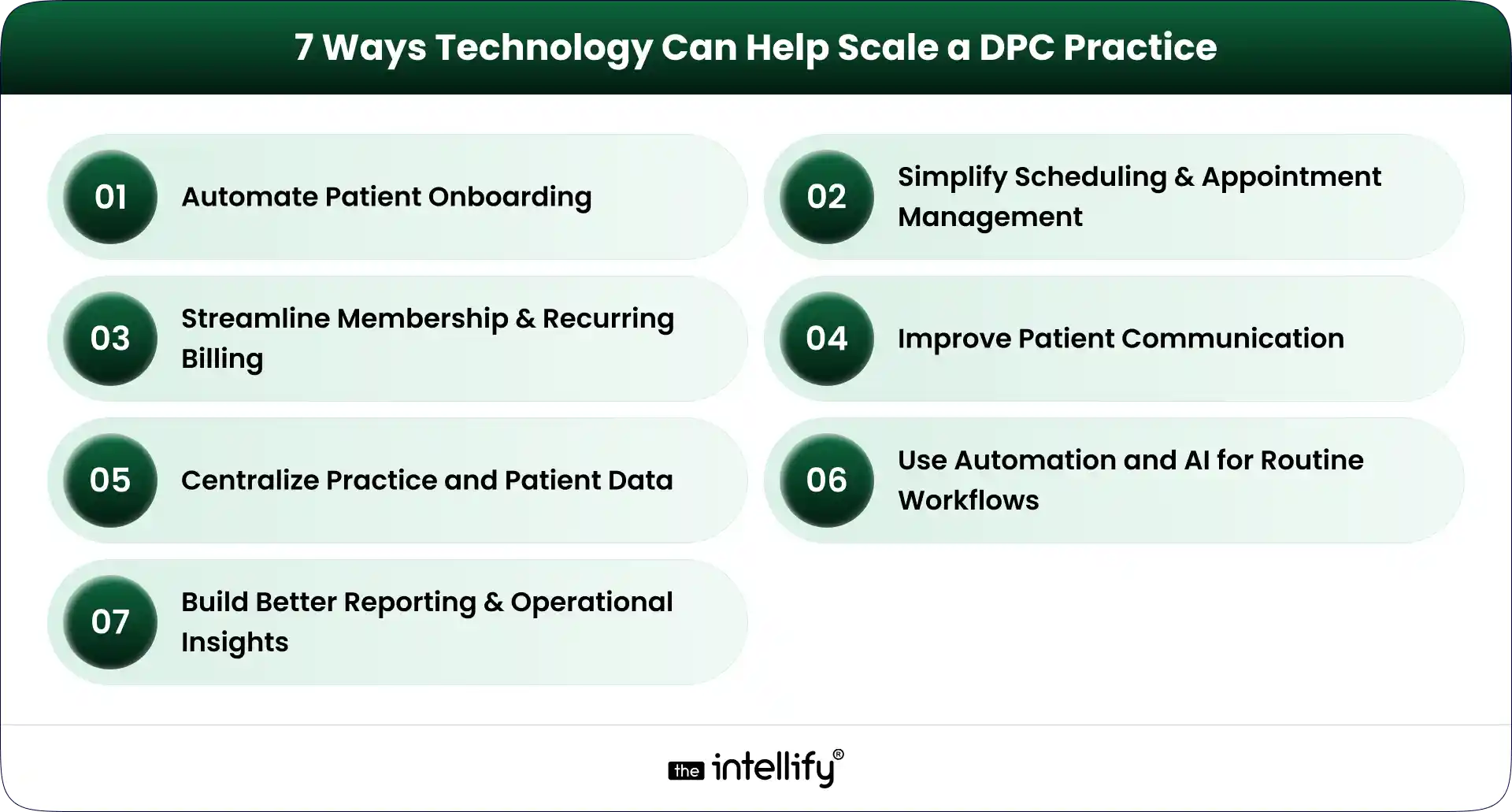
7 Ways Technology Can Help Scale a DPC Practice

7 Ways to Scale a DPC Practice

Technology can support nearly every part of the DPC member journey. But seven areas tend to have the biggest operational impact.

1. Automate Patient Onboarding

Patient onboarding is one of the first places where manual processes become difficult to maintain.

A DPC membership platform can guide a new member through registration, forms, consent, payment, and initial appointment scheduling.

For example, a new member could:

  1. Register online.
  2. Select a membership plan.
  3. Complete required information.
  4. Submit payment details.
  5. Receive onboarding instructions.
  6. Schedule an initial appointment.

The workflow can then notify staff when human attention is actually needed. This creates a better experience for the patient and reduces repetitive work for the practice team.

2. Simplify Scheduling and Appointment Management

Scheduling sounds simple until appointment volume increases. Phone calls, cancellations, rescheduling, reminders, provider availability, and different appointment types can quickly become a daily headache.

DPC scheduling software can give patients online access to available appointment slots while allowing staff to maintain control over scheduling rules. Useful capabilities can include:

  • Online appointment booking
  • Automated reminders
  • Rescheduling
  • Cancellation workflows
  • Calendar integration
  • Provider availability management
  • Appointment-type configuration

The objective is not to remove staff from scheduling. It is to stop staff from spending their day doing tasks that patients can safely handle themselves.

3. Streamline Membership and Recurring Billing

Membership billing is central to the DPC model. A DPC billing software solution can help practices manage recurring payments, membership status, payment failures, invoices, and account changes.

Automated payment workflows can also reduce the awkward situation where staff have to repeatedly contact members about missed payments.

A good billing workflow should make it clear:

  • Who is an active member?
  • Which plan are they enrolled in?
  • When is the next payment due?
  • Did the payment succeed?
  • Is an account past due?
  • Has a membership been paused or canceled?

The more members a practice has, the more important this visibility becomes.

4. Improve Patient Communication

Patient communication doesn’t stop when an appointment ends. Members may have questions, need follow-up information, or simply need to know what happens next.

A DPC patient portal can provide a secure channel for appropriate communication between patients and the practice.

Automated messages can also handle routine updates such as appointment reminders, onboarding instructions, and payment notifications.

For practices with higher call volumes, AI-powered or automated communication can potentially help with common administrative questions and routing. But clinical questions still need appropriate clinical oversight. That distinction matters.

5. Centralize Practice and Patient Data

Disconnected systems create unnecessary work. When membership data, scheduling, billing, patient communication, and clinical information sit in separate systems, staff often end up acting as the bridge between them.

A connected DPC platform can reduce that problem by integrating the systems and workflows that the practice depends on.

The exact architecture will vary by practice. Some may use an existing EHR and add a membership layer. Others may need deeper integrations or a more customized platform.
The goal is the same: reduce unnecessary movement of information between systems.

6. Use Automation and AI for Routine Workflows

AI is becoming part of healthcare operations, but it needs to be used carefully. For DPC practices, practical use cases can include:

  • Handling common administrative questions
  • Appointment reminders
  • Basic patient routing
  • Follow-up notifications
  • Intake assistance
  • Voice-based administrative interactions
  • Staff workflow automation

The best use cases are often the less glamorous ones. If a staff member answers the same five questions 30 times a week, that is a potential automation opportunity.

AI shouldn’t be treated as a replacement for physicians. It should handle appropriate routine work so clinicians and staff can spend more time on tasks that actually require their expertise.

7. Build Better Reporting and Operational Insights

Growth becomes difficult to manage when practice leaders can’t see what is happening. A modern DPC technology stack can provide reporting around areas such as:

  • Membership growth
  • Membership churn
  • Appointment volume
  • No-shows
  • Payment collection
  • Outstanding balances
  • Patient engagement
  • Staff workload

These numbers don’t need to become a giant dashboard nobody checks. A smaller set of useful metrics is often better.

For a multi-provider or multi-location DPC organization, however, this visibility becomes increasingly important. Leaders need to understand which locations are growing, where operational bottlenecks exist, and whether processes are keeping pace.


Direct Primary Care platform


What Should a Modern DPC Technology Stack Include?

A modern DPC platform doesn’t necessarily mean one giant piece of software that does everything. It means the important systems work together.

Capability What It Helps With
Patient portal Patient self-service and communication
Scheduling Appointment booking and reminders
Membership management Enrollment and member lifecycle
Billing Recurring payments and payment tracking
EHR/clinical integration Patient and clinical data workflows
Automation Repetitive administrative processes
Analytics Practice performance and growth
Communication Patient engagement and notifications

The right combination depends on the practice. A small single-location clinic may need a relatively simple setup. A larger DPC organization may require deeper integrations, custom workflows, centralized reporting, and more sophisticated automation.

That is why choosing DPC software should start with operational requirements rather than a feature checklist.


When Should a DPC Practice Consider Upgrading Its Technology?

There isn’t one membership number that automatically means a practice needs new software. Instead, look for operational signals.

1. Your Team Is Spending Too Much Time on Manual Tasks

If staff repeatedly copy information between systems, manually send reminders, or chase routine paperwork, it may be time to rethink the workflow.

2. Patient Volume Is Growing Faster Than Operations

If membership is increasing but administrative work is increasing even faster, the current technology setup may not be scaling properly.

3. You Are Managing Too Many Disconnected Tools

Five tools aren’t necessarily better than one. When those tools don’t share information, however, the practice can end up paying for integration problems with staff time.

4. You Are Opening Additional Locations

Multi-location DPC practices usually need stronger centralized systems for memberships, billing, scheduling, reporting, and user management.

What works for one location may become messy across three or five.

5. Your Existing Software Limits New Workflows

Sometimes the problem isn’t that the existing system is bad. It may simply have been designed for an earlier stage of the practice.

If you can’t introduce a workflow you now need because the software doesn’t support it, modernization may be worth considering.

6. Patients Expect More Digital Self-Service

Patients increasingly expect convenient digital options for scheduling, communication, forms, and account management.

A practice doesn’t need to digitize everything. But basic self-service capabilities can remove friction for both patients and staff.


Buy DPC Software or Build a Custom DPC Platform?

This is one of the bigger technology decisions a growing DPC practice can face. There isn’t a universal answer.

When Off-the-Shelf DPC Software Makes Sense

Off-the-shelf DPC software can be a practical choice when:

  • Your workflows are relatively standard
  • You need to implement quickly
  • You don’t need extensive customization
  • Existing integrations meet your requirements
  • Your practice is comfortable adapting some processes to the software

The main advantage is simplicity. You aren’t responsible for building and maintaining every feature yourself.

When a Custom DPC Platform May Be Better

Custom DPC development becomes more relevant when the practice has requirements that standard products can’t handle well. That may include:

  • A unique membership model
  • Complex billing rules
  • Multiple locations or entities
  • Specialized integrations
  • A highly customized patient experience
  • Existing legacy systems
  • Proprietary workflows
  • Specific reporting requirements

Custom doesn’t automatically mean better. It means the technology can be designed around the practice instead of forcing the practice to work around the software.

A Hybrid Approach Can Also Work

There is another option: modernize in stages.

A practice might keep its existing EHR while improving its membership, billing, scheduling, patient portal, or communication layer.

This approach can make sense when the underlying clinical system still works, but the surrounding technology has become outdated.

That is where healthcare platform modernization can be useful. Instead of throwing everything away, the practice can identify what needs to change and improve those areas first.


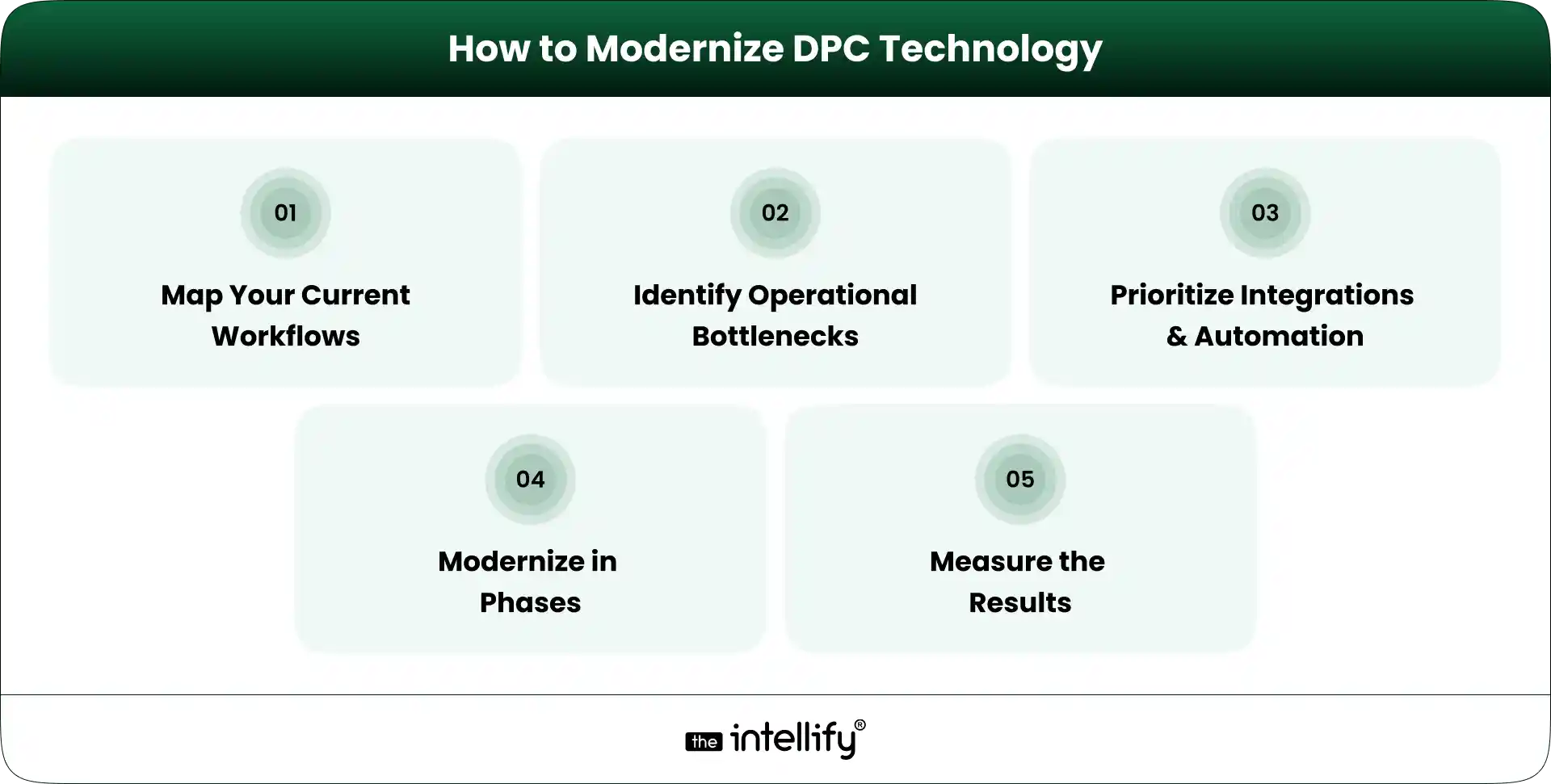
How to Modernize DPC Technology Without Disrupting Patient Care

How to Modernize DPC Technology

Technology projects can become disruptive when practices try to change too much at once. A phased approach is usually easier to manage.

1. Map Your Current Workflows

Document what actually happens today. Follow the member journey from registration to onboarding, appointment scheduling, billing, communication, and ongoing care.

Don’t just document what the software is supposed to do. Document what staff actually do. That difference can be revealing.

2. Identify the Biggest Operational Bottlenecks

Look for tasks that consume significant staff time or regularly create errors. For example:

  • Manual data entry
  • Payment follow-ups
  • Appointment coordination
  • Patient inquiries
  • Repetitive reporting
  • Duplicate information across systems

3. Prioritize Integrations and Automation

Not every workflow needs automation. Prioritize tasks that are repetitive, predictable, high-volume, and relatively low-risk.

At the same time, identify which systems need to exchange data. Integration can be just as important as automation.

4. Modernize in Phases

Instead of replacing everything in one project, establish clear phases. For example:

Phase 1: Membership and onboarding
Phase 2: Scheduling and patient communication
Phase 3: Billing and payment workflows
Phase 4: Reporting and automation
Phase 5: Advanced AI or voice workflows

The exact order should depend on the practice’s bottlenecks.

5. Measure the Results

Technology should produce measurable operational improvements. Useful KPIs can include:

  • Administrative time per member
  • Scheduling time
  • Payment collection rate
  • Patient response time
  • Membership retention
  • Staff workload

If a new system doesn’t improve the workflow, it’s worth asking why.


Common Technology Mistakes DPC Practices Should Avoid

Technology can solve problems, but a poorly planned implementation can create new ones.

Adding Too Many Disconnected Tools

More software doesn’t automatically mean better operations. Every new system introduces another login, workflow, integration, and potential failure point.

Automating Before Fixing the Workflow

Automating a bad process simply makes the bad process happen faster. Map the workflow first. Then decide what should be automated.

Ignoring the Patient Experience

A practice may save staff time while making things harder for patients. That is not a successful technology project. Test workflows from the member’s perspective, too.

Treating Security and Compliance as an Afterthought

Healthcare technology handles sensitive information. Security, access controls, data protection, auditability, and applicable healthcare compliance requirements need to be considered from the beginning, not added at the end.

Choosing Software That Cannot Scale With the Practice

A tool that works for 150 members may not work for 1,500. Before selecting a DPC platform, consider where the practice expects to be in the next few years.

Replacing Everything at Once

A complete technology replacement can create unnecessary risk. If an existing system still works well, keep it where practical and modernize the parts that are holding the practice back.


How The Intellify Can Help Modernize a DPC Practice

The technology needs of every DPC practice are a little different. The Intellify can help practices and healthcare organizations evaluate those requirements and build or modernize technology around their actual workflows.

That can include:

  • Custom DPC platform development
  • DPC platform modernization
  • Patient-facing digital experiences
  • Workflow automation
  • Third-party integrations
  • Scheduling and billing workflows
  • Patient portals
  • Scalable application architecture
  • AI and automation for appropriate operational use cases

The starting point shouldn’t be a list of features. It should be the practice’s current workflow, its biggest operational problems, and where it wants to go next.


Final Thoughts: Scale the Practice, Not the Administrative Burden

Scaling a Direct Primary Care practice is not just a matter of bringing in more members.

The operating model has to scale, too. Scheduling, onboarding, billing, communication, reporting, and patient self-service all become more important as membership grows. If those processes remain heavily manual, growth can create a surprising amount of administrative pressure.

The right DPC technology strategy can change that. A modern DPC platform should connect the workflows that matter, automate appropriate repetitive tasks, and make information easier for staff and patients to access. But there is no single technology stack that works for every practice.

Start with the bottlenecks. Understand the workflows. Decide what should be integrated, automated, replaced, or left alone.

Then build from there. The goal is simple: help the practice grow without making the administrative burden grow at the same speed.


DPC modernization solutions


Frequently Asked Questions (FAQs)

1. How can DPC software help a practice scale?

DPC software can reduce repetitive administrative work, automate recurring processes, support online scheduling and payments, improve patient communication, and provide better visibility into membership and practice operations.

2. Can DPC practices automate membership billing?

Yes. DPC practices can use billing technology to manage recurring membership payments, track payment status, handle failed transactions, and maintain membership billing records. The specific capabilities depend on the software and payment infrastructure being used.

3. Should a DPC practice buy software or build a custom platform?

It depends on the practice’s requirements. Off-the-shelf DPC software can be suitable for standard workflows and faster implementation. A custom DPC platform may make more sense when a practice needs unique workflows, specialized integrations, complex membership models, or greater control over the patient experience.

4. How can AI help a Direct Primary Care practice?

AI can support appropriate administrative tasks such as routine inquiries, appointment workflows, patient routing, reminders, intake assistance, and voice-based interactions. Clinical decisions and sensitive patient situations still require appropriate human oversight.

5. How do you modernize an existing DPC platform?

Start by mapping existing workflows and identifying bottlenecks. Then prioritize integrations, automation, and patient-facing improvements. A phased modernization approach can allow the practice to improve outdated components without replacing every system at once.

View
Case Study