HIPAA Compliant App Development: Complete Healthcare Guide

Summary:
Understanding HIPAA compliant app development is crucial for any healthcare business handling sensitive patient data. This blog explores HIPAA regulations, the types of protected information, and why compliance is essential. It also outlines key security features, development processes, common challenges, and cost considerations. Whether you’re a startup, healthcare provider, or SaaS platform, this guide helps you build secure, compliant applications while reducing legal risks and strengthening patient trust.

Today, many people use mobile apps to manage their health, from booking appointments to checking reports. With this growing use, protecting patient data has become essential. A HIPAA compliant app helps ensure that sensitive information stays safe. In this blog, we’ll break down what HIPAA compliance means, why it matters, and how to build an app that follows these rules.


What is HIPAA Compliance in Healthcare Apps?

HIPAA, short for the Health Insurance Portability and Accountability Act, is a U.S. law designed to protect patient privacy and secure sensitive health information. When we say an app is “HIPAA compliant,” it means it adheres to all the established standards to keep patient data safe and sound.

Who needs to follow it?

HIPAA compliance isn’t just for big healthcare organizations; it applies to a range of players in the field. Here’s a breakdown:

  • Healthcare Providers: Doctors, clinics, hospitals, and any other providers handling patient health information need to comply.
  • Startups: New companies venturing into the healthcare space must prioritize compliance right from the start.
  • Saas Platforms: Software that provides healthcare solutions is expected to follow HIPAA guidelines.
  • Developers: Anyone developing apps that will handle patient data is responsible for ensuring compliance.

What kind of data is protected

Protected Health Information(PHI): includes any personal details that could identify a patient. This can be:

  • Names
  • Email addresses
  • Health records
  • Billing information
  • Appointments

Grasping what data is under protection is crucial for any organization dealing with health information.


Why HIPAA Compliance is Essential for Healthcare Mobile Apps

As healthcare apps proliferate, so do the risks of data breaches involving patient information.

Rising use of Healthcare Apps

With more patients turning to apps for everything from booking appointments to accessing their medical records, the call for stringent security measures has never been louder. Non-compliance not only puts data at risk but could also lead to expensive legal issues.

Legal consequences of non-compliance

The penalties for not adhering to HIPAA regulations can be quite severe. Organizations may face:

Fines: Ranging anywhere from hundreds to millions of dollars.
Lawsuits: Legal battles can drain a healthcare provider’s financial resources.

Trust Factor

Patients genuinely care about their privacy. Knowing that their data is secure fosters trust in their healthcare provider. For providers, building this trust translates directly into patient loyalty and engagement.

Business Impact

Failure to comply can tarnish a healthcare provider’s reputation and obstruct vital partnerships, which ultimately stifles growth and scalability.


What Data Does HIPAA Protect in Healthcare Applications?

HIPAA zeroes in on data characterized as Protected Health Information (PHI). This includes:

Types of Protected Health Information (PHI)

  • Health records: Medical history and treatment details.
  • Billing Information: Payment history and insurance specifics.
  • Appointment details: Dates, reasons for visits, and any cancellations.

Examples in Real Apps

Take, for example, a telemedicine app this kind of app might gather and retain patient records, appointment logs, and billing information, all of which must be kept secure and compliant with HIPAA standards.

Where this data exists

Data can find a home in various places, including:

  • Mobile apps
  • Cloud servers
  • APIs

Understanding where your data resides helps clarify compliance needs.

When an app becomes “HIPAA applicable”

Any app that collects, stores, or transmits PHI falls under the umbrella of HIPAA regulations. Even applications intended for more straightforward tasks must ensure compliance if they handle any protected information.


Types of Healthcare Apps That Require HIPAA Compliance
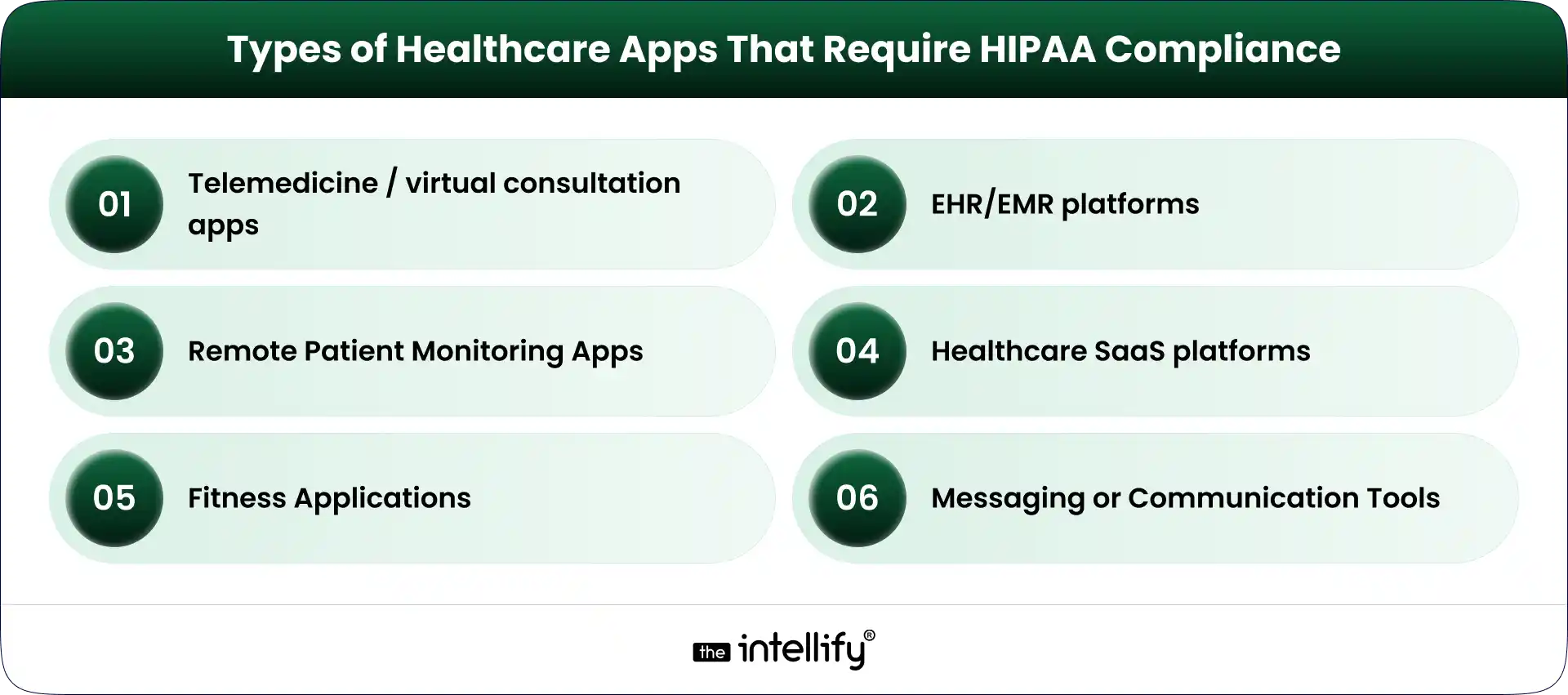
Healthcare Apps That Require HIPAA Compliance

Certain healthcare applications absolutely need to prioritize compliance:

Telemedicine / virtual consultation apps

These platforms manage sensitive patient data during virtual visits, making robust security essential.

EHR/EMR platforms

Electronic Health Records (EHR) and Electronic Medical Records (EMR) systems must comply with HIPAA, as they contain extensive patient data.

Remote Patient Monitoring Apps

Apps that track patient health metrics routinely collect and manage PHI.

Healthcare SaaS platforms

Software-as-a-Service solutions that assist healthcare providers must make sure they follow HIPAA rules too.

Fitness Apps

When these apps start collecting sensitive health information, they also need to be compliant.

Messaging or Communication Tools

Any app utilized in the delivery of patient care, like chat or messaging tools, should keep compliance in focus.
 

Healthcare2U Case Study Card


Understanding HIPAA Rules That Impact App Development

To comply with HIPAA, it’s vital to grasp the key rules that guide app development:

  • Privacy Rule: This rule outlines who can access patient data and under what conditions.
  • Security Rule: It specifies how to protect data digitally, including aspects like data encryption and access controls.
  • Breach Notification Rule: Organizations must notify affected parties promptly if there’s any data exposure.
  • Omnibus Rule: The Omnibus rule extends responsibilities to business associates, meaning data vendors also need to ensure compliance.

Understanding these rules is crucial for developers aiming to craft compliant applications.


HIPAA Safeguards Every Healthcare App Must Follow

When developing a HIPAA compliant app, you need to implement several key safeguards:

  • Administrative safeguards: These encompass policies regarding data access, staff training, and regular compliance assessments.
  • Physical safeguards: It’s vital to keep devices and data centers secure from unauthorized access.
  • Technical safeguards: Technical measures like encryption, authentication protocols, and activity monitoring must be put in place.

 

HIPAA Compliant mobile app development


Essential Features of a HIPAA Compliant App

To stay compliant, your app should incorporate these essential features:

1. End-to-end data encryption: Protects data during both transmission and storage.

2. Secure login & multi-factor authentication: Adds an extra layer of user security.

3. Role-based access control: Guarantees that only authorized personnel can access PHI.

4. Audit logs & activity tracking: Monitors who access data and when.

5. Secure data storage & backups: Shields against potential data loss.

6. API security & third-party integrations: Protects data shared with other applications.

7. Session timeouts and automatic logouts: Prevent unauthorized access if users leave the app open.


HIPAA Compliant App Development: Step-by-Step Process

HIPAA compliant healthcare mobile app development involves several key steps:

  • Requirement gathering with compliance in mind: Start by clearly outlining what data your app will handle and which HIPAA standards apply.
  • Risk assessment & planning: Evaluate potential risks to data security and map out your compliance strategy.
  • UI/UX design with privacy-first approach: Design your app with user privacy in focus, making data protection features easy to access.
  • Secure development practices: Embed security measures throughout the development cycle to minimize risks.
  • Testing (security + compliance validation): Execute thorough testing to ensure the app is both secure and compliant.
  • Deployment on compliant infrastructure: Utilize hosting solutions that meet HIPAA compliance standards for data protection.
  • Ongoing monitoring & updates: Continuously watch for vulnerabilities and make updates to keep your app compliant.


Key Security Requirements for HIPAA Compliant Mobile Apps

Key security elements to include are:

  • Data encryption: Protect data at rest and during transit.
  • Secure cloud: Opt for HIPAA-ready hosting solutions.
  • Access control systems: Implement strong access management protocols.
  • Data integrity protection: Guarantee that data remains accurate and unaltered.
  • Regular vulnerability testing: Identify and address any potential threats.
  • Business Associate Agreements (BAAs): Confirm third-party vendors also comply with HIPAA.
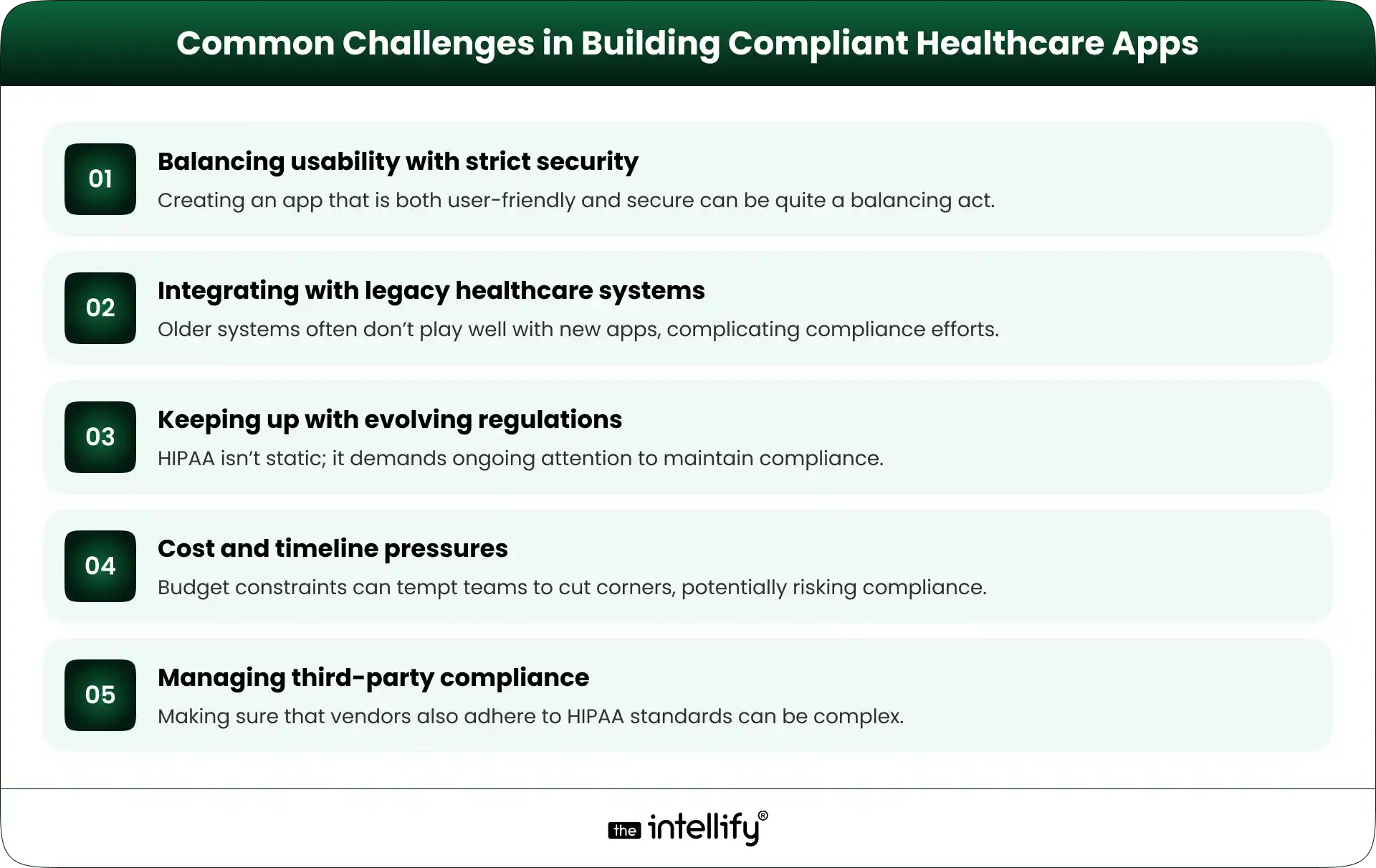
 

Challenges in Building Compliant Healthcare


Cost Factors of HIPAA Compliant App Development

Various elements can influence the cost of developing a HIPAA compliant app:

1. Complexity of features: More intricate features generally lead to higher development costs.

2. Security Implementation Level: Investing in robust security measures can be costly but is essential.

3. Integration Requirements: Connecting with EHR systems or APIs can significantly bump up expenses.

4. Compliance Audits & Testing: Ensuring compliance through stringent audits can add to the overall cost.

5. Maintenance and updates: Keeping up with ongoing compliance requirements will also need budgetary consideration.

Cutting costs in these areas may lead to dangerous compromises in data security.


How to Choose the Right HIPAA Compliant App Development Partner

Choosing the right partner for app development is critical:

  • Proven healthcare experience: Look for partners who have a solid track record in healthcare.
  • Understanding of HIPAA regulations: Make sure they genuinely understand HIPAA guidelines.
  • Security-first development approach: Select partners who prioritize security during the development process.
  • Ability to sign BAAs: Ensure they’re willing and capable of signing Business Associate Agreements.
  • Portfolio of compliant apps: Review their past work for examples of HIPAA compliant applications.
  • Long-term support & scalability: Look for partners who can support your app as it grows and as regulations evolve.


Future Trends in Healthcare App Development

The future of healthcare app development is bright and continuously changing. Here are some key trends to watch:

  • AI in healthcare: While AI holds immense potential, it also brings along compliance challenges that developers must navigate.
  • Remote care & wearable integrations: The need for remote care solutions keeps climbing, necessitating regular compliance checks.
  • Cloud-native secure healthcare platforms: Expect a shift towards cloud-native solutions that prioritize security and data management.
  • Growing focus on patient-controlled data: Patients are gaining more control over their health data, making compliance even more crucial.
  • Increasing audits and stricter enforcement: Regulatory bodies are upping the frequency of audits, demanding a robust focus on compliance.
 

HIPAA Compliant App Development


Final Thoughts

In closing, grasping the nuances of HIPAA compliant app development is vital for any organization involved in healthcare. Ignoring these regulations can lead to considerable legal and financial repercussions. By prioritizing compliance from the get-go, you’re paving the way for long-term success and trust.

If you’re contemplating developing a HIPAA-compliant app, feel free to reach out to us at The Intellify for expert guidance and tailored solutions. We’re here to help you navigate the complexities of healthcare app development, ensuring you deliver secure and compliant applications.


Frequently asked questions (FAQs)

1. Do all healthcare apps need HIPAA compliance?

Not every app needs it. If your app handles patient health data like reports, prescriptions, or consultations, then HIPAA rules apply. Apps that only track general fitness without medical data usually don’t require it.

2. What does it really mean for an app to be HIPAA compliant?

It means the app is built to keep patient data safe at every stage, whether it’s stored, shared, or accessed. This includes encryption, secure logins, and limiting access to sensitive information.

3. Can I make my app compliant after launching it?

You can, but it’s not ideal. Fixing compliance later often requires reworking core parts of the app, which increases time and cost. It’s much easier to plan for it from the beginning.

4. What are the most common mistakes in compliant app development?

Common mistakes include weak encryption, poor access control, and using third-party tools that aren’t secure. Even small gaps can lead to serious data risks if not handled properly.

5. How long does it take to build a compliant healthcare app?

It depends on the app’s complexity. Compliance adds extra time for planning, security setup, and testing, but it helps avoid bigger issues after launch.

6. Do third-party tools (like chat, analytics, or APIs) affect compliance?

Yes, they do. If these tools handle patient data, they must also comply with applicable requirements. You’ll also need proper agreements to ensure data is handled securely.

7. What’s the difference between a secure app and a HIPAA-compliant app?

A secure app focuses on protecting data technically, while HIPAA compliance also includes legal rules and how data is managed. It’s a broader approach that goes beyond just security.
Healthcare Software Modernization: A Practical Guide to Upgrading Legacy Systems

Summary:
Legacy healthcare systems often slow operations, limit integration, and increase maintenance costs. Healthcare software modernization helps providers replace or upgrade outdated platforms with secure, flexible, and efficient solutions. This guide explores practical modernization methods, key decisions before starting, expected challenges, and how modern systems improve patient care, usability, and operational performance.

Healthcare runs on software more than most people realize. Appointments, patient records, billing, prescriptions, lab reports, and insurance checks almost every step touches a system somewhere in the background. The problem? Many hospitals, clinics, and healthcare groups are still leaning on software built years ago. Sometimes decades ago.

Those old systems may still “work,” but they often work like an old ceiling fan in summer, slow, noisy, and one bad push away from stopping.
That’s where healthcare software modernization becomes important. It helps healthcare organizations upgrade aging systems without breaking core operations. And in an industry where downtime can create real-world problems, that matters a lot.

This guide explains where legacy systems still exist, why change is needed, and how to modernize in a practical, low-chaos way.


Where Legacy Systems Still Exist in Healthcare

Many healthcare organizations still depend on older systems for daily operations. It’s common, and honestly, understandable. If a system has been handling patient records for 12 years, replacing it feels risky.

Common areas where legacy platforms still exist include:

  • Electronic Health Record (EHR) systems
  • Billing and claims management software
  • Laboratory information systems
  • Scheduling tools
  • Pharmacy systems
  • Internal admin tools built years ago
  • Reporting dashboards patched together over time

Often, these systems were built separately. One handles billing. Another stores patient records. Another runs lab workflows. They don’t always talk to each other smoothly.

That creates data silos, duplicate work, and weird delays. A nurse may need to open three screens just to confirm one patient update. Not ideal.

As digital healthcare grows, these gaps become more visible and harder to ignore.


What is Healthcare Software Modernization

Healthcare software modernization means improving outdated healthcare systems so they are faster, more secure, easier to use, and better connected to today’s technology needs.

Modernization doesn’t always mean throwing everything away and starting from scratch. In many cases, it means upgrading step by step. That can include:

  • Updating old infrastructure
  • Moving systems to the cloud
  • Improving user interfaces
  • Connecting systems through APIs
  • Rebuilding specific modules
  • Replacing only what no longer makes sense

There’s also a difference between a basic upgrade and a full transformation.

A basic upgrade might patch performance issues or update servers. A full transformation reshapes how systems work together across the organization. This is where legacy app modernization plays a major role. Instead of replacing every old application, teams modernize valuable apps so they still serve the business in a newer environment.


The Real Need for Change in Healthcare Systems

Some organizations delay modernization because “the current system still works.” But working and working well are two different things.

  • Slow performance affects daily operations:- When systems take forever to load, staff lose time all day long. Ten seconds here, thirty there, it adds up fast.
  • Difficulty integrating newer tools:- Need telehealth? AI-assisted documentation? Advanced analytics? Many older platforms struggle to connect with newer tools.
  • Limited scalability:- Healthcare organizations grow. More patients. More locations. More data. Old systems often weren’t built for modern scale.
  • Security and compliance pressure:- Outdated software can create security gaps. It may also make compliance harder with changing healthcare regulations and privacy requirements. Eventually, the cost of doing nothing becomes higher than the cost of change.


Practical Ways to Modernize Legacy Healthcare Systems

There isn’t one perfect modernization method. Different systems need different treatment.

Moving systems to the cloud without major changes (Rehosting)

This means shifting an application to cloud infrastructure while keeping most of the app intact.

Good for:

  • Fast infrastructure improvement
  • Lower hardware dependency
  • Better scalability

Improving existing systems for better performance (Refactoring)

This updates internal code without changing core business functions.

Good for:

  • Faster performance
  • Easier maintenance
  • Better long-term flexibility

Rebuilding key parts while keeping core functionality

Sometimes only parts of the system are outdated. Rebuilding those modules can deliver results without replacing everything.

Replacing outdated systems with modern solutions

If a platform is too rigid, too risky, or impossible to maintain, replacement may be the best path.

Choosing the right approach

Strong legacy system modernization starts with honesty. What still works? What drains time? What creates risk?

Not every old system is bad. Some are just old and badly dressed.


Step-by-Step Process of Healthcare Software Modernization

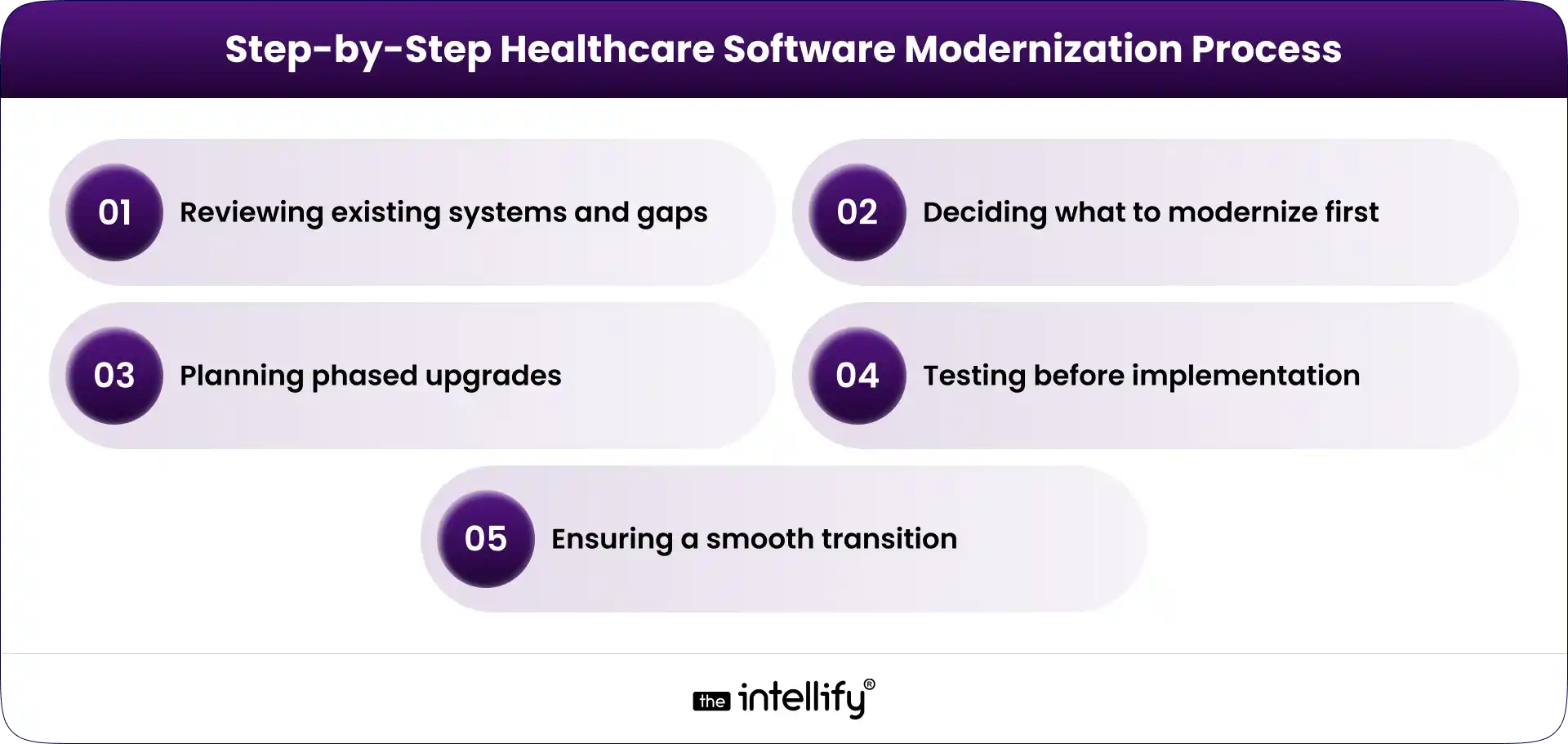
Healthcare Software Modernization Process

Modernization works best when handled in planned phases instead of sudden full-system replacement. A structured approach reduces risk and keeps healthcare operations stable.

Reviewing existing systems and identifying gaps

Start by assessing current applications, integrations, performance issues, security concerns, and workflow bottlenecks. This helps identify what needs attention first.

Deciding what to modernize first

Prioritize systems based on business impact, usage level, maintenance cost, and operational risk. High-value systems should usually come first.

Planning phased upgrades

Upgrade systems in stages rather than replacing everything at once. This makes the transition easier to manage and lowers disruption.

Testing before implementation

Each change should be tested for performance, data accuracy, security, and user experience before full deployment.

Ensuring a smooth transition

Provide staff training, technical support, and rollout planning to help teams adapt while maintaining daily healthcare services.


Improving Healthcare Applications for Better Usability

Modernization should not focus only on backend systems. It should also improve how healthcare applications feel and function for the people using them every day.

Better experience for doctors and staff

Doctors, nurses, administrators, and support teams need systems that are fast, simple, and easy to navigate. Cleaner dashboards, fewer clicks, and faster access to records can improve productivity.

Stronger patient-facing platforms

Patient portals and mobile apps should make common tasks easier, such as booking appointments, viewing reports, paying bills, and receiving updates.

Reduced manual work

Better workflows can automate repetitive tasks like data entry, reminders, approvals, and status tracking. This saves time and reduces errors.

Faster decision-making

When accurate information is available in one place, healthcare teams can respond more quickly and make better operational or clinical decisions.

Higher user adoption

Easy-to-use systems are more likely to be accepted by staff and patients, helping organizations get better results from modernization efforts.


Healthcare software modernization solutions


Technologies Enabling Smarter Healthcare Systems

Modern healthcare systems need technology that improves performance, supports growth, and helps different platforms work together. The right tools make modernization smoother and more practical.

Cloud infrastructure for scalability and flexibility

Cloud environments help healthcare organizations reduce dependency on old hardware and scale resources as demand grows. They also improve system availability and remote access.

APIs for connecting healthcare systems

APIs allow systems such as EHRs, billing tools, lab software, and patient portals to share data more efficiently. This reduces manual work and improves coordination.

Interoperability standards like FHIR

FHIR supports secure and structured data exchange between healthcare platforms. It helps organizations create more connected patient experiences.

Automation and AI where useful

Automation can handle repetitive workflows such as reminders, document routing, or status updates. AI can support forecasting, reporting, and operational efficiency when applied with a clear purpose.


Challenges to Expect During Modernization

Modernization can create major benefits, but it also comes with real challenges. Ignoring them is usually where projects go sideways.

  • Data migration risks: Moving records from older systems to new platforms requires careful planning, validation, and testing to avoid data errors or loss.
  • Compliance requirements: Healthcare systems must continue meeting privacy, security, and regulatory standards throughout the transition.
  • Resistance from internal teams: Employees used to existing systems may be hesitant to adopt new workflows. Proper training and communication are essential.
  • Budget and timeline pressure: Unexpected integration work or technical issues can increase costs and extend timelines if planning is weak.
  • Avoiding patient care disruption: System upgrades should be managed in phases to ensure daily healthcare services continue without interruption.


Key Decisions Before Starting Modernization

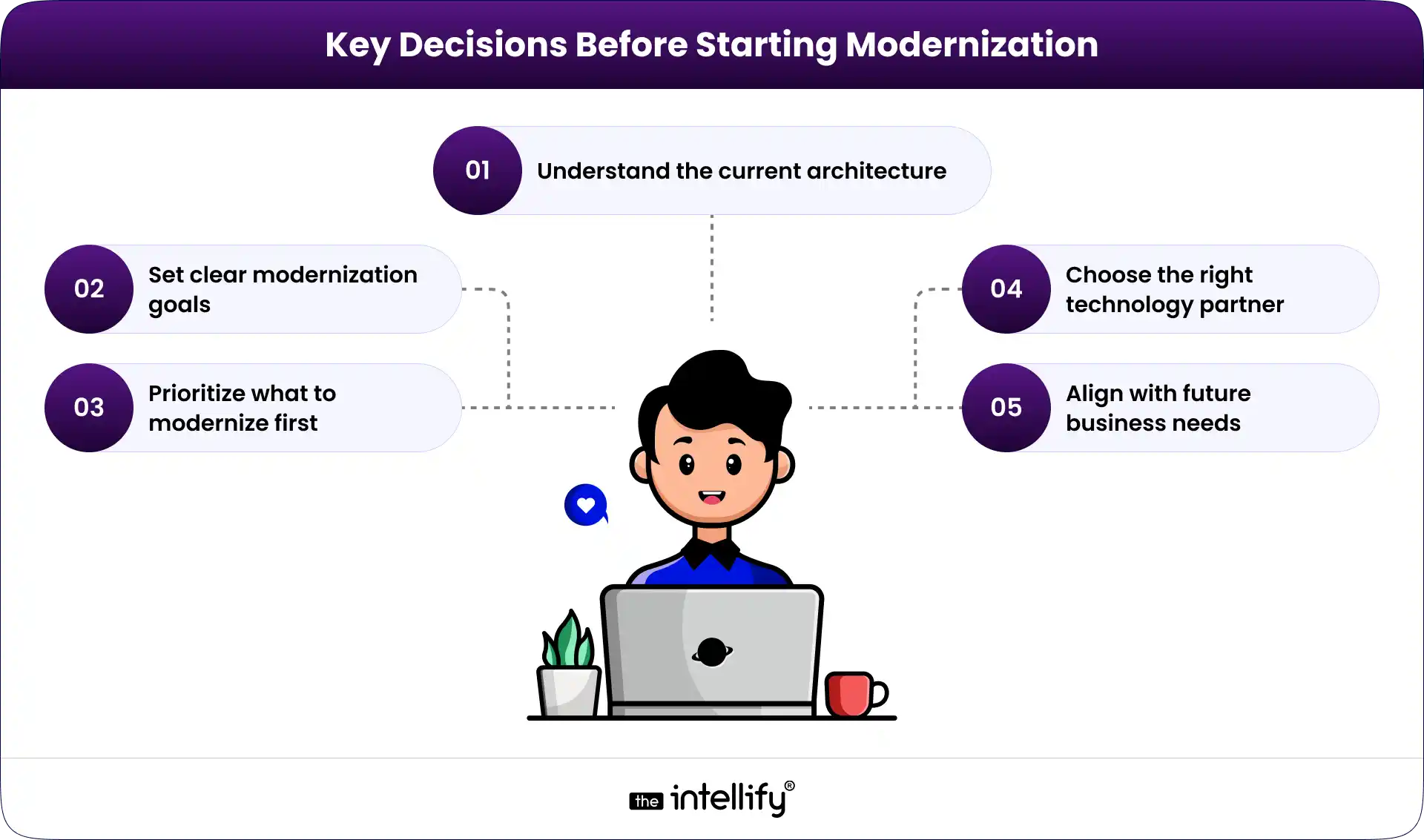
Decisions Before Starting Modernization

Before starting any modernization effort, leadership teams need clarity. Rushing into tools or vendors too early can create expensive mistakes.

Understand the current architecture

Review existing systems, integrations, performance issues, and dependencies before making changes.

Set clear modernization goals

Define what success looks like, such as faster workflows, better reporting, stronger security, or improved patient experience.

Prioritize what to modernize first

Not every system needs immediate attention. Some upgrades create far more value than others. Focus first on systems that are high-risk, heavily used, expensive to maintain, or blocking growth.

Choose the right technology partner

Technology skill matters, but healthcare experience matters too. A strong partner understands workflows, compliance realities, and the importance of operational continuity.

Align with future business needs

Modernization should support where the organization is heading over the next three to five years. Expansion plans, growth in remote care, acquisitions, and new service lines should all be considered.


How Healthcare Operations Improve After the Upgrade

Once systems are modernized, operational improvements are usually noticeable across teams.

  • Faster and smoother workflows: Tasks such as scheduling, billing, reporting, and communication become quicker and more efficient.
  • Better access to connected data: Departments can access shared information more easily, improving collaboration and decision-making.
  • Improved patient experience: Patients benefit from easier portals, faster responses, and more convenient digital services.
  • Lower maintenance burden: Modern systems reduce reliance on outdated infrastructure and constant technical fixes.
  • Better scalability: Organizations can support more users, locations, and services without major system strain.


Future Direction of Healthcare Systems

Healthcare technology is moving toward smarter, more connected environments rather than isolated software tools.

Real-time operations and decision-making

More systems will provide live visibility into appointments, patient flow, staffing needs, inventory, and service performance. Real-time data helps leaders respond faster rather than react days later.

Growth of remote care models:

Telehealth, remote monitoring, and digital patient engagement will continue expanding. That means backend systems must support secure communication, integrated records, and seamless virtual workflows.

Stronger interoperability

The future depends on systems exchanging data smoothly across providers, insurers, labs, and patient-facing platforms. Better interoperability reduces friction and improves continuity of care.

Continuous modernization

Healthcare organizations are moving away from giant once-a-decade replacement projects. Instead, they are adopting steady improvement cycles with regular updates and modular upgrades.

Honestly, that’s a healthier model for everyone involved.

Smarter use of automation and AI

Expect more targeted AI adoption in operations, documentation support, forecasting, and workflow efficiency. The winning organizations will use it selectively, where value is measurable.


Modernize legacy healthcare system


Final Thoughts

Modernization is not a one-time event. It is an ongoing process focused on improving systems step by step. Healthcare organizations should prioritize real business needs such as usability, speed, security, and better data access rather than chasing unnecessary technology trends.

Start with clear goals, modernize high-impact systems first, and scale improvements over time. That practical approach usually delivers the strongest long-term results.


Frequently Asked Questions (FAQs)

1. How do you know if your healthcare system needs modernization instead of small upgrades?

If your system slows down daily work, struggles to connect with newer tools, or needs frequent fixes, it’s a sign that upgrades aren’t enough. Modernization becomes necessary when the system starts limiting efficiency and growth.

2. Can healthcare software be modernized without replacing the entire system?

Yes, most organizations follow a phased approach where critical parts are upgraded step by step. This helps avoid major disruptions while gradually improving the overall system.

3. How long does it take to modernize healthcare software systems?

The timeline depends on system complexity and size, ranging from a few months to over a year. Most organizations prefer phased modernization to manage risk and maintain continuity.

4. How does software modernization improve patient experience in healthcare?

It makes processes like appointment booking, record access, and communication faster and smoother. This reduces wait times and improves overall patient satisfaction.

5. What should be modernized first in a healthcare system?

Systems that directly impact patient care or daily operations should be prioritized first. This ensures quicker improvements and better overall efficiency early in the process.

6. How is compliance managed during healthcare software modernization?

Compliance is maintained by following data protection standards and ensuring secure handling of patient information. Regular testing and audits also help keep systems aligned with regulations.

7. Is healthcare software modernization a one-time effort or continuous?

It’s an ongoing process, as technology and healthcare needs continue to evolve. Regular updates and improvements are required to keep systems efficient and future-ready.

View
Case Study